
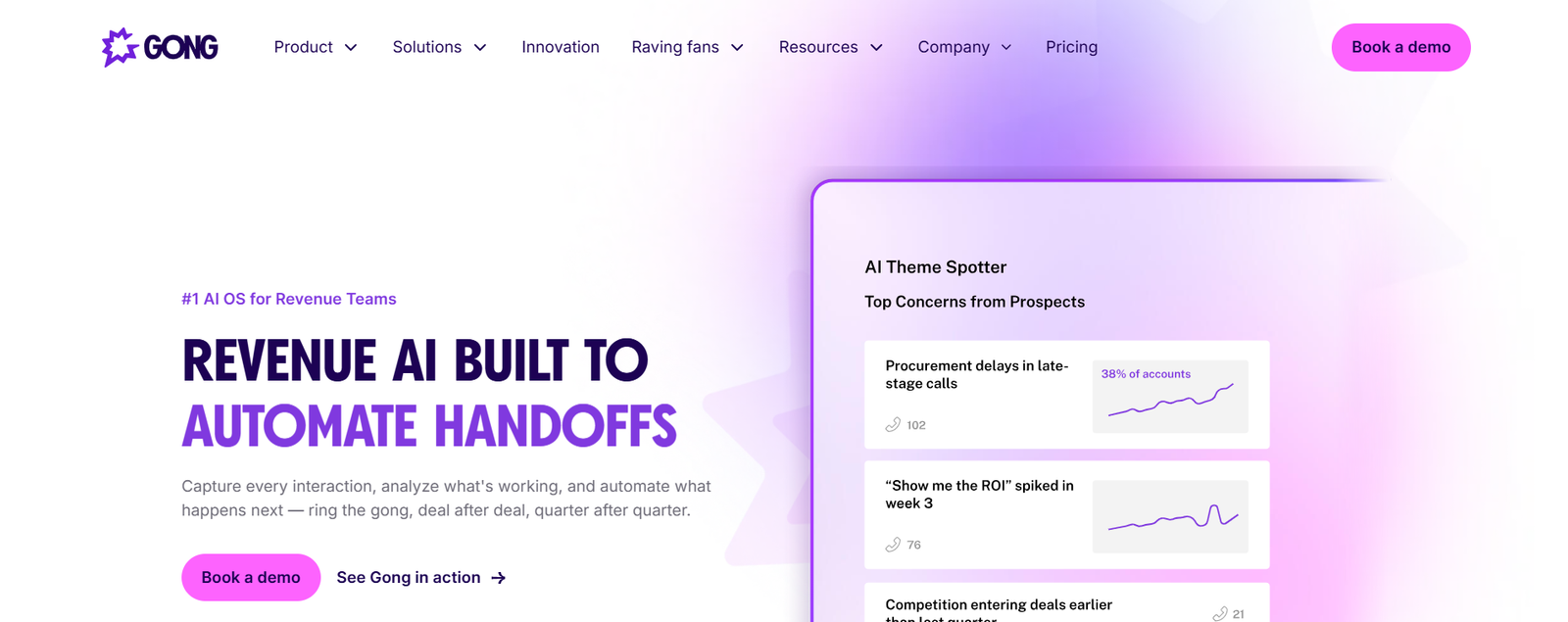
Gong is probably on your shortlist. It sits at the top of every “best conversation intelligence” ranking, and most sales leaders have at least heard the pitch. But category leadership and team fit are two different questions.
Here’s the tension most buyers run into: Gong is genuinely powerful. The conversation analysis is deep, the coaching workflows are mature, and the deal intelligence layer gives managers visibility they can’t get from CRM fields alone. The problem is that power comes packaged with enterprise-grade pricing, a mandatory platform fee, and a feature surface area that a five-person sales team may never actually use.
The verdict: Gong is worth the investment for mid-market and enterprise revenue teams running enough call volume to justify scaled conversation analysis and active coaching programs. If your team is small, your primary need is meeting notes, or your real bottleneck is demo workflow management rather than call intelligence, the cost and complexity likely won’t pay back.
What is Gong?
Gong is a conversation and revenue intelligence platform that records sales calls, transcribes them, and applies AI analysis to surface patterns across your pipeline. It helps sales managers coach reps using real conversation data, gives revenue leaders deal-level risk visibility, and connects what was said on calls to what’s happening (or not happening) in the CRM.
Gong is not a CRM. It sits alongside Salesforce, HubSpot, or whatever system of record you use, pulling conversation data into a layer that your CRM was never designed to provide.
Gong review at a glance
| Category | Assessment |
|---|---|
| Best for | Mid-market and enterprise sales teams with active coaching programs |
| Core strength | Conversation intelligence and deal visibility at scale |
| Main limitation | Custom pricing with mandatory platform fee; can be expensive for small teams |
| Pricing model | Annual contract: per-user license plus platform fee (not publicly listed) |
| Ideal company size | 15+ sales reps with dedicated management |
| Free plan | No |
| Best use case | Analyzing sales conversations to improve rep performance and pipeline accuracy |
How I evaluated this
I weighted six areas based on what matters most to small SaaS founders and lean sales teams: Ease of Use (30%), Value for Money (25%), Core Workflow (20%), Integrations (10%), Support (10%), and Reliability (5%). Scores reflect Gong’s official documentation, third-party pricing research, and user-reported experiences from review platforms like G2. Where evidence comes from community reports rather than direct measurement, I say so.
Scorecard
| Area | Score (1 to 10) | Why |
|---|---|---|
| Setup and onboarding | 6 | Gong’s onboarding typically involves professional services, with implementation fees reported at roughly $7,500 or more. Calendar and CRM integration setup quality determines whether automatic call capture actually works. Users report that getting permissions, field mapping, and consent handling right takes more than a single session. |
| Core workflow | 8 | Call recording, transcription, conversation search, and coaching workflows are mature. Conversation intelligence reliably surfaces talk patterns, objections, and themes when call volume is sufficient. Deal inspection catches missing next steps. |
| Integrations and data portability | 7 | CRM sync with Salesforce and HubSpot pushes notes and outcomes into opportunity records. Data hygiene issues create manual cleanup if CRM fields are inconsistent, which users report as a recurring friction point. |
| Pricing and value | 4 | Mandatory platform fee (reported by third-party sources at $5,000 to $50,000 per year) plus per-seat licensing ($1,300 to $1,920 per user per year for core tiers) makes the entry point steep for small teams. The platform fee dominates unit economics when you have fewer than ten seats. |
| Support and documentation | 6 | Documentation covers standard setup paths. Community reports suggest support is responsive for enterprise accounts, though specific SLA commitments are not publicly detailed. |
| Reliability and performance | 7 | Call recording and transcription are generally reliable when integration setup is clean. One documented community complaint involved Gong Engage flows continuing to send emails after being disabled, pointing to automation-state lag. |
Feature checklist
| Feature | Available? | Notes and limits |
|---|---|---|
| Automatic call recording | Yes | Depends on calendar integration and consent setup |
| AI transcription | Yes | Accuracy drives trust in search and coaching |
| Conversation search | Yes | Search across all recorded calls by keyword or theme |
| Talk pattern analysis | Yes | Tracks talk ratios, filler words, topic mentions |
| Deal inspection | Yes | Surfaces stalled deals, missing stakeholders, weak next steps |
| Forecasting | Yes | Pipeline predictability layer; often overkill for very small teams |
| Coaching workflows | Yes | Manager review, scorecards, rep comparison |
| CRM sync | Yes | Salesforce, HubSpot; field mapping quality matters |
| Email and engagement sequences | Yes (Engage module) | Bundled pricing raises cost; automation control issues reported |
| Usage-based credits | Emerging | Newer metering can change the budget model over time |
The forensic audit
Conversation intelligence
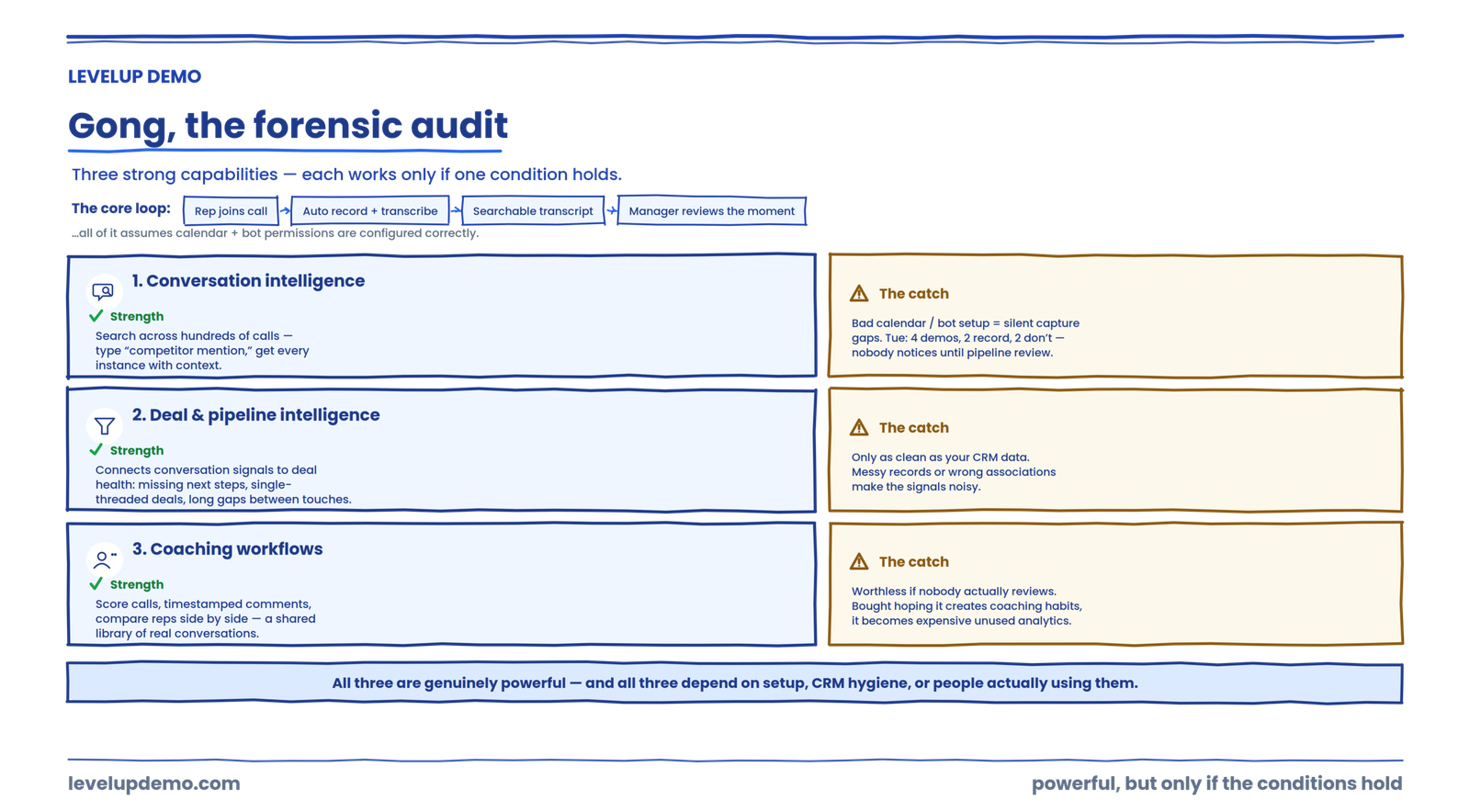
Gong’s core loop works like this: a rep joins a call, the system records and transcribes automatically (assuming the calendar integration and bot permissions are configured correctly), and the transcript becomes searchable and analyzable. Managers can pull up any call, jump to specific moments, and review how reps handled objections or pricing discussions.
That searchability is the feature competitors struggle to match at the same depth. Being able to type “competitor mention” and get every instance across hundreds of calls, with context, is genuinely useful for teams running enough volume.
The friction shows up in setup. If your calendar permissions aren’t configured correctly or your meeting platform’s bot-join settings are off, calls don’t get captured. There’s no obvious error. The activity feed just stays empty for that meeting. Community workarounds suggest checking bot permissions in your video platform settings and re-authenticating the calendar connection if recordings silently stop appearing.
A real scenario: your SDR runs four demos on Tuesday. By Wednesday morning, the manager opens Gong expecting transcripts. Two calls recorded fine. Two didn’t, because the rep used a different meeting link format. Nobody notices until the weekly pipeline review.
Deal and pipeline intelligence
Gong connects conversation signals to deal health. Missing next steps, single-threaded deals, long gaps between touches. For a founder managing three reps, this surfaces problems that would otherwise hide inside CRM fields nobody updates.
The catch is that deal intelligence is only as clean as your CRM data. If reps aren’t associating calls with the right opportunities, or if contact records are messy, the signals get noisy. Gong’s official materials emphasize automatic capture and intelligence, but the real-world reliability depends on how disciplined your team’s CRM hygiene is.
Coaching workflows
Managers can score calls, leave timestamped comments, and compare rep performance side by side. This is where Gong earns its reputation. For organizations that actually run coaching programs, having a shared library of real conversations (good and bad) changes how training works.
If nobody reviews the calls, though, the coaching module becomes expensive analytics that sits unused. Gong works best when managers actively run reviews, not when the tool is purchased hoping it will create coaching habits on its own.
Gong’s biggest strengths
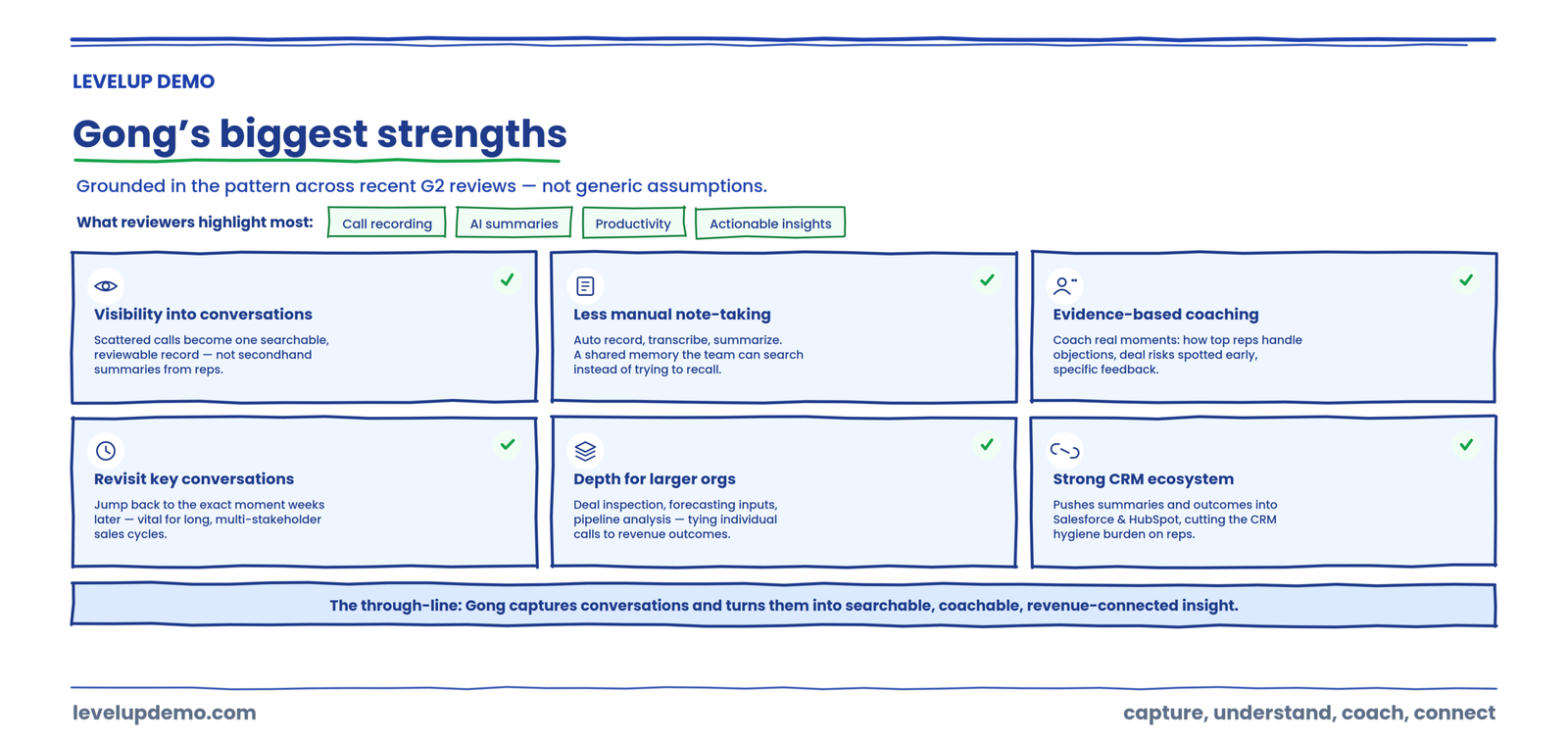
These aren’t generic assumptions. They reflect the pattern in recent G2 feedback, where reviewers consistently highlight call recording, AI summaries, productivity benefits, and actionable insights as the platform’s major positives.
Strong visibility into customer conversations
The most consistent value reviewers describe is visibility. Gong turns scattered sales calls into a searchable, reviewable record of what customers actually said, so leaders aren’t relying on secondhand summaries from reps. Reviewers frequently frame this as clarity into what’s working versus what isn’t across the pipeline.
Reduces reliance on manual notes
Automatic recording, transcription, and AI summaries mean reps and managers spend less time writing up calls and more time acting on them. Users repeatedly cite the time saved on note-taking as a concrete productivity win, and some describe the platform as a shared memory the team can search instead of trying to recall every exchange.
Useful for sales coaching
Because every call is captured and labeled, managers can coach against real moments rather than impressions. Reviewers point to the ability to spot how top performers handle objections, identify deal risks earlier, and give reps specific, evidence-based feedback. This is one of the clearest reasons larger teams adopt Gong.
Helps teams revisit important conversations
The searchable transcript library means a team can return to a specific conversation weeks later, jump to the exact moment a topic came up, and confirm what was actually said. For multi-stakeholder deals and long sales cycles, that ability to revisit context is genuinely valuable.
Deep functionality for larger revenue organizations
Beyond recording, Gong layers on deal inspection, forecasting inputs, and pipeline-level analysis. For organizations with the scale and the operations function to use it, that depth connects individual conversations to revenue outcomes in a way lighter tools don’t attempt.
Strong conversation intelligence ecosystem
Gong integrates with the systems sales teams already run on, most notably CRM platforms like Salesforce and HubSpot, pushing call summaries and outcomes into opportunity records. Reviewers cite this integration quality as a meaningful strength because it reduces the CRM hygiene burden on reps and keeps conversation data close to the deal.
Gong’s limitations and potential drawbacks
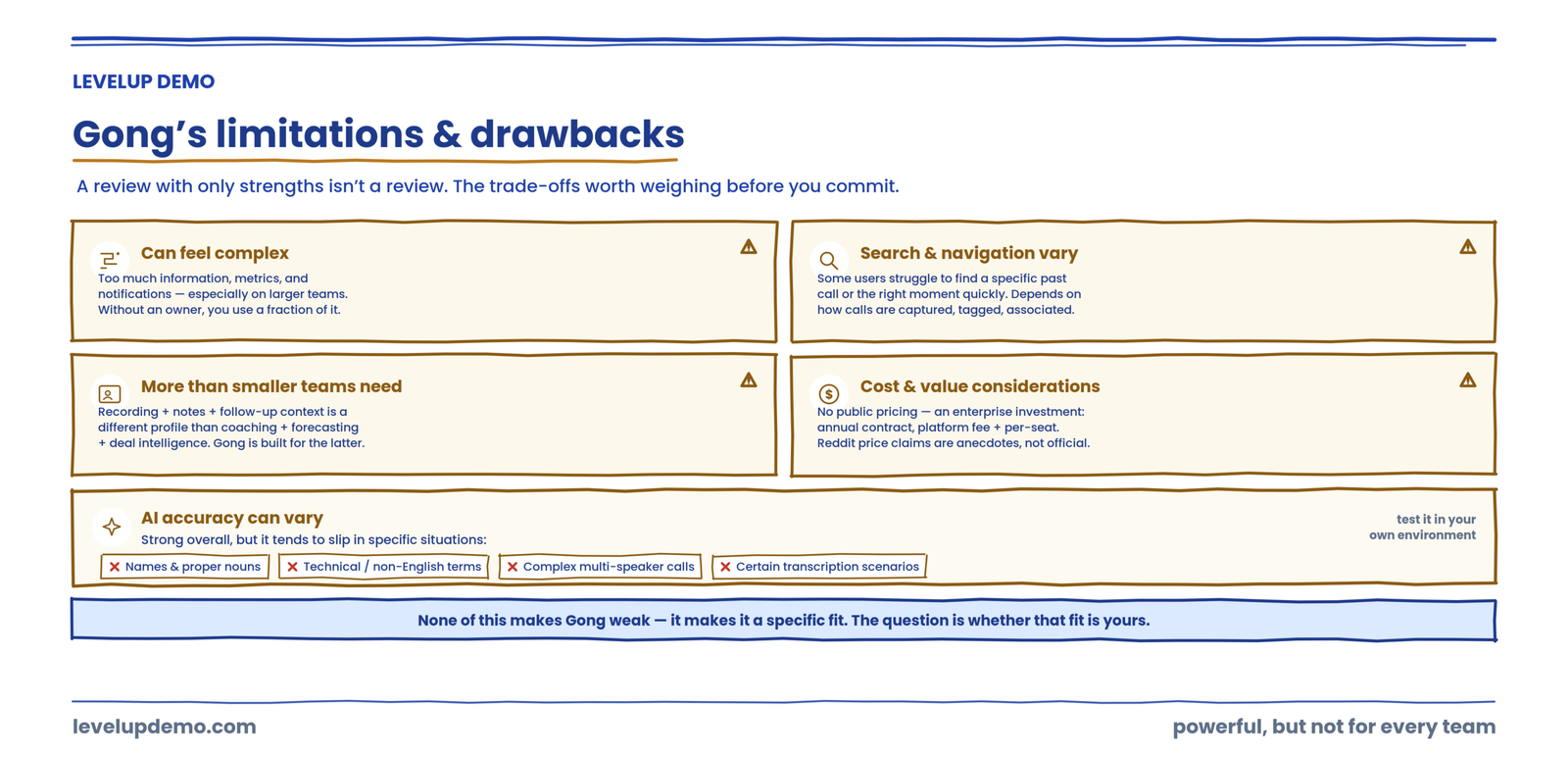
A review that gives a tool only strengths isn’t a review. Gong is a strong platform, and it also has real trade-offs that surface repeatedly in user feedback. Here are the ones worth weighing honestly before you commit.
Gong can feel complex
Several users report that the sheer amount of information, metrics, and notifications can feel overwhelming, especially on larger teams. The depth that makes Gong powerful also means there’s more to learn, more dashboards to interpret, and more signal to filter. Teams without someone dedicated to owning the platform can end up using a fraction of what they pay for.
Search and navigation may not work equally well for everyone
Search is central to Gong’s value, but not every user finds it equally smooth. Some reviews mention difficulty locating specific past calls or navigating to the right moment quickly. Experience here can vary with how consistently calls are captured, tagged, and associated with the right deals.
AI accuracy can vary
AI transcription and analysis are strong overall, but reviewers note accuracy isn’t uniform. It tends to slip in specific situations:
None of this makes the AI unreliable overall, but it’s worth knowing that transcription and search limitations show up in some contexts, and that accuracy in your specific environment is worth testing during evaluation.
It may be more than smaller teams need
This is the critical positioning point. A company whose real need is recording, notes, and follow-up context has fundamentally different requirements from a large enterprise sales organization that needs coaching, forecasting, deal intelligence, and organization-wide conversation analysis. Gong is built for the second profile. A smaller team can end up paying for enterprise-grade depth it will never fully use.
Cost and value considerations
Gong does not publish straightforward public pricing, so it’s difficult to know your real cost without going through a sales process. What’s clear is that this is an enterprise software investment: an annual contract with a platform fee on top of per-seat licensing, rather than a simple monthly per-user rate. The question that matters isn’t just the sticker cost but whether the capabilities justify the investment for your team size, and community discussions frequently raise cost as a consideration. Individual pricing claims that circulate on Reddit and review sites should be treated as anecdotes, not official pricing.
What real users say about Gong
Rather than “users love Gong,” it’s more useful to look at the pattern in the reviews. Recent G2 feedback shows both sides consistently: strong praise for visibility, recordings, and summaries, alongside recurring mentions of complexity, search limitations, and occasional AI or transcription issues. Here’s how that breaks down.
What users commonly like
Call recording — frequently described as best in class.
Transcription — turns every call into a searchable record.
AI summaries — save time and keep teams aligned.
Visibility into conversations — the most cited overall benefit.
Coaching — evidence-based feedback from real calls.
Reduced manual note-taking — a concrete productivity gain.
What some users struggle with
Information overload — too many metrics and notifications.
Search / navigation — finding a specific call isn’t always smooth.
Recording issues — access or capture problems in some cases.
AI limitations — flagged in certain contexts.
Transcription accuracy — inconsistent with technical or non-English terms.
The pattern behind the reviews is more informative than any single rating. The praise clusters around capturing and understanding conversations, which is exactly what Gong was built to do and does well. The friction clusters around scale and precision: the more you rely on it across a large team, the more the volume of information and the edge cases in AI accuracy start to matter. Read that way, the reviews aren’t contradictory. They describe a powerful capture-and-understand engine whose rough edges appear at the margins of heavy, organization-wide use.
The true cost
Gong does not publish pricing on its website. Third-party research consistently reports a structure of mandatory platform fee plus annual per-user licensing.
| Item | Reported range | Source type |
|---|---|---|
| Platform fee | $5,000 to $50,000 per year | Third-party research |
| Per-user license (core) | $1,300 to $1,920 per user per year | Third-party research |
| Per-user license (bundled tiers) | Up to $2,880 to $3,000 per user per year | Third-party research |
| Onboarding and implementation | $7,500 or more (one-time) | Third-party research |
For a five-person team, year-one costs reported by third-party sources range from roughly $11,500 to $58,000 or more depending on the platform fee tier, modules selected, and implementation scope.
That platform fee is the number that changes the math for small teams. A $5,000 floor before you add a single seat means your per-user effective cost is dramatically higher at two seats than at twenty.
Sales community discussions on Reddit and G2 show a consistent pattern: users praise what the platform does while questioning whether the cost makes sense for teams that primarily need recording, notes, and basic insights.
Gong pricing: what should teams consider?
The most important thing to know about Gong pricing is what it isn’t: Gong does not publish straightforward public pricing, there’s no self-serve plan, and there’s no free tier. Every deal goes through a sales conversation and a custom quote based on your team size and the modules you choose. Reported figures circulate widely, but because they come from third parties rather than Gong’s own price list, the honest answer to “what does Gong cost” is that it depends on your negotiation, your seat count, and your module mix.
Rather than anchor on any single number, it’s more useful to evaluate the cost factors that will actually shape your quote and your return:
The practical takeaway: don’t budget from a number you found in a third-party article. Get a current quote for your exact team and modules, then weigh it against how much of Gong’s depth you’ll genuinely use.
Pros and cons
| Pros | Cons |
|---|---|
| Deep conversation intelligence across large call libraries | Custom pricing with no public transparency |
| Searchable transcripts and conversation patterns | Mandatory platform fee is disproportionate for small teams |
| Mature coaching workflows for active managers | More platform surface area than lean teams typically use |
| Deal risk visibility from conversation signals | Setup and CRM sync quality require ongoing attention |
| Strong ecosystem and integration support | Engage module automation has shown control issues (flows continuing after being disabled) |
The LevelUp Conversation Intelligence Fit Framework™
Instead of another generic comparison, here’s a simple way to decide whether a conversation intelligence tool actually fits your situation. Evaluate any tool, Gong included, across five questions. The order matters, because each one moves further from simply capturing a call toward actually operating on what you learn.
Here’s the distinction the framework surfaces: capturing conversations is one thing, and turning conversation intelligence into operational action is another. Gong is very strong on the first three questions. The last two, operating across the wider demo workflow and turning an insight into the next action, are where the picture gets more nuanced, because that work often lives in your CRM, your process, or a separate workflow tool.
That progression, from Conversation Intelligence to Demo Intelligence to Demo Operations, is a genuinely different lens than “Gong versus everyone.” It asks not just what happened on the call, but whether your tooling helps you act on it across the whole demo motion.
Gong vs AI meeting note takers: what’s the difference?
A question more buyers ask every year: why pay for Gong when inexpensive AI note-taking tools exist? It’s a fair question, and the answer is that they’re solving different depths of the same problem.
Basic AI meeting note takers
Usually focused on the essentials of a single meeting:
Recording, transcription, notes, and summaries. Great for capturing what was said in a call and sharing it, at a low, transparent price point.
Conversation intelligence platforms
Focused more deeply on sales performance across many calls:
Sales conversations, patterns across the pipeline, coaching, deal intelligence, and team-wide analysis. Built to connect what’s said to revenue outcomes, at enterprise pricing.
Put simply: an AI note taker answers “what was said in this meeting?” A conversation intelligence platform like Gong answers “what patterns run across all our sales conversations, and what should we coach and forecast because of them?” If you only need the former, you don’t need to pay for the latter. If you genuinely need team-wide analysis and coaching, a note taker won’t get you there.
Gong vs demo intelligence: an important difference
There’s a distinction underneath all of this that most reviews never name. Conversation intelligence and demo intelligence ask different questions.
Conversation intelligence asks:
“What happened in the conversation?” It analyzes the call itself — the words, the patterns, the objections.
Demo intelligence asks:
“What happened across the entire demo process?” It looks at the whole motion around the call, not just the call.
That whole motion looks something like this:
→
Qualification
→
Routing
→
Scheduling
→
Preparation
→
Demo conversation
→
Meeting intelligence
→
Follow-up
→
Outcome analysis
This isn’t about attacking Gong. Gong may be highly relevant to organizations focused on analyzing sales conversations. But a SaaS team managing a broader demo workflow may need to evaluate the entire operational process surrounding the demo, not just the conversation inside it. The demo conversation is one box in that chain. If your deals are leaking in the other boxes, conversation analysis alone won’t show you where.
See the whole demo motion, not just the call
Conversation intelligence analyzes the demo conversation. LevelUp Demo tracks the entire demo workflow around it, from request and qualification through scheduling, follow-up, and outcome, so you can see where deals actually stall.
The “do we need Gong?” test
Gong likely makes sense if you have enough sales conversations to analyze at scale, managers struggle to review calls manually, coaching is inconsistent across reps, deal visibility is limited to whatever reps type into the CRM, and you have a growing sales organization with budget for enterprise tooling.
Gong is probably unnecessary if you mainly need meeting notes and action items, your sales team is under five people, nobody on your team will actively review calls or run coaching sessions, you need workflow automation more than call analysis, or you can’t absorb a platform fee plus per-seat licensing on an annual contract.
The Sales Conversation-to-Action Gap
Most reviews stop at features. Here’s what they miss.
Many sales tools handle the first two steps well: capture (was the conversation recorded?) and understand (what happened?). Gong is strong at both. The gap opens further down the chain.
Capture, then understand, then identify what matters, then assign who owns the next action, then execute (did the follow-up actually happen?), then measure whether the action affected the outcome.
Gong covers capture through identification. The assign-through-measure steps, the operational execution layer, often still depend on your CRM, your project management habits, or a separate workflow tool. Recognizing where Gong’s coverage ends helps you evaluate what else your stack needs.
Who is Gong best for?
Mid-market sales organizations with 15 or more reps and dedicated sales management. Enterprise revenue teams needing pipeline accuracy and forecasting inputs. Organizations running structured coaching programs. Sales leaders who want visibility beyond what CRM data provides.
Put as clear buyer profiles, Gong may be a good fit for:
Who should look elsewhere: solo founders who need a lightweight way to manage demo follow-up, teams under five people where the platform fee destroys unit economics, companies primarily solving for demo scheduling and qualification rather than conversation analysis, and anyone who needs transparent, self-serve pricing.
When the bottleneck is the demo workflow, not the conversation
If your core challenge is managing demo requests, qualification, scheduling, follow-up, and conversion tracking rather than analyzing what was said during calls, LevelUp Demo is built for that specific motion.
Who might need an alternative to Gong?
Gong’s strengths are real, but they’re aimed at a specific profile. If you recognize your team in the list below, an alternative built for your actual bottleneck will likely serve you better and cost less.
Each of those profiles points toward a different category of tool, which is exactly how the alternatives below are organized.
Best Gong alternatives
A useful alternatives list isn’t ten random tools. It’s organized by the job you’re actually trying to do, so you can jump straight to the category that fits your bottleneck.
For AI meeting notes
Fireflies AI, Otter.ai, or Avoma handle recording, transcription, and summaries without enterprise pricing. Our Fireflies AI comparison breaks down that category in more detail.
For conversation intelligence
Chorus (ZoomInfo), Salesloft’s conversation features, or Clari Copilot offer conversation intelligence, often at a lower entry point than Gong.
For demo intelligence
If you need to understand the whole demo motion rather than a single call, that’s a different category, closer to demo analytics and demo operations than conversation intelligence.
For interactive product demos
Navattic, Storylane, or Reprise focus on self-serve, interactive demos for buyers who want to explore the product themselves.
For demo operations
If the breakdown is in managing demo requests, qualification, scheduling, follow-up, and outcome tracking, LevelUp Demo is built for that end-to-end motion rather than conversation analysis.
Gong vs LevelUp Demo
This isn’t “LevelUp Demo is better than Gong.” Different products solve different parts of the workflow, and the honest framing is about where each one is strongest. Gong’s core strength is conversation intelligence and revenue insights. LevelUp Demo focuses on the broader demo workflow and demo operations, including capabilities such as demo management, meeting intelligence, notes, follow-up context, and workflow optimization.
| Capability / Need | Gong | LevelUp Demo |
|---|---|---|
| Conversation recording | ✓ | Relevant capability |
| Meeting notes | ✓ | ✓ |
| Sales coaching | Strong focus | Depends on workflow |
| Demo workflow | Not primary category | Core focus |
| Demo operations | Limited category focus | Core positioning |
| Demo intelligence | Conversation-centric | Demo-centric |
The takeaway isn’t a winner. It’s that these tools index on different parts of the funnel. If your hardest problem is what’s said inside sales calls, Gong’s focus fits. If it’s everything wrapped around the demo, from request to follow-up, that’s the motion LevelUp Demo is built for. Some teams run both.
The Demo Intelligence Gap™
Here’s the single idea that ties this whole review together. Most tools in this space capture one thing: the conversation. What a demo operations team actually needs to understand is the entire journey.
What most tools capture
The conversation. One call, recorded, transcribed, and analyzed in isolation.
What DemoOps teams need
The entire journey — how the whole demo system performs from first touch to revenue.
→
Demo request
→
Qualification
→
Scheduling
→
Preparation
→
Demo
→
Follow-up
→
Pipeline
→
Revenue
The Demo Intelligence Gap is the difference between understanding an individual conversation and understanding how the entire demo system performs. A tool can be excellent at the demo box and still leave you blind to why requests aren’t converting, where qualified prospects stall before scheduling, or which follow-ups never happen. Closing that gap means measuring the whole journey, not just the call inside it.
Is Gong worth it?
Here’s the direct answer, structured so you can find yourself in it.
Gong is likely worth considering if…
you run a mid-market or enterprise sales team with enough call volume to analyze, you have dedicated managers who will actively coach from real conversations, and you need deal intelligence and forecasting beyond what your CRM shows. At that scale, Gong’s depth earns its cost.
Gong may be overkill if…
your team is small, nobody will actively review calls, or you’d use only a fraction of the platform. The mandatory platform fee and enterprise depth are hard to justify when your real need is lighter.
Consider alternatives if…
your primary need is AI meeting notes, or your real bottleneck is the demo workflow rather than the conversation. Those are different categories with tools designed specifically for them, usually at a lower and more transparent cost.
The balanced verdict: Gong is worth it when you can fully use its depth, and an expensive mismatch when you can’t. Match the tool to where your pipeline actually breaks.
Frequently asked questions
What does Gong actually do?
Gong records sales conversations, transcribes them with AI, and analyzes patterns across your team’s calls. It surfaces coaching insights, deal risks, and pipeline signals that help managers improve rep performance and forecast accuracy. It’s a conversation and revenue intelligence platform, not a CRM or a meeting scheduler.
How much does Gong cost?
Gong does not publish pricing. Third-party sources report a mandatory annual platform fee (ranging from $5,000 to $50,000) plus per-user licensing (roughly $1,300 to $1,920 per user per year for core functionality). Final pricing depends on team size, modules, and negotiation. Request a custom quote from Gong’s pricing page.
Does Gong have a free plan?
No. Gong requires an annual contract with a platform fee and per-user licenses.
Is Gong worth the money?
For teams with 15 or more reps, active coaching programs, and sufficient call volume, Gong’s conversation intelligence provides insights that are difficult to replicate manually. For small teams or those primarily needing transcription, the cost relative to usage often doesn’t justify the investment.
Is Gong a CRM?
No. Gong syncs with CRMs like Salesforce and HubSpot but does not replace them. It adds a conversation intelligence layer on top of your existing system of record.
What is the difference between Gong and LevelUp Demo?
Gong analyzes sales conversations to generate coaching and deal insights. LevelUp Demo manages the demo workflow itself: lead capture, qualification, scheduling, outcome tracking, and follow-up management. They solve adjacent problems. Some teams need both; many need one or the other depending on where their pipeline breaks.
Who uses Gong?
Primarily mid-market and enterprise B2B sales teams, revenue operations leaders, and sales managers running coaching programs. G2 reviews indicate strong adoption among companies with dedicated sales organizations of 15 or more reps.
Gong review: final verdict
Gong is a powerful and mature conversation intelligence platform for teams that need deep visibility into sales conversations, coaching, and revenue activity. Its value is likely strongest when an organization can fully use its broader capabilities. Teams with narrower needs, particularly around meeting notes or demo workflow operations, should compare Gong against tools designed specifically for those use cases.
Where this leaves you
Choose Gong when your team runs enough calls that manual review is impossible and your managers will actively use conversation data to coach. The platform earns its cost at that scale.
Look at lighter tools when your real need is transcription, meeting summaries, or basic call recording without the intelligence layer.
And if the breakdown in your pipeline isn’t about what’s being said on calls but about what happens before and after the demo, that’s a demo operations problem. Different category, different solution, different buying decision.
The next question worth asking: where exactly are your deals dying? If it’s during the conversation, Gong helps you see that. If it’s in the gaps between conversations, you’re solving a workflow problem, and no amount of call recording fixes a broken follow-up process.
When the demo workflow is the real bottleneck
If your deals leak before and after the call, not inside it, LevelUp Demo manages the whole demo motion: requests, qualification, scheduling, follow-up, and outcome tracking.