A user signs up for your trial on a Tuesday. By Friday, they’ve vanished. A customer who logged in daily for three months hasn’t opened the app in six weeks. A prospect sat through a 30-minute demo, said “this is exactly what we need,” promised to loop in their VP, and then went radio silent.
Your dashboard shows the same thing for all three: no activity.
But the reason behind that silence is completely different. And that reason should change what you write.
Most SaaS reactivation campaigns ignore this. They batch every inactive contact into one segment and send a variation of “We miss you! Here’s 20% off.” The email lands, gets ignored, and sender reputation takes the hit.
The best reactivation email depends on why the relationship went inactive in the first place. This piece gives you 12 scenario-specific examples you can copy, a framework for choosing the right one, and the thinking behind each so you’re not just swapping in your company name and hoping.
What you’ll get in this guide
What is a SaaS reactivation email?
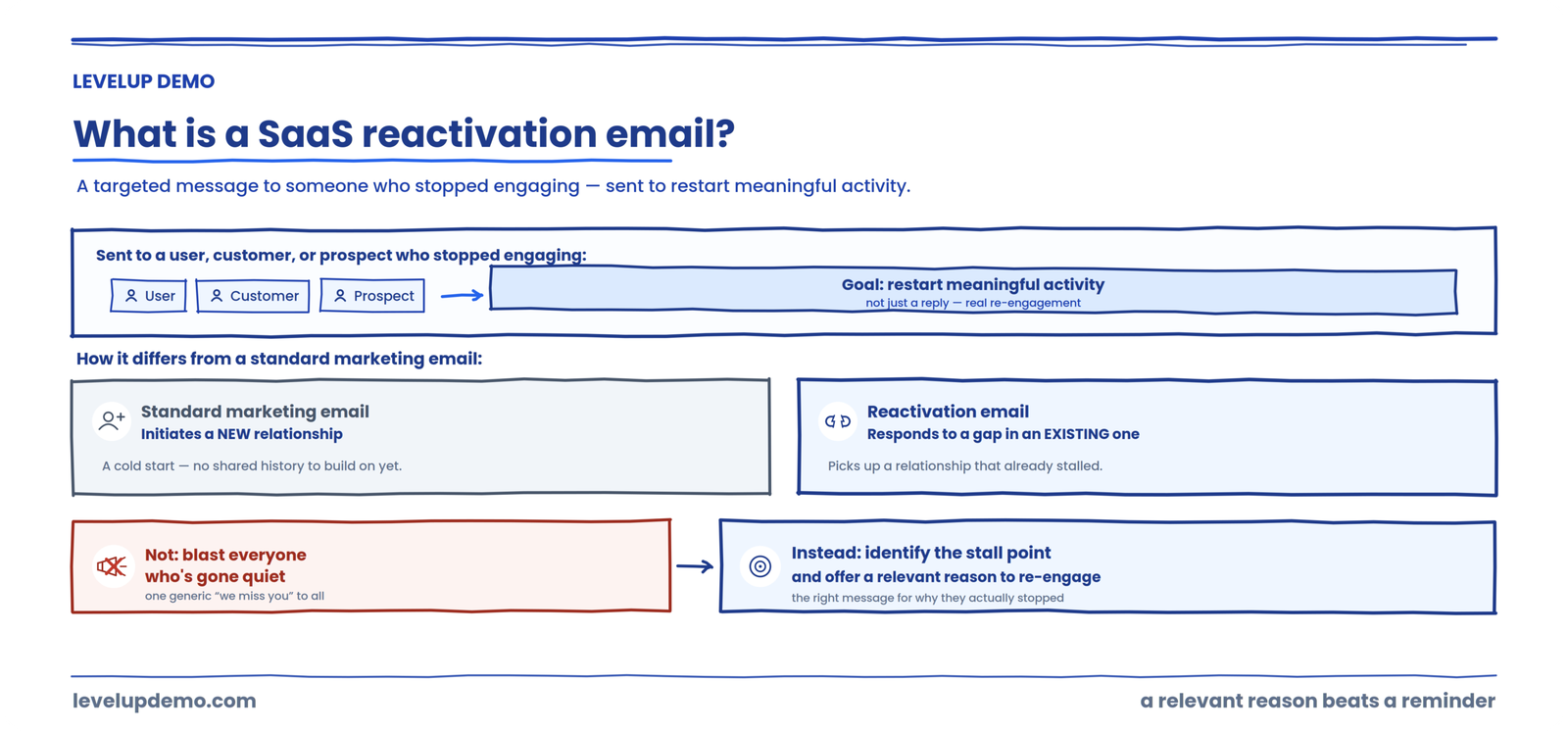
A SaaS reactivation email is a targeted message sent to a user, customer, or prospect who has stopped engaging with your product or sales process, with the goal of restarting meaningful activity. It differs from a standard marketing email because it responds to a specific gap in an existing relationship rather than initiating a new one.
The purpose isn’t to blast everyone who’s gone quiet. It’s to identify the stall point and offer a relevant reason to re-engage.
Reactivation vs. re-engagement vs. win-back emails
These terms get used interchangeably. They shouldn’t be, even if the boundaries aren’t always clean.
| Type | Typical audience | Goal | Example situation |
|---|---|---|---|
| Reactivation | Users or prospects who stopped mid-journey | Restart a stalled action | Trial user who never completed setup |
| Re-engagement | Active subscribers showing declining activity | Prevent full disengagement | Customer whose logins dropped from weekly to monthly |
| Win-back | Churned or lost customers and deals | Recover a closed relationship | Customer who cancelled four months ago |
In practice, teams blend these. That’s fine. What matters is recognizing that a user who never activated needs a fundamentally different message than a customer who cancelled over pricing.
The biggest mistake SaaS teams make with reactivation emails
Sending the same message to everyone.
I’ve watched teams dump 4,000 inactive contacts into one Mailchimp blast, subject line “We want you back!”, body copy offering a coupon, and then wonder why the open rate cratered and spam complaints spiked. One deliverability-focused guide recommends keeping re-engagement sends to no more than 10% of your daily volume to engaged users, specifically to protect sender reputation.
Before you write a single word of copy, run every inactive contact through what I call the Reactivation Reason Framework.
Good reactivation asks: what stopped momentum, and what would make restarting it genuinely worthwhile?
12 SaaS reactivation email examples you can copy
Each example below names the scenario, explains why inactivity happened, gives you a copyable email, and flags what to avoid.
1. Trial expired without converting
They were curious enough to sign up. Life got in the way, or they didn’t see enough value fast enough.
Subject line: Your trial ended, but your [specific workflow] problem didn’t
Hi [Name],
Your trial wrapped up last week. Totally understand if the timing wasn’t right.
If [specific pain point your product solves] is still on your plate, I can reopen your account for another 7 days so you can pick up where you left off.
Want me to reactivate it? Just reply “yes.”
Why it works: One low-friction action. No discount, no guilt. References the problem, not the product.
Avoid: Leading with a discount before you know price was the issue.
2. Signed up but never activated
This person didn’t even get started. Onboarding friction, confusion about the first step, or they signed up on impulse and forgot.
Subject line: You signed up but never got to the good part
Hi [Name],
I noticed you created an account but haven’t [completed first key action] yet.
Most people who get stuck here just need to [one specific setup step]. Takes about 3 minutes.
Here’s a quick link to pick up right there: [deep link]
Why it works: Points to a single concrete action instead of “explore our platform.”
Avoid: Sending a product tour link when the problem is that they don’t know what to do first.
3. Previously active user suddenly went quiet
They were engaged. Something changed. Maybe they hit a wall with a workflow, maybe priorities shifted, maybe a competitor caught their eye.
Subject line: Your [specific workflow] reports stopped running
Hi [Name],
You were running [specific feature/action] pretty regularly until a few weeks ago. Just wanted to check: did something break, or did priorities shift?
If something’s not working, I’d like to fix it. If timing changed, no worries at all.
Why it works: References their actual behavior. Shows you’re paying attention without being creepy.
Avoid: “We haven’t seen you in a while!” with zero context.
4. Customer stopped using a key feature
They adopted one part of your product, then dropped it. The email should reconnect them to the outcome that feature delivered.
Subject line: Your team’s [outcome] might be slipping
Hi [Name],
Your team was using [feature] to [outcome, e.g., “track demo follow-ups”]. Usage dropped off about three weeks ago.
Wanted to flag it because teams that stop here usually see [consequence]. If something changed on your end, happy to help adjust the setup.
Avoid: “Come back and use Feature X!” without tying it to a result.
5. Customer cancelled because of pricing
A discount might help. Or a smaller plan might be the real answer.
Subject line: A smaller option that might fit better
Hi [Name],
When you cancelled, pricing came up. Totally fair.
We’ve since added a [lighter tier / usage-based option] that might make more sense for where you are right now. It starts at [price] and covers [core capability].
Worth a look? Here’s the breakdown: [link]
Avoid: Throwing a blanket 30% discount at someone whose real issue was plan structure.
6. Customer left because a feature was missing
This is one of the strongest reactivation scenarios because the reason for leaving is explicit.
Subject line: [Feature they requested] just shipped
Hi [Name],
You told us [feature] was a dealbreaker when you left. We listened.
[Feature] is live now. Here’s what it does: [one-sentence description].
If you want to take it for a spin, I can set up a fresh trial with your old data intact.
Why it works: Closes the exact loop they opened.
7. Prospect went cold after a product demo
This one deserves extra attention because it’s where most sales teams default to “just following up on our demo” and wonder why nobody replies.
That email fails because it contains no reason to restart the conversation. The prospect already knows you exist. What they need is a reason to care again.
I use a framework called the Demo Re-engagement Loop:
Subject line: Quick thought on [their specific pain point]
Hi [Name],
During our conversation, you mentioned [specific pain point, e.g., “losing track of demo follow-ups because notes live in four different places”].
We just published a breakdown of how [similar company or role] solved that exact problem. Thought it might be useful regardless of where things stand: [link]
If it makes sense to revisit the conversation, I’m around. If not, no pressure.
Why it works: References their words, not your product. Gives value before asking for anything.
Avoid: “Just checking in.” “Any updates?” “Circling back.” These all translate to “I have nothing new to say.”
The hard part is remembering what the prospect actually said during the demo. Pain points, objections, stakeholder concerns, agreed next steps. That context usually scatters across recordings, notes, CRM fields, and individual reps’ memories. Tools like LevelUp Demo exist specifically to centralize demo workflow context so follow-up doesn’t depend on one rep’s memory of a conversation from three weeks ago.
8. Prospect said “not now”
“Not now” is not “not interested.” It’s a timing signal. Return with a reason, not a reminder.
Subject line: [Relevant trigger], thought of your team
Hi [Name],
Last time we spoke, timing wasn’t right. Completely fair.
I noticed [trigger: company news, hiring pattern, product launch]. That sometimes shifts the priority around [problem your product addresses]. If it has, happy to pick up where we left off. If not, I’ll check back in [timeframe].
9. Lost the deal to a competitor
Don’t trash the competitor. Focus on what’s changed on your side.
Subject line: Things have changed since you evaluated us
Hi [Name],
When you went with [competitor], we didn’t have [specific capability]. We do now.
If your current setup is working well, ignore this. But if [common pain point with competitor] has come up, it might be worth a quick comparison. Here’s what’s new: [link]
10. Customer lost momentum after onboarding
They started. They didn’t finish. Different from never activating because they’ve seen part of the product and stalled.
Subject line: You’re one step away from [specific outcome]
Hi [Name],
You completed [steps finished] but haven’t gotten to [next milestone]. That’s usually where things click.
Here’s a 2-minute walkthrough of just that step: [link]. Or reply and I’ll walk you through it live.
11. A whole team or account became dormant
Individual emails won’t fix a team-wide problem. Reach the admin or champion.
Subject line: Your team’s [product] usage dropped, wanted to flag it
Hi [Name],
Usage across your team dropped significantly over the past month. That sometimes means the setup needs adjusting, or priorities shifted.
Would a 15-minute check-in help? I can look at your account beforehand and come with specific suggestions.
12. The final “should we close this out?” email
Respectful. No fake urgency. Sometimes the most effective email in a sequence.
Subject line: Should I close your file?
Hi [Name],
I’ve reached out a few times and haven’t heard back. Totally fine.
I’ll close this out on my end so I’m not cluttering your inbox. If things change down the road, just reply to this thread and we’ll pick up where we left off. No forms, no re-qualifying.
Why it works: People respond to the threat of a door closing more than to another door opening. And it’s genuine, which matters.
How to build a reactivation sequence
Don’t start with the discount. Most teams jump straight to incentives when the real blocker is confusion, timing, or missing context.
This SaaS Reactivation Ladder gives you a progression:
The spacing and number of emails depends on your product’s natural usage cadence. A daily-use tool can follow up sooner than a quarterly reporting platform. Most practitioners run 2 to 3 emails over 2 to 6 weeks, with clear exit criteria for non-responders.
SaaS reactivation email best practices
Most of what separates a reactivation email that works from one that gets flagged as spam comes down to a handful of habits. Use these as a checklist before any send.
How to reactivate a SaaS prospect after a product demo
Post-demo silence is its own category. The prospect has already seen the product, sat through the pitch, and understood roughly what you do. So a generic “just following up” adds nothing they don’t already have. Reactivating them well starts with understanding why they went quiet, then leading with something that speaks to that specific reason.
Why prospects ghost after demos
There’s rarely a single reason, and assuming the wrong one is how follow-up goes sideways. A prospect who went silent because of an unresolved objection needs a very different message than one who simply got pulled onto another priority. The common causes worth considering:
Not every prospect ghosts for the same reason, and you usually can’t know for certain which one applies. The point isn’t to guess perfectly. It’s to make the follow-up specific enough that whichever reason is true, your email gives them a genuine reason to re-engage.
What information makes post-demo reactivation better
The quality of a post-demo follow-up depends almost entirely on how much of the original conversation you can still recall accurately. The reps who re-engage cold prospects well are the ones who remember the specifics. When you sit down to write, it helps enormously to have:
The problem is that this context scatters. It lives in call recordings, scattered notes, CRM fields, and one rep’s memory of a conversation from three weeks ago. When it’s fragmented, follow-up defaults to the generic “just checking in” that fails. This is exactly the gap LevelUp Demo is built to close: keeping the demo workflow context in one place, so the person writing the reactivation email can reference what was actually said instead of guessing.
Reactivation is only as good as your memory of the demo
LevelUp Demo keeps what each prospect said, the objections they raised, and the agreed next step in one place, so your follow-up references the real conversation instead of a generic “just checking in.”
How AI can improve SaaS reactivation emails
AI is genuinely useful for reactivation, but not in the way most “AI email” pitches suggest. The failure mode is obvious once you’ve seen it: point a model at your inactive list, let it generate hundreds of generic emails, and send them unread. That’s just the “same message to everyone” mistake at higher speed, and it damages deliverability faster than a human ever could.
The useful roles are narrower and more supportive. Think of AI as the layer that helps you prepare a better email, not the layer that decides who gets what and hits send:
Summarize previous interactions
Condense the demo transcript, past emails, and support tickets into a short recap so you’re not re-reading everything.
Identify themes
Spot patterns across a segment — recurring objections, common drop-off points — that tell you what to address.
Extract objections
Pull the specific concerns a prospect raised so your follow-up answers the real blocker, not a guessed one.
Help personalize first drafts
Turn that context into a starting draft a human then edits — faster than a blank page, not a finished send.
Suggest relevant follow-up context
Surface a case study, product update, or trigger event that fits the prospect’s situation.
In every one of these, a person stays in the loop. AI drafts and surfaces; the human decides what’s accurate, what’s appropriate, and what actually gets sent. It won’t replace the judgment of someone who understands the relationship, and used carelessly it makes the deliverability problem worse. Used well, it removes the busywork that stops reps from personalizing at all.
How LevelUp Demo helps with SaaS reactivation
Almost every email in this guide depends on one thing: remembering what actually happened before the prospect or customer went quiet. That’s the piece that breaks down at scale, and it’s where LevelUp Demo fits. It’s the demo operations layer that keeps the context your reactivation emails need in one place, so follow-up references the real conversation instead of a generic reminder.
Keeps the demo context in one place
What the prospect said, the objections they raised, the stakeholders involved, the timeline, and the agreed next step — centralized instead of scattered across recordings, notes, and one rep’s memory of a call from three weeks ago.
Closes the loop after the demo
The scenario that leaks the most deals is a prospect going cold after a demo. Keeping the next step tied to what was actually discussed means the follow-up doesn’t fall through the cracks between the demo and the reactivation email.
Gives whoever writes the email real context
Whether a rep or an AI assist drafts the first version, the email is only as good as the context behind it. LevelUp Demo supplies the specifics so the message speaks to why that prospect actually stalled.
None of this replaces the judgment of the person who owns the relationship. It removes the guesswork, so the reactivation email you send is the specific, relevant one this whole guide argues for — not the generic “just checking in” that gets ignored.
Where practitioners disagree
There’s a live debate about whether to send reactivation emails to contacts who’ve been inactive for 90+ days. One camp argues that anyone silent that long is a deliverability risk and should be sunset immediately. The other holds that with proper list hygiene and gradual volume ramp-up, 90-day-plus contacts can still convert at 2 to 5%. I lean toward the second camp, but only if you’ve verified the contact data is clean and you’re monitoring bounce and complaint rates after every send. If 3 out of 5 random records in your inactive segment are miscategorized or stale, the campaign should stop before it starts.
Common reactivation mistakes
| Problem | The fix | Where this comes from |
|---|---|---|
| Open rates collapse after a reactivation send | Ramp inactive contacts into a low-frequency stream first; don’t blast the full list | Deliverability practitioner consensus |
| Replies are low despite decent opens | Reference the user’s last meaningful action, not a generic greeting | Behavioral segmentation best practices |
| Spam complaints spike | Sunset long-silent contacts after non-response; tighten consent hygiene | Email deliverability guides |
| Demo follow-up falls through cracks | Use branching logic with clear exit criteria tied to reply, booking, or no-show | CRM workflow documentation |
| Contacts click but don’t book | Replace broad asks with one single action: reply, book, or confirm interest | Conversion rate optimization practitioners |
SaaS reactivation email FAQs
What is a SaaS reactivation email?
A SaaS reactivation email is a targeted message sent to a user, customer, or prospect who has stopped engaging with your product or sales process. Its goal is to restart meaningful activity by addressing the specific reason the relationship stalled, rather than sending a generic “we miss you” message to everyone who went quiet.
How many reactivation emails should you send?
Two to three, spaced over two to six weeks. After that, if there’s no response, move the contact into a sunset or suppression flow. Continuing to email non-responders damages deliverability.
Should you offer a discount in a reactivation email?
Only after you’ve tried restoring relevance and reducing friction first. If the person left because of onboarding confusion, a discount solves nothing. Discounts work when price was genuinely the blocker. For everything else, they train your audience to churn and wait for a coupon.
How do you follow up with a prospect who went cold after a demo?
Reference something specific from the conversation: their pain point, an objection they raised, a stakeholder they mentioned. Then offer new value (a case study, a product update, a relevant insight) and a low-friction next step. If your team can’t remember what was discussed, that’s a demo workflow problem, not a copywriting problem.
When should a SaaS company send a reactivation email?
When you can identify both why the person became inactive and what has changed that makes re-engagement worthwhile. Without those two inputs, you’re just adding noise.
The pattern across all 12 scenarios is the same. Inactivity is a symptom. The reason behind it determines the strategy. Figure out what stalled, identify what’s different now, and make the next step as small as possible.
The next problem you’ll hit isn’t writing the email. It’s getting your data clean enough to know which email to send. Start there.
Send the right reactivation email, not the generic one
LevelUp Demo centralizes what happened in every demo — the pain points, objections, stakeholders, and next steps — so your team can follow up on cold prospects with real context instead of guesswork.