A demo request lands at 11:47 AM. The CRM has a name and an email, maybe a company. Someone looks up the account. Someone else checks routing rules. The AE preps the demo from memory because the discovery notes live in a Slack thread. The meeting happens, a transcript gets generated, and then nobody updates the CRM until Friday’s pipeline review, when nobody remembers what was said.
None of those tasks is hard. The problem is there are a dozen of them, they touch four systems, and on a two-person sales team they all belong to the same person.
AI agents for SaaS sales are software systems that interpret sales context and perform defined actions (researching accounts, qualifying leads, updating CRM records, preparing meetings, managing follow-up) with limited human intervention. They sit between a basic automation rule and a full human workflow. And in 2026, after watching teams test read-only agent access for months before trusting write-back permissions, I’m convinced the real unlock isn’t any single agent capability. It’s connecting the tasks into a workflow that actually closes the loop.
By the end of this piece you’ll understand where agents fit, which sales tasks they should own, which they shouldn’t, and what “agentic” means for the demo workflow specifically.
Who this is for (and who should stop reading)
This applies to SaaS founders running their own sales process, and small B2B sales teams of one to five people without dedicated ops support. If your pain is missed follow-ups, inconsistent qualification, messy scheduling, or CRM records that rot between pipeline reviews, keep reading.
If you manage a 50-rep org evaluating enterprise agentic platforms, the frameworks here still apply, but the tooling decisions will look different. And if you’re looking for a product comparison of AI SDR vendors, this isn’t that article.
How AI sales agents actually work
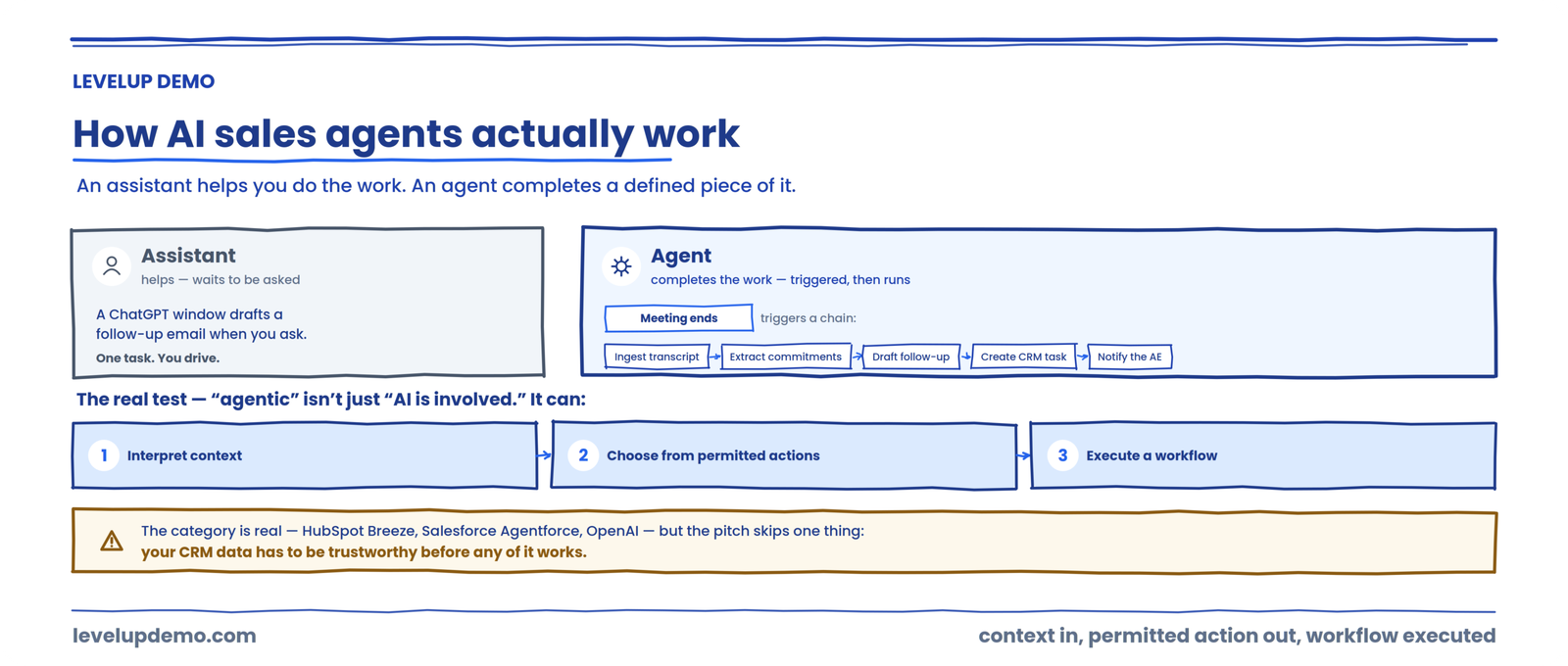
An AI assistant helps a seller do the work. An AI agent is designed to complete a defined piece of the work.
That distinction matters because it changes what you’re evaluating. A ChatGPT window can draft a follow-up email. An agent can ingest the meeting transcript, extract commitments, draft the follow-up, create a CRM task for the next step, and notify the AE, all triggered by the meeting ending.
The meaningful difference between sales automation and agentic AI for sales isn’t simply whether AI is involved. It is whether the system can interpret context, choose from permitted actions, and execute a workflow.
HubSpot describes its Breeze Prospecting Agent as a system that researches, qualifies, drafts outreach, and schedules meetings inside the CRM. Salesforce positions Agentforce around what it calls an “agentic sales cycle” spanning multiple selling stages. OpenAI is positioning agents for sales research, CRM work, and meeting preparation. The category is real. But the vendor pitch skips the part where your CRM data has to be trustworthy before any of this works.
| Technology | Primary role | Example |
|---|---|---|
| AI assistant | Helps a human complete a task | Draft a follow-up email |
| Automation | Executes predefined rules | Send a reminder after 48 hours |
| AI agent | Interprets context and takes permitted actions | Qualify a lead, route it, update CRM |
| AI SDR | Focuses on prospecting and outbound | Research and contact new prospects |
| Meeting intelligence | Captures and analyzes conversations | Summarize a call |
| Demo operations platform | Coordinates the demo workflow end to end | Qualify, schedule, prepare, follow up, analyze |
The SaaS Sales Agent Maturity Model™
Most teams jump straight to “automate outbound.” That’s Level 2 at best, applied to the wrong workflow. Here’s how agent maturity actually stacks up.
Most SaaS teams I’ve watched are stuck between Level 1 and Level 2, using agents for isolated drafting tasks while the workflow between those tasks stays manual and fragmented. The jump to Level 3 requires the CRM to be the system of record. Without that, the agent stack becomes untrustworthy. I spent weeks watching one team debug agent outputs before realizing the root cause was stale CRM data, not the agent logic.
The Agent-to-Revenue Workflow™
Every agent action should map to this sequence:
→
Context
→
Decision
→
Action
→
Human Review
→
System Update
→
Outcome
A demo request arrives (signal). The agent gathers company and prospect context. It evaluates qualification criteria (decision). It routes and schedules (action). The AE reviews the account brief (human review). The CRM is updated (system update). The demo occurs and progresses toward an opportunity (outcome).
If any step breaks, the downstream steps degrade. And the step that breaks most often in practice is context, because enrichment data is missing or the CRM record is incomplete.
15 AI agent use cases for SaaS sales
Each use case below pairs the agent’s job with a real 2026 example tool, a concrete scenario, and the part a human should still verify. Tool names are examples of the category, not endorsements, and the right choice depends on your stack and data quality.
Agents pull company data, persona details, trigger events, and competitive context. Example: a research agent scans a new account’s website, recent news, and filings, then drops a funding round and a leadership change into the account record before the rep opens it.
What humans should verify: whether the account actually fits ICP, and whether the trigger event is current. Stale enrichment data is the most common failure point here.
Agents fill missing firmographic fields, classify accounts, flag duplicates. Example: an enrichment agent takes a bare email domain, appends employee count, industry, and location, and flags that the company already exists under a slightly different name.
What humans should verify: capabilities depend entirely on integrations and data permissions. If enrichment is missing firmographics, follow-up quality drops fast.
Agents match against ICP criteria, score intent signals, assess urgency. The agent should recommend a qualification status. Example: an inbound chat agent asks two or three qualifying questions on the pricing page, then tags the visitor SQL and books a demo while intent is high.
What humans should verify: the final MQL-to-SQL promotion should require both intent and fit to clear threshold checks.
Lead → qualification → territory → segment → rep assignment → CRM update. Example: a 400-person fintech submits a demo request, and the routing agent checks account ownership, matches territory, assigns the right AE, and updates the CRM in seconds instead of the next morning.
What humans should verify: this is one of the simplest agent workflows to implement and one of the highest-impact for teams where leads disappear after the demo because nobody owns the next steps.
Agents research context, select relevant proof points, and draft messages. Example: an outbound agent researches a prospect across LinkedIn, company news, and reviews, then drafts a first-touch email referencing a genuinely current trigger rather than a merge-field placeholder.
What humans should verify: the danger is AI-generated personalization that references a company’s Series B from 2023 as if it happened yesterday. If the enrichment layer feeds bad data, the “personalization” actively hurts you. Deliverability governance matters more than copy quality if you want replies to land.
Post-call summaries, action items, follow-up drafts, reminders, CRM updates. This was the single biggest win I saw across small teams: summary, next step, and CRM update generated in one pass after the meeting. Example: the moment a call ends, an agent produces the recap email, logs the next step, and files it to the opportunity before the rep switches tabs.
What humans should verify: the question isn’t whether AI can write the follow-up. It can. The question is whether the follow-up actually happens, with the right context, before the prospect goes cold.
Missing fields, stale records, duplicate contacts, activity logging, next-step updates. Unglamorous. Commercially critical. Example: a hygiene agent quietly fills core fields, merges duplicate contacts, and logs activity so pipeline reports aren’t built on gaps. According to Salesforce’s own data, 87% of organizations use some form of AI, and 54% are deploying AI agents across the sales cycle.
What humans should verify: if CRM field completeness is low, every downstream agent action degrades.
An agent assembles a pre-demo brief: company overview, prospect role, previous interactions, stated pain, likely use cases, stakeholders, recommended discovery questions. Example: thirty minutes before a call, the rep gets a one-page brief that stitches together the CRM record, past transcripts, and enrichment into a single view.
What humans should verify: this is where connected demo operations become relevant, because the brief is only useful if it pulls from the CRM, transcript history, and enrichment data together.
Goes deeper than meeting prep. Account research → discovery context → stakeholder mapping → use-case selection → demo customization → preparation brief. Example: for a multi-stakeholder deal, an agent maps who’s involved, picks the two use cases that match their stated pain, and tees up a tailored demo path.
What humans should verify: an agent can prepare the rep. It shouldn’t decide what matters to the buyer without validation. That distinction separates a useful tool from a liability.
Summary, commitments, unanswered questions, next steps, follow-up draft, CRM update, task creation. Example: after a demo, an agent lists what was promised, what’s still open, and the agreed next step, then drafts the recap and creates the task. Capturing a meeting isn’t the same as moving the opportunity forward.
What humans should verify: meeting intelligence tells you what happened. Demo operations ensure the right action follows.
Agents classify objections, surface relevant responses, flag competitor mentions and pricing concerns. Example: when a competitor name comes up on a call, an agent surfaces the relevant battlecard and flags the pricing question for the rep to address live.
What humans should verify: don’t automate responses for security questions or pricing negotiations. Human-in-the-loop review is mandatory for first-touch outbound and anything pricing-sensitive.
Stalled opportunities, missing next steps, low stakeholder engagement, delayed follow-up, declining engagement. Example: a deal-risk agent flags an opportunity that’s had no next step booked and no stakeholder reply in two weeks, so a human can decide whether it’s real.
What humans should verify: stage changes need governance, or the AI will create phantom progression. Add stage-gates that require a transcript keyword or meeting outcome flag before advancing a deal.
Agents identify patterns across discovery, objections, talk/listen balance, next-step clarity. Example: a coaching agent shows that a rep’s talk-to-listen ratio spikes on discovery calls that don’t convert, giving the manager a specific pattern to coach. AI surfaces the pattern. The manager provides judgment and coaching.
What humans should verify: one directional claim from Gainsight suggests autonomous agents can improve conversion rates by up to 20% through earlier risk detection, though that’s presented as directional, not universal.
Pipeline review, stale deal flagging, missing information, risk signals, next actions. Example: before the forecast call, an agent surfaces every deal untouched in two weeks and lists what’s missing, so the review starts from a clean list. I won’t make unsupported claims about forecasting accuracy.
What humans should verify: what agents do well is surface the deals that haven’t been touched in two weeks so a human can decide what’s real.
This is where individual agent tasks become a connected workflow. Request → qualify → route → schedule → prepare → deliver → follow up → analyze → optimize. Example: instead of a dozen disconnected agents, one demo operations layer coordinates the whole path from request to follow-up so nothing stalls between steps.
What humans should verify: a meeting notetaker captures what happened. An AI sales agent performs a specific action. A demo operations platform coordinates the workflow around the demo. That’s the strategic difference. See LevelUp Demo’s demo operations playbook for the full framework.
The unlock isn’t one more agent. It’s connecting them.
Most of these agents each own one task. LevelUp Demo connects qualification, routing, scheduling, preparation, follow-up, and analytics into one demo operations workflow, so the loop actually closes.
Where AI sales agents still struggle
| Problem | Root cause | The community fix |
|---|---|---|
| Follow-up emails are generic | Missing transcript context or poor CRM notes | Force the agent to summarize only from transcript plus latest CRM fields |
| CRM shows “updated” but fields are wrong | Agent had write access before validation | Start read-only, then gradually enable write access |
| Leads disappear after the demo | No SLA for follow-up or routing | Auto-create next-step tasks and owner assignments immediately after meetings |
| Sales team stops trusting the agent | Hallucinated or inferred CRM data | Restrict the agent to explicit extraction; human review for uncertain fields |
| Stage progression looks inflated | Agent advanced deals without validation | Add stage-gates requiring a transcript keyword or meeting outcome flag |
| Prospect gets duplicate outreach | Multiple automations firing from different tools | Centralize triggers in one workflow layer and suppress overlap |
The Human-Agent Boundary
AI should generally handle
Work that is repetitive, high-volume, rules-driven, data-heavy, time-sensitive, and reversible.
Humans should own
Relationship building, strategic judgment, negotiation, sensitive communication, major commercial decisions, and final accountability.
The copilot-to-autopilot rollout pattern works: begin with review-required drafts, then enable bounded autonomous actions only after proving accuracy.

Where practitioners disagree
There’s a live debate about whether agents should have CRM write access from day one. One camp (mostly RevOps leaders) insists on read-only access first, sometimes for months, before trusting write-back. The other camp (mostly founders moving fast) argues that read-only defeats the purpose and you should just audit aggressively. I land on the read-only-first side, because I’ve seen agents fill required CRM fields with guessed data, and the false confidence that creates is worse than an empty field.
How to measure AI agent ROI
Track hours saved, response-time improvement, conversion-rate change, and revenue protected against software and implementation cost. example: if an agent saves one rep five hours per week on CRM updates and follow-up drafting, and that rep’s loaded cost is $75/hour, that’s roughly $1,500/month in recovered capacity against a tool cost of $200 to $1,000 per seat per month. The math only works if the agent’s outputs are accurate enough that the rep doesn’t spend the saved time reviewing and correcting.
How LevelUp Demo fits
Most of the 15 use cases above are single-task agents: one researches, one enriches, one drafts the follow-up. That’s Level 1 and Level 2 on the maturity model. The value the article keeps pointing at, connecting those tasks into a workflow that closes the loop, is Level 3 and Level 4. That’s the demo operations layer, and it’s where LevelUp Demo sits.
Coordinates the workflow, not one task
Where a notetaker captures a call and a single agent performs one action, LevelUp Demo coordinates the path around the demo: request → qualify → route → schedule → prepare → deliver → follow up → analyze.
Closes the loop after the demo
The most common failure in this article is leads disappearing between the demo and the follow-up. LevelUp Demo assigns the owner, fires the next step, and tracks the outcome so the handoff doesn’t stall.
Keeps the human in the loop
Consistent with the Agent-to-Revenue Workflow, the AE reviews the account brief before the demo, so the workflow moves fast without handing ownership decisions to an unattended agent.
In other words, LevelUp Demo isn’t a replacement for a research or enrichment agent. It’s the orchestration layer that turns their individual outputs into one demo operations workflow, which is exactly the jump from Level 2 to Level 3 that most teams get stuck before.
When the demo workflow is the bottleneck
If your team is losing deals between the demo request and the follow-up, not because of bad selling but because the workflow around the demo is fragmented, LevelUp Demo connects qualification, scheduling, preparation, follow-up, and analytics into one coordinated process. See how it works.
FAQs
What are AI agents for SaaS sales?
AI agents for SaaS sales are software systems that interpret sales context and perform defined actions, such as researching accounts, qualifying leads, updating CRM records, preparing demos, and managing follow-up, with limited human intervention. They go beyond simple automation by reasoning over context before choosing an action.
How are AI sales agents different from AI assistants?
An assistant waits for you to ask it something. An agent monitors for a trigger, evaluates context, and executes a permitted action without being prompted each time.
Can AI agents replace SDRs?
Not entirely. Agents handle research, enrichment, and initial qualification well. Relationship judgment, exception handling, and complex objection responses still need a human. The pattern that works: agents do the prep, humans do the conversation.
Can AI agents qualify SaaS leads?
Yes, against defined ICP criteria and intent signals. The agent recommends a qualification status. A human should validate the final decision, especially for high-ACV opportunities.
Can AI agents prepare sales demos?
Agents can assemble a pre-demo brief pulling from CRM data, transcripts, and enrichment sources. They shouldn’t decide what matters to the buyer without the AE reviewing the brief.
Can AI agents update CRM records?
Yes, and this is one of the highest-impact use cases. Start with read-only access, validate accuracy, then enable write-back.
What are the risks of AI sales agents?
Bad CRM data, hallucinated fields, duplicate outreach from overlapping automations, phantom deal progression, and over-reliance on agent outputs without human review.
How should SaaS teams measure AI agent ROI?
Track hours saved, response-time improvement, conversion change, and revenue protected. Compare against software cost and the time spent reviewing agent outputs. If review time eats the savings, the agent isn’t ready for write access.
What should sales teams automate first?
Post-meeting CRM updates and follow-up drafting. Highest impact, lowest risk, and it proves whether your CRM data is clean enough to support more complex agent workflows.
The next problem most teams hit after deploying their first agent isn’t capability. It’s realizing that the agent exposed how broken the underlying data was all along. Fix the CRM first. Then let the agents work.
Turn isolated agents into one demo workflow
LevelUp Demo connects qualification, routing, scheduling, preparation, follow-up, and analytics into one coordinated process, so deals stop leaking between the demo request and the follow-up.