One of the fastest ways to lose a deal is to show the same demo to every prospect.
I’ve watched it happen dozens of times. A rep pulls up a revenue dashboard, walks through forecasting workflows, highlights pipeline analytics — and the technical architect on the call sits there, arms crossed, waiting for someone to mention integrations. The demo wasn’t bad. It was just built for a different person.
Buyers care about different things. A VP of Sales and an Operations Manager may buy the same software, but they evaluate it through completely different lenses. Generic demos create disconnects. Relevance drives engagement. And personalization — real, pain-point-driven personalization — is what separates demos that close from demos that stall.
This piece breaks down exactly how to personalize a SaaS demo for different buyer personas, step by step, with specific frameworks you can use before your next call.
How do you personalize a SaaS demo?
To personalize a SaaS demo, tailor the presentation around the buyer’s role, goals, challenges, and success metrics. Focus on the workflows, features, and outcomes most relevant to that specific stakeholder instead of showing every feature. Effective personalization starts during the discovery call and carries through the entire demo experience.
Why Generic SaaS Demos Fail
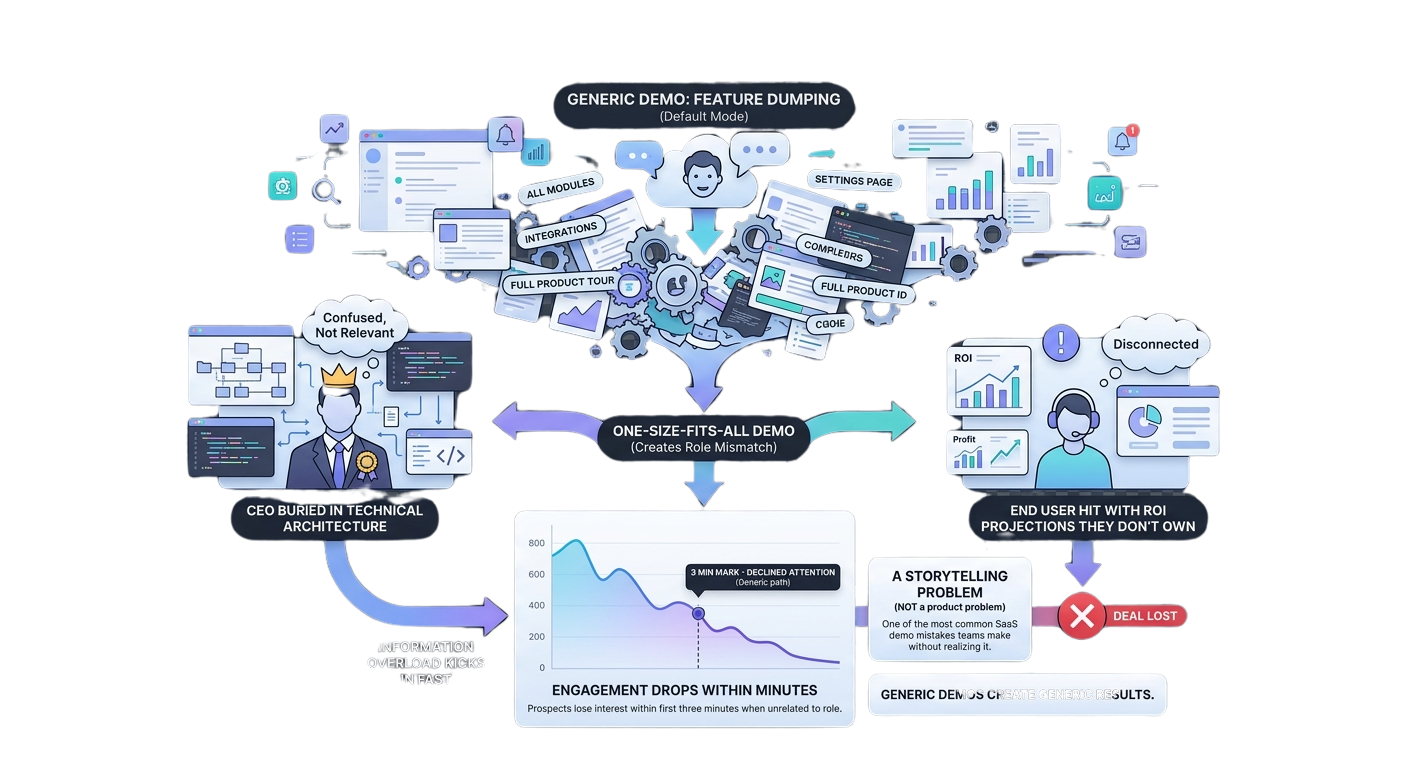
Feature dumping is the default mode for most demo presenters. Show everything, hope something sticks. The problem? Buyers don’t evaluate products through the same lens.
When you run a one-size-fits-all demo, you create role mismatch. The CEO gets buried in technical architecture. The end user gets hit with ROI projections they don’t own. Information overload kicks in fast — and engagement drops within minutes.
We’ve seen prospects lose interest within the first three minutes when the demo focused on features unrelated to their role. That’s not a product problem. That’s a storytelling problem. And it’s one of the most common SaaS demo mistakes teams make without realizing it.
Generic demos create generic results.
What Is Demo Personalization?
Demo personalization means adapting examples, workflows, messaging, use cases, and outcomes based on who is attending.
It’s not slapping a prospect’s logo on slide one and calling it tailored. It’s structuring the entire narrative around what that specific buyer needs to see, hear, and believe before they move forward.
Personalization is not about showing more features. It’s about showing more relevance.
A well-run personalized demo typically focuses on 3–5 high-value features instead of a broad feature dump, because too much surface area makes the experience feel slower and less relevant. The goal is precision, not coverage.
The 4 Elements Every Personalized Demo Should Include
Role-Specific Challenges
Every persona walks into a demo with a different problem. Name it. If you’re demoing to an Operations Manager, open with the operational pain — process inconsistency, manual handoffs, lack of visibility. If you don’t address their challenge in the first two minutes, they’ll mentally check out.
Relevant Workflows
Show the workflows that mirror their daily reality. A technical buyer needs to see integrations and API documentation. A sales leader needs to see pipeline views and reporting. Buyers engage when they see their workflow reflected in the demo.
Business Outcomes
Features are proof. Outcomes are the story. Every persona needs to understand what changes if they adopt the product. Tie every feature you show to a measurable result they personally care about.
Stakeholder-Specific Success Metrics
A CEO measures success differently than an end user. Define the metric that matters to the person in the room — revenue growth, time saved, adoption rate, implementation speed — and build the demo’s climax around that number.
The same product can be valuable to multiple stakeholders, but each stakeholder needs a different story.
How to Personalize a SaaS Demo for Different Buyer Personas
This is where it gets tactical. Here’s how to adjust your demo for five common buyer personas, following product demo best practices that actually move deals forward.
Persona #1: Founder / CEO
What they care about: Growth, revenue, efficiency, ROI.
Show: Business impact dashboards, scalability proof, high-level visibility into how the product drives outcomes. Keep it strategic.
Avoid: Deep feature walkthroughs. They don’t want to see how the sausage is made. They want to know the sausage sells.
Demo flow example: Open with a 60-second market problem statement. Show a single dashboard that ties product usage to revenue impact. Walk through one workflow that demonstrates efficiency gains. Close with a scalability story — how this grows with their team. Three slides. Maybe four. That’s it.
Persona #2: VP of Sales / Revenue Leader
What they care about: Pipeline velocity, conversion rates, lead response time, forecasting accuracy.
Show: Reporting views, sales workflow automation, rep productivity metrics. This persona lives in dashboards — give them dashboards.
Demo flow: Start with pipeline visibility. Show how deals move through stages. Highlight forecasting accuracy and how the tool surfaces buying signals reps might miss. End with a conversion metric — something tied to demo-to-close rate improvement.
I’ve found that revenue leaders make decisions fast when they can see their own funnel reflected in the product. Don’t waste time on features outside their reporting world.
Persona #3: Operations Manager
What they care about: Process consistency, adoption, accountability, efficiency.
Show: Workflow automation, task management, audit trails, team accountability views.
Demo flow: Open with the operational pain — manual processes, inconsistent handoffs, lack of standardization. Walk through an automated workflow that eliminates a specific bottleneck. Show how the system enforces consistency without micromanagement.
Operations buyers are detail-oriented. They want to see how things work, not just that they work. Give them the mechanics.
Persona #4: Technical Buyer
What they care about: Integrations, implementation timelines, security, APIs, data architecture.
Show: Technical architecture diagrams, setup process, compatibility with existing stack, security certifications.
Avoid: Excessive ROI slides. A technical architect doesn’t need a business case — they need proof the product won’t break their infrastructure.
Demo flow: Start with the integration map. Show how the product connects to their existing tools. Walk through the API documentation. Address security and compliance unprompted — don’t wait for them to ask.
(I’ll be honest, I got stuck on this one early in my career. I kept leading with business value for technical buyers and getting blank stares. The fix was embarrassingly simple: lead with architecture, follow with compatibility, close with implementation timeline.)
Persona #5: End Users
What they care about: Usability, daily productivity, learning curve, time savings.
Show: The actual interface. Click through real tasks. Demonstrate how intuitive the experience is for someone who’ll use it eight hours a day.
Demo flow: Open inside the product. No slides. Show a common daily task from start to finish. Highlight time savings — “this used to take 12 clicks, now it takes 3.” Let them see themselves using it.
End users are the silent deal-killers. If they push back on adoption post-purchase, the whole deal unravels. Winning them during the demo prevents that.
How Discovery Calls Make Demo Personalization Easier
Great demo personalization starts during discovery, not during the presentation.
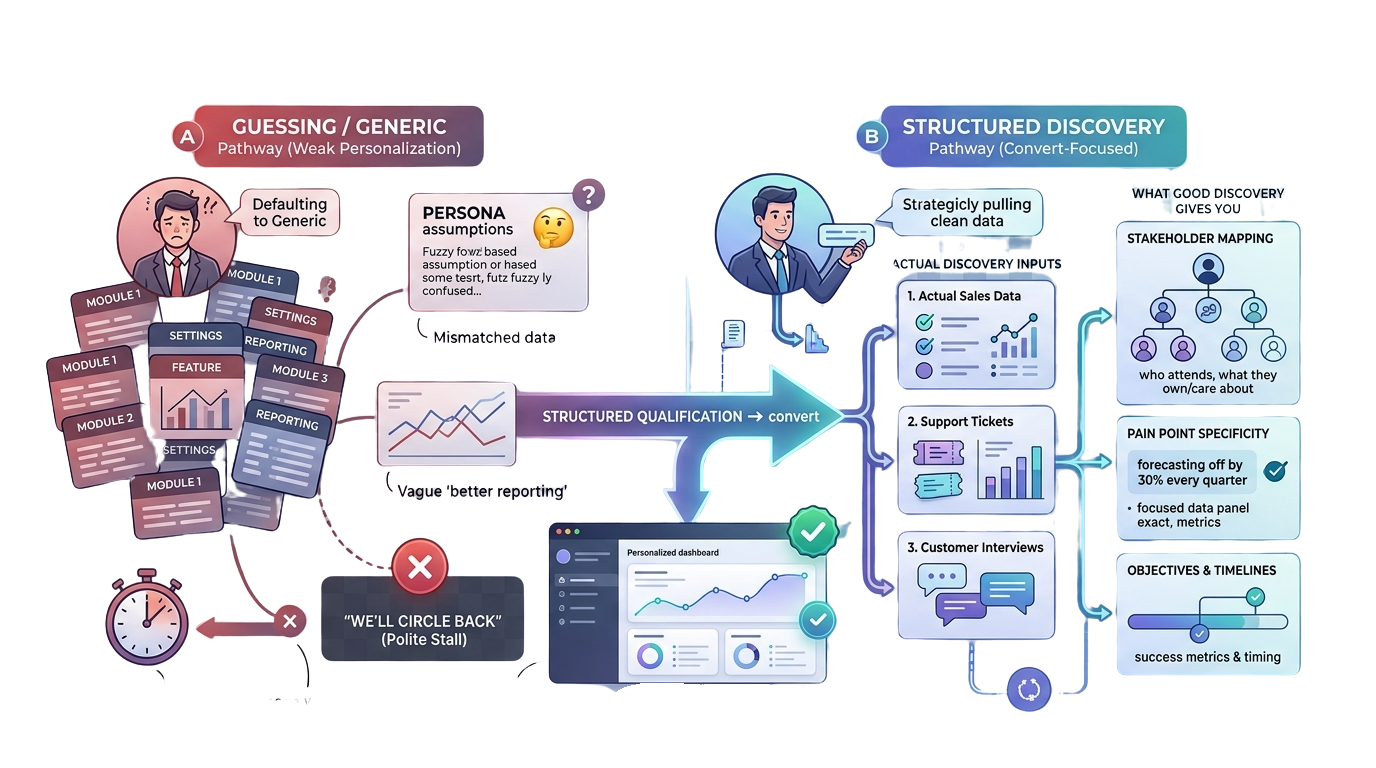
If you’re not running structured discovery call questions before the demo, you’re guessing. And guessing means defaulting to the generic version.
Good discovery gives you:
- Stakeholder mapping — who’s attending, what they own, what they care about
- Pain point specificity — not “we need better reporting” but “our forecasting is off by 30% every quarter”
- Objectives and timelines — what does success look like, and when do they need it
You need actual discovery inputs from sales, support, and customer interviews. Persona work based on assumptions produces weak demo personalization. Every time.
When you qualify demo requests properly, you walk into the demo knowing exactly which story to tell. That’s the difference between a demo that converts and one that gets a polite “we’ll circle back.”
Common Demo Personalization Mistakes
- Showing everything. The “data dump” demo where too many features dilute the narrative.
- Assuming all stakeholders care about the same outcomes. They don’t. Ever.
- Ignoring discovery insights. You did the discovery call — use what you learned.
- Over-personalizing irrelevant details. Adding the prospect’s logo isn’t personalization. Addressing their specific pain is.
- Using generic examples. “Company X saved 20%” means nothing if Company X is in a different industry with different challenges.
Teams often confuse persona with industry. A marketing manager and an IT director in the same SaaS account need different proof points entirely.
Personalized Demos vs Generic Demos
Same flow for everyone. Feature-driven. Engagement is lower as prospects disengage. Objections show up more often and are harder to resolve. Follow-up is a generic recap, and close rates land below benchmark.
Flow is tailored to the persona. Outcome-driven. Engagement is higher because prospects see themselves in it. Objections are fewer and better aligned, follow-up points to targeted next steps, and close rates are measurably higher.
How Interactive Product Demos Support Personalization
Interactive product demos take personalization further by letting prospects self-select their path. Role-specific tours, use-case branches, and segmented experiences mean each viewer gets the version of the demo that matters to them — without a rep manually rebuilding assets.
This is especially powerful for mid-funnel leads who aren’t ready for a live call but need more than a generic product page. Use a base demo architecture with reusable variables, and the same demo renders differently per viewer. That scales. Manual 1:1 demo production for every lead does not.
Modern buying behavior is self-directed. Buyers research before they talk to sales. Meeting them with a personalized, interactive experience — before the first call — creates an advantage most competitors aren’t offering yet.
How LevelUp Helps Teams Personalize SaaS Demos
For teams building a repeatable personalization process, LevelUp fits naturally into the workflow. It helps capture qualification data during the discovery phase, organize buyer information by persona and account, and track demo outcomes so you can see which personalization approaches actually move deals.
The consistency piece matters. When you’re running 30+ demos a week across multiple reps, personalization can drift. LevelUp helps standardize the process — managing follow-up workflows, surfacing the right buyer context before each call, and keeping the team aligned on what each persona needs to see.
It’s not about adding another tool. It’s about making the personalization you’re already doing more reliable at scale.
LevelUp
One Demo Won’t Fit Every Buyer.
Stop running the same walkthrough for every persona. LevelUp helps you capture discovery data, organize buyers by persona and account, and keep personalization consistent across every rep and every call.
FAQs
What is demo personalization?
Demo personalization is the practice of adapting a product demo’s content, examples, workflows, and messaging to match the specific role, goals, and challenges of the person watching. Rather than running the same presentation for every prospect, personalized demos focus on the 3–5 features and outcomes most relevant to that buyer.
Why is SaaS demo personalization important?
Personalized demos drive higher engagement, fewer objections, and better close rates. When prospects see their own workflow and challenges reflected in the demo, they move through the buying process faster. Generic demos create friction because different stakeholders evaluate the same product through different lenses.
How do you personalize a product demo?
Start with structured discovery to identify the buyer’s role, pain points, and success metrics. Build a base demo with variable elements you can swap per persona. Lead with the buyer’s specific challenge, show the feature that resolves it, and tie everything to an outcome they personally own.
What should different stakeholders see during a demo?
CEOs need business impact and ROI. Sales leaders need pipeline and forecasting views. Operations managers need workflow automation and accountability. Technical buyers need integrations and security. End users need usability and daily workflow improvements.
How do discovery calls improve demo personalization?
Discovery calls surface the specific pain points, stakeholder dynamics, and success criteria that shape an effective demo. Without discovery, personalization defaults to assumptions. With it, every demo moment maps directly to something the buyer said they care about.
The Bottom Line
So here’s what I’d do next: pull up your last five demo recordings. Watch the first three minutes of each. If the opening is identical across all five, you already know where to start.
Personalization doesn’t require a new product. It requires a different story for each person in the room.