The demo went well. The champion liked the workflows, the manager liked the reporting, and you are about to propose next steps. Then the person who runs operations on the buyer’s side asks one question:
“Can we move all our existing data into your platform without losing anything?”
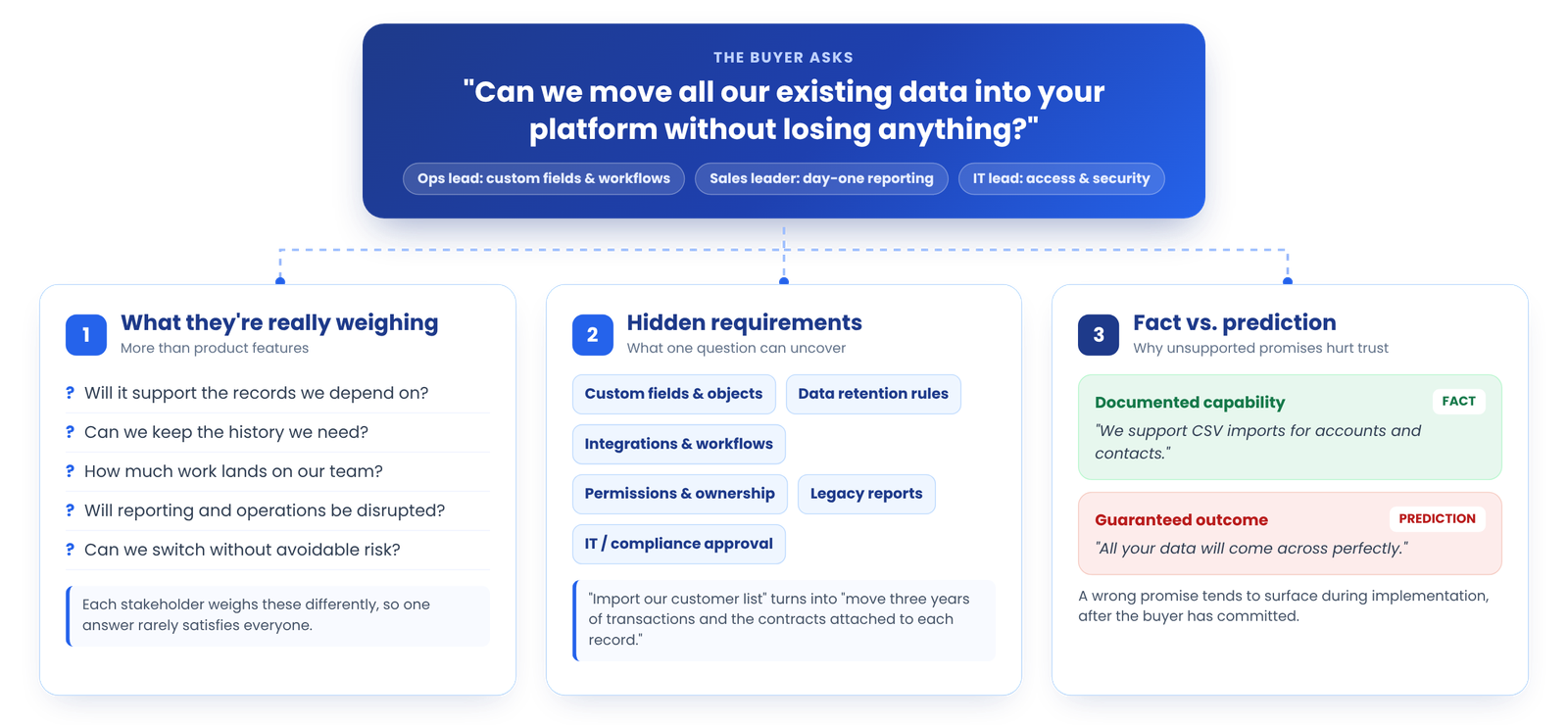
That question changes the conversation. The buyer is no longer asking whether your product works. They are asking whether switching to it is safe: whether their historical records, custom fields, attachments, and reports will survive the move, how much work their team will have to do, and whether day-to-day operations will be disrupted.
Quick answer: To handle data migration questions during a SaaS demo, first clarify what the buyer actually needs to move and from which system. Then share only what your product and team have documented, name the specific items that still need verification, and agree on a concrete next step with the right technical specialist. Never promise compatibility, zero data loss, or a timeline before the scope is known.
Three principles run through everything below:
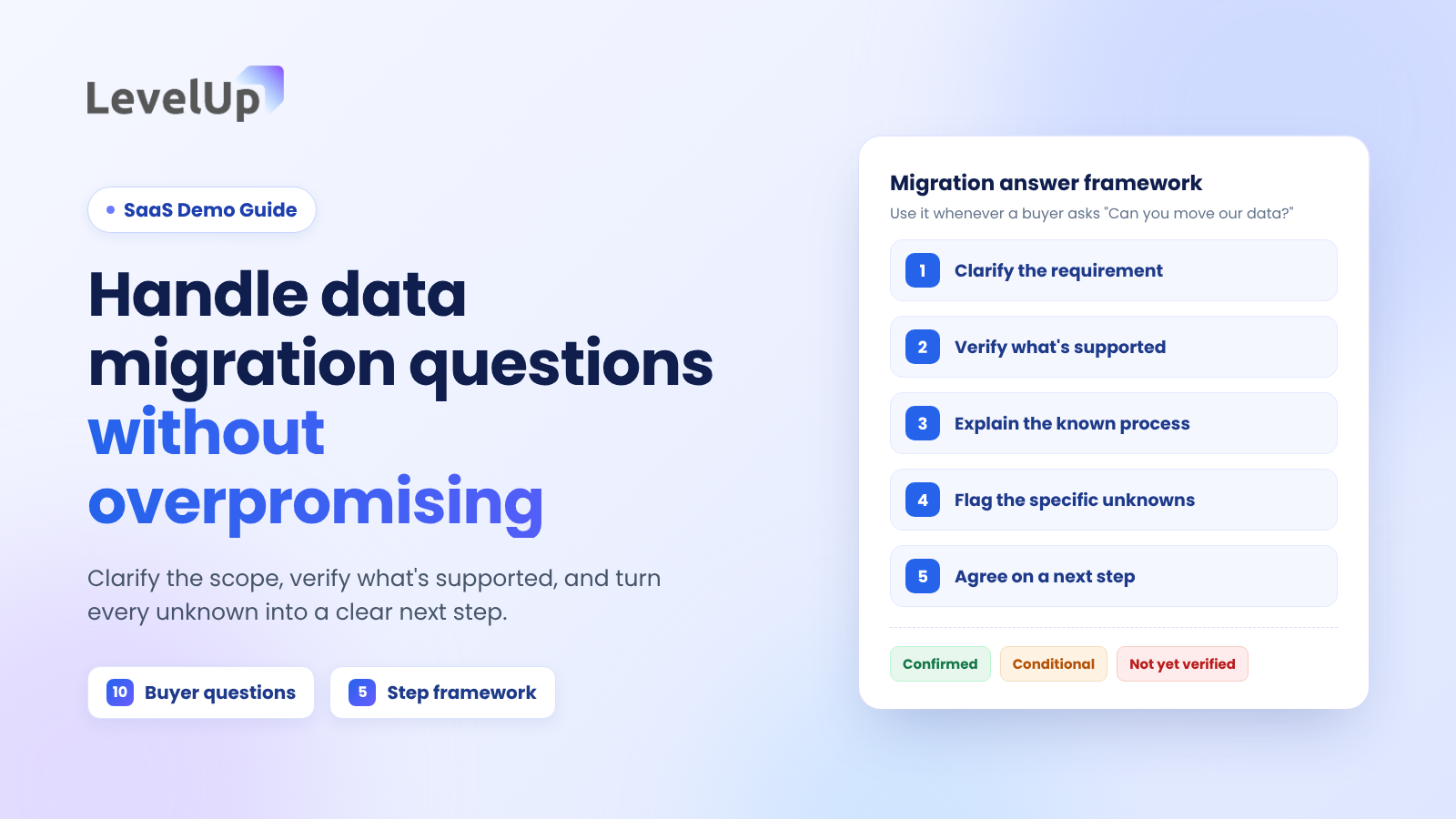
This guide covers why migration questions matter, the ten questions buyers ask most often with illustrative responses, a five-step framework for answering without overpromising, weak vs. strong answers, when to bring in a sales engineer, a pre-demo discovery checklist, and how to follow up on what you could not answer live.
Why data migration questions matter during a SaaS demo
A migration question can influence the buying decision even when the product itself is a clear fit. Switching software means moving the information a team depends on, and the buyer has to justify that risk internally.
Buyers are evaluating more than product features
Behind a migration question there are usually practical concerns:
- Will the new system support the records we depend on?
- Can we keep the historical information we need for reporting, audits, or customer context?
- How much work will our team need to do, and who will do it?
- Will reporting and day-to-day operations be disrupted during the switch?
- Can we change systems without creating avoidable business risk?
Different stakeholders weigh these differently. An operations lead cares about custom fields and workflows, a sales leader about pipeline reporting on day one, and an IT lead about access, security, and integrations. If several of them are on the call, it helps to plan the demo for multiple stakeholders rather than answer every concern at one level of detail.
Migration concerns can reveal hidden buying requirements
A simple question often uncovers requirements that never came up in discovery: mandatory fields or custom objects, data retention rules, integrations and downstream workflows, permission or ownership rules, legacy reports the business still relies on, and IT or compliance approvals.
Illustrative example: A buyer first asks whether you can import their customer list. A follow-up question reveals that their finance team also needs three years of transaction history, and that contracts are stored as attachments on each customer record. The requirement just changed from “import a spreadsheet” to “move linked records, history, and files,” which is a different conversation with a different set of people.
Why unsupported promises damage trust
There is a difference between describing a documented capability (“we support CSV imports for accounts and contacts”) and guaranteeing an outcome that depends on the buyer’s data, source system, and configuration (“all your data will come across perfectly”). The first is a fact. The second is a prediction you cannot make yet.
Migration concerns do not always cause deals to fail. But an answer that later turns out to be wrong tends to surface at the worst possible moment, during implementation, when the buyer has already committed and the person who made the promise is no longer in the room.
First, understand what the buyer means by data migration
“Can you migrate our data?” is not a specific enough requirement to answer. Before responding, narrow it down across four areas.
Identify the source system
Find out which platform holds the data today. A modern SaaS application, a legacy on-premise system, a database, a set of spreadsheets, and a collection of disconnected tools all present different migration paths. Ask whether the buyer can export the data, in what format, whether an API is available, and whether the source has unusual customizations.
Clarify which data must move
“Data” covers many categories, and each may need a different method or separate validation:
- Customer and account records
- Contacts and activity history (emails, calls, notes)
- Transactions and other historical records
- Product or service catalogs
- Documents and attachments
- Custom fields and the relationships between records
- User accounts, permissions, and record ownership
- Reports, configuration, and workflow logic
Establish the required outcome
Ask whether the buyer needs a complete historical migration, only active or recent records, a clean import of selected data, read access to history without moving every record, or continuity for specific reports. These outcomes carry very different effort and risk.
Understand constraints and dependencies
Cover data volume, target dates, access to the source system, security requirements, tolerance for downtime, and which internal stakeholders need to approve the switch. These are discovery considerations, not assumptions about every project. The table below turns them into questions you can ask in the room; for broader discovery, see these discovery call questions for SaaS.
| Discovery area | What to ask, and why it matters |
|---|---|
| Source system | “Which system holds this data today, and can you export it?” Determines whether a supported import path exists at all. |
| Data scope | “Which records do you need on day one, and which can stay archived?” Separates must-move data from nice-to-have history. |
| History | “How many years of history do you need active in the new system?” Historical activity is often harder to move than core records. |
| Structure | “Which custom fields or linked records does your team rely on daily?” Custom fields and relationships may not map one-to-one. |
| Files | “Are documents or attachments stored on records?” Files often move through a different process than structured data. |
| Volume | “Roughly how many records are we talking about?” Affects which import method and timeline are realistic. |
| Constraints | “Is there a go-live date, a contract end date, or a compliance requirement?” Sets urgency and who must approve the plan. |
| Ownership | “Who on your side owns this data and would work on the migration?” Identifies the technical counterpart for follow-up. |
10 data migration questions buyers ask during SaaS demos
Each question below follows the same structure: what the buyer is really asking, what to clarify, an illustrative response, what must be verified before you commit, and the next step. All dialogue is illustrative. It is not a description of any specific product’s capabilities, so replace it with what your own product and team have documented.
1. Can we migrate data from our current software?
What the buyer is really asking: Is there a realistic path from our system to yours, and will the data structure survive the trip?
Clarify first: The exact source platform and version, the export formats available, and which data categories matter.
Illustrative response: “We can look at the migration path for your current system. Which platform are you on, and which data do you need to bring across? I’ll confirm the supported options with our implementation team rather than guess.”
Verify before committing: Supported import methods, any native connector or integration for that source, and whether an export from the source keeps relationships intact.
Next step: Request the source system details and, if possible, a sample export.
2. Can we migrate all our historical data?
What the buyer is really asking: Will my team trust the new system on day one, and can we meet our retention obligations?
Clarify first: What “all” means: active records, full activity history, archived records, attachments. Ask whether history must be editable in the new system or only accessible.
Illustrative response: “Let’s define what history you need active versus what you need to keep accessible. That tells us whether it’s a full historical migration or a smaller import plus an archive.”
Verify before committing: Limits on importing historical activities, timestamps and original owners, and any volume constraints.
Next step: Document required history by data type and date range.
3. What happens to our custom fields and data relationships?
What the buyer is really asking: Will the structure we built over years be flattened or lost?
Clarify first: Which custom fields, linked records, IDs, and parent-child relationships are business-critical.
Illustrative response: “Some fields will likely map directly and some may need configuration. Could you share your list of critical custom fields so our team can review how each one maps?”
Verify before committing: Field types, picklist values, required fields with no source equivalent, and how record relationships are rebuilt.
Next step: Schedule a field-mapping review.
4. Will we lose data during migration?
What the buyer is really asking: Is this safe, and how would we know if something went wrong?
Clarify first: Which data loss would actually hurt them: missing records, broken links, wrong owners, altered dates.
Illustrative response: “I don’t want to give you a casual guarantee on something this important. What I can do is walk you through how a migration would be validated for your data, so you can see how gaps would be caught.”
Verify before committing: The validation approach: source backup, test import, record counts, field-level checks, and exception reporting.
Next step: Agree on what “no data loss” means for this buyer and how it will be checked.
5. Can we migrate documents, attachments, and notes?
What the buyer is really asking: Will the context attached to our records come with them?
Clarify first: File types and sizes, where files live today, and whether they must stay linked to specific records.
Illustrative response: “Files are often handled separately from structured records. Can you tell me roughly what kinds of files you store and whether they need to stay attached to each customer record?”
Verify before committing: Whether attachments and notes are supported, storage limits, and whether file-to-record links and metadata are preserved.
Next step: Add file migration as a named item in the technical review.
6. How long will data migration take?
What the buyer is really asking: How long will we be in limbo, and when can we stop paying for the old system?
Clarify first: Data volume, number of sources, data quality, required transformations, integrations, and who does the work.
Illustrative response: “I’d rather not give you a number that turns out to be wrong. The timeline depends on volume, how clean the data is, and how much needs transforming. Once we’ve seen a sample, our implementation team can give you a scoped estimate.”
Verify before committing: Any timeline must come from whoever will actually do the work, after scoping.
Next step: Commit to a date for a scoped estimate, not a date for the migration.
7. Will we need downtime during migration?
What the buyer is really asking: Will our team be unable to work, and for how long?
Clarify first: Whether the source system must stay live, how often data changes, and how much interruption is acceptable.
Illustrative response: “That depends on the approach and the final cutover plan. Tell me which parts of your operation can’t pause, and we’ll factor that into how the cutover is planned.”
Verify before committing: The cutover approach, whether changes made during migration can be synchronized, and the realistic freeze window.
Next step: Capture downtime tolerance as a requirement for the implementation team.
8. Can we keep using our existing system during migration?
What the buyer is really asking: Can we de-risk the switch by running both systems for a while?
Clarify first: How long they want to run in parallel and which system is the source of truth during that period.
Illustrative response: “Running both systems for a period is something we’d need to plan carefully, mainly around which system is the source of truth. Let’s confirm what’s feasible for your setup.”
Verify before committing: Feasibility of parallel operation, staged migration, reconciliation between systems, and cutover planning.
Next step: Include parallel-run requirements in the feasibility review.
9. Who is responsible for the migration?
What the buyer is really asking: How much of this lands on my team?
Clarify first: Whether they expect the vendor, an implementation partner, their own IT team, or a third party to do the work.
Illustrative response: “Let me confirm exactly which migration responsibilities our team covers and what your team would need to provide, so there are no surprises later.”
Verify before committing: Whether migration services exist, what they include, whether they cost extra, and what the buyer must supply.
Next step: Send a written split of responsibilities.
10. What happens if some records cannot be migrated?
What the buyer is really asking: Is there a plan B, or will we discover gaps after go-live?
Clarify first: Which records would be critical if they failed, and which could be archived or handled manually.
Illustrative response: “Good question to raise now. If any records can’t move as-is, they should be documented with an agreed workaround before go-live, not discovered afterwards.”
Verify before committing: How exceptions are reported, what remediation options exist, and how unresolved records are signed off.
Next step: Agree that exceptions will be documented and reviewed with the buyer.
Migration question or objection? Some migration questions are objections in disguise (“switching is too much work”). If the buyer is pushing back rather than asking, the broader SaaS objection handling framework applies. This guide focuses on answering the technical question accurately.
A five-step framework for answering migration questions without overpromising
The ten questions above share one pattern. You can reuse it for any migration question, including ones that are not on the list.
Step 1: Clarify the requirement
Ask one follow-up question before answering, for example: “When you say you need to migrate everything, are historical records and attachments included, or is it mainly your active customer data?” The answer often shrinks the question to something you can address accurately.
Step 2: Separate confirmed capabilities from unknowns
Sort everything you could say into three categories, and let the category decide how you phrase it:
Confirmed
What it means: Documented, and you have verified it applies.
How to phrase it: State it plainly: “We support importing accounts and contacts from CSV.”
Conditional
What it means: Supported, but depends on the buyer’s data or setup.
How to phrase it: State the condition: “Custom fields can be mapped, depending on field type. We’d check yours.”
Not yet verified
What it means: You do not know, or it depends on something you have not seen.
How to phrase it: Name it and assign verification: “I’ll confirm attachment handling for your system with our team.”
Step 3: Explain the known process
Describe only the relevant, documented process or general considerations: how imports work, what usually needs mapping, how data is validated. Do not improvise product functionality to fill a silence.
Step 4: Flag the specific unknowns
Name exactly what is still open: source-system compatibility, field mapping, attachment handling, data volume, migration ownership, or timing and downtime. A precise unknown (“we need to confirm how your contract attachments link to account records”) sounds far more credible than “let me get back to you on that.”
Step 5: Agree on a concrete next step
Depending on the situation, propose a technical discovery session, a review of sample export files, a field-mapping assessment, a migration feasibility review, or a documented follow-up from the relevant specialist. Make it specific and dated, the same way you would define any strong SaaS demo next step. Only offer deliverables your company can actually provide.
Weak vs. strong answers to data migration questions
The weak answers below are fast and confident, which is exactly why reps reach for them. The stronger answers take a few more seconds and hold up during implementation. All examples are illustrative.
| Buyer question | Weak response | Stronger response |
|---|---|---|
| Can you migrate everything? | “Yes, everything can be moved.” | “Let’s identify the records, attachments, and history you need so we can confirm the migration scope.” |
| Will we lose data? | “No, there’s no risk.” | “Data integrity needs to be validated. Let’s confirm the approach and the checks your data needs.” |
| How long will it take? | “It usually takes a day.” | “It depends on the source, volume, transformations, and validation. Let’s establish those first, then get you a scoped estimate.” |
| Can you migrate our custom fields? | “That shouldn’t be a problem.” | “Let’s review the fields and how they map before confirming support.” |
| Do you handle the migration? | “Our team takes care of everything.” | “I’ll confirm which responsibilities our team covers and what your team would need to provide.” |
| Can we import from our current tool? | “Sure, it’s one click.” | “Which tool and version? I’ll confirm the supported import path and whether relationships come across.” |
Strong responses work because they acknowledge the question, narrow the scope, stay honest about what is known, and move the conversation toward verification instead of ending it.
Why “imported successfully” is not the same as “usable”
Reps do not need to be migration architects, but knowing where migrations commonly go wrong explains why casual promises are risky. A file can import without errors and still leave the buyer with data that is technically present but operationally wrong.
| What the buyer sees | Common cause | Question to raise early |
|---|---|---|
| Record counts match, but users say data is missing | Records were filtered by status, owner, or date during export | “Which records are in the export, and which were left out?” |
| Duplicate contacts or accounts after import | Records were matched on inconsistent identifiers, or an import was re-run | “Which unique identifier will be used to match records?” |
| Deals or tickets with no linked company or contact | Relationships were not carried across, or related files lacked a shared key | “How will links between records be rebuilt?” |
| Rows rejected or fields blank | Source values do not match target picklists, required fields, or validation rules | “Which fields have fixed values or validation rules in the new system?” |
| Automations fire on imported records | Workflows treat bulk-loaded records as new activity | “Which automations should be paused during the load?” |
These are well documented by platform vendors. Salesforce’s Trailhead guidance on importing data recommends cleaning the import file, testing with a small file first, and notes that validation rules can stop records from importing and that workflow rules may need to be temporarily deactivated. HubSpot’s import tool documentation explains that unique identifiers such as email, company domain, or record ID are used to prevent duplicates, and that associating records across files requires a shared column.
The takeaway for sales: every row in that table is a reason to say “let’s verify that” instead of “that won’t be a problem.”
When sales reps should bring in a sales engineer or implementation specialist
Your job is to own the conversation and the relationship, not to become an on-the-spot migration architect. Knowing where that line sits keeps you credible.
| Sales can usually clarify | Needs technical verification |
|---|---|
| Which system the buyer uses today | Complex field mapping and data transformation |
| Which records and history matter most | API, connector, or integration compatibility |
| Whether migration is a condition of purchase | Attachments, custom objects, and record relationships |
| Who owns the data on the buyer’s side | Security, permissions, and sensitive data handling |
| Whether there is a target go-live date | Feasibility, downtime, and timeline estimates |
How to make a useful internal handoff
A structured handoff saves the buyer from repeating discovery to a second person. Share:
- The source platform and version, if known
- The required data categories and history
- Approximate record volume
- Critical fields and relationships
- Target timing and constraints
- The buyer’s exact unanswered question, in their words
The same escalation logic applies to other technical questions; it is covered in more depth in our guide to handling “Do you have this feature?” requests.
Where practitioners disagree
Should the vendor own the migration? One camp argues that vendors should take on as much migration work as they can. SaaStr founder Jason Lemkin has argued that most SaaS vendors push migration onto the customer and lose on-the-fence deals as a result. The other camp warns that offering open-ended migration help during a sale creates unscoped commitments that implementation teams cannot always deliver. Both positions point to the same rule for reps: whatever your company’s policy is, describe it accurately and do not expand it on the call.
Should you show an import during the demo? Some teams demonstrate a sample import to build confidence. Others avoid it, because a smooth import of clean demo data can create an implied promise that the buyer’s real, messier data will behave the same way. If you do show one, say explicitly that it uses sample data and that their migration will be scoped separately.
Pre-demo data migration discovery checklist
Use this before any demo where the buyer is replacing an existing system. It is a discovery aid, not a guarantee that every migration can be completed.
Source system
- Identify the current platform or data source
- Confirm whether the buyer can export the required data, and in what format
- Identify relevant customizations and integrations
Data scope
- Identify required record types
- Clarify historical data and retention requirements
- Identify attachments, notes, and custom fields
- Determine which relationships must be preserved
Technical and operational constraints
- Establish approximate data volume
- Identify security and access restrictions
- Clarify downtime or parallel-operation requirements
- Identify dependencies on reports or downstream systems
Ownership and next steps
- Identify the migration decision-maker
- Confirm who is expected to perform the work
- List unresolved compatibility questions
- Agree on the next validation step
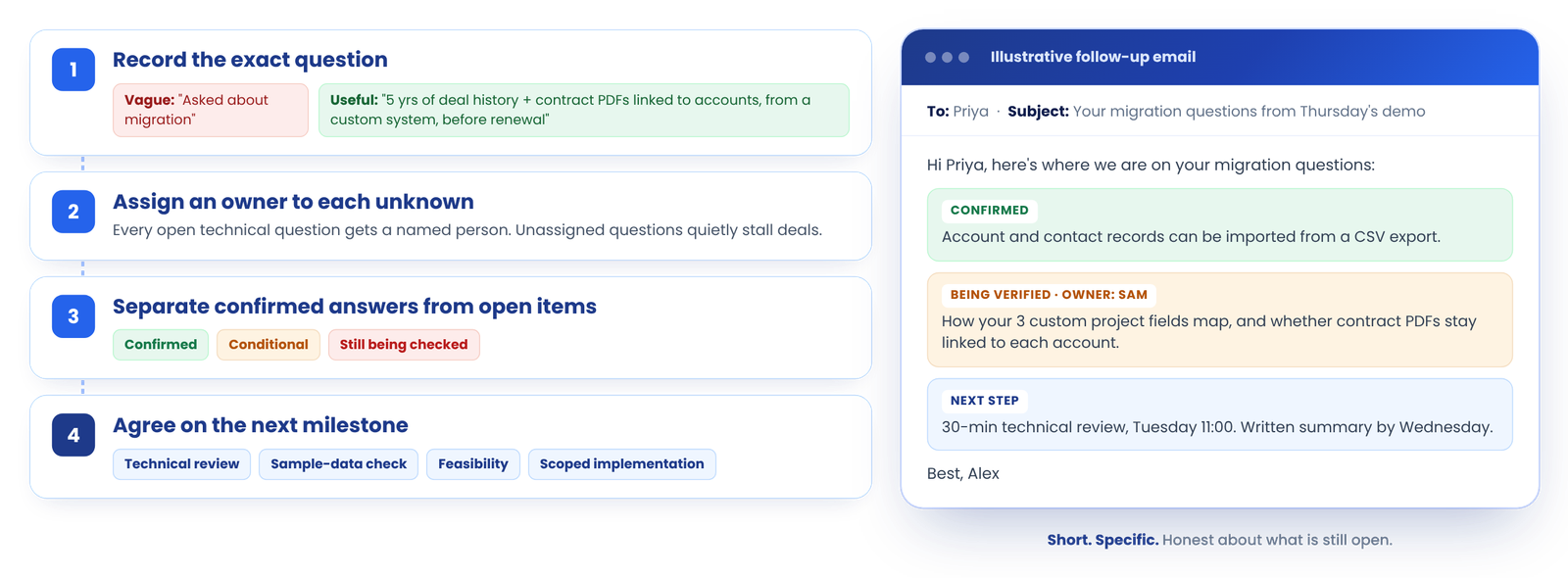
How to follow up on unanswered migration questions after the demo
Record the exact question
“Asked about migration” is not a useful note. “Needs five years of deal history and contract PDFs linked to accounts, moving from a custom-built system, before their renewal date” is.
Assign an owner to each unknown
Every open technical question needs a named person who will verify it. Unassigned questions are the ones that quietly stall deals.
Separate confirmed answers from open items
In your follow-up, list what is confirmed, what is conditional, and what is still being checked. Buyers can share that with their own stakeholders without needing you in the room.
Agree on the next milestone
That might be a technical review, a sample-data assessment, a feasibility confirmation, or a scoped implementation discussion, set with the team that will deliver it. If the deal has several open workstreams, fold migration into a mutual action plan.
Illustrative follow-up email:
Hi Priya,
Thanks again for Thursday’s demo. Here’s where we are on your migration questions:
Confirmed: account and contact records can be imported from a CSV export.
Being verified: how your three custom project fields map, and whether contract PDFs can stay linked to each account. Our implementation lead, Sam, is reviewing the sample export you sent.
Next step: a 30-minute technical review on Tuesday at 11:00. I’ll send a written summary of confirmed and open items by Wednesday.
Best,
Alex
Short, specific, and honest about what is still open.
Common mistakes to avoid when discussing data migration
Most of these are habits, not knowledge gaps. They are worth building into rep onboarding and demo certification, so every rep handles migration questions the same way.
Frequently asked questions
What should a sales rep say when a buyer asks about data migration during a SaaS demo?
Start by clarifying what the buyer means by migration, because it can mean anything from a one-time contact upload to moving years of history, custom fields, attachments, and relationships. Then share only what is documented, name what still needs verification, and agree on a specific next step, such as a review of a sample export with a technical specialist.
What questions should you ask before migrating data to a SaaS platform?
Ask which system holds the data today, whether it can be exported and in what format, which record types and how much history must move, which custom fields and relationships are critical, approximate record volume, security or retention requirements, whether the old system must stay live during the switch, who will do the work, and when the buyer needs to go live.
How do you answer a buyer who asks whether all their data can be migrated?
Do not answer yes or no straight away. Ask what “all” includes: active records only, full history, attachments, notes, custom objects, users and permissions. Confirm which of those categories are documented as supported, flag the ones that depend on the source system or data structure, and offer to verify the rest against a sample export.
Should sales reps promise a migration timeline during a demo?
No. A responsible estimate depends on data volume, number of source systems, data quality, custom transformations, integrations, testing, and who is doing the work. A rep can describe the factors that drive the timeline and commit to getting a scoped estimate from the implementation team after discovery.
Who should handle data migration questions during a sales demo?
The account executive owns the conversation: clarifying scope, capturing requirements, and coordinating the follow-up. A sales engineer or implementation specialist should verify technical details such as field mapping, API or import limits, attachment handling, security, and timelines. The buyer’s own IT or data owner usually needs to confirm what can be exported from the source system.
How can a SaaS team reduce data migration risk?
Define the scope in writing, clean and deduplicate source data before loading, run a small test import first, check record counts and key fields after each load, keep a backup of the source data, pause automations that could fire on imported records, and document any records that cannot be migrated along with an agreed workaround.
What should be included in a data migration handoff from sales to implementation?
The buyer’s exact question, the source system and version if known, required data categories and history, approximate volume, critical fields and relationships, integrations, security or retention requirements, target dates, what was already confirmed in the demo, and what remains open with an owner and date.
Conclusion: clarify, verify, and move the question forward
You do not need to solve every migration question during the demo. You need to understand the requirement, avoid unsupported commitments, and make sure the right person verifies what is still open.
Buyers rarely expect migration to be effortless. What they look for is evidence that you have a process: that you will understand their data, be honest about what is confirmed, and connect them with the people who can validate the rest. Handled that way, a migration question becomes a chance to build trust rather than a reason to stall.
The harder part is making that happen consistently across every rep and every deal, so that migration questions, promised answers, and follow-ups do not get lost between the demo and implementation.
Keep migration questions from falling through the cracks.
LevelUp Demo gives SaaS teams pre-call briefs built from past demos, an objection playbook, auto-generated recap emails, and automated follow-up workflows, so the questions buyers raise in the demo get a real answer afterwards.