I still remember the exact moment I realized our sales process was broken.
It was 2 AM on a Tuesday, and I was scrolling through our CRM—or what we called a CRM, which was really just a messy Google Sheet with 47 tabs. A prospect who’d requested a demo three weeks earlier had just sent a frustrated email asking if we were still in business. We’d completely lost track of them. They’d moved on to a competitor.
That stung. But what really kept me up was the realization that they weren’t alone. We were losing deals not because our product wasn’t good enough, but because our sales process was basically non-existent. We were winging it, and it showed.
If you’re a founder or sales leader at an early-stage company, you’ve probably felt this pain. You’re juggling demo requests, follow-ups, and trying to remember which prospect said what three days ago. You know you need a “real” sales process, but you’re not sure where to start—and you definitely don’t have time to build some complex, enterprise-level system.
Here’s the good news: building a successful sales process doesn’t require a massive team or expensive tools. What it requires is clarity, consistency, and a framework that actually fits how you work. In this guide, I’ll walk you through exactly how to build a sales process that converts—based on what I’ve learned the hard way, and what actually works for small teams.
What Exactly Is a Successful Sales Process?
A sales process is simply the repeatable steps your team takes to turn prospects into customers. Think of it as a roadmap that guides every lead from initial interest to closed deal.
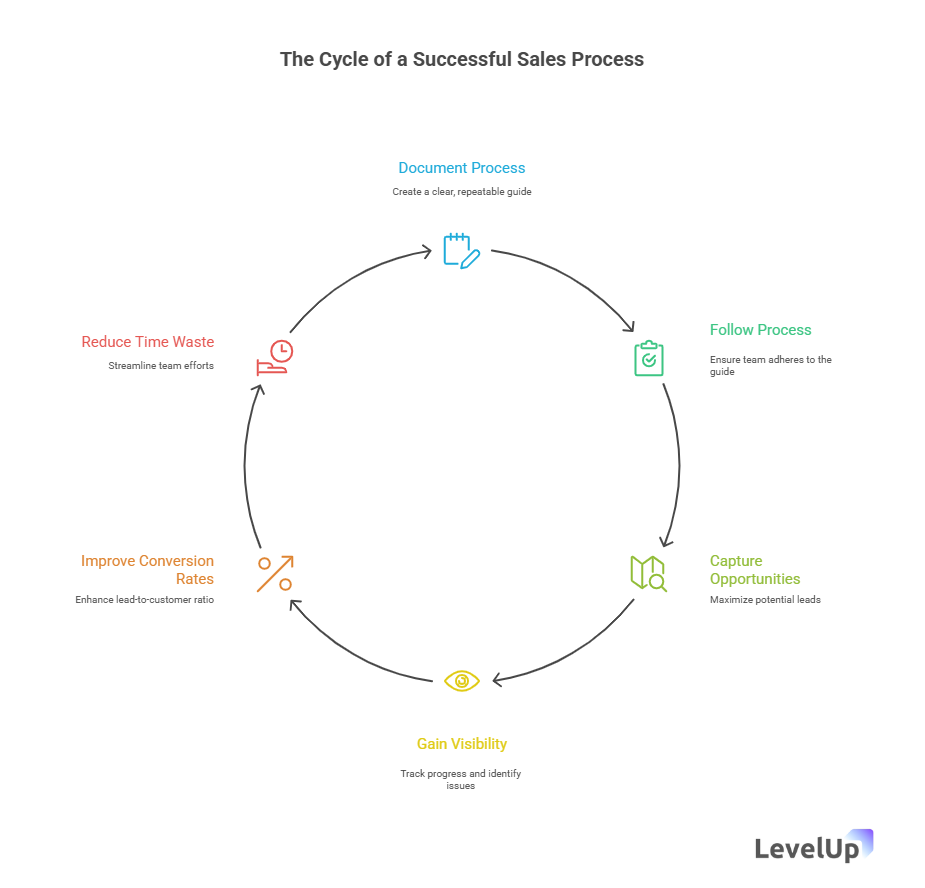
But here’s what makes a sales process successful: it’s not just documented—it’s actually followed. It fits your team’s reality, captures every opportunity, and makes it nearly impossible for leads to slip through the cracks. A successful sales process gives you visibility into what’s working, what’s not, and where deals are getting stuck.
The best part? Once you have this framework in place, your conversion rates improve, your team stops wasting time, and you can finally sleep at night knowing no qualified lead is sitting in limbo.
Why Your Sales Process Matters More Than You Think
Let me share some numbers that changed how I think about this.
According to research from Directive Consulting, companies with a defined sales process see 18% more revenue growth compared to those without one. And personalized demos—which are only possible when you have a structured process for capturing lead information—can increase conversion rates by up to 20%.
But beyond the statistics, here’s why this matters for you specifically:
You’re losing deals you should be winning. Without a clear process, qualified leads fall through the cracks. They request demos and never hear back. They ask questions that go unanswered. They move on to competitors who simply responded faster.
Your team is working harder, not smarter. When everyone handles leads differently, you waste time reinventing the wheel. You duplicate efforts, miss handoffs, and spend mental energy trying to remember what happened with each prospect.
You can’t improve what you can’t measure. Without a defined process, you have no idea where deals are getting stuck. Is it the demo? The follow-up? Pricing conversations? You’re flying blind.
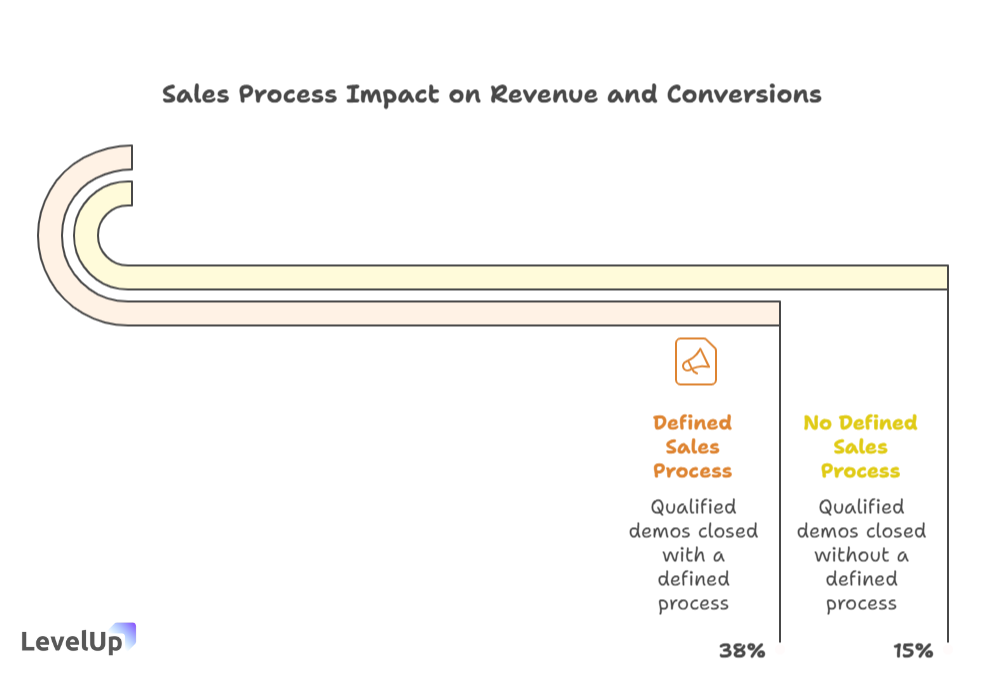
I’ve been there. Before we built our process, we were closing maybe 15% of qualified demos. After implementing the framework I’m about to share, that number jumped to 38% in just three months. Same product, same team—we just stopped losing winnable deals.
How Does a Sales Process Actually Work in Practice?
Here’s what confused me at first: I thought a sales process meant rigid scripts and complicated workflows. It doesn’t.
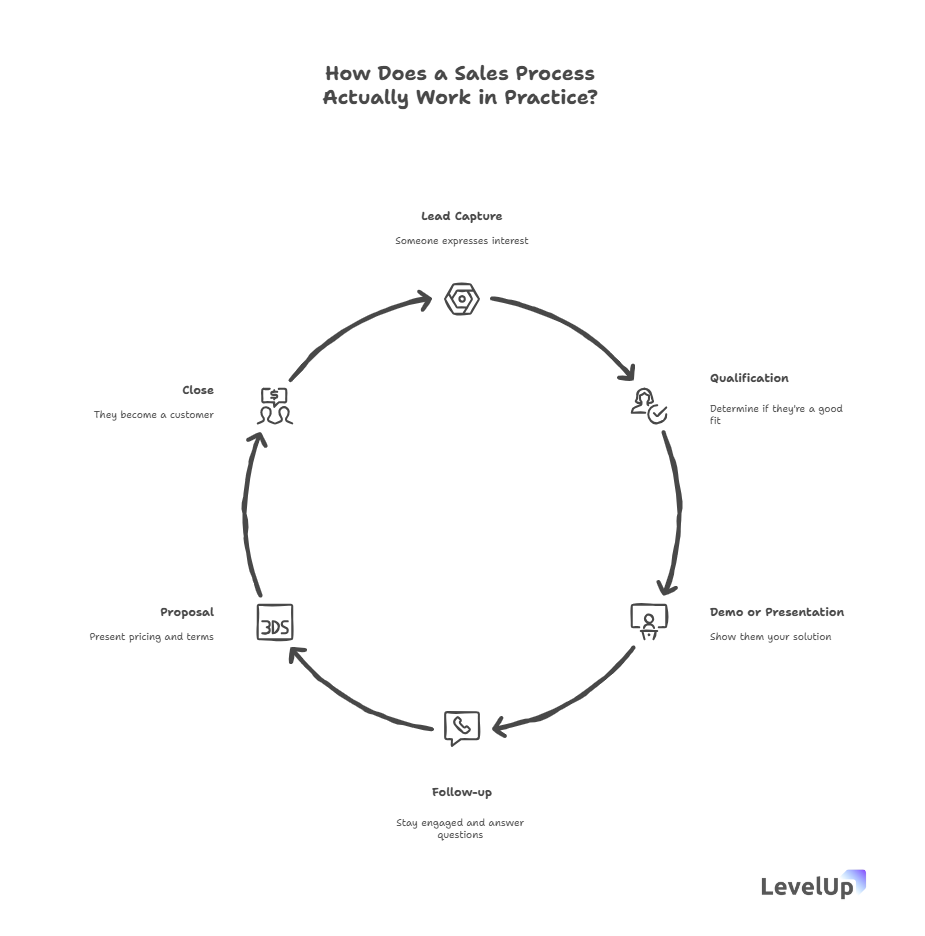
In practice, a good sales process is just a clear sequence of steps that ensures nothing gets missed. For most SaaS and B2B companies, it looks something like this:
- Lead capture – Someone expresses interest
- Qualification – You determine if they’re a good fit
- Demo or presentation – You show them your solution
- Follow-up – You stay engaged and answer questions
- Proposal – You present pricing and terms
- Close – They become a customer
The magic isn’t in the steps themselves—it’s in how you execute each one consistently. Your process should answer: What happens at each stage? Who’s responsible? What information do we capture? When do we move to the next step?
For example, when a lead comes in, do you have a system that automatically logs them, qualifies them based on specific criteria, and assigns a team member? Or are you manually copying information from emails into spreadsheets?
The companies that convert well have systems that make the right actions automatic. The ones that struggle are constantly reacting, trying to remember what they should do next.
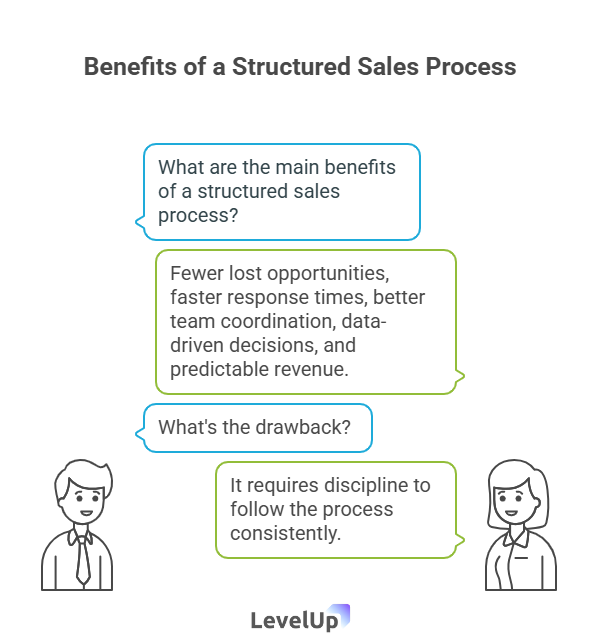
What Are the Main Benefits of a Structured Sales Process?
Let me break down what actually changes when you implement a real sales process:
Fewer lost opportunities. Every lead gets captured, followed up with, and tracked. No more “I thought you were handling that” moments.
Faster response times. When you have a system, you respond to demo requests in hours, not days. Speed matters—studies show that responding within an hour can increase conversion by up to 7x.
Better team coordination. Everyone knows who owns what. Handoffs are smooth. You’re not stepping on each other’s toes or leaving gaps.
Data-driven decisions. You can see exactly where leads drop off and optimize those specific points. Maybe your demo is great but your follow-up timing is off. Now you know.
Predictable revenue. When you know your conversion rates at each stage, you can forecast more accurately and plan growth accordingly.
The drawback? It requires discipline. You have to actually follow the process, even when you’re busy. But honestly, that discipline is what separates growing companies from chaotic ones.
When Should You Build (or Rebuild) Your Sales Process?
You need to focus on your sales process if any of these sound familiar:
- You’re getting demo requests but can’t keep track of them all
- Follow-ups happen randomly, if they happen at all
- Different team members handle prospects completely differently
- You have no idea how many leads you’re actually losing
- Your conversion rate feels lower than it should be
- You’re about to scale and need systems that can grow with you
Here’s the thing: you don’t need to wait until you have a big team or complex needs. Actually, the best time to build your process is before things get chaotic. Start simple when you have 10 leads a month, and it’ll scale naturally to 100.
I made the mistake of waiting too long. We tried to implement a process when we were already drowning in leads, and it was way harder than it needed to be. Learn from my mistake—build the foundation early.
Step-by-Step: Building Your Sales Process From Scratch
Alright, let’s get practical. Here’s exactly how to build a sales process that works, broken down into manageable steps.
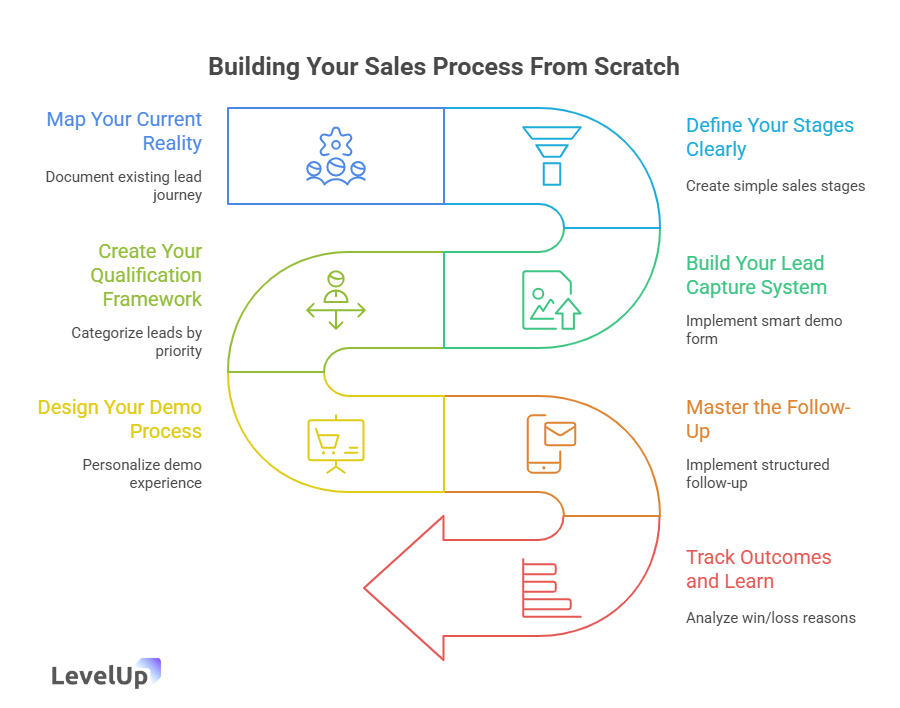
Step 1: Map Your Current Reality
Before you build anything, document what’s actually happening right now—even if it’s messy.
Grab a whiteboard (or a Google Doc) and trace the journey of your last few leads:
- How did they first contact you?
- What happened next?
- Who talked to them?
- What information did you capture?
- How did you decide to move forward (or not)?
- What made them ultimately buy or walk away?
Be honest about the gaps. When I did this exercise, I realized we were losing leads at three specific points: right after they filled out our demo form (we were too slow to respond), after the demo itself (we had no structured follow-up), and when they went quiet for a week (we assumed they weren’t interested and gave up too soon).
Just seeing these patterns made it obvious where to focus.
Step 2: Define Your Stages Clearly
Now create your actual process stages. Keep it simple—five to seven stages is usually plenty for most small teams.
Here’s what worked for us:
- New Lead – Just came in, needs immediate response
- Qualified – We’ve confirmed they’re a good fit
- Demo Scheduled – Meeting is on the calendar
- Demo Completed – They’ve seen the product
- Proposal Sent – Pricing and terms are with them
- Negotiation – Working through final details
- Closed – Won or lost
For each stage, write down:
- What triggers movement into this stage
- What actions must happen here
- Who’s responsible
- What information needs to be captured
- What moves them to the next stage (or disqualifies them)
This clarity eliminates 90% of the confusion and dropped balls.
Step 3: Build Your Lead Capture System
This is where most early-stage companies fall apart. You need a way to capture every lead that comes in—from your website, email, LinkedIn, referrals, everywhere—and get them into your system immediately.
The old way was copying information from emails into spreadsheets. Terrible. It’s manual, it’s slow, and stuff gets missed.
What you actually need:
A smart demo request form on your website. Not just a “Contact Us” form—a purpose-built form that asks the right qualification questions upfront and automatically logs leads into your tracking system.
Automatic lead logging. Every request should instantly appear in a dashboard where your team can see it, claim it, and act on it. No manual data entry.
Lead qualification built in. Your form should capture company size, use case, timeline, and budget range so you know immediately whether someone’s worth prioritizing.
For example, when someone fills out your demo form, your system should:
- Automatically create a lead record
- Tag them based on their answers (enterprise vs. SMB, hot vs. cold, etc.)
- Assign them to a team member based on your rules
- Trigger an immediate response email
This is exactly what tools like LevelUp Demo were built for—replacing messy forms and spreadsheets with a system that actually captures and organizes leads automatically. (More on tooling in a bit.)
Step 4: Create Your Qualification Framework
Not every lead deserves the same attention. I learned this the hard way after spending hours on demos with people who had zero budget or weren’t decision-makers.
Build a simple qualification framework—something like BANT (Budget, Authority, Need, Timeline) works great:
Budget: Can they actually afford your solution?
Authority: Are you talking to someone who can make the decision?
Need: Do they have a problem you can solve?
Timeline: When are they looking to implement?
During your first conversation (or through your demo form), capture this information. Then categorize leads:
- High-priority: All four boxes checked—move fast
- Medium-priority: Three out of four—worth pursuing but be efficient
- Low-priority: Two or fewer—nurture for later or politely disqualify
This framework saves you from wasting time on leads that won’t convert and ensures your best prospects get immediate attention.
Step 5: Design Your Demo Process
Your demo is often your biggest conversion lever, so it deserves its own mini-process.
Here’s what should happen:
Before the demo:
- Send a confirmation email with clear logistics
- Include a pre-demo survey asking about their goals, challenges, and what they want to see
- Review their information so you can personalize the demo
- Prepare relevant examples or case studies
During the demo:
- Start with their specific pain points (from the survey)
- Show, don’t tell—let them see your product solving their problem
- Use real data and examples they can relate to
- Leave time for questions
- End with clear next steps
After the demo:
- Send a follow-up email within 2 hours (yes, 2 hours—strike while it’s hot)
- Recap what you discussed
- Share relevant resources or case studies
- Propose concrete next steps with specific dates
According to Userpilot’s research, personalized demos that address specific customer pain points can dramatically increase conversion. But personalization only works if you’ve captured the right information upfront—which is why your lead capture system matters so much.
Step 6: Master the Follow-Up
Here’s a truth that took me years to accept: most deals are won or lost in the follow-up, not the demo.
The stats back this up. Research shows that 80% of sales require five follow-up calls after the initial meeting, but 44% of salespeople give up after just one follow-up.
Your follow-up process should include:
Immediate follow-up (same day): Thank them, recap the demo, share resources
3-day follow-up: Check in, answer any questions that came up
7-day follow-up: Share a relevant case study or testimonial
14-day follow-up: Propose a trial or next concrete step
21-day follow-up: Final check-in before moving them to “nurture” status
The key is having a system that reminds you when to follow up and tracks what you’ve already sent. You should never have to wonder “Did I already send them that case study?” or “When was the last time I reached out?”
This is another area where having a dedicated tool makes a massive difference. A good system will show you everyone who needs follow-up today, what stage they’re in, and what you last discussed.
Step 7: Track Outcomes and Learn
Every lead should end with a clear outcome: Won, Lost, or Not Now.
But here’s what most people miss: you need to capture why they made that decision.
When you lose a deal, note the reason:
- Went with a competitor (which one?)
- Budget constraints
- Bad timing
- Not the right fit
- Went dark (ghosted)
When you win, note what made the difference:
- Specific feature they loved
- Pricing that worked
- Strong demo
- Great timing
This information is gold. After 20 deals, you’ll start seeing patterns. Maybe you’re losing on price to one specific competitor—that tells you where to adjust. Maybe you’re winning when you emphasize a particular use case—lean into that.
I review our win/loss reasons monthly, and it’s consistently the most valuable hour I spend. It tells me exactly what to change.
What Mistakes Should You Avoid When Building Your Sales Process?
Let me save you from the mistakes I made (and I made plenty):
Overcomplicating it. Your first version doesn’t need 15 stages and 47 custom fields. Start simple. You can add complexity later if you actually need it.
Building it in a vacuum. Involve your team. They’re the ones who’ll use it. If they think it’s too bureaucratic or doesn’t match reality, they won’t follow it.
Forgetting to assign ownership. Every stage needs a clear owner. “Someone should follow up” means no one will.
Skipping the qualification step. I spent months doing demos with unqualified leads because I was afraid of “losing opportunities.” I was just wasting time.
Not using the right tools. Trying to manage a real sales process in spreadsheets and email is like trying to run a restaurant with a camping stove. Sure, technically possible, but why make it so hard?
Setting it and forgetting it. Your process should evolve. Review it quarterly. What’s working? What’s not? Where are deals getting stuck? Adjust accordingly.
Ignoring response time. Speed matters enormously in sales. If your process doesn’t help you respond to leads within a few hours, it’s broken.
Choosing the Right Tools for Your Sales Process
Look, I’m not going to pretend you can run a modern sales process without software. You can’t. The question is which tools you need.
Here’s what you actually require:
Lead capture and tracking: You need something that logs every lead, shows you where they are in the process, and reminds you what to do next.
Scheduling: Your prospects should be able to book time on your calendar instantly, without the email ping-pong.
Communication: Email is fine for most follow-ups, but you need templates and tracking.
Analytics: You should be able to see conversion rates at each stage and identify bottlenecks.
For most small teams, a full CRM like Salesforce or HubSpot is overkill—too complex, too expensive, too much setup. You don’t need all that power when you’re doing 50 demos a month.
What you need is something purpose-built for the demo-driven sales process. This is exactly why we built LevelUp Demo—it handles the entire workflow from lead capture through demo scheduling, qualification, outcome tracking, and follow-up management. It’s basically a lightweight CRM focused specifically on what matters for product demos.
The smart demo form replaces your website’s “Request a Demo” form and automatically logs leads. You can qualify them instantly, assign team members, schedule demos with Google Calendar integration, track outcomes, and get a dedicated follow-ups view so nothing slips through.
The analytics dashboard shows you exactly where leads are converting (or dropping off), so you can optimize the right parts of your process.
But whatever tool you choose, make sure it:
- Reduces manual work (no copying info between systems)
- Gives you visibility into every lead
- Makes follow-up automatic and consistent
- Integrates with your calendar and email
- Actually gets used by your team (if it’s too complicated, it’ll be ignored)
Common Questions About Building a Sales Process
How long does it take to build a sales process?
If you’re starting from scratch, you can map out your initial process in a day or two. Implementing it—getting your tools set up, training your team, building templates—takes about a week. But honestly, your process will keep evolving for the first few months as you learn what works. That’s normal and good.
Do I need a sales process if I’m the only person doing sales?
Yes, even more so. When you’re solo, a process is what keeps you from dropping balls when you get busy. It’s your safety net. Plus, when you eventually hire someone, they can just follow the process you’ve already built instead of figuring it out from scratch.
What if my sales cycle is really long—does this still apply?
Absolutely. Longer sales cycles actually need more structure, not less. You need a system to stay engaged over months without being annoying. The stages might be different (more discovery calls, multiple stakeholder meetings, etc.), but the principles are the same.
How do I get my team to actually follow the process?
Make it easier to follow the process than to not follow it. If your process requires tons of manual data entry, they won’t use it. If it actually makes their job easier—automatically captures leads, reminds them when to follow up, tracks everything for them—they’ll adopt it gladly. Also, review it with them regularly and adjust based on their feedback.
Should I use a CRM or a specialized tool?
Depends on your needs. If you’re doing complex, multi-touch enterprise sales with long cycles and lots of stakeholders, a full CRM might make sense. But if you’re primarily demo-driven (like most SaaS companies), a specialized tool like LevelUp Demo will be simpler, faster to implement, and more focused on what you actually need.
What’s a good conversion rate to aim for?
It varies wildly by industry and price point, but for B2B SaaS, converting 20-30% of qualified demos into customers is a solid benchmark. If you’re below 15%, there’s probably a clear problem to fix (usually in qualification or follow-up). Above 40% is excellent—or might mean you’re not being aggressive enough with pricing.
How often should I update my sales process?
Review it quarterly. Look at your conversion rates at each stage, talk to your team about what’s working and what’s frustrating, and make adjustments. But don’t change things too often—you need enough time to see patterns and know if changes actually helped.
What if a lead doesn’t fit neatly into my stages?
That happens. Your process should be a guide, not a straitjacket. The key is that 80% of leads should flow through your standard process. The other 20% might need custom handling—partnerships, enterprise deals, whatever. That’s fine. Just make sure those exceptions are conscious decisions, not signs that your process is broken.
Can I automate too much of the sales process?
Yes, absolutely. Automation should handle repetitive tasks (logging leads, sending reminders, scheduling), but the human connection is what closes deals. Don’t automate the actual conversations, the personalization, or the relationship building. Automate the scaffolding, not the substance.
What metrics should I track?
Start with these five:
- Lead response time (how fast you reply to new leads)
- Demo-to-close conversion rate (your big money metric)
- Average time in each stage (where deals get stuck)
- Follow-up completion rate (are you actually following up?)
- Win/loss reasons (why deals go each way)
Everything else is nice-to-have. Focus on these and you’ll know exactly where to improve.
Putting It All Together: Your Next Steps
Alright, let’s recap what we’ve covered and get you moving.
A successful sales process isn’t about complexity—it’s about consistency. It’s about making sure every lead gets captured, qualified, followed up with, and tracked. It’s about giving your team a clear roadmap so they’re not constantly improvising.
Here’s your action plan:
This week: Map your current reality. Document exactly what happens (or doesn’t happen) with leads right now. Identify your biggest gaps.
Next week: Define your stages and create your process document. Get input from your team. Decide what tools you need.
Within a month: Implement your lead capture system, build your demo process, and create your follow-up framework. Start tracking outcomes.
Ongoing: Review your metrics monthly. Adjust what’s not working. Keep optimizing.
If you’re serious about improving your demo conversion rate and tired of losing track of leads, take a look at LevelUp Demo. It’s specifically designed to handle everything we’ve talked about—from that first demo request all the way through to closed deal—without the complexity of traditional CRMs. You can request a demo to see how it works, or check out the pricing to see if it fits your budget.
But honestly, the specific tool matters less than the commitment to building a real process. Even if you start with a well-organized spreadsheet and calendar reminders, that’s infinitely better than winging it.
The companies that grow consistently aren’t the ones with the flashiest product or the biggest marketing budget. They’re the ones that capture every opportunity, follow up relentlessly, and never let a qualified lead slip through the cracks.
That’s what a successful sales process gives you. And you can start building it today.
Now go map out those stages. Your future self—and your conversion rate—will thank you.