
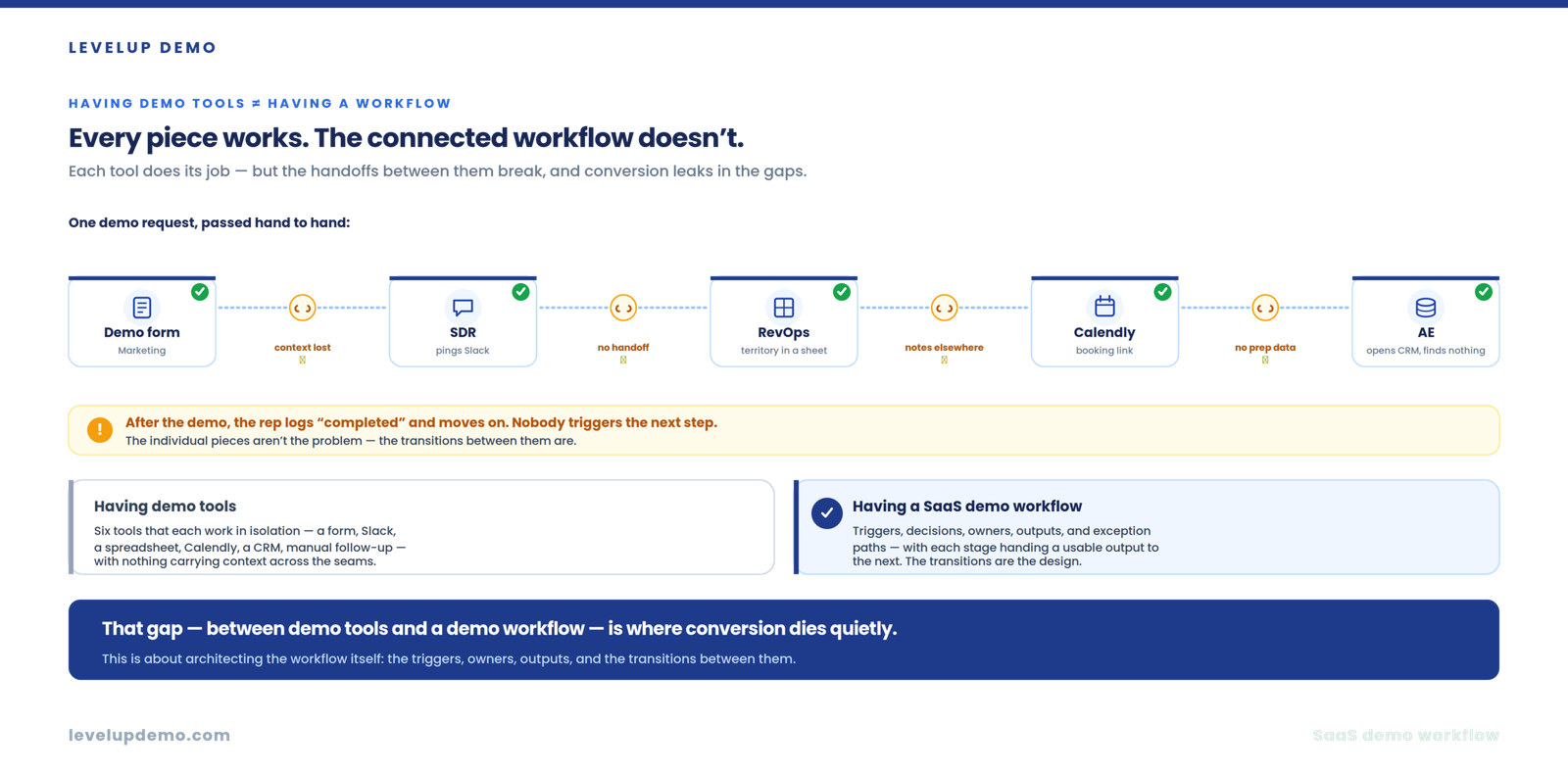
A demo request lands. Marketing owns the form. An SDR eyeballs the lead in one tab, then pings Slack. RevOps checks territory rules in a spreadsheet. Calendly fires a booking link. The AE opens the CRM ten minutes before the call and finds nothing useful, because the qualification notes live in a different thread. After the demo, the rep logs “completed” and moves on. Nobody triggers the next step. Every individual piece works. The connected workflow doesn’t.
That gap, between having demo tools and having a SaaS demo workflow, is where conversion dies quietly.
This article teaches you how to architect the workflow itself: triggers, decisions, owners, outputs, exception paths, and the transitions between them. Not the demo delivery. Not the checklist. Not the AI layer. Those already exist in the LevelUp Demo library and I’ll point you to them where they belong. This piece covers the structural blueprint most SaaS teams skip.
What is a SaaS demo workflow?
A SaaS demo workflow is the connected sequence of triggers, decisions, and actions that moves a prospect from a demo request through qualification, routing, scheduling, preparation, delivery, follow-up, and outcome tracking. Each stage produces a defined output that activates the next stage. A complete demo workflow also defines what happens when the expected path breaks: no-shows, reschedules, disqualification, and lost deals.
The Demo Workflow Framework
LevelUp Demo uses an eight-stage framework for the SaaS demo process:
Qualify→
Route→
Schedule→
Prepare→
Deliver→
Follow-up→
Analyze
The stages themselves aren’t new. LevelUp Demo’s existing content covers the lifecycle in depth. What most teams lack is the internal architecture of each stage. Knowing you need qualification doesn’t tell you what triggers it, who owns the decision, what the output looks like, or what happens when the prospect fails the gate.
That’s why I built the Demo Workflow Blueprint.
The Demo Workflow Blueprint
This is LevelUp Demo’s framework for designing each workflow stage. Every stage gets six components:
Here’s what that looks like applied to capture and qualification.
Capture stage
Trigger: prospect submits a demo form. Decision: is there enough information to qualify? Action: create the lead record, enrich company data. Owner: marketing or an automated workflow. Output: a complete demo request with company size, role, use case. Next trigger: qualification begins.
Qualification stage
Trigger: complete demo request exists. Decision: does the prospect meet ICP criteria? Action: score and classify. Owner: SDR or qualification system. Output: qualified, nurture, or disqualified status with a reason. Next trigger: routing.
When I first set up a Calendly-plus-HubSpot integration for a small team, I mapped booking form answers into CRM contact properties and assumed that would handle context. It didn’t. The meeting activity in HubSpot showed the event, but the custom field data wasn’t attached to the meeting record itself. The AE could see the contact’s properties if they clicked through, but the prep workflow that fired on “meeting booked” didn’t pull those fields into the notification. I spent most of an afternoon rebuilding the workflow to include the form answers in the internal prep email. The architecture looked right on paper. The data didn’t travel between stages.
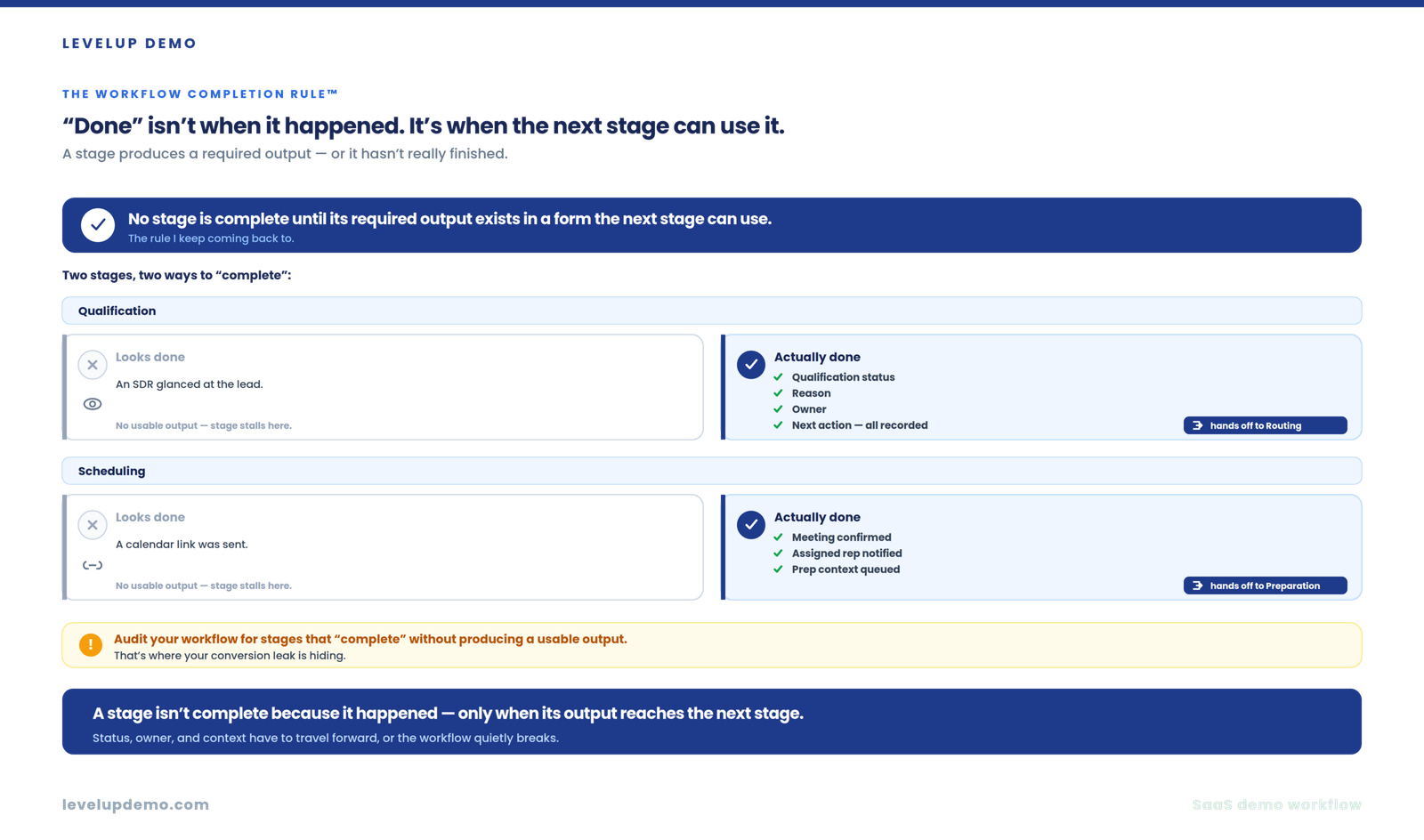
That experience is why the Blueprint exists. A stage isn’t complete because it happened. It’s complete when its required output actually reaches the next stage.
The Workflow Completion Rule
This is a concept I keep coming back to.
No stage is complete until its required output exists in a form the next stage can use.
Qualification isn’t done because an SDR glanced at the lead. It’s done when qualification status, reason, owner, and next action are all recorded. Scheduling isn’t done because a calendar link was sent. It’s done when the meeting is confirmed, the assigned rep is notified, and prep context is queued.
If you audit your demo workflow and find stages that “complete” without producing a usable output, you’ve found your conversion leak.
How to build a SaaS demo workflow step by step
This is the core. I’ll walk through each step as a workflow design decision, not a feature description.
Step 1: define the starting trigger
Most teams assume the trigger is always “demo form submitted.” Sometimes it is. But your workflow might also need to handle outbound-created demos, partner referrals, product-qualified leads, or sales-generated opportunities. Each source may require different qualification criteria or routing logic.
Map every entry point. Then decide: do they all enter the same workflow, or do they branch immediately?
Step 2: define the qualification gate
The workflow needs a decision point with clear inputs and clear outputs. Required information (company size, role, use case, urgency). Qualification criteria. Three possible outcomes: qualified, nurture, or reject.
Don’t rebuild the full qualification methodology here. LevelUp Demo’s guide on how SaaS teams should qualify demo requests covers that in depth. What matters for the workflow is that this gate produces a definitive status, not a vague “looks good.”
Step 3: define routing rules
Routing answers one question: who owns what happens next? Territory, company size, industry, product line, account ownership, rep specialization. Pick the criteria that matter for your team and document them.
The critical design rule: routing should produce a single accountable owner. If two people could plausibly own the next step, your routing is broken.
I’ve seen teams where routing happened before qualification because they wanted to assign the lead to a rep immediately. The problem was that the rep then had to do qualification, scheduling, and prep, and the workflow had no gate to prevent unqualified leads from consuming AE time. Routing after qualification solves that by ensuring only qualified prospects get an owner.
Step 4: define the scheduling sequence
From a workflow architecture perspective, scheduling is a chain:
Rep assigned→
Availability checked→
Booking→
Confirmation→
Reminder
Calendly’s routing forms now support conditional scheduling based on form responses, which means the prospect can land on the right rep’s calendar without manual assignment. But you still need to design what happens when booking doesn’t occur. Does a task fire? Does someone follow up within a defined window?
The scheduling stage should produce a confirmed meeting with a prep trigger attached.
Step 5: define preparation
The workflow should automatically surface the right context before the meeting. Inputs: qualification data, company information, use case, attendees, previous interactions, requested topics. Output: demo-ready context delivered to the rep.
When I configured a prep automation that fired 24 hours before a scheduled demo, the most common failure wasn’t the automation itself. It was that the qualification notes were stored in a property the workflow didn’t reference. The rep got a reminder with the prospect’s name and company but none of the context that would have made the demo relevant. Field mapping between booking, qualification, and prep is where this stage breaks.
For the full before-during-after prep list, the SaaS demo checklist covers it.
Step 6: define the demo outcome
“Demo completed” is not a useful output. A finished meeting should produce a structured outcome: qualified opportunity, follow-up required, nurture, not a fit, lost, or next meeting scheduled. That outcome becomes the trigger for the next workflow stage.
If your reps log “completed” and nothing else, your workflow has a dead end where a transition should be.
Step 7: define follow-up logic
Follow-up isn’t “send an email.” It’s a workflow stage with its own structure.
Next action→
Owner→
Deadline→
Execution
Community advice on SaaS follow-up timing is consistent: same day or within 24 hours. Delaying to “optimize open rates” borrows logic from newsletter marketing that doesn’t apply to a sales conversation where the prospect’s memory of the demo is decaying by the hour. Using a transcript to draft the recap and editing for specificity cuts the writing time enough that same-day follow-up becomes realistic for small teams.
For demo delivery mechanics, see the guide on how to give a product demo that actually converts.
Step 8: define exception paths
This is where most demo workflows fall apart, because most teams only design the happy path.
| Exception | What should happen |
|---|---|
| No-show | Automated reschedule sequence fires. CRM status updates. Task assigned. |
| Reschedule | CRM meeting record updates automatically. Prep trigger resets. |
| No response after qualification | Nurture sequence activates after defined wait period. |
| Wrong routing | Re-route mechanism with ownership transfer and context handoff. |
| Incomplete qualification | Return to qualification with a task to collect missing information. |
| Demo canceled | Log reason. Trigger save sequence or close. |
| Prospect requests self-serve | Redirect to product trial or interactive demo. Log source. |
| Deal lost | Capture reason. Trigger loss review. Enter re-engagement track. |
| Prospect returns later | Reactivate record. Skip redundant qualification if data is recent. |
A workflow that handles only the straight line from request to close isn’t a workflow. It’s a wish.
The Demo Workflow Decision Map
This LevelUp Demo framework maps every branching point in the workflow:
Every fork needs a defined path. If you can’t answer “what happens when the prospect goes left instead of right,” the workflow has a gap.
The Demo Workflow Friction Map
Instead of listing generic bottlenecks, this framework asks one question at every transition: what information, ownership, or automation could fail here?
Walk through each stage boundary. Request to qualification: does the qualification stage receive enough data? Qualification to routing: does the routing rule have access to the qualification output? Routing to scheduling: does the assigned rep know they own this lead? Scheduling to preparation: does the prep automation pull the right context?
Each transition is a potential failure point. The friction isn’t inside the stages. It’s between them.
The Demo Workflow Health Score
Score your workflow architecture across eight dimensions:
| Dimension | Question |
|---|---|
| Trigger clarity | Does every stage have a defined trigger? |
| Ownership | Does someone clearly own each stage? |
| Decision rules | Are qualification and routing rules documented? |
| Automation | Are repetitive transitions automated? |
| Exception handling | Does the workflow handle failures? |
| Data continuity | Does context move between stages? |
| Output clarity | Does every stage produce a usable output? |
| Measurement | Can you see where prospects drop? |
If you score below six out of eight, your demo workflow has structural gaps that no amount of tooling will fix.
What to automate, what to assist, what to keep human
| Automate | Assist | Keep human |
|---|---|---|
| Lead creation | Qualification recommendations | Complex qualification |
| Data enrichment | Account research | Discovery conversations |
| Routing | Prep briefs | Live demo delivery |
| Calendar availability | Recap drafts | Negotiation |
| Reminders and notifications | Objection classification | Strategic deal decisions |
| Task creation | Pattern detection | |
| Status updates | ||
| Follow-up triggers |
For the full AI automation model, see LevelUp Demo’s article on how AI can automate the SaaS demo workflow.
Build or buy?
Build internally when you have strong RevOps resources, complex custom routing, unusual qualification logic, or deep existing infrastructure. Buy a dedicated demo workflow platform when the workflow is fragmented across five tools, manual work dominates transitions, demo volume is growing, or your CRM handles records well but not operational workflow.
If your current demo process requires a form builder, a spreadsheet for routing, a scheduling tool, CRM, Slack for handoffs, and manual follow-up tracking, the individual tools might each work fine. The transitions between them are the problem. That’s the operational layer LevelUp Demo is built to replace: demo request capture, qualification, scheduling, preparation, outcome tracking, follow-up, and analytics in one connected workflow.
Where this approach fails
If your team runs fewer than five demos a month, architecting a full workflow with branching logic and exception handling is over-engineering. Use a simple booking page, a shared doc for notes, and manual follow-up. Invest in workflow architecture when demo volume reaches a point where manual coordination creates delays, lost context, or dropped leads. Below that threshold, the overhead of maintaining the workflow exceeds the cost of doing it by hand.
Connect every stage of your demo workflow
LevelUp Demo replaces the fragmented stack — capture, qualification, scheduling, preparation, outcome tracking, follow-up, and analytics — with one connected workflow, so the transitions between stages stop leaking conversions.
FAQ
What is a SaaS demo workflow?
A SaaS demo workflow is the connected system of triggers, decisions, actions, and ownership that moves a prospect from demo request through qualification, scheduling, preparation, delivery, follow-up, and outcome tracking. It defines both the expected path and what happens when the path breaks.
How do you handle demo no-shows?
Automate a reschedule sequence that fires when the meeting status changes to no-show. Update the CRM record, assign a follow-up task to the rep, and set a defined window for re-engagement before moving the prospect to a nurture track.
What should be automated in a demo workflow?
Lead creation, data enrichment, routing, calendar availability, reminders, task creation, status updates, and follow-up triggers. Keep qualification judgment, live demos, and deal decisions human-owned.
Should SaaS teams build or buy demo workflow software?
Build when you have RevOps capacity and complex custom requirements. Buy when the workflow spans too many disconnected tools and manual transitions are creating delays or lost leads. Most teams under-invest in the transitions between tools, which is where a purpose-built platform adds the most value.
How do you route demo requests?
Define routing rules based on territory, company size, industry, product line, or rep specialization. Apply them after qualification so the routing logic has access to qualification data. The output should be a single accountable owner, not a shared queue.
How do you measure a demo workflow?
Use the Demo Workflow Health Score™ to assess architecture: trigger clarity, ownership, decision rules, automation, exception handling, data continuity, output clarity, and drop-off visibility. For funnel metrics, the SaaS demo funnel most teams don’t track covers what to measure.
What stages should a SaaS demo workflow include?
Capture, qualify, route, schedule, prepare, deliver, follow-up, and analyze. Each stage needs a trigger, decision, action, owner, output, and next trigger to function as part of a connected workflow.
The next problem you’ll hit after building the workflow is measuring whether it actually converts better than what you had before. Start by tracking drop-off between stages. If you can see where prospects stall, you can fix transitions one at a time instead of rebuilding everything at once.
Stop losing conversions in the transitions
LevelUp Demo connects capture, qualification, routing, scheduling, preparation, outcome tracking, follow-up, and analytics in one workflow — so no stage completes without handing off a usable output to the next.