Fifty-three demo requests came in last month. Your CRM logged every single one as a new contact. Names, emails, company sizes, all captured. And yet, when your VP of Sales asked a simple question on Monday’s pipeline call, “Which demos actually happened, and which ones converted?” the room went quiet. Someone opened a spreadsheet. Someone else checked Calendly. A third person scrolled through Slack threads looking for notes from an AE who was on PTO.
Your CRM knew everything about those prospects. It knew almost nothing about those demos.
That’s the real question behind Demo Workflow vs CRM: can your CRM actually manage the entire operational workflow around a product demo, or is it primarily built to manage the customer and deal record?
The distinction matters. A demo has its own workflow, from capturing and qualifying the request to routing, scheduling, preparation, follow-up, and analyzing the outcome. Your CRM may support parts of that process, but managing the entire workflow is a different operational problem.
That gap is the entire argument of this article
TL;DR
A CRM manages customer records and deal progression. A demo workflow manages the operational lifecycle of every product demo, from request capture through follow-up and revenue analysis. They are complementary systems, not competing ones. Most SaaS teams don’t need to replace their CRM. They need to stop forcing it to run a process it was never architected to own.
What Is a Demo Workflow?
A demo workflow is the complete sequence of operational steps required to move a demo request from initial capture to closed-loop revenue insight. It includes qualification, routing, scheduling, preparation, delivery, outcome tracking, follow-up, and analysis.
Think of it as the operating choreography around a single live demo. Not the deal record. Not the contact card. The actual work that determines whether a prospect gets the right demo, at the right time, from the right rep, with the right follow-up.
What Does a CRM Actually Manage?
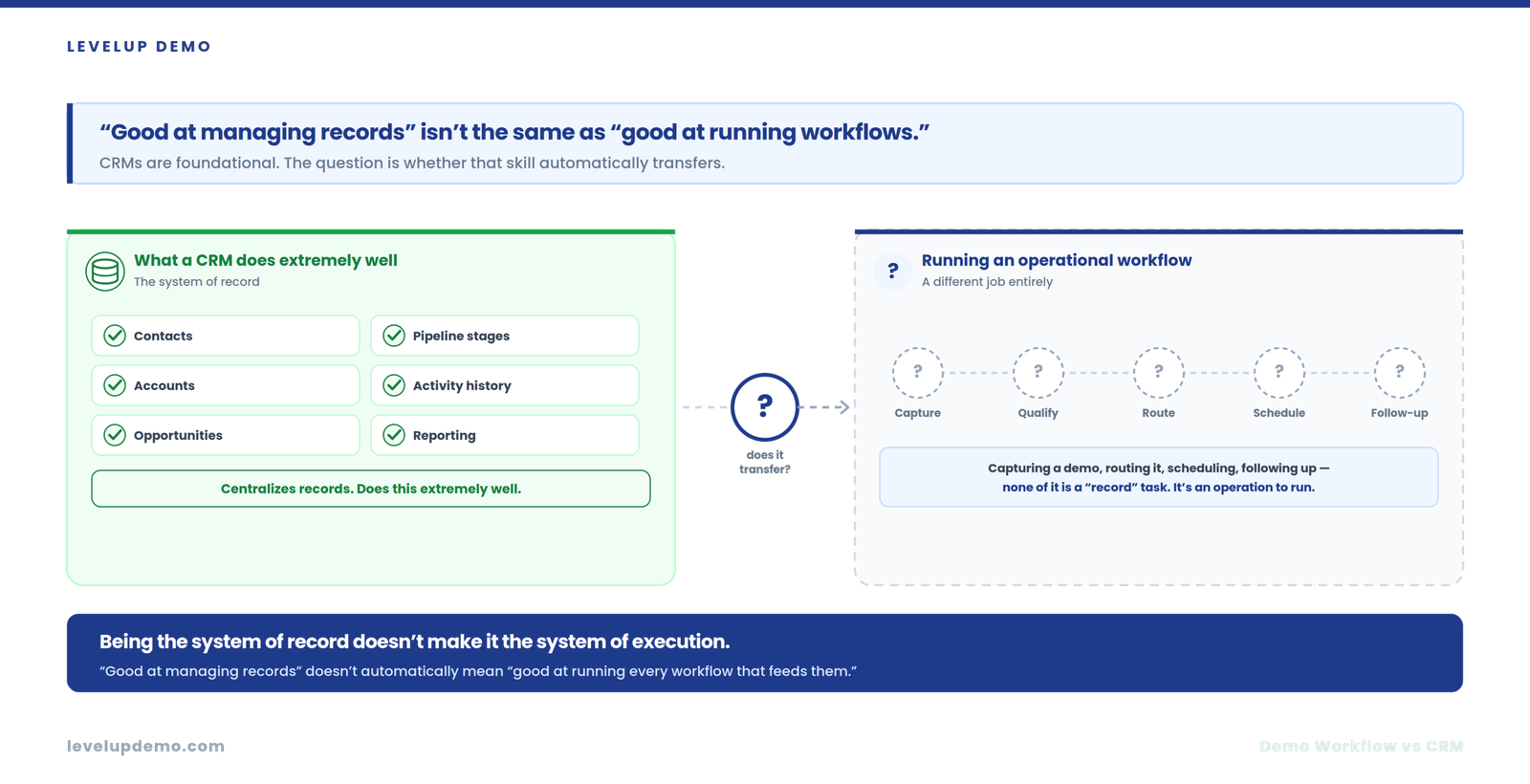
CRMs are built to be the system of record. They manage contacts, accounts, opportunities, pipeline stages, activity history, and reporting across the full customer lifecycle.
Modern CRMs like HubSpot, Salesforce, Pipedrive, and Zoho do this extremely well. They centralize relationship data, track deal progression, and give leadership visibility into pipeline health. Many also offer workflow automation, task assignment, and integrations with scheduling or communication tools.
None of that is a criticism. CRMs are foundational. The question isn’t whether your CRM is good. The question is whether “good at managing records” automatically means “good at running every operational workflow that feeds those records.”
What Is Demo Workflow Management?
Demo Workflow Management is the practice of orchestrating every operational step in the demo lifecycle through a purpose-built system. It covers demo request capture, AI-driven qualification and enrichment, intelligent routing, scheduling with calendar sync, reminders, structured outcome tracking, AI engagement scoring, follow-up automation, and conversion analytics.
This is not the same category as interactive demo creation tools (Consensus, Navattic, Storylane, Arcade, and similar platforms focus on building self-serve product tours and interactive demos). Demo Workflow Management addresses the operational lifecycle of live demos, not the creation of recorded or interactive demo assets.
CRM vs Demo Workflow Management: The Real Difference
The clearest way to frame this: CRM is a system of record. Demo Workflow Management is a system of execution.
CRM — System of Record
Your CRM tells you who the prospect is and where the deal stands. One tracks the relationship.
Demo Workflow — System of Execution
Your demo workflow tells you what needs to happen next to make this specific demo successful, and then captures whether it actually was. The other runs the operation.
What Your CRM Can Handle Well
Let’s be fair. A well-configured CRM can support parts of the demo process:
For teams running fewer than 15 demos a month with a single rep and a simple product, a CRM alone may be perfectly sufficient. There is no reason to add complexity where complexity isn’t warranted.
Where Demo Workflows Start Breaking Down Inside a CRM
The friction appears when demo volume, routing complexity, or qualification requirements increase. Here is where the cracks show:
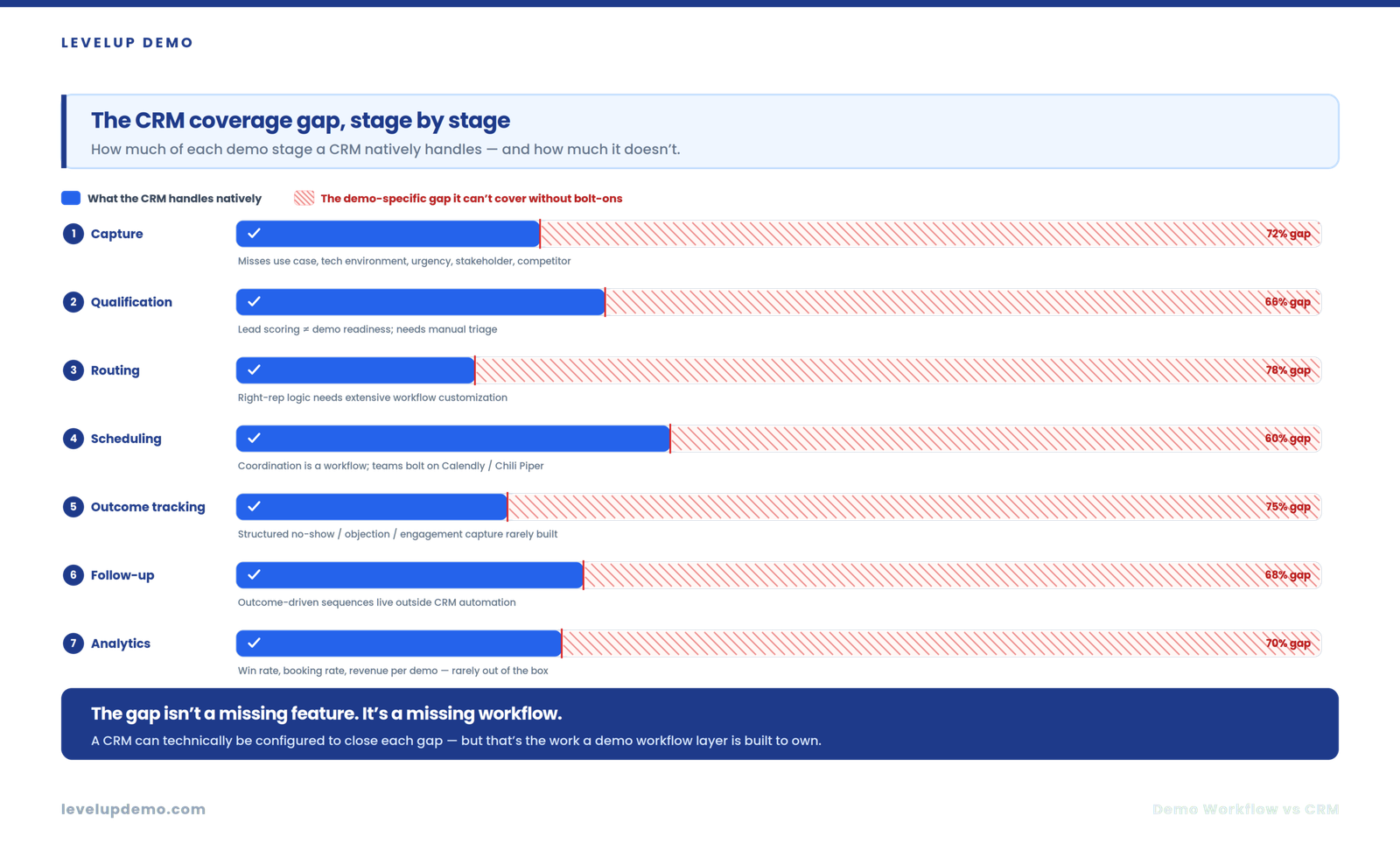
Capture. CRM forms collect contact data. They rarely capture demo-specific context: use case, technical environment, urgency, stakeholder role, or competitive situation.
Qualification. CRMs can score leads. But demo-specific qualification (Is this person ready for a live demo? Do they need a technical deep-dive or a business overview?) typically requires manual triage or bolt-on tools.
Routing. Assigning the right rep based on product expertise, territory, availability, and demo type requires logic most CRMs support only through extensive workflow customization.
Scheduling. Calendar coordination between prospect and rep is a workflow problem, not a record problem. Most teams bolt on Calendly or Chili Piper alongside their CRM.
Outcome tracking. After the demo, what happened? CRMs offer free-text notes or custom fields, but structured outcome capture (demo completed, no-show, rescheduled, objections raised, engagement level) requires deliberate configuration that most teams never build.
Follow-up. Outcome-driven follow-up (sending different sequences based on demo results, not just deal stage) lives outside most CRM automation.
Analytics. Demo-specific metrics like demo win rate, demo booking rate, or revenue per demo require custom reporting that CRMs can technically produce but rarely do out of the box.
Demo Workflow vs CRM Responsibility Matrix
| Activity | CRM | Demo Workflow | Why It Matters |
|---|---|---|---|
| Contact/account record | Primary owner | Supporting | CRM owns relationship data |
| Deal/pipeline tracking | Primary owner | Supporting | CRM tracks commercial opportunity |
| Demo request capture | Can support | Primary owner | Demo-specific intake needs context beyond contact fields |
| AI qualification/enrichment | Possible with add-ons | Primary owner | Demo readiness differs from lead scoring |
| Demo routing | Workflow-dependent | Primary owner | Matching request to rep requires demo-specific logic |
| Scheduling + calendar sync | Possible with integrations | Primary owner | Demo scheduling is a workflow event, not a record update |
| Reminders | Possible | Primary owner | Reducing no-shows requires demo-specific cadence |
| Demo outcome capture | Custom fields possible | Primary owner | Structured results need purpose-built data models |
| AI demo analysis | Limited/varies | Primary owner | Demo-specific engagement intelligence |
| Outcome-driven follow-up | Possible with automation | Primary owner | Follow-up should reflect what happened in the demo |
| Revenue attribution | Primary owner | Supporting | CRM remains the commercial system of record |
The distinction is ownership and workflow depth, not whether the CRM technically has a feature.
Why SaaS Demo Workflows Differ From Ordinary Sales Activities
A demo is not a phone call logged to a contact record. Demos involve timing sensitivity (a 48-hour response window matters), multiple stakeholders on both sides, specialized qualification (technical fit, not just budget authority), rep assignment based on product expertise, structured preparation, real-time delivery, and outcome capture that feeds demo analytics and optimization.
No other sales activity combines all of these operational dimensions in a single event.
The Demo Workflow Layer Model
This LevelUp proprietary model illustrates how the systems relate:
The CRM doesn’t disappear. The workflow becomes more specialized around it, feeding richer data back into the record.
CRM Alone vs CRM + Point Tools vs Demo Workflow Platform
| Dimension | CRM Alone | CRM + Point Tools | Demo Workflow Platform |
|---|---|---|---|
| Demo capture | Basic form | Form + enrichment tool | Purpose-built intake |
| Qualification | Manual or lead score | Manual + enrichment | AI qualification |
| Scheduling | External link | Calendly/Chili Piper | Integrated scheduling |
| Outcome tracking | Free-text notes | Spreadsheet or custom fields | Structured + AI-scored |
| Follow-up | Generic sequences | Triggered but disconnected | Outcome-driven automation |
| Analytics | Custom reports | Fragmented across tools | Unified demo intelligence |
| Data entry | Manual | Duplicate across tools | Single workflow, synced to CRM |
| Tool count | 1 | 4 to 7 | 1 + CRM |
The Hidden Cost of a CRM-Centered Demo Process
Reddit threads and RevOps communities surface the same frustrations repeatedly: reps toggling between six tabs to prepare for a single demo, demo notes living in Google Docs instead of the CRM, follow-up emails sent three days late because nobody logged the outcome, and pipeline reviews where “demo completed” is a checkbox with zero context behind it.
The cost isn’t a line item on your SaaS budget. It is context loss at every handoff, demo follow-up that arrives too late, and reporting that tells you how many demos happened but not why they converted or didn’t.
When Your CRM Is Enough
Your CRM can reasonably own the demo process when:
If this describes your team, adding another platform would create more overhead than it solves.
When You Need a Dedicated Demo Workflow Layer
Consider a dedicated layer when:
Demo Workflow Maturity Model
This LevelUp proprietary model maps where teams typically fall:
| Level | Description | Typical Stack |
|---|---|---|
| 1: Manual | Forms, email, spreadsheets | Google Forms + inbox + sheets |
| 2: CRM-Centered | CRM handles most tracking | CRM + manual logging |
| 3: Connected | CRM plus scheduling and basic automation | CRM + Calendly + sequences |
| 4: Intelligent | AI qualification, analysis, automated follow-up | Demo workflow platform + CRM |
| 5: Revenue-Optimized | Closed-loop workflow, intelligence, and optimization | Demo workflow + CRM + demo operations KPIs |
Most SaaS teams operating between Level 2 and Level 3 experience the pain described in this article. They have outgrown manual processes but haven’t yet built the dedicated workflow layer.
How LevelUp Fits Alongside Your CRM
LevelUp Demo runs the demo workflow while the CRM remains the system of record. According to LevelUp’s current product positioning, the platform handles demo request capture, AI qualification and enrichment, scheduling with calendar synchronization, reminders, demo outcome tracking, AI engagement scoring, conversion and attendance analytics, AI summaries, follow-up automation, and proposal templates. Demo details and outcomes sync back into connected CRMs including HubSpot, Zoho, and Pipedrive.
LevelUp can also operate without a CRM for teams that aren’t ready for one, serving as the initial operational layer until a CRM becomes necessary.
The architecture is deliberate: LevelUp does not attempt to replace your CRM. It handles the demo workflow management layer that your CRM was never designed to own.
How Demo Workflow Management Changes the Operating Model
Before
Request lands in inbox → Rep manually qualifies → Calendar links exchanged → Demo happens → Notes typed into CRM (maybe) → Follow-up sent (eventually) → No demo-specific reporting.
After
Request captured with context → AI qualifies and enriches → Routed to right rep → Scheduled with sync and reminders → Demo delivered → Outcome structured and scored → Follow-up triggered by result → Analytics feed demo-to-close insights → CRM updated automatically.
The CRM still holds the deal. The workflow actually runs the demo.
Give your demo process its own operational home
Keep your CRM as the system of record and let LevelUp run the demo workflow — capture, AI qualification, routing, scheduling, outcome tracking, and analytics — syncing back to HubSpot, Zoho, and Pipedrive.
Frequently Asked Questions
Can a CRM manage demo requests?
Yes. Most CRMs can capture, route, and track demo requests using native features, workflows, or integrations. The real question is whether your CRM should own the entire demo-specific operational workflow, or whether that workflow benefits from a dedicated layer as complexity increases.
Is Demo Workflow Management the same as CRM?
No. CRM is the system of record for customer relationships and deals. Demo Workflow Management is a system of execution for the operational steps surrounding live product demos.
Can LevelUp replace a CRM?
LevelUp is not designed to replace a CRM. It runs the demo workflow and syncs outcomes back into the CRM. For teams without a CRM, LevelUp can operate independently as the initial operational layer.
When should SaaS teams add demo workflow software?
When demo volume, routing complexity, or analytics requirements exceed what a CRM and manual processes can reliably handle. Common triggers include rising no-show rates, inconsistent follow-up, and leadership asking demo performance questions nobody can answer.
What is the difference between demo workflow and demo automation?
Demo automation often refers to creating interactive or self-serve product demos. Demo workflow management covers the full operational lifecycle of live demos, from request to revenue insight.
Does demo workflow software replace sales engagement tools?
No. Sales engagement platforms manage multi-channel outreach sequences. Demo workflow software manages the specific operational process around scheduling, delivering, and analyzing product demos.
The Bottom Line
Your CRM is not the problem. Expecting it to run every operational detail of your demo process is.
The most productive framing is not “CRM vs. demo workflow.” It is “CRM plus demo workflow,” each system doing what it was built to do. The CRM holds the record. The demo workflow runs the operation. Data flows between them.
If your team is small and your demo process is simple, your CRM is likely enough. If you are stitching together forms, schedulers, spreadsheets, notetakers, and email sequences to make demos work, the gap between your system of record and your system of execution is already costing you.
The fix isn’t abandoning your CRM. It is giving your demo process its own operational home.
Pricing and feature availability referenced as of July 2026. Verify current details on vendor websites.
CRM plus demo workflow, each doing its job
LevelUp runs the demo lifecycle end to end and syncs outcomes back to your CRM. Start free, or see it on a live walkthrough.