I’ll never forget the Tuesday morning I lost a $15,000 deal because I forgot to follow up with a demo lead.
The prospect had attended our product demo, seemed genuinely interested, asked all the right questions, and said they’d “circle back with their team.” I scribbled a reminder on a Post-it note—yes, an actual Post-it—stuck it to my monitor, and promptly buried it under three other notes by lunchtime. Two weeks later, I saw their company announcement on LinkedIn: they’d signed with our competitor. My stomach dropped. That wasn’t just a lost sale; it was a completely preventable failure that happened because I was trying to manage everything in my head, across scattered spreadsheets, and with sticky notes that literally fell off my desk.
If you’re a SaaS founder juggling product development, marketing, and sales all at once—or you’re leading a scrappy sales team where everyone’s wearing multiple hats—you’ve probably had your own version of this nightmare. Maybe it’s the lead who requested a demo three days ago and still hasn’t heard back. Or the promising prospect who fell through the cracks because nobody knew whose turn it was to follow up. These aren’t just minor inconveniences; they’re revenue killers that add up fast.
Here’s what I learned the hard way: you can’t scale a sales process that lives in your head or across a dozen disconnected tools. And that’s exactly why a Sales CRM isn’t just “nice to have”—it’s the single best business decision you’ll make for sustainable growth. In this guide, I’ll walk you through why CRM matters so much for small teams and early-stage founders, how to choose and implement one without the overwhelm, and the specific ways it transforms chaotic sales workflows into predictable revenue engines.
So, What Exactly Is a Sales CRM and Why Does It Matter?
A Sales CRM (Customer Relationship Management system) is software that centralizes all your customer data, tracks every interaction, automates repetitive tasks, and gives you a clear view of your entire sales pipeline—all in one place. Think of it as your sales team’s shared brain: it remembers everything, organizes it logically, and reminds you what needs to happen next so nothing falls through the cracks.
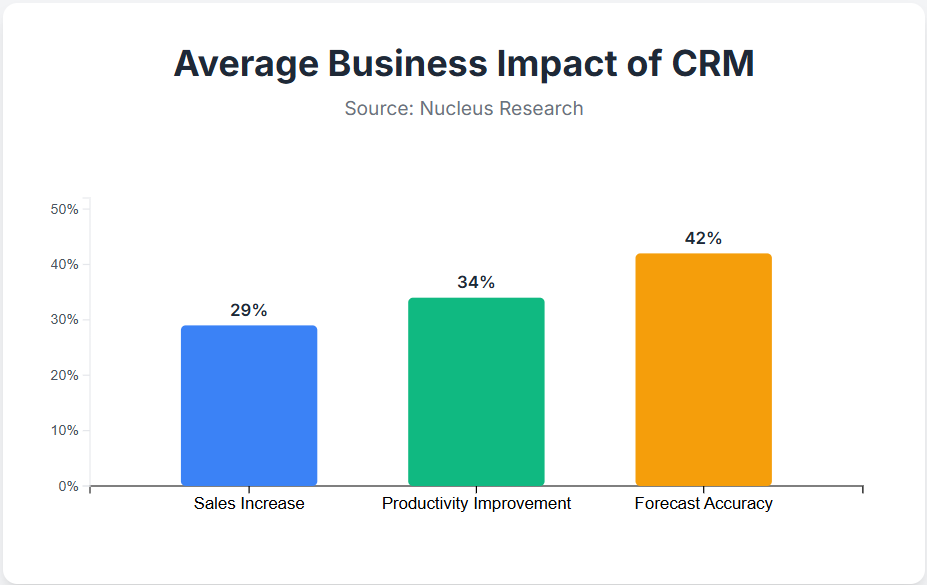
For SaaS founders and small sales teams, a CRM breaks down the chaos of managing leads, demos, and follow-ups across email inboxes, spreadsheets, and sticky notes. Instead of wondering “Did anyone follow up with that lead?” you have instant visibility into every demo request, every conversation, and every next step. According to Nucleus Research, companies using CRM see an average 29% increase in sales, 34% improvement in productivity, and 42% better forecast accuracy. That’s not hype—that’s what happens when you stop losing deals to disorganization.
How Does a Sales CRM Actually Work in Practice?
Let me paint you a picture of what this looks like day-to-day.
Someone fills out your “Request a Demo” form on your website at 11 PM on a Friday night. Instead of that lead sitting in your inbox until Monday morning (or worse, getting buried under weekend emails), your CRM automatically logs the lead, assigns it to the right team member based on territory or availability, and sends an automated confirmation email with scheduling options. By Saturday morning, the lead has booked a demo slot for Tuesday—without anyone on your team lifting a finger.
Now fast-forward to Tuesday. Your CRM sends a reminder to both your sales rep and the prospect an hour before the demo. After the call, your rep logs the outcome directly in the system: “Interested, needs pricing proposal by Friday.” The CRM automatically creates a follow-up task with a deadline and sends a reminder Thursday morning. On Friday, your rep sends the proposal, marks the task complete, and schedules another check-in for the following week.
Here’s the magic: everyone on your team can see this entire journey. Your co-founder can check pipeline status without interrupting anyone. Your customer success lead can prepare onboarding materials in advance. And you—the founder—can finally sleep without worrying that leads are slipping away.
The Core Workflow Components
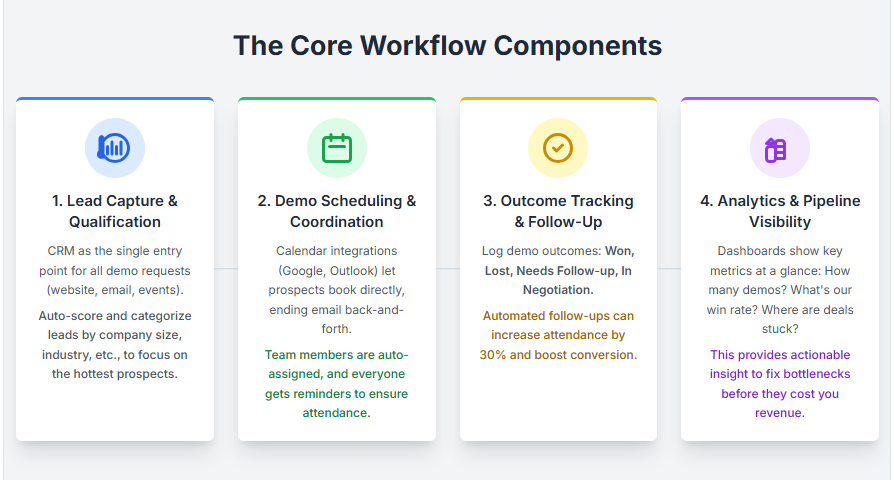
Lead capture and qualification
Your CRM becomes the single entry point for all demo requests, whether they come from your website form, email inquiries, or event sign-ups. Modern CRMs like HubSpot or lightweight tools like LevelUp Demo can automatically score and categorize leads based on criteria you define—company size, industry, budget signals—so you focus your energy on the hottest prospects first.
Demo scheduling and coordination
Integration with calendar tools (Google Calendar, Outlook) means prospects can book demos directly without the back-and-forth email tennis. Team members get assigned automatically based on round-robin logic or expertise, and everyone gets reminders to actually show up.
Outcome tracking and follow-up management
After each demo, you log what happened: Won, Lost, Needs Follow-up, or In Negotiation. The CRM surfaces follow-up tasks in a dedicated view so nothing gets forgotten. Research from BigContacts shows that automated follow-ups increase demo attendance rates by up to 30% and significantly improve conversion.
Analytics and pipeline visibility
Your dashboard shows you at a glance: How many demos this week? What’s our win rate? Where are deals getting stuck? This isn’t vanity metrics—it’s actionable insight that helps you fix bottlenecks before they cost you revenue.
What Are the Main Benefits of Using a Sales CRM?
Let’s get practical. Here’s what actually changes when you implement a CRM—not the marketing fluff, but the real-world outcomes I’ve seen and experienced.
&nbs
You Stop Losing Leads to Human Error
Before CRM, my team lost deals because someone forgot to follow up, double-booked demos, or couldn’t find the notes from a previous conversation. With CRM, every lead gets logged, every follow-up gets scheduled, and every conversation is documented. It’s like having a safety net that catches the things your brain will inevitably drop when you’re juggling ten priorities at once.
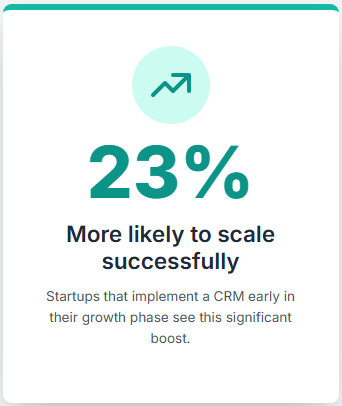
A Litslink study found that startups implementing CRM early are 23% more likely to scale successfully beyond initial growth phases. That’s because they build reliable processes from day one instead of scrambling to fix broken workflows later.
You Save Hours Every Week on Administrative Busywork
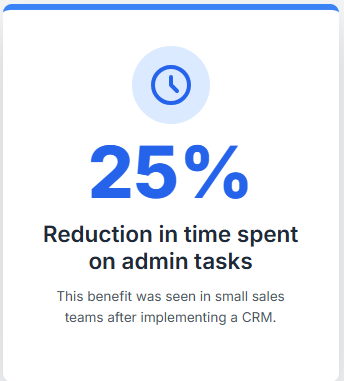
I used to spend at least five hours a week updating spreadsheets, sending follow-up emails, and hunting for information scattered across email threads and Slack messages. Now? My CRM automates demo confirmations, follow-up reminders, and data entry. According to one report small sales teams using CRM reduce time spent on administrative tasks by 25%—that’s more than a full workday every week that you can reinvest in actually selling.
You Get Clear Pipeline Visibility and Forecasting
When I was flying blind with spreadsheets, I had no idea which deals were actually going to close or where revenue was coming from next quarter. CRM gives you a real-time view of your entire sales funnel: how many leads at each stage, average time to close, and projected revenue based on historical win rates.
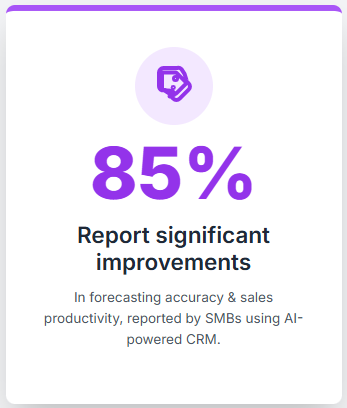
This visibility isn’t just nice for planning—it’s critical for making smart decisions about hiring, marketing spend, and product priorities. According to Salesforce research, 85% of SMBs using AI-powered CRM report significant improvements in forecasting accuracy and sales productivity.
You Build Team Accountability and Coordination
In a small team where everyone wears multiple hats, it’s easy for things to fall between the cracks. Who’s following up with that lead? Did anyone send the proposal? CRM creates accountability by showing exactly who owns what and what’s overdue.
Plus, when team members can see each other’s activities and notes, coordination improves dramatically. Your customer success lead knows when a deal is about to close and can prep onboarding. Your co-founder can jump into a deal if you’re out sick. Everyone’s working from the same playbook instead of isolated silos.
You Create a Customer-Centric Culture From Day One
Here’s something I didn’t expect: using CRM fundamentally changed how my team thought about customers. Instead of seeing leads as one-time transactions, we started tracking the entire relationship—demo conversations, pain points mentioned, follow-up promises made. This history makes every interaction more personal and relevant, which builds trust and increases win rates.
CRM helps you deliver on the promise that every SaaS founder makes: “We’re customer-focused and responsive.” The difference is, now you actually have the system to back it up.
When Should You Use a Sales CRM? (And When Should You Wait?)
Let me be honest: not every business needs a CRM on day one. If you’re still validating product-market fit and you’ve done fewer than ten demos total, a simple spreadsheet might be enough. Don’t overcomplicate things before you have repeatable processes to automate.
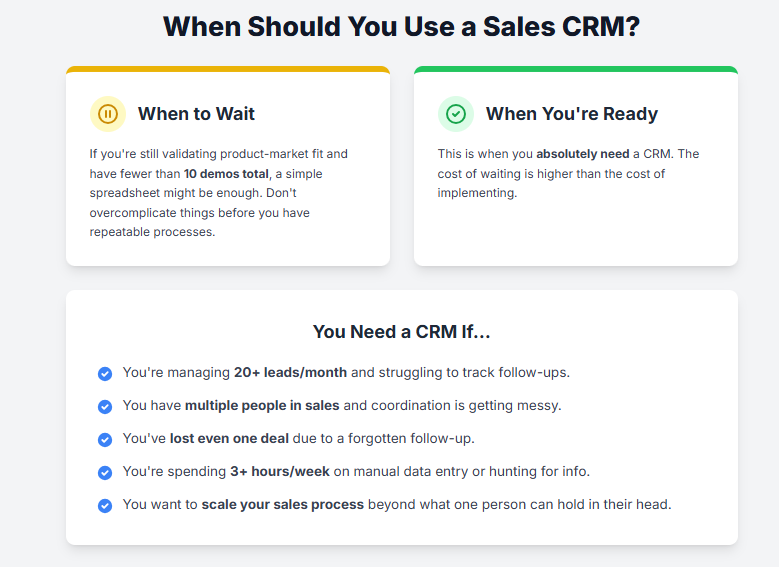
But here’s when you absolutely need CRM:
- You’re managing more than 20 leads per month and struggling to keep track of who needs follow-up.
- You have multiple people involved in sales or demos and coordination is getting messy.
- You’ve lost at least one deal due to forgotten follow-ups or missed communication—even once is a sign the old system isn’t working.
- You’re spending more than 3 hours per week on manual data entry, scheduling, or hunting for information across tools.
- You want to scale your sales process beyond what one person can hold in their head.
Basically, if you’re reading this article and nodding along to the pain points I described in the intro, you’re ready for CRM. The cost of waiting is higher than the cost of implementing.
What About “We’re Too Small for CRM”?
I hear this all the time, and I get it—CRM sounds like enterprise software for big sales organizations. But modern CRM tools are built specifically for small teams and startups. Platforms like LevelUp Demo , HubSpot offer free plans, Pipedrive is designed for simplicity, and tools like LevelUp Demo focus exclusively on the demo workflow without enterprise bloat.
The real question isn’t “Are we big enough?” It’s “Can we afford to keep losing deals and wasting time on manual work?” When you frame it that way, the answer becomes obvious.
How to Choose the Right CRM for Your SaaS Startup or Small Sales Team
Choosing a CRM can feel overwhelming because there are hundreds of options, each claiming to be the perfect fit. Here’s how I’d approach it if I were starting over today.
Start With Your Actual Workflow, Not Feature Lists
Before you even look at CRM demos, map out your current sales process on paper:
- How do leads come in? (Website form, email, referrals?)
- What happens next? (Qualification, demo scheduling, follow-up?)
- Where do things break down? (Forgotten follow-ups? Unclear ownership?)
- What do you need to track? (Demo outcomes, follow-up tasks, conversion rates?)
Now look for a CRM that matches your workflow, not one that forces you to adapt to its rigid structure. The best CRM is the one your team will actually use consistently.
Prioritize These Core Features
Lead capture and management
Can it automatically log leads from your website form, email, and other sources? Does it let you tag, categorize, and prioritize leads?
Demo scheduling automation
Does it integrate with your calendar? Can prospects self-schedule? Does it send automatic reminders?
Follow-up and task management
Can you set follow-up tasks with deadlines? Does it surface overdue tasks prominently? Can you filter by status (Pending, In Progress, Completed)?
Pipeline visibility and reporting
Can you see your entire sales funnel at a glance? Does it show conversion rates, average time to close, and forecasted revenue?
Team collaboration
Can multiple people access and update records? Can you assign leads and tasks to specific team members? Is there a shared activity feed?
Integration with your existing tools
Does it connect with your email, calendar, marketing automation, and support tools? Fragmented systems defeat the purpose of centralized data.
Consider Specialized vs. General-Purpose CRM
General-purpose CRMs like Salesforce, HubSpot, and Pipedrive offer tons of features but can be overkill for small teams focused on demos. They’re powerful but often require customization and training.
Specialized demo management tools like LevelUp Demo are purpose-built for SaaS teams that rely on product demos for conversions. They streamline lead capture, demo scheduling, outcome tracking, and follow-ups without the complexity of traditional CRM. If your sales process centers on demos, a specialized tool might be a better fit—you can always add a full CRM later as you scale.
Don’t Overlook Ease of Adoption
The fanciest CRM in the world is worthless if your team won’t use it. Look for:
- Intuitive interface that doesn’t require hours of training
- Mobile access so reps can update records on the go
- Fast setup without needing IT support or consultants
- Responsive support when you get stuck
I’ve seen startups buy enterprise CRM licenses, get overwhelmed by setup complexity, and abandon the tool within three months. Start simple and scale up as needed.
What Mistakes Should You Avoid When Implementing a Sales CRM?
I’ve made most of these mistakes myself, so learn from my pain.
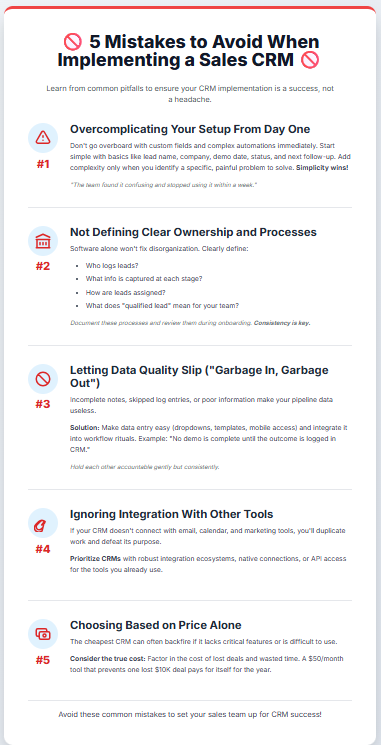
Mistake #1: Overcomplicating Your Setup From Day One
When I first set up our CRM, I went overboard creating custom fields, complex automation rules, and elaborate tagging systems. Result? The team found it confusing and stopped using it within a week.
Better approach: Start with the basics—lead name, company, demo date, status, next follow-up. Add complexity only when you have a specific, painful problem to solve. Simplicity wins.
Mistake #2: Not Defining Clear Ownership and Processes
Just buying CRM software doesn’t magically fix disorganization. You need to define:
- Who’s responsible for logging leads?
- What information gets captured at each stage?
- How do we assign leads to team members?
- What does “qualified lead” actually mean for us?
Document these processes in a simple one-pager and review them with your team during onboarding. Consistency is what makes CRM data valuable.
Mistake #3: Letting Data Quality Slip
“Garbage in, garbage out” is painfully true with CRM. If reps don’t log demo outcomes, skip follow-up notes, or enter incomplete information, your pipeline data becomes useless for forecasting and decision-making.
Solution: Make data entry as easy as possible (dropdown menus, templates, mobile access) and build it into your workflow rituals. For example, “No demo is complete until the outcome is logged in CRM.” Hold each other accountable gently but consistently.
Mistake #4: Ignoring Integration With Other Tools
Your CRM shouldn’t be an island. If it doesn’t integrate with your email, calendar, and marketing tools, you’ll end up duplicating work across platforms—which defeats the whole purpose.
Prioritize CRMs with robust integration ecosystems or native connections to the tools you already use. Modern CRM platforms offer API access and pre-built connectors for popular SaaS tools.
Mistake #5: Choosing Based on Price Alone
I get it—budgets are tight in early-stage startups. But choosing the cheapest CRM often backfires if it lacks critical features or is painful to use. Factor in the cost of lost deals and wasted time when evaluating options. A $50/month tool that prevents one lost $10K deal has already paid for itself for the year.
How to Get Your Team to Actually Use the CRM (The Real Challenge)
Here’s the uncomfortable truth: most CRM implementations fail not because of the software, but because teams resist changing their habits. I’ve seen this firsthand—people keep using their old spreadsheets and email folders “just in case,” and within weeks the CRM is abandoned.
Make Adoption Non-Negotiable (But Explain Why)
Don’t just mandate “Everyone must use the CRM.” Explain the why: “We lost three deals last quarter because follow-ups were missed. CRM ensures that never happens again. It protects our revenue and makes everyone’s job easier.”
When people understand the problem being solved—and see leadership using the tool consistently—adoption improves dramatically.
Start With a Pilot and Iterate
Roll out CRM to a small group first (maybe just you and one other person). Work out the kinks, refine the process, and document what works. Then expand to the full team with a proven system and real success stories to share.
Celebrate Wins Publicly
When CRM helps you close a deal (e.g., “The automated follow-up reminder caught this lead right before they signed with a competitor”), share that story with the team. Positive reinforcement builds momentum.
Make It Ridiculously Easy
The less friction, the better. Use browser extensions, mobile apps, and email integrations so logging data takes seconds, not minutes. Remove unnecessary fields. Pre-fill information wherever possible.
If using the CRM feels like extra work instead of making work easier, you’ve lost the battle.
Real-World Impact: What Changes After You Implement CRM?
Let me share a quick example that brings this all together.
A small SaaS company I advised was managing about 40 demo requests per month across three team members using a shared Google Sheet. They were losing roughly 20% of leads to missed follow-ups and scheduling confusion. Their close rate was around 15%.
After implementing a lightweight CRM focused on demo workflows (LevelUp Demo, in their case), here’s what changed within 60 days:
- Zero lost leads due to forgotten follow-ups (automated reminders caught everything)
- Response time dropped from 18 hours to under 2 hours (automatic lead notifications)
- Close rate increased from 15% to 22% (better qualification and timely follow-ups)
- Team coordination improved dramatically (everyone could see pipeline status in real time)
- Forecasting became reliable (historical data showed clear conversion patterns)
That’s not a miracle—it’s what happens when you replace chaotic manual processes with a system designed to prevent the problems that kill deals.
The founder told me, “I can finally take a vacation without worrying that everything will fall apart.” That peace of mind alone is worth the investment.
Advanced CRM Strategies: Getting More Value Over Time
Once you’ve mastered the basics, here are some ways to level up your CRM game.
Use Predictive Analytics to Prioritize Leads
Modern CRMs with AI capabilities analyze historical data to identify which leads are most likely to convert. This helps small teams focus energy on high-value opportunities instead of wasting time on tire-kickers.
According to Salesforce research, 85% of SMBs using AI in CRM report significant improvements in productivity and forecasting accuracy.
Automate Personalized Outreach at Scale
You can use CRM data to trigger personalized email sequences based on specific behaviors—for example, if a lead attended a demo but didn’t book a follow-up, send a tailored message addressing their specific pain points mentioned during the call.
This feels personal to the recipient but requires minimal manual effort from your team.
Track Customer Success Milestones Post-Sale
CRM isn’t just for sales—use it to manage onboarding milestones, track product usage signals, and flag at-risk customers before they churn. This creates a seamless handoff from sales to customer success and helps you maximize lifetime value.
Build Custom Dashboards for Different Roles
Your sales reps care about their individual pipeline and follow-up tasks. You (the founder) care about overall conversion rates, revenue forecasts, and team performance. Your customer success lead cares about onboarding progress and health scores.
Most CRMs let you create role-specific dashboards so everyone sees the data that matters to them without wading through irrelevant noise.
Frequently Asked Questions About Sales CRM
What’s the difference between a CRM and a spreadsheet?
A spreadsheet is static—it just stores data. A CRM is dynamic: it automates tasks, sends reminders, tracks relationships over time, and provides analytics. Think of it as a spreadsheet with a brain and hands that do work for you.
How much does CRM cost for small teams?
It varies widely. Free options like LevelUp Demo or HubSpot CRM cover basics. Mid-tier tools like Pipedrive or LevelUp Demo range from $10–$50 per user per month. Enterprise platforms like Salesforce start around $75/user/month. Choose based on your workflow needs, not just price.
Do I need technical skills to set up a CRM?
Not for modern SaaS CRMs. Most offer guided setup wizards, templates, and drag-and-drop customization. You can get a basic system running in an afternoon without writing a single line of code.
Can CRM integrate with my existing tools?
Almost certainly. Most CRMs offer native integrations or API access for email (Gmail, Outlook), calendars (Google Calendar), marketing automation (Mailchimp, HubSpot), and support tools (Intercom, Zendesk). Check the integrations page before committing.
What if my team resists using the CRM?
Start by understanding why they’re resisting. Is it too complicated? Does it feel like extra work? Involve them in choosing and configuring the system, make it as easy as possible to use, and lead by example. Celebrate wins publicly to build momentum.
How do I migrate data from spreadsheets to CRM?
Most CRMs offer CSV import tools. Clean up your spreadsheet data first (remove duplicates, standardize formats), then map columns to CRM fields during import. Start small—import a subset of data, test, then import the rest.
Can I use CRM for customer success, not just sales?
Absolutely. Many teams use CRM to track onboarding progress, log support interactions, monitor product usage, and flag churn risk. It creates a unified view of the entire customer lifecycle.
What’s the biggest mistake startups make with CRM?
Overcomplicating it from day one. Start simple, focus on solving one painful problem (like forgotten follow-ups), and add complexity gradually as your processes mature.
How long does it take to see results from CRM?
You’ll see immediate benefits like fewer lost leads and better organization within the first week. Measurable improvements in close rates and productivity typically show up within 60–90 days once the team is fully adopted.
Should I choose a general CRM or a specialized demo management tool?
If product demos are your primary sales motion, a specialized tool like LevelUp Demo will streamline that workflow better than a general CRM. You can always add a full CRM later as your needs expand. If you need broader functionality (marketing automation, support ticketing), start with a platform like HubSpot.
Wrapping It All Up: Why CRM Is the Best Business Choice You’ll Ever Make
Look, I’ll level with you: implementing CRM isn’t glamorous. It won’t go viral on Twitter or make for a sexy product launch announcement. But it’s one of those foundational decisions that quietly transforms your business from chaotic to scalable.
For solo founders, CRM gives you the superpower of never forgetting a lead, automating follow-ups while you sleep, and seeing your entire pipeline at a glance—without hiring a sales ops team.
For small sales teams, CRM creates accountability, coordination, and consistency that’s impossible to maintain with spreadsheets and email threads. It turns a scrappy group into a high-performing unit.
For growing startups, CRM lays the groundwork for scale. The processes you build now—lead qualification, demo workflows, follow-up cadences—become the playbook you hand to new hires as you grow.
The best part? You don’t need a massive budget or months of implementation. Start simple, focus on solving your most painful problem first (probably forgotten follow-ups or messy demo scheduling), and build from there.
If you’re tired of losing deals to disorganization, spending hours on manual busywork, or wondering which leads need attention, it’s time to stop procrastinating and implement CRM. Your future self—and your revenue—will thank you.
Ready to Transform Your Demo Workflow?
If you’re a SaaS founder or small sales team focused on product demos, LevelUp Demo was built specifically for you. It streamlines your entire demo workflow—from lead capture through conversion—without the complexity of traditional CRM.
Here’s what makes it different:
- Smart demo form that auto-logs leads into your dashboard
- Instant lead qualification so you focus on hot prospects
- Built-in demo scheduling with calendar integration
- Simple outcome tracking (Won, Lost, Follow-up, Pending)
- Dedicated follow-ups view with reminders so nothing slips through
- Clean analytics dashboard showing conversion metrics that matter
No bloat. No six-month implementation. Just the features you need to stop losing deals and start closing more.
Request a demo to see how LevelUp Demo can transform your sales process—or check out our pricing to get started today.
And if you found this guide helpful, explore more practical SaaS sales insights on our blog.