
Key Insights
- Lead assignment directly impacts response time and conversion — a 5-minute delay can tank your demo rate
- Most SaaS teams lose deals not because of bad selling, but because of unclear ownership
- Manual assignment creates bottlenecks, missed opportunities, and finger-pointing
- Structured assignment using rules, notifications, and fallback logic improves pipeline flow dramatically
- The right system ensures every single lead gets handled on time, every time
What Is Lead Assignment in SaaS?
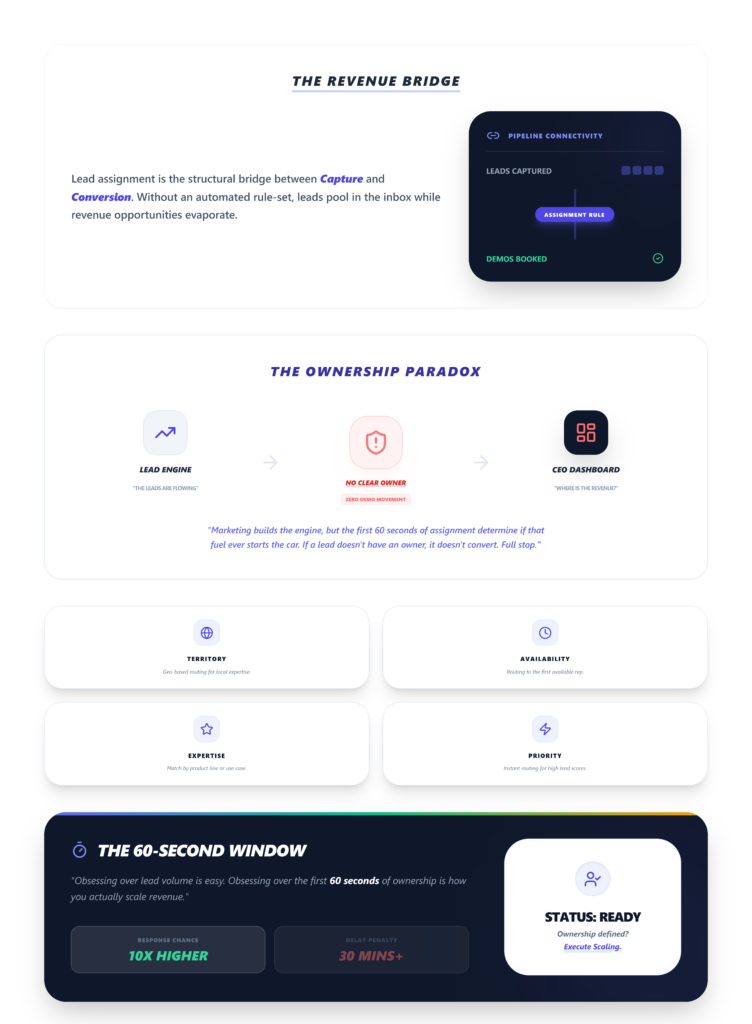
Lead assignment is the process of distributing incoming leads to the right sales reps based on predefined rules — territory, availability, expertise, lead score, or priority. It’s the bridge between “lead captured” and “demo booked.” When that bridge breaks, revenue falls through.
In simple terms, it’s how SaaS teams assign leads to the right person at the right time.
It’s the bridge between “lead captured” and “demo booked.” When that bridge breaks, revenue falls through.
Why Lead Assignment Is More Important Than You Think
Here’s something I’ve watched play out at least a dozen times across SaaS teams I’ve worked with.
The marketing team spends months building a pipeline engine. Paid ads, content, SEO, webinars — the whole stack. Leads start flowing in. Everyone celebrates.
Then three weeks later, the CEO is staring at a dashboard wondering why demo bookings haven’t moved.
The leads were there. Nobody owned them.
Most SaaS teams obsess over lead generation. But what happens after the lead comes in — the first 60 seconds, the first assignment, the first notification — that’s what determines whether it ever converts.
If a lead doesn’t have an owner, it doesn’t convert. Full stop.
What Happens When Leads Aren’t Assigned Properly
I’ll keep this blunt because I’ve seen every version of this failure:
- Leads sit in shared inboxes. No one picks them up because everyone assumes someone else will. Classic bystander effect, but with revenue on the line.
- Response times balloon. That pricing page lead who was ready to talk? They submitted a form at 2 PM. Your rep saw it at 5:47 PM. By then, they’d already booked a demo with your competitor.
- Wrong reps handle wrong leads. A junior SDR gets an enterprise lead with a $100K budget. They fumble the discovery call. Deal dies quietly.
- Demos get missed entirely. No notification, no calendar hold, no follow-up. The lead just… vanishes.
One team I consulted with had a vacationing rep who kept receiving 20% of inbound volume for 48 hours because nobody toggled their availability off. Deals stalled. Conversions dropped. They only caught it because a prospect emailed support asking why nobody had called them back.
If a lead doesn’t have a clear owner, it doesn’t convert.
And if you’re wondering why leads don’t convert even when volume looks healthy, this is usually the first place I look.
Why Most SaaS Teams Get Lead Assignment Wrong
Four patterns show up constantly:
- 1. Manual assignment by the founder or sales manager.
This works when you’re getting 5 leads a week. At 15+ per day, it’s a full-time job nobody signed up for. One founder I know forgot to map the “lead_owner” column during a bulk CSV import — 500 leads sat unassigned overnight. Manual fix took 4 hours. - 2. No clear rules.
Salesforce processes rule entries top-down. If your criteria are vague — say, “enterprise” without defining employee count — the first matching rule wins. That causes roughly 40% misroutes in teams I’ve audited. First match wins. And if the first match is wrong, so is everything downstream. - 3. Assigning leads after a delay.
Even a 10-minute gap kills urgency. Leads don’t wait — they move to whoever responds first. - 4. No prioritization.
A pricing page lead and a blog subscriber get the same treatment. Same queue, same response time, same rep. That’s not a system. That’s a coin flip.
Different Ways to Assign Leads
Round Robin
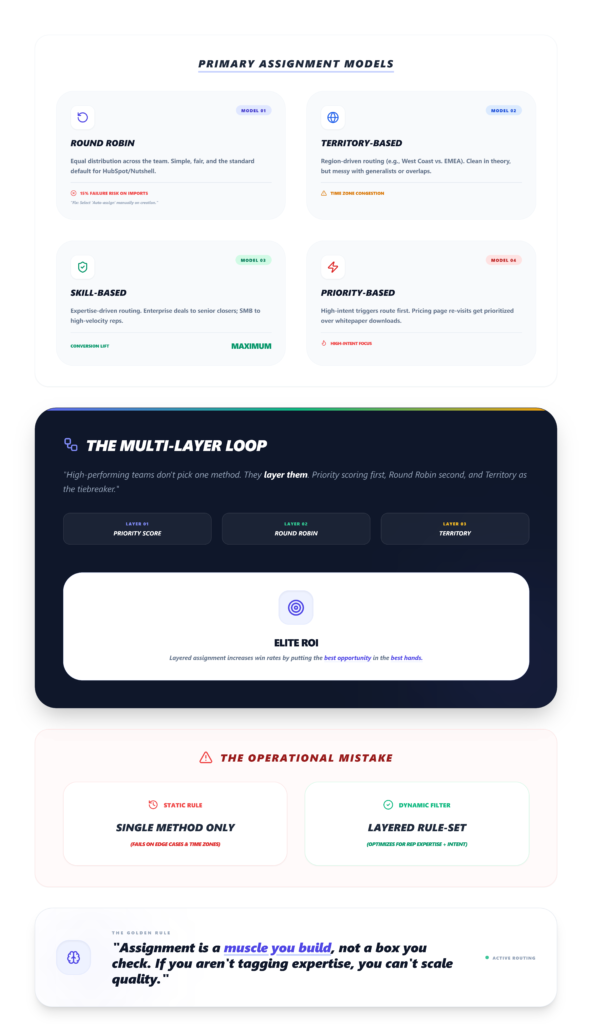
Equal distribution across reps. Simple, fair, and the default in tools like HubSpot and Nutshell.
You enable it at the pipeline stage level — look for the spinning arrow icon next to the team list. The catch? Nutshell users report about a 15% failure rate when round-robin doesn’t trigger on imported leads. The fix is weirdly manual: you have to select “Auto-assign” on creation to force the pipeline trigger.
Territory-Based
Region-based routing. West Coast leads go to your West Coast rep, EMEA leads go to EMEA. Clean in theory. Messy when territories overlap or when your “APAC rep” is actually a generalist covering three time zones.
Skill-Based
Expertise-driven. Enterprise deals go to senior closers. SMB leads go to high-velocity reps. This is where I’ve seen the biggest conversion lifts — but only when the tagging is accurate. No community consensus exists on edge cases beyond manual tagging, so you’re building this muscle yourself.
Priority-Based
High-intent leads get routed first. Someone who hit your pricing page three times and then submitted a demo request shouldn’t sit in the same queue as someone who downloaded a whitepaper.
Most teams use one method. High-performing teams combine them — priority-based scoring layered on top of round-robin, with territory as a tiebreaker.
The SaaS Lead Assignment Framework
This is the system I recommend. Five steps, no shortcuts.
Step 1: Capture the Lead Instantly
Your form submits. The lead hits your CRM or demo tool. If there’s a gap here — even a sync delay — you’re already behind.
Visual checkpoint: The lead appears in your dashboard within 2-5 seconds. In Salesforce, you’ll see a green success banner reading “Rule executed.” In HubSpot, the owner field updates instantly with a blue highlight.
Verification: If the lead isn’t visible in your system within 10 seconds of submission, your capture layer is broken.
Step 2: Qualify and Enrich
Before routing, you need context. Company size, lead source, intent signals, geography. Pre-mapped form fields are non-negotiable here — without them, assignments default to an unassigned queue and nobody notices until it’s too late.
Expert nuance: Create your user queues before you turn on any automation. Solo founders skip this step constantly, and leads pile up in limbo.
Step 3: Assign Based on Rules
This is where your rule entries, capacity thresholds, and catch-all rules do the heavy lifting. Set up your IF/THEN logic. Test it mentally with a real scenario — not a generic one.
One practitioner I worked with tested their rules using a sample lead: “Sarah Chen, Acme Corp, CA, healthcare, $100K budget.” That mental test caught a misroute to the wrong rep and saved the deal.
Friction warning: If you don’t set capacity thresholds (e.g., max 50 open opps per rep), the system will keep assigning without pause. No warning. No red flag. Just a buried rep and stale leads.
Visual checkpoint: Rep dashboard shows a red “Capacity Full” badge when limits are hit.
Step 4: Notify the Rep Instantly
Assignment without notification is just a database update. The rep needs to feel ownership — mobile push alerts, Slack messages, email. Layer them.
Here’s the thing: email confirmations get buried by spam filters at a 20-30% miss rate. And Slack notifications? They lag 1-10 minutes during peak hours in HubSpot workflows. So don’t rely on a single channel.
Pro move: Set up CRM webhooks to Slack API for sub-second delivery. Map the lead source (e.g., “source: pricing page”) directly into the notification message so the rep knows the urgency before they even click.
Step 5: Track Ownership and Set SLA Reassignment
Ownership isn’t a one-time event. If a rep doesn’t act within your SLA window — I like 2 hours for hot leads — the lead should automatically reassign to the next available rep.
Speed without ownership is still lost revenue. But ownership without accountability is just a name on a record.
Visual checkpoint: Your reports tab shows an assignment heatmap with even distribution bars. If one bar is twice the height of the others, something’s broken.
Good vs. Bad Lead Assignment: A Real Scenario
Lead A: Submits a demo request at 10:02 AM. Rules fire. Assigned to Rep 3 (territory match, capacity open) by 10:02:05 AM. Slack notification hits at 10:02:06 AM. Rep calls at 10:04 AM. Demo booked for Thursday.
Lead B: Submits the same form at 10:15 AM. No rules configured for their segment. Lands in a shared queue. Sales manager notices it at 3:30 PM. Assigns manually. Rep emails at 4:45 PM. No response. Follow-up sent two days later. Lead has already signed with a competitor.
Same product. Same form. Wildly different outcomes.
How Lead Assignment Impacts Demo Conversion
This is where it gets real. Every minute of delay between form submission and first rep contact reduces demo booking probability.
I’ve seen teams cut their lead response time from 4 hours to under 5 minutes just by implementing automated assignment — and demo bookings jumped 25%.
The math is simple: faster assignment → faster response → more demos → more pipeline.
If your demo funnel is leaking, start here.
At $20M ARR, one SaaS founder realized they’d waited too long to segment SMB vs. enterprise leads. Reps 1 and 2 were burning out on complex deals while simpler ones sat untouched. They lost 30% velocity before finally specializing at rep #4.
Why Lead Assignment Needs a System
Spreadsheets fail because they don’t notify anyone. They’re static. A lead can sit in row 847 for a week and nobody blinks.
CRMs are better but slow. Manual override dropdowns ignore auto-rules — I’ve watched founders click “Assign to Me” and break round-robin equity for the entire team.
Manual processes break flow. Period.
Which brings me to this: if you’re running a small SaaS team and your demo workflow still involves copying lead info between tabs, toggling calendar apps, and pinging reps on Slack manually — you don’t have a system. You have a habit. And habits break under volume.
Tools like LevelUp Demo exist specifically for this gap. It handles lead capture, qualification, assignment, scheduling, and outcome tracking in one lightweight layer — without forcing you to migrate your entire CRM.
For early-stage teams doing 10-50 demos a month, it’s the kind of system that prevents the “lost lead” problem before it starts. You can check their pricing to see if it fits.
(I’ll be honest — I spent years duct-taping Salesforce rules and Zapier triggers together before realizing that most small teams don’t need enterprise tooling. They need a focused system that does one job well.)
Ready to automate your lead assignment?
Stop losing deals to slow follow-ups. LevelUp Demo ensures every lead gets routed, notified, and acted upon instantly.
FAQ
What is lead assignment?
Lead assignment is the process of routing incoming leads to specific sales reps based on predefined criteria like territory, lead score, availability, or deal complexity. The goal is to ensure every lead has a clear owner within seconds of capture — not hours.
How do you assign leads effectively?
Effective assignment combines automated rules (round-robin, priority scoring, territory matching) with real-time notifications and SLA-based reassignment. Pre-map your form fields, set capacity thresholds, and never rely on a single notification channel.
What is the best lead distribution method?
There’s no single best method. Round-robin works for equal distribution. Priority-based routing works for high-intent leads. The highest-performing teams layer multiple methods — priority scoring on top of round-robin with territory tiebreakers.
Does lead assignment impact conversion?
Directly. Slow or incorrect assignment increases response time, and response time is the single biggest predictor of whether a demo gets booked. Teams that automate assignment consistently see 20-25% lifts in demo conversion rates.
How do you exclude unavailable reps from round-robin?
Most CRMs require a manual toggle per pipeline. In Nutshell, you need to temporarily remove the rep and reset the rotation — but be aware this can cause 1-2 days of lost leads if you forget to re-add them.
What This Comes Down To
Lead assignment isn’t a CRM setting. It’s a revenue function.
Ownership drives conversion. Speed matters. And systems outperform manual processes every single time — especially when you’re scaling past the point where one person can eyeball every lead.
So here’s the question: do your leads have owners right now? Or are they sitting in a queue, waiting for someone to notice?
If you’re not sure, that’s your answer.