Quick Answer :
A SaaS demo checklist is a structured 3-phase process to ensure high conversion. Before the demo: Research the prospect, confirm qualification, load lived-in data, and set a single goal. During the demo: Open with a pain-led intro, hit the “wow moment” within 2 minutes, and handle objections live. After the demo: Log the outcome immediately, send a personalized follow-up within 2 hours, and assign concrete next steps.
It’s 2:03 PM. Your AE is sharing their screen with a VP of Operations at a mid-market logistics company. Sixty seconds in, they’re clicking through a settings panel. Two minutes in, they’re explaining user permissions. By minute four, the prospect’s camera is off.
That demo was dead before it started.
I’ve watched this happen dozens of times—teams with genuinely strong products bleeding pipeline because nobody built a repeatable SaaS demo checklist. Not a vague “be prepared” reminder. An actual, phase-by-phase process that prevents the slow bleed of unqualified leads, feature dumps, and forgotten follow-ups from quietly destroying your conversion rate.
Here’s what this guide gives you: A complete SaaS demo checklist—before, during, and after—with the specific verification steps and friction warnings that separate teams closing 40%+ of demos from those wondering why prospects keep ghosting.
Quick SaaS Demo Checklist Summary
For the skimmers (no judgment):
- ☐ Research the prospect’s company, role, and likely pain points
- ☐ Confirm lead qualification before scheduling
- ☐ Prepare a demo environment with lived-in data
- ☐ Define a single demo goal tied to their use case
- ☐ Open with a pain-led intro, not a product tour
- ☐ Hit the wow moment within the first 2 minutes
- ☐ Identify buying signals and handle objections live
- ☐ Log demo outcome immediately
- ☐ Send a personalized follow-up within 2 hours
- ☐ Assign and track next steps in your demo workflow
Now let’s break each one down properly.
What Is a SaaS Demo Checklist?
A SaaS demo checklist is a structured sequence of steps that sales teams follow before, during, and after a product demo to increase demo-to-close rates and ensure no critical action is missed. It covers everything from prospect research and lead qualification through to follow-up workflows and outcome tracking.
Think of it less like a to-do list and more like a pre-flight checklist. Pilots don’t skip it because they’ve flown a thousand times. Your reps shouldn’t skip it because they’ve “done demos before.”
Why Most SaaS Demos Fail
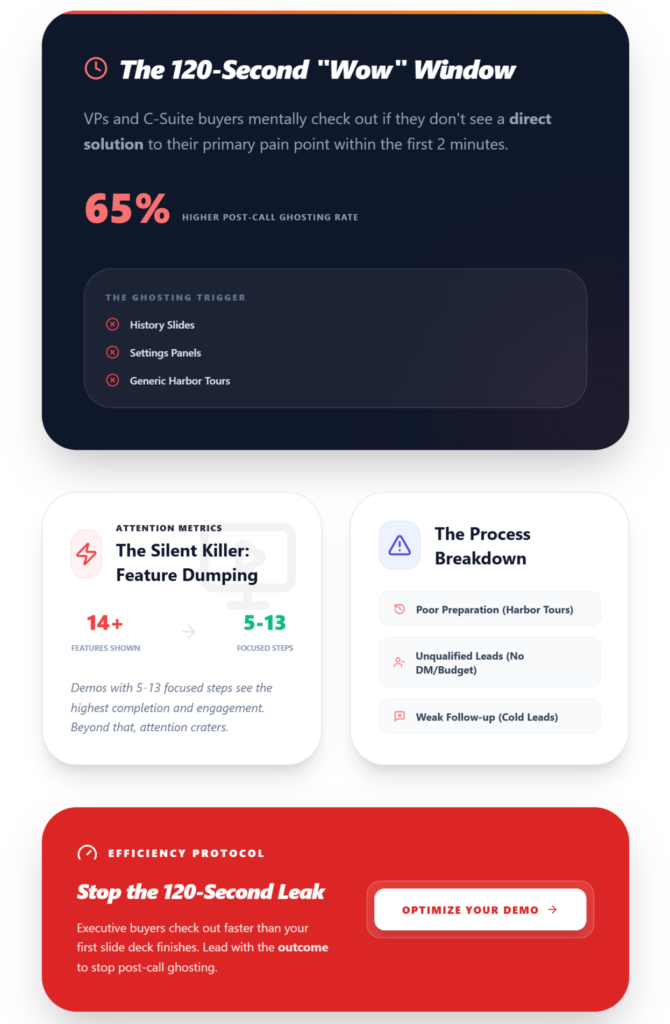
Here’s the uncomfortable part. Most SaaS demos fail not because the product is weak, but because the process around the demo is broken.
There’s a detailed breakdown of why SaaS demos fail even when the product is good, but the patterns are predictable:
- Poor preparation. The rep doesn’t know the prospect’s industry, role, or what triggered the demo request. They default to a generic “harbor tour”—clicking through every menu like a museum guide nobody asked for.
- Unqualified leads. Someone filled out a form. Nobody checked if they’re a decision-maker, if there’s budget, or if the timing makes sense. The demo happens anyway. Thirty minutes wasted.
- Feature dumping. This is the silent killer. The rep shows 14 features in 20 minutes. The prospect remembers zero. Data consistently shows that flows with 5–13 focused steps see the highest completion and engagement. More than that, and you’re watching attention crater.
- Weak follow-up. The demo ends. The rep says “I’ll send over some info.” Three days pass. No personalized recap, no next-step assignment, no behavioral signals captured from the call. The lead goes cold.
Each of these failures is preventable. That’s the whole point of having a SaaS demo process you actually follow.
⏳ The 2-Minute ‘Wow’ Window
Recent 2026 sales intelligence data proves that executive-level buyers (VPs and C-Suite) mentally check out if they do not see a direct solution to their primary pain point within the first 120 seconds of screen sharing. Demos that open with company history slides or settings panels suffer a 65% higher ghosting rate post-call.
The Pre-Flight Check: Are You Actually Ready?
Before touching the checklist, answer one question honestly:
Stop/Go Test: Can you describe, in one sentence, the specific outcome this prospect wants from your product?
If you can’t, you’re not ready to demo. You’re ready to do more research. What you need locked down:
- CRM access with the prospect’s company info populated
- A working demo environment (not your production instance)
- Recording software to capture behavioral signals
- LinkedIn open for last-minute persona alignment checks
- Your demo script tailored to this prospect’s use case—not last week’s
The Complete SaaS Demo Checklist
Phase 1: Before the Demo
This is where 70% of demo success is determined. Not during the call. Before it.
- ☐ Research the prospect deeply. Go beyond the company website. Check their LinkedIn activity, recent funding rounds, job postings (which reveal pain points), and any public product reviews. If they’re in retail, your demo better show retail metrics, not generic placeholder data.
- ☐ Qualify the lead. Many SaaS teams struggle with this step, which is why having a structured process for qualifying demo requests matters so much. At minimum, confirm: Is this person a decision-maker or influencer? Is there an active problem they’re trying to solve? Is budget allocated or exploratory?
- ☐ Understand their specific use case. Send a brief pre-demo questionnaire or have your SDR capture this during booking. “What’s the biggest workflow problem you’re trying to solve?” gives you more demo ammunition than any amount of LinkedIn stalking.
- ☐ Prepare the demo environment with lived-in data. Nothing kills credibility faster than demoing with “Acme Corp” and “John Doe” placeholder accounts. Use industry-matched data. If the prospect is in healthcare SaaS, your demo should show healthcare terminology, realistic metrics, and relevant workflows.
- ☐ Define a single demo goal. Not “show them the product.” Something like: “Prove we can cut their onboarding time from 3 weeks to 3 days.” Every click in the demo ladders to this activation event.
Visual Checkpoint: Your CRM record shows the prospect’s company, role, use case, and qualification status filled in. Your demo environment loads in under 2 seconds with industry-relevant data. If either is missing, postpone.
☐ Send a pre-demo process map. This is the “weird fix” that actually works. Two days before the demo, email a brief outline: “Here’s what we’ll cover based on what you told us about [their pain point].” This alone dramatically reduces no-shows. For more on this, check out strategies to reduce demo no-shows.
Quick Pre-Demo Actions & Impact
- 1. Research prospect on LinkedIn + company site: Enables persona alignment and personalized talk track
- 2. Confirm qualification criteria: Prevents wasting time on unqualified leads
- 3. Capture use case pre-demo: Shapes the entire demo narrative
- 4. Load lived-in data into demo environment: Builds credibility and trust instantly
- 5. Define one demo goal: Keeps the demo focused and outcome-driven
- 6. Send pre-demo agenda: Reduces no-shows and sets expectations
Phase 2: During the Demo
This is where most reps default to autopilot. Don’t.
- ☐ Set the agenda in the first 30 seconds. “Here’s what I’d like to cover in the next 15 minutes, based on what you shared about [pain point]. Does that work, or is there something else you’d like to prioritize?” This immediately signals you’ve done your homework.
- ☐ Open with a pain-led intro. Do not start with “Let me tell you about our company.” Start with their problem. “You mentioned your team spends 4 hours a week manually reconciling data. Let me show you exactly how that goes away.”
- ☐ Hit the wow moment within the first 2 minutes. Top-performing demos reach their a-ha moment early. If you bury the most impressive capability at minute 12, you’ve already lost half the room. Map 2–3 a-ha moments per demo flow—and front-load the strongest one.
- ☐ Personalize relentlessly. Use their company name. Reference their specific workflow. Show the exact screen they’d see on Day 1. Persona alignment isn’t optional—a mismatch kills multi-stakeholder deals faster than anything.
- ☐ Highlight value, not features. Instead of “This is our reporting dashboard,” say “This is where your ops manager would see, every Monday morning, exactly which accounts are at risk—without pulling a single spreadsheet.” The difference is enormous.
- ☐ Identify buying signals. Are they asking about pricing? Implementation timelines? Integrations with their existing stack? These are green lights. Note them. If they’re asking about edge cases for their specific team, that’s committee buy-in forming in real time.
- ☐ Handle objections in the moment. Pre-map the top 3 objections for your ICP. “Too expensive” becomes an ROI calculation you have ready. “We’re already using X” becomes a migration story from a similar customer. Don’t dodge objections—they’re the demo’s most valuable content.
For a deeper playbook on this, there’s a solid guide on mastering the art of closing a sales demo.
Visual Checkpoint: The prospect is asking follow-up questions, referencing their own workflow, or leaning forward (literally or figuratively). If they’ve gone quiet for more than 3 minutes, pause and ask: “Does this match what you’re dealing with, or should we shift focus?”
Verification: After the demo, replay the recording. Did the prospect reach the wow moment? Check the timestamp. If fewer than 80% of your demos hit it, your flow needs reworking.
Phase 3: After the Demo
This is where deals go to die quietly. The demo went great. Everyone smiled. And then… nothing.
- ☐ Log the demo outcome immediately. Within 15 minutes. Not tomorrow. Not “when I get to it.” Status: Won, Lost, In Follow-up, or Pending. If this isn’t happening consistently, your demo pipeline has no integrity.
- ☐ Run a 15-minute internal debrief. What resonated? Where did the prospect hesitate? What objections came up? Capture behavioral signals from the recording—Q&A patterns, moments of engagement, points of confusion. This is how you iterate.
- ☐ Send a personalized follow-up within 2 hours. Not a template. Reference the specific pain point you solved. Include a brief async demo or recording clip of the wow moment for stakeholders who weren’t on the call. Async demos in the 7–10 minute range outperform longer leave-behinds.
- ☐ Assign concrete next steps. “Let’s circle back next week” is not a next step. “I’ll send the security questionnaire by Thursday, and we’ll schedule a 20-minute call with your IT lead for Tuesday” is a next step. Make sure these auto-populate in your CRM.
- ☐ Schedule the follow-up call before hanging up. While you’re still live, get the next meeting on the calendar. Next-step rates below 40% mean your close needs serious rework.
📈 The Async Leave-Behind Lift
Deals rarely close on the first call anymore. Sending a personalized 7-10 minute async video summarizing the demo’s highlights directly to the prospect’s inbox increases the win rate by up to 34%. This arms your champion with exactly what they need to sell your product to the rest of the buying committee internally.
Streamline Your Post-Demo Workflow
If tracking demo outcomes, follow-ups, and next steps across spreadsheets is getting messy, LevelUp Demo was built specifically for this. It handles lead capture through outcome tracking without the overhead of a full CRM—so nothing slips through after the call ends.
The “Ugly Truth”: Ghost Errors That Kill Demos
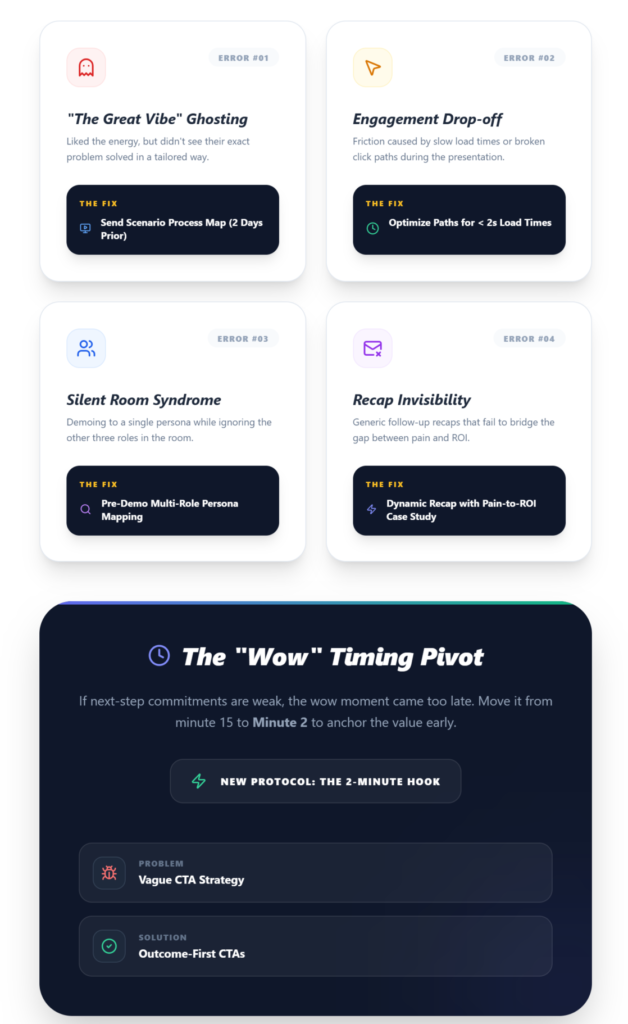
These are the problems nobody puts in their sales playbook but every team encounters:
Prospect ghosts after a “great” demo
Root Cause: No tailored use case; they liked the vibes but didn’t see their problem solved.
The Fix That Actually Works: Send a process map with their exact scenario 2 days pre-demo.
Low engagement mid-demo
Root Cause: Slow load times or broken click paths.
The Fix That Actually Works: Test every demo path for <2s load times + use lived-in data.
No committee buy-in
Root Cause: You demoed to one persona and ignored the other 3 in the room.
The Fix That Actually Works: LinkedIn-stalk all attendees; prep multi-role examples.
Weak next-step commitment
Root Cause: Vague CTA; wow moment came too late.
The Fix That Actually Works: A/B test placing the wow moment at minute 2; use specific CTAs.
Follow-up emails ignored
Root Cause: Generic recap with no pain-to-ROI connection.
The Fix That Actually Works: Review recordings for Q&A patterns; include a relevant case study.
Common SaaS Demo Mistakes
Four patterns I see constantly with early-stage teams:
- Rushing through features like a product changelog. You’re not presenting at a conference. You’re solving one person’s specific problem. Cut to 3 core pain points and storytell around those.
- Not asking a single question. The best demos are conversations. If you talked for 18 of the 20 minutes, you ran a webinar, not a demo.
- Treating follow-up as optional. Every demo without a structured follow-up is a leak in your pipeline. Track it. For teams struggling with this, there are clear frameworks for improving demo conversion rates that center on post-demo discipline.
- Never iterating. Review your won and lost demo recordings. Change one element per quarter—your opening, your CTA phrasing, your demo flow order. A/B testing demos on CTA framing alone can yield 20%+ lifts.
How SaaS Teams Can Improve Demo Conversions
Three levers that move the needle:
- Qualification rigor. Stop demoing to everyone who fills out a form. A structured qualification step—even a simple one—prevents your best reps from burning hours on prospects who were never going to buy.
- Structured, repeatable demos. Not scripted. Structured. A consistent demo framework that every rep follows, with room to personalize per prospect. This is the difference between a process and chaos.
- Follow-up workflows with teeth. Reminders, outcome tracking, next-step assignments—all visible in one place. If your team is using a patchwork of calendar reminders and Slack messages, deals are falling through. Tools like LevelUp Demo exist specifically to give small teams this visibility without migrating to an enterprise CRM.
Key Takeaways
- Preparation determines 70% of demo success. Research, qualification, and lived-in demo data are non-negotiable.
- Hit the wow moment in the first 2 minutes. Front-load value. Feature tours kill attention.
- Log outcomes and debrief within 15 minutes. If it’s not tracked, it didn’t happen.
- Follow up with specificity, not templates. Reference their pain, include async clips, and lock the next meeting before you hang up.
- Iterate one element per cycle. Review recordings, A/B test your opening or CTA, and measure next-step rate as your north star metric.
FAQ
What should be included in a SaaS demo checklist?
A complete SaaS demo checklist covers three phases: pre-demo (prospect research, lead qualification, demo environment prep, goal setting), during the demo (pain-led intro, personalized flow, objection handling, buying signal identification), and post-demo (outcome logging, personalized follow-up, next-step assignment, follow-up scheduling).
How long should a SaaS demo be?
Most effective SaaS demos run 15–20 minutes for live calls. Async demo leave-behinds perform best in the 7–10 minute range. Anything beyond 20 minutes risks attention drop-off, especially with senior stakeholders.
What makes a SaaS demo successful?
A successful demo solves a specific prospect pain point within the first 2 minutes, maintains engagement through personalization and relevant data, handles objections with pre-mapped responses, and ends with a concrete next step—not a vague “we’ll be in touch.”
How do you prepare for a SaaS demo?
Research the prospect’s company, role, and likely pain points. Confirm they’re qualified. Load your demo environment with industry-relevant, lived-in data. Define one clear demo goal tied to their use case. Send a brief agenda 2 days before the call.
Why do prospects ghost after a SaaS demo?
Usually because the demo was generic. The prospect enjoyed the conversation but didn’t see their specific problem solved. Sending a use-case process map before the demo and following up with a personalized recap tied to their exact workflow significantly reduces ghosting.
Conclusion: Building a Repeatable Demo Engine in 2026
Winning SaaS deals in 2026 requires moving away from improvised feature walkthroughs and adopting a strict, repeatable framework. A comprehensive SaaS Demo Checklist ensures that your reps are meticulously preparing pre-call, delivering targeted “wow moments” early, and executing flawlessly on post-demo follow-ups. By systematically eliminating unforced errors and routing workflows intelligently, your sales team transforms individual heroics into a scalable revenue engine.
Stop Winging It. Start Tracking Outcomes.
Demos fail when the process around them breaks. LevelUp Demo helps your sales team capture leads, track every outcome, and enforce airtight follow-ups without the friction of a bloated CRM.
✅ Organize Follow-Ups
✅ Track Win Rates
✅ Pre-Qualify Leads