
You’re running ads. You’re publishing content. Traffic’s hitting your site. Demo requests are trickling in.
But here’s the thing—half of them never book. A third are unqualified. And your sales team is chasing ghosts instead of closing deals.
I’ve seen this happen dozens of times. A SaaS founder spends $10k on paid traffic, gets 50 demo requests, and books 12 meetings. That’s a 24% demo-to-booked meeting rate when industry benchmarks sit at 60-70% for optimized funnels. The culprit?
A demo form that creates friction before the conversation even starts.
Your demo form isn’t just a form. It’s a conversion moment. It’s part of your sales process. And if it’s broken, you’re losing deals before the demo even happens.
Reader Promise: By the end of this guide, you’ll know exactly what’s killing your demo conversion rate and how to fix it with specific, actionable changes you can implement today.
Pre-Flight Check: What You Need Before Optimizing
Before you fix your demo form, make sure you’ve got three basics in place: a CRM like LevelUp Demo, a reliable way to schedule demos, and simple automation so follow-ups never get missed.
- Clarity: Can you describe your Ideal Customer Profile in one sentence? If not, stop. You can’t qualify leads without knowing who you’re trying to attract.
- Baseline Metrics: What’s your current demo request rate? Demo-to-booked meeting rate? If you don’t know these numbers, track them for two weeks before changing anything.
- Stop/Go Test: Pull up your demo form right now. Can a qualified prospect submit it, see what happens next, and book a time slot in under 90 seconds? If no, you’ve got friction.
Signs Your Demo Form Is Hurting Conversion
Let’s start with the obvious symptoms. These are the red flags that your form is actively pushing prospects away:
Too Many Fields: Every additional field drops conversion by 4-8%. I’ve audited forms asking for company size, industry, role, phone number, LinkedIn URL, and a paragraph explaining “business challenges.” That’s not a form—it’s a job application. If your form has more than five fields, you’re bleeding leads.
Unclear Expectations: The prospect hits submit and sees… nothing. No confirmation. No “here’s what happens next.” No calendar link. Just a generic “Thanks, we’ll be in touch.” That uncertainty creates cognitive friction. They’re left wondering: Did it work? When will someone respond? Should I follow up?
Slow Response Time: Speed to lead matters. Research shows that responding under two minutes doubles meeting acceptance rates compared to a 10-minute delay. But most teams take hours or even days. By then, the prospect has moved on or booked with a competitor.
No Calendar Booking Option: If your form doesn’t embed scheduling, you’re forcing prospects into back-and-forth email ping-pong. “When are you free?” “How about Tuesday?” “Actually, Wednesday works better.” That’s 30-50% no-shows right there.
Doesn’t Qualify Intent: Short forms feel fast, but they attract low-intent traffic. You get personal Gmail addresses, students doing research, and competitors poking around. Without basic qualification filters, 70% of requests fail qualification, wasting your team’s time.
Feels Like a Sales Trap: Aggressive CTAs like “Book Your Demo Now!” trigger prospect anxiety. They’re worried about being sold to, not helped. That’s why value-first CTAs like “See It in Action” outperform traditional “Request Demo” buttons by 5x in some funnels. A short demo form increases completion rate. High-intent fields improve lead quality.
The Most Common Mistakes SaaS Teams Make
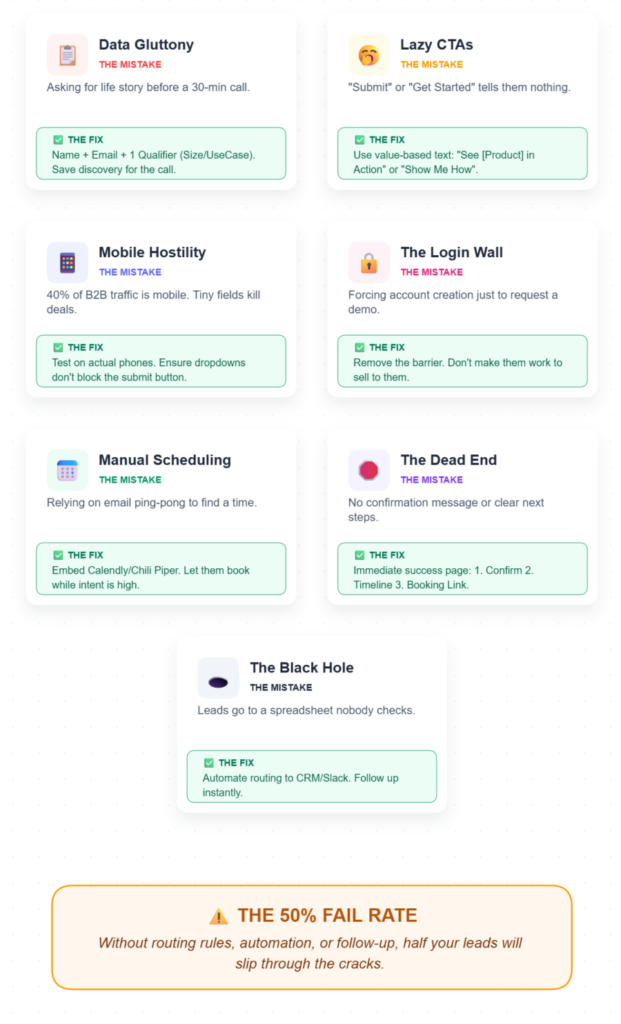
Let’s dig into the specific mistakes I see repeatedly:
- Asking for Too Much Information Too Early: You don’t need their life story to book a 30-minute call. Name, email, and one qualifier (like use case or company size) is enough. Save the deep discovery for the actual demo.
- Vague CTA Buttons: “Submit” tells me nothing. “Get Started” is generic. “Book Demo” feels pushy. Compare that to “See [Product] in Action” or “Show Me How It Works”—those communicate value, not obligation.
- Poor Mobile Layout: 40% of B2B traffic comes from mobile. If your form breaks on a phone—tiny text, fields that don’t resize, dropdowns that cover the submit button—you’re losing deals to UX friction.
- Forcing Account Creation: Some teams make prospects create an account before requesting a demo. That’s insane. You’re adding a massive friction layer to an already delicate conversion moment.
- No Instant Scheduling: If you’re not using embedded Calendly or similar tools, you’re relying on manual coordination. That delay kills momentum. Prospects are ready now, not three emails from now.
- No Confirmation Message or Next-Step Clarity: After submit, the page should immediately show: (1) Confirmation it worked, (2) What happens next, (3) When they’ll hear from you, and (4) A calendar link if they want to book now. Most forms show none of this.
- Leads Go Nowhere: The form submits to a spreadsheet or a forgotten inbox. No routing rules. No automation. No follow-up workflow. That’s how you hit a 50% qualification fail rate.
How to Fix It (Step-by-Step)
Here’s the execution path. Follow these phases in order:
Phase 1: Reduce Fields to High-Intent Only
Action: Strip your form down to three fields: Name, Business Email, and Use Case (dropdown). That’s it. If you need company size for ICP filtering, add it as a fourth field—but only if you’ll actually use it for routing or qualification.
Visual Checkpoint: Your form should fit on one screen without scrolling. No multi-step progress bars unless you’re capturing complex B2B data (which you shouldn’t be at this stage).
Verification: A/B test the shortened form against your current one. If completion rate jumps 20%+ without a drop in lead quality, you’ve validated the change.
Expert Nuance: Don’t confuse “short form” with “no qualification.” Use smart defaults. For example, require a business email domain (block Gmail, Yahoo) and use real-time enrichment APIs like Clearbit to auto-populate company size and industry in your CRM. You’re not asking the prospect—you’re capturing zero-party data intelligently.
Phase 2: Add Instant Scheduling
Action: Embed LevelUp Demo, Calendly, Chili Piper, or RevenueHero directly on your form confirmation page. The moment someone submits the form, they see available time slots. No waiting. No email chains.
Visual Checkpoint: After submit, the page should reload with a green “Book Your Time” section showing a calendar iframe. Available slots should be visible immediately—no extra clicks.
Verification: Track your demo-to-booked meeting rate. It should jump from 40-50% to 60-70% within two weeks if your ICP targeting is solid.
Friction Warning: If your team’s calendars aren’t consistently updated, prospects will see “unavailable” errors. That’s worse than no calendar at all. Set a rule: calendars must be synced daily or use round-robin scheduling to avoid dead slots.
Phase 3: Build a Follow-Up Workflow
Action: Set up automation that triggers within two minutes of form submit. The email should include: (1) Confirmation they’re in the queue, (2) A clear agenda for the demo, (3) Another calendar link, and (4) A reminder 24 hours before the booked time.
Visual Checkpoint: In your CRM, each new demo request should show a “Follow-Up Sent” timestamp and a “Next Action” field (e.g., “Awaiting Booking” or “Demo Scheduled”).
Verification: Check your follow-up logs. If 80%+ of requests get an automated response within five minutes, you’re good. If not, your workflow has gaps.
Expert Nuance: Canned responses feel robotic. Personalize with merge tags (first name, company) and include a specific value proposition tied to their use case. “Hi [Name], I saw you’re interested in [Use Case]—here’s how [Product] handles that…”
Phase 4: Add Qualification Logic
Action: Use conditional routing based on form data. If company size is under 10 employees, route to a junior rep or a self-serve resource. If it’s 50+, route to your senior closer. If the email domain is a competitor, flag it for review.
Visual Checkpoint: In your CRM, qualified leads should auto-tag with an orange “Qualified” badge. Unqualified leads should go to a separate “Nurture” list.
Verification: Audit 10 recent requests. If 70%+ show enrichment data (company size, industry, use case), your qualification logic is working. If not, your enrichment API isn’t firing.
Friction Warning: Don’t over-filter. If you reject leads too aggressively (e.g., blocking all free email domains), you’ll miss solo founders and early-stage startups who are often high-intent buyers.
Phase 5: Improve Speed-to-Lead
Action: Set a hard rule: every demo request gets a human touch within two minutes. Use Slack notifications, CRM alerts, or SMS pings to your sales team. If you can’t hit two minutes manually, use automation with a personal video (Loom) or voice note.
Visual Checkpoint: Your CRM should show a “Response Time” field. Green if under two minutes, yellow if under 10, red if longer.
Verification: Track acceptance rates by response speed. If sub-2-minute responses double your booking rate compared to 10+ minutes, you’ve proven the value.
Expert Nuance: Speed isn’t just about being fast—it’s about being ready. If a prospect submits at 11 PM, don’t wake up your sales team. Instead, send an immediate auto-response with a calendar link and a note: “We’re offline, but you can book a time now.” When demo requests go into a simple workflow instead of a spreadsheet, teams respond faster and convert more consistently.
What a High-Converting Demo Form Includes
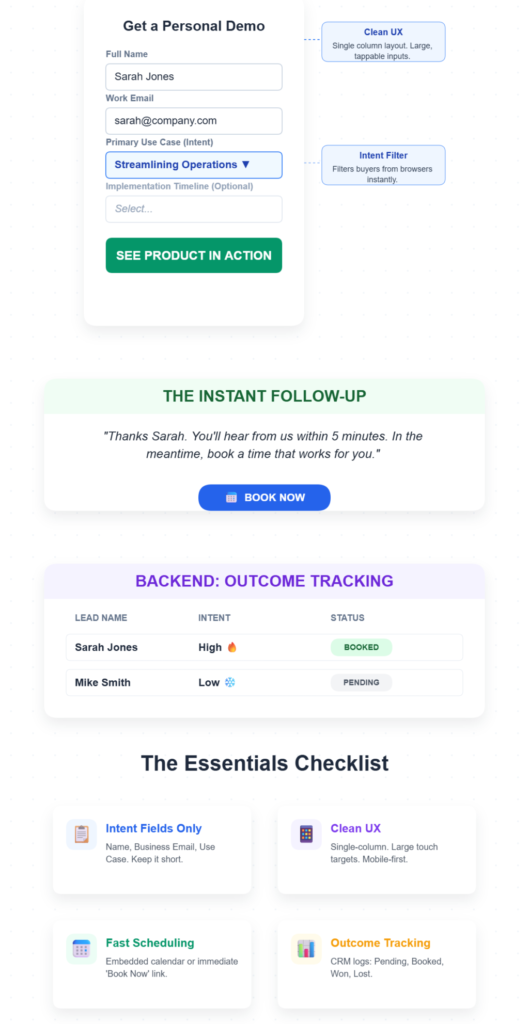
Here’s your checklist. A properly optimized demo form should have:
- Intent Fields Only: Name, business email, use case. Optional: company size, timeline.
- Timeline or Use-Case Field: A dropdown asking “When are you looking to implement?” or “What’s your primary use case?” filters tire-kickers from ready buyers.
- Clean UX: Single-column layout. Large, tappable fields. Mobile-responsive. No CAPTCHA unless you’re getting bot spam.
- Fast Scheduling: Embedded calendar or a prominent “Book Now” button on the confirmation page.
- Follow-Up Clarity: Confirmation message that says: “Thanks, [Name]. You’ll hear from us within 5 minutes. In the meantime, book a time that works for you.”
- Outcome Tracking Readiness: Your CRM should log every request with a status field (Pending, Booked, Completed, Won, Lost) so you can track conversion at every stage.
Before vs After Examples
Let’s make this concrete with side-by-side comparisons:
Form Length:
Bad: * 9 fields (Name, Email, Phone, Company, Role, Industry, Company Size, Budget, “Tell us about your needs”)
Good: * 3 fields (Name, Business Email, Use Case dropdown)
CTA Text:
Bad: * “Submit” or “Request Demo”
Good: * “See How It Works” or “Show Me [Product] in Action”
Confirmation Message:
Bad: * “Thanks! We’ll be in touch soon.”
Good: * “Got it, [Name]. You’ll hear from [Rep Name] within 5 minutes. Want to skip the wait? Book your demo now: [Calendar Link]”
Fields Asked:
Bad: * “What’s your annual revenue?” “How many employees?” “What tools are you currently using?”
Good: * “What’s your primary use case?” (Dropdown: Lead Management, Pipeline Tracking, Demo Scheduling, Other)
A clean demo form with embedded scheduling converts 60-70% of requests into booked meetings.
Why Do Demo Forms Reduce Conversion?
Form friction kills intent. Every field you add increases cognitive load. Prospects start questioning: Why do they need this? Will I get spammed? Is this worth my time?
Each extra field adds 4-8% friction. A nine-field form can drop completion rates by 30-50% compared to a three-field version. Unclear expectations compound the problem. If prospects don’t know what happens after they submit, they hesitate. That hesitation turns into abandonment.
What Fields Should a Demo Form Include?
Stick to three core fields:
- Name: First name only is fine. You don’t need a formal “First Name / Last Name” split.
- Business Email: Block free domains (Gmail, Yahoo, Outlook) to filter out low-intent traffic. Use real-time validation to catch typos.
- Use Case or Timeline: A single dropdown that qualifies intent. Examples: “I need this in the next 30 days” vs. “Just researching options.”
Optional fourth field: Company size (if you route based on deal size).
How Many Fields Are Too Many on a Demo Form?
Anything over five fields is too many. Three is ideal. Five is acceptable if you’re in complex B2B sales and need industry or role data for routing. Remember: you’re not closing the deal in the form. You’re booking a conversation. Save the deep discovery for the demo itself.
Not sure which fields are actually worth keeping? Here are high-intent fields to add to your demo request form that improve lead quality without making the form longer.
How Can I Increase Demo Form Conversion Rate?
Focus on three levers:
- Reduce friction: Fewer fields, clearer CTAs, mobile-friendly layout.
- Add instant scheduling: Embed calendars so prospects can book immediately.
- Speed up follow-up: Automate responses within two minutes and send reminders before the meeting.
Combined, these changes can lift demo-to-booked meeting rates from 40% to 70%.
Turn Demo Requests Into a Real Workflow
If you’re tired of losing leads to slow follow-ups and messy spreadsheets, LevelUp Demo is built to turn demo requests into an end-to-end workflow—capture, qualify, schedule, follow up, and track outcomes. When your demo process runs like a system instead of a scramble, you close more deals.
The Ugly Truth: Ghost Errors That Kill Demos
Let’s talk about the problems nobody mentions in the official guides:
High Requests, Low Bookings: You’re getting 50 demo requests a month but only booking 15. The root cause? Slow follow-up (over 10 minutes) or no canned response. The weird fix: auto-send an agenda and Calendly link within two minutes using marketing automation.
50% Qualification Fails: You’re booking demos, but half turn out to be unqualified. The root cause? Broad targeting or ad traffic bringing in tire-kickers. The weird fix: use real-time enrichment (Clearbit, ZoomInfo) and add ICP filters like company size.
Form Fills But No-Shows: Prospects book and then ghost. The root cause? Confusing calendars or no reminders. The weird fix: embed scheduling at submit and send auto-reminders 24 hours before the meeting.
Low-Quality Leads (Personal Emails): Your form is short, but you’re getting Gmail addresses and students. The root cause? no qualifiers. The weird fix: add a business email field and a use-case dropdown to focus on SQL-ready traffic.
Top-Funnel Drop-Offs: Traffic hits your demo page, but nobody submits. The root cause? Salesy CTAs create cognitive friction. The weird fix: use multi-path CTAs—”See It in Action” for researchers, “Talk to an Expert” for ready buyers.
Final Thought
Your demo form is a sales tool, not a data collection exercise. Every field, every word, and every second of delay either moves a prospect closer to a booked meeting or quietly pushes them away. The fixes are usually simple: remove unnecessary fields, add instant scheduling, and make sure follow-ups happen on time.
If your team is handling demos every week, a workflow tool like LevelUp Demo can help you capture requests, schedule faster, and keep outcomes and next steps clear without relying on messy spreadsheets. Start by tracking your demo-to-booked rate for the next 7 days. Once you can see where leads drop off, improving it becomes a lot easier.