
The demo went great. Smiles. Nodding. “This looks really promising, we’ll circle back next week.”
Then… nothing. Two follow-ups. A “just checking in” email. A Slack message to the team: “Any update on Acme Corp?”
And three weeks later, the CRM status quietly shifts to “Lost – No Response.”
I’ve watched this happen dozens of times. Not because the demo was bad—it wasn’t.
The product clicked, the pain was real, the prospect was engaged. The demo didn’t fail on the call.
It failed in the 48 hours after it, when “next steps” amounted to little more than “I’ll send over some pricing.”
That’s the pattern. We treat “next steps” like a calendar placeholder. A polite handshake at the door.
But in a SaaS sales cycle, the next step is the deal.
It’s the moment where momentum either compounds or evaporates.
By the end of this guide, you’ll have a concrete framework for structuring SaaS demo next steps that actually move pipeline—complete with the verification checks, friction warnings, and ugly truths that most playbooks skip.
The Pre-Flight Check: What You Need Before Fixing Your Next Steps
Before we get into the how, let’s be honest about readiness.
You can’t fix post-demo execution if the pre-demo foundations are cracked.
Here’s what needs to be locked down:
- CRM hygiene is non-negotiable. If your lead assignment process has gaps—notes missing, owners unassigned, status fields stale—no next-step framework will save you. Your CRM should be a live operating system, not a graveyard of “Demo Completed” entries with no follow-up task attached.
- You know who was on the call. Not just the company. The actual humans. Their roles, their motivations, their level of authority. Persona alignment matters because the next step for a VP of Product looks radically different from the next step for an end-user evaluating workflow fit.
- You have a recording or structured notes. If you can’t reference specific moments from the demo—what excited them, where they paused, what objection surfaced—you’re guessing. And guessing is how you send a generic recap to someone who asked a very specific question about integrations.
Stop/Go test: Can you open your CRM right now and see, for your last demo, exactly who attended, what their stated pain was, and what follow-up action was assigned with a due date?
If yes, keep reading. If no, fix that first. Everything below depends on it.
Phase 1: Redefine What “Next Step” Actually Means
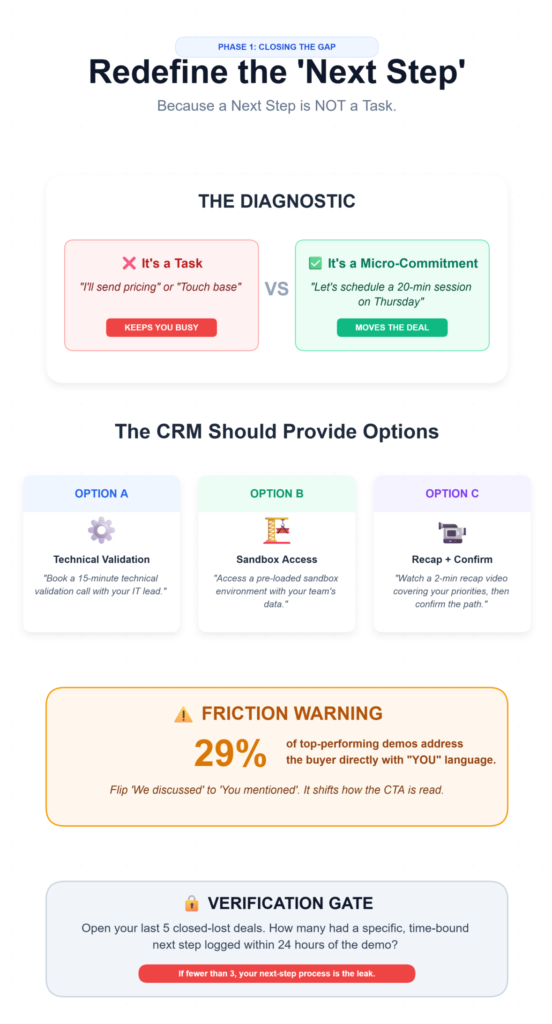
Here’s the diagnostic most teams miss: a next step is not a task. It’s a micro-commitment.
“I’ll send pricing” is a task. “Let’s schedule a 20-minute technical validation session with your integration lead on Thursday” is a micro-commitment.
One keeps you busy. The other moves the deal.
The difference matters because vague CTAs—”circle back,” “touch base,” “send over some info”—give the prospect zero reason to act.
They create no urgency, no specificity, and no accountability. The prospect didn’t ghost you because they lost interest.
They ghosted because you gave them nothing concrete to respond to.
What you should see: After every demo, your CRM should auto-populate with 2-3 pre-drafted next-step options. Not one.
Not zero. Options. Because the right next step depends on where the buyer actually is, and you won’t always know in the moment.
Examples:
- Option A: “Book a 15-minute technical validation call with your IT lead.”
- Option B: “Access a pre-loaded sandbox environment with your team’s data.”
- Option C: “Watch a 2-minute recap video I’ll record covering your top 3 priorities, then confirm which path makes sense.”
Verification: Open your last 5 closed-lost deals. How many had a specific, time-bound next step logged within 24 hours of the demo?
If fewer than 3, your next-step process is likely the leak.
Friction warning: 29% of top-performing demos address the buyer directly with “you/your” language in follow-ups.
Most teams default to “we” language in their recaps—”We discussed,” “Our platform does.” Flip it.
“You mentioned,” “Your team’s workflow,” “Your timeline.” It’s a small CTA framing shift that changes how the prospect reads the email.
💡 Live Scheduling Show Rates
Recent 2026 sales pipeline data shows that securing the next micro-commitment while still on the active call—by actually putting the meeting on the calendar before hanging up—increases the follow-up show rate to 82%. Compare that to a 41% show rate when the calendar link is sent via a post-demo email.
Phase 2: The Recap That Actually Gets Opened
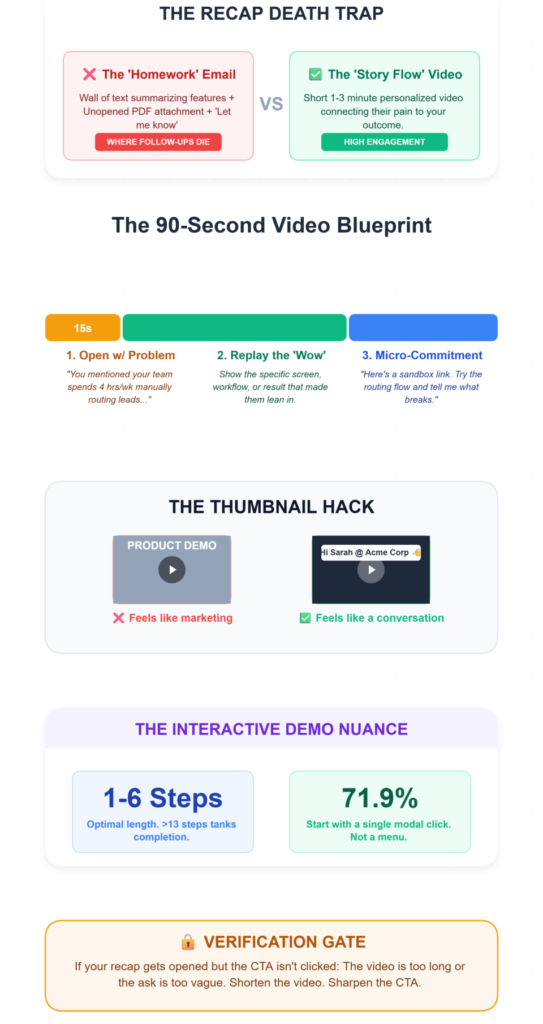
The recap email is where most follow-ups go to die.
Here’s why: it’s usually a wall of text summarizing features the prospect already saw, attached to a PDF they’ll never open, signed off with “Let me know if you have any questions.”
That’s not a recap. That’s homework.
What works instead is a recap video. Short—1 to 3 minutes. Personalized. Not a re-demo.
A story flow that connects their pain to your outcome, narrated over 2-3 key screenshots or demo moments.
Here’s the structure:
- Open with their problem (15 seconds). “You mentioned your team spends 4 hours a week manually routing demo leads—here’s what we showed you.”
- Replay the wow moment (45 seconds). The specific screen, workflow, or result that made them lean in. If you mapped your a-ha moments from sales calls beforehand using an LLM, you already know what this is.
- Close with the next micro-commitment (30 seconds). Not “let me know.” A specific ask. “I’ve set up a sandbox environment with your sample data. Here’s the link. Try the lead routing flow yourself and tell me what breaks.”
What you should see: The recap video thumbnail in your email should display the prospect’s name or company.
Generic thumbnails with your logo feel like marketing collateral. Personalized ones feel like a conversation.
Verification: Track open and click rates on recap emails.
If your recap gets opened but the CTA link doesn’t get clicked, the content is too long or the ask is too vague.
Shorten the video. Sharpen the CTA.
The nuance here: Flows with 1-6 steps have the highest completion rates.
The moment you push past 13 steps in any interactive follow-up—a sandbox walkthrough, a self-serve demo, a guided onboarding—completion tanks.
Cap it. 71.9% of the top-performing interactive demos start with a modal (a single, clear first action). Not a menu.
Not a dashboard. One thing to click.
📉 The Internal Shareability Factor
Why a video instead of text? Modern buying committees average 6-10 stakeholders. A 2025 B2B buyer study found that a 2-minute personalized recap video is 3x more likely to be forwarded internally to a decision-maker than a text-heavy recap email. Your champion doesn’t want to explain your product; they want you to do it for them.
Phase 3: Hand Off Without Dropping the Ball
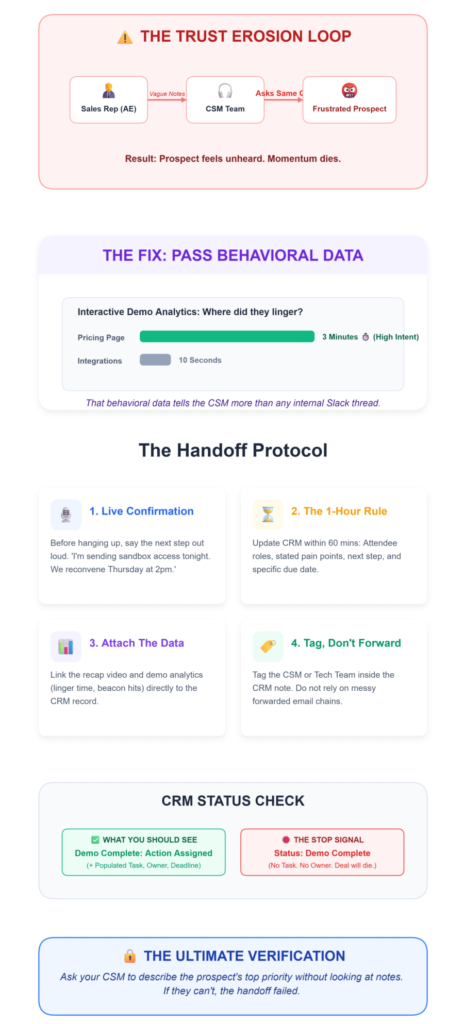
This is where pipeline quietly bleeds out.
The demo went well. The AE logs a note. Maybe. The CSM gets looped in… eventually.
But the prospect’s specific context—what they cared about, what objection they raised, what timeline they mentioned—doesn’t travel with the handoff.
So the CSM asks the same questions. The prospect feels unheard. Trust erodes.
The fix isn’t more meetings. It’s embedding demo analytics directly into the handoff.
Pull the data: where did the prospect linger during the interactive demo? Which engagement beacons did they hit?
Did they spend 3 minutes on the pricing page and 10 seconds on integrations, or the reverse?
That behavioral data tells the CSM more than any internal Slack thread.
Directive steps:
- Before the demo ends, confirm the next step live on the call. Say it out loud. “So we’re aligned—I’m sending you sandbox access tonight, and we’ll reconvene Thursday at 2pm with your integration lead. Sound right?”
- Within 1 hour post-demo, update CRM with: attendee names, roles, stated pain points, the agreed next step, and a due date.
- Attach the recap video link and any demo analytics (linger time, beacon hits) to the CRM record.
- If a handoff to CSM or technical team is needed, tag them in the CRM note—don’t rely on a forwarded email.
What you should see: CRM status reads “Demo Complete: Next Action Assigned” with a populated task, an owner, and a deadline.
If the status just says “Demo Complete” with no task, that’s a stop signal.
Verification: Ask your CSM to describe the prospect’s top priority without looking at notes.
If they can’t, the handoff failed.
The Ugly Truth: Why “Good” Demos Still Stall
Let’s talk about the messy stuff. The problems that don’t show up in playbooks but show up constantly in pipeline reviews.
| Problem | The Weird Fix | Why It Works |
|---|---|---|
| Prospect ghosts after a strong demo | Pre-draft 3 next-step options during the demo and present them before hanging up | Eliminates the “I’ll think about it” exit ramp |
| Demo felt irrelevant despite preparation | Run a 5-minute BuiltWith scrape + About Us skim right before the call | Catches tech stack and org changes your CRM data missed |
| Interactive demo completion drops off | Cap flows at 5-6 steps, start with a modal, add engagement beacons at key moments | 71.9% of top demos use modals; over 13 steps kills completion |
| Prospect’s questions derail the entire flow | Announce “I’ll park questions and we’ll hit them at the end” in the first 60 seconds | Protects flow integrity without dismissing the buyer |
| CSM handoff creates a “start over” feeling | Embed demo analytics and recap video in the CRM record before handoff | CSM walks in with context, not cold |
The pattern across all of these? The fix happens before or during the demo, not after.
Post-demo execution is really pre-demo planning wearing a different hat.
Your demo workflow shouldn’t be held together by memory.
If you’re running demos with a small team and losing deals in the handoff—not the pitch—LevelUp Demo was built for exactly this. It captures leads from your demo form, tracks outcomes, manages follow-ups with reminders, and gives your team a clean view of what’s moving and what’s stuck. No bloated CRM migration. Just the pipeline visibility that prevents “Lost – No Response” from becoming your most common status.
Frequently Asked Questions
How long should a SaaS demo next step take to execute?
The recap video and CRM update should happen within 1 hour post-demo. Sandbox setup, if applicable, within 24 hours. The prospect’s micro-commitment (a validation call, a self-serve test) should be scheduled within 48 hours. Letting a week pass between demo and next action is where most SaaS demo follow-up processes break down.
Why do prospects ghost after saying the demo looked great?
Almost always because the next step was vague. “I’ll send pricing” or “Let’s reconnect next week” gives the prospect nothing to act on and no accountability. Pre-draft specific options and confirm one live on the call. Deals with a clear post-demo CTA close faster because they create forward motion, not open loops.
How do I keep interactive demo follow-ups from feeling overwhelming?
Cap self-serve flows at 5-6 steps maximum. Start with a single modal action—not a menu or dashboard. Use engagement beacons to guide attention to the moments that matter. Data shows completion rates collapse past 13 steps, so shorter demo workflows consistently outperform longer ones.
What’s the biggest mistake small sales teams make after demos?
Not updating the CRM in real time. When lead assignment lags and notes are incomplete, follow-ups become generic, handoffs lose context, and the prospect feels like they’re starting over. A streamlined demo management tool with built-in follow-up tracking solves this without adding process overhead.
Should I send a recap email or a recap video?
Video. Every time. A 1-3 minute personalized recap video that replays the prospect’s pain, the wow moment, and the specific next step outperforms text recaps because it’s harder to ignore and easier to share internally with other stakeholders.
How do I know if my demo next-step process is actually working?
Track two numbers: the percentage of demos with a specific, time-bound next step logged within 24 hours, and the percentage of those next steps that actually happen. If the first number is below 80% or the second is below 50%, your demo-to-close pipeline has a structural leak.
The uncomfortable truth about SaaS demo next steps is that they’re not a sales technique. They’re an operational discipline.
The teams that close consistently aren’t running better demos—they’re running tighter systems around what happens after the screen share ends.
Stop losing deals in the follow-up gap.
Give your team the post-demo structure that actually converts. LevelUp Demo manages the entire workflow from the moment the call ends.
✅ Enforce Micro-Commitments
✅ Automate Follow-ups
✅ Track Handoffs