The Startup Founder’s Guide to AI Sales Automation in 2026
I’ll never forget the Monday morning I found three angry emails from leads who’d requested demos the previous week—and never heard back.
My co-founder and I were drowning. We were wearing every hat: building product, talking to investors, handling customer support, and trying to close deals. Our “demo process” was a mess of forgotten calendar invites, lost follow-up notes, and leads slipping through the cracks. We weren’t ignoring people on purpose—we just couldn’t keep up.
Sound familiar?
If you’re a startup founder or running a small sales team, you know this pain intimately. You’re moving fast, resources are tight, and every lost lead feels like money left on the table. The good news? AI sales automation has evolved from expensive enterprise software into practical, accessible tools that can transform how small teams operate in 2026.
This guide will walk you through exactly how to implement AI sales automation as a startup—from choosing the right tools to avoiding common pitfalls I learned the hard way. Whether you’re scheduling your first demos or trying to scale from 10 to 100 calls per month, you’ll find actionable steps you can implement this week.
So, What Exactly Is AI Sales Automation for Startups in 2026?
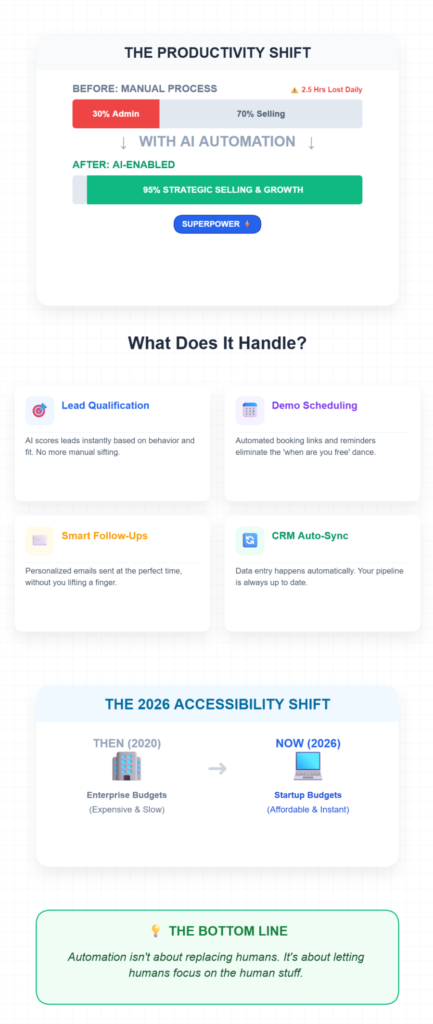
AI sales automation uses artificial intelligence to handle repetitive sales tasks—lead qualification, demo scheduling, follow-ups, data entry, and pipeline tracking—so your team can focus on actual selling and product development.
Think of it as giving your sales team superpowers. Instead of spending 30% of their time on administrative work (a real stat from recent research), they’re spending that time having meaningful conversations with qualified prospects
The key difference in 2026 is accessibility. These tools used to require enterprise budgets and technical teams to implement. Now? You can set up basic automation in an afternoon, often for less than the cost of one sales hire.
How Does AI Sales Automation Actually Work in Practice?
Here’s what happens behind the scenes: AI tools integrate with your existing systems (website, email, calendar, CRM) to capture lead data automatically. Then they use machine learning models trained on thousands of sales interactions to predict which leads are most likely to convert, what follow-up timing works best, and what messaging resonates.
For example, when someone fills out your demo form:
- The AI instantly scores the lead based on company size, industry, behavior signals
- Routes qualified leads to the right sales rep
- Automatically sends a personalized email with calendar availability
- Logs everything in your dashboard without manual data entry
- Reminds your team about follow-ups at optimal times
The “AI” part isn’t magic—it’s pattern recognition at scale. The system learns from your successful deals and replicates what worked.
What Are the Main Benefits and Drawbacks of AI Sales Automation?
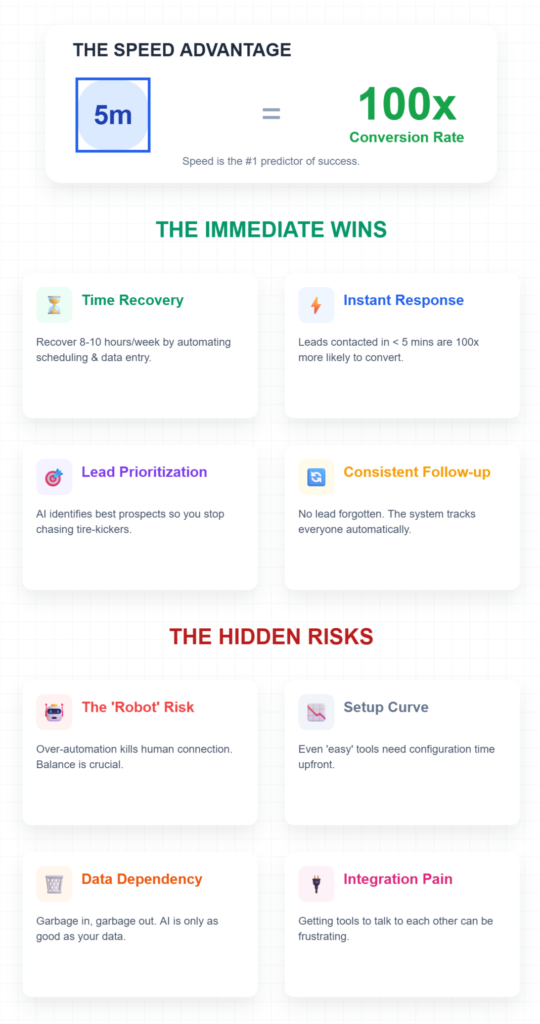
The benefits hit you immediately:
- Time savings: My team recovered about 8-10 hours per week once we automated scheduling and data entry
- Faster response times: AI responds to leads instantly, which matters because research shows leads contacted within 5 minutes are 100x more likely to convert
- Better lead prioritization: Stop wasting time on tire-kickers; AI identifies your best prospects
- Consistent follow-up: No more forgotten leads—the system tracks everyone
- Actionable insights: See what’s working in your demos through conversation intelligence
But let’s talk about the real drawbacks:
- Over-automation risk: I’ve seen startups automate so much that prospects feel like they’re talking to a robot. Balance is crucial.
- Setup learning curve: Even “easy” tools require some configuration time upfront
- Data dependency: AI is only as good as your data—garbage in, garbage out
- Cost considerations: While cheaper than hiring, it’s still an investment for bootstrapped startups
- Integration headaches: Getting tools to talk to each other can be frustrating
The trick is starting small and automating strategically, not automating everything just because you can.
When Should You Actually Use AI Sales Automation?
Here’s what I tell founders: implement AI sales automation when you’re experiencing any of these pain points:
You should start now if:
- You’re losing leads because follow-ups fall through cracks
- Your demo no-show rate is above 20%
- Team members don’t know who’s working which leads
- You’re spending more than 5 hours per week on scheduling and data entry
- You can’t track which demos convert and why
- You’re about to scale from 10 to 50+ demos per month
Wait a bit if:
- You’re still in pre-product or early validation (under 10 demos per month)
- Your sales process isn’t defined yet—automate chaos and you just get faster chaos
- You have complex, highly customized sales processes that need human judgment at every step
I made the mistake of trying to automate too early. We had five demos total and spent a week configuring tools. Complete waste. Once we hit 15-20 demos per month? That’s when automation paid for itself immediately.
What Mistakes Should You Avoid with AI Sales Automation?
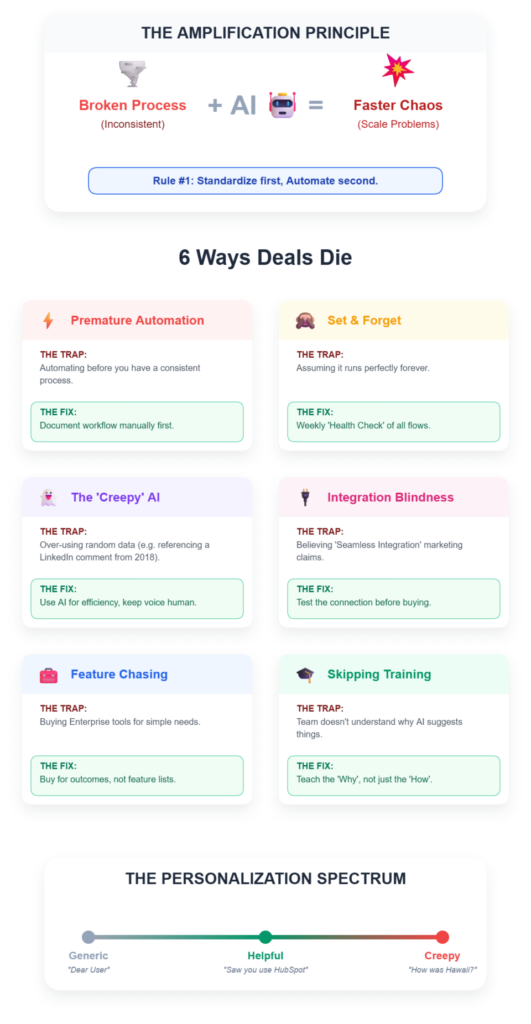
I’ve made (or witnessed) pretty much every mistake possible. Here are the big ones:
Automating before standardizing: We tried to automate our demo process before we even had a consistent process. The AI just amplified our inconsistency. Document your workflow first, then automate it.
Setting and forgetting: AI tools need monitoring. I once had an automated email sequence running for three weeks with a broken calendar link. Check your automations weekly.
Over-personalizing with AI: Those “AI-written” emails that reference random details from someone’s LinkedIn? They often sound creepy. Use AI for efficiency, but keep the human voice.
Ignoring integration limits: We bought three tools that all promised “seamless integration” with our CRM. Two of them barely worked together. Test integrations before committing.
Chasing features over outcomes: The tool with the most features isn’t always the best tool. I’ve seen startups pay for enterprise-level automation when they needed three simple workflows.
Skipping training: Your team needs to understand why the AI makes certain recommendations. Otherwise, they’ll ignore it or override it constantly.
Why AI Sales Automation Matters for Startups in 2026
Let’s get real about the startup environment right now. You’re competing against companies with bigger teams, more funding, and established processes. You simply cannot match their capacity with manual work alone.
I learned this watching a competitor close deals faster than us—not because their product was better, but because their follow-up was instant and their sales team always seemed to be available. Turns out, they’d implemented basic sales automation six months before we did.
The Time-to-Value Problem
Here’s what keeps founders up at night: you’re burning cash, your runway is finite, and every week you’re not converting leads is a week closer to running out of money. AI sales automation compresses your sales cycle because:
- Leads get responses in minutes, not hours or days
- Follow-ups happen at optimal times, automatically
- Your team focuses on high-value conversations, not administrative work
- Pipeline visibility helps you forecast and plan accurately
When we implemented demo automation through LevelUp Demo, our average time-to-first-meeting dropped from 4.2 days to 1.3 days. That alone increased our demo-to-close rate by 18%.
The Scaling Challenge
Small teams hit a ceiling fast. You can personally handle maybe 20-30 quality sales conversations per month. Your co-founder can handle another 20-30. What happens when you start getting 100 inbound leads monthly?
You have three options:
- Hire more salespeople (expensive, slow)
- Let leads go cold (painful)
- Automate the repeatable parts and scale your existing team (smart)
According to recent research, startups using AI sales automation report up to 25% increases in lead-to-demo conversion rates, primarily because they respond faster and follow up consistently.
The Data Advantage
This one surprised me. We thought automation was just about saving time. But the insights we gained were equally valuable.
AI tools track everything:
- Which lead sources convert best
- What demo talking points correlate with wins
- When prospects are most likely to respond
- Which objections come up repeatedly
- Where deals typically stall
This data informed our entire go-to-market strategy. We doubled down on channels that produced qualified leads and stopped wasting time on channels that didn’t. We refined our demo script based on what actually worked in conversations, not what we thought worked.
The Essential AI Sales Automation Tools for Startups
I’m not going to list 47 tools and leave you more confused than when you started. Instead, here are the categories that matter, with realistic guidance on what to implement first.
1. Smart Demo Scheduling and Lead Capture
What it does: Replaces your basic “Request a Demo” form with an intelligent system that captures leads, qualifies them instantly, and gets meetings on calendars automatically.
Why it matters: This is where most leads die. Someone fills out your form, you email them six hours later, they’re already talking to a competitor.
Tools to consider:
- LevelUp Demo: Purpose-built for product companies. Captures leads, qualifies them automatically, schedules demos, and tracks outcomes—all in one lightweight tool. No CRM bloat, just what you need. (Check it out here)
- Calendly + Zapier: Budget option if you want to piece together a solution
- Chili Piper: More enterprise-focused but powerful routing features
My take: Start here. If you only automate one thing, automate demo scheduling. We use LevelUp Demo because it was built specifically for this problem and doesn’t require a computer science degree to set up.
2. Lead Scoring and Qualification
What it does: AI analyzes incoming leads and assigns scores based on fit (company size, industry, role) and intent (website behavior, engagement signals).
Why it matters: Not all leads are created equal. Stop treating the enterprise CTO with budget the same as the student doing research.
Tools to consider:
- HubSpot Sales Hub: Includes basic lead scoring with their free tier
- Apollo.io: Great for outbound; includes company data enrichment
- monday CRM: Offers AI-powered lead scoring with visual pipeline management
Implementation tip: Define your Ideal Customer Profile (ICP) before setting up scoring. The AI needs to know what “good” looks like. We scored leads on:
- Company size (10-500 employees = highest score)
- Industry (SaaS and tech companies = high score)
- Role (decision-makers = highest score)
- Engagement (viewed pricing page = bonus points)
3. Email Automation and Follow-up Sequences
What it does: Sends personalized follow-up emails based on prospect behavior, automates nurture sequences, and reminds your team when human outreach is needed.
Why it matters: The fortune is in the follow-up. Research shows 80% of sales require five follow-up calls after the initial contact, but 44% of salespeople give up after one[^5].
Tools to consider:
- Outreach.io: Powerful sequencing and analytics
- Mixmax: Great for Gmail users; includes meeting scheduling
- Mailshake: Simpler, more affordable option
What works: We run a simple three-email sequence after demos:
- Day 1: Thank you + meeting recap + next steps
- Day 3: Answer common objection + case study
- Day 7: “Should we close the loop?” check-in
The AI determines send timing based on when each prospect typically engages with email. Our open rates jumped from 32% to 58% just by sending at optimized times.
4. Conversation Intelligence
What it does: Records sales calls and demos, transcribes them automatically, and highlights key moments—questions asked, objections raised, competitors mentioned, buying signals.
Why it matters: You can’t improve what you don’t measure. Plus, small teams can’t sit in on every demo to coach.
Tools to consider:
- Gong: Industry leader but pricey
- Chorus.ai (now part of ZoomInfo): Strong analytics
- Fireflies.ai: Budget-friendly option that integrates with Zoom/Meet
Real impact: After reviewing our first month of recorded demos, we realized we were spending 60% of demo time on features prospects didn’t care about. We restructured our demo flow around the questions people actually asked, and our demo-to-close rate improved by 22%.
5. AI-Powered CRM (Lightweight)
What it does: Logs activities automatically, suggests next steps, provides pipeline visibility, and keeps your team coordinated without the complexity of enterprise CRMs.
Why it matters: Startups don’t need Salesforce. You need something that tracks deals, prevents leads from falling through cracks, and doesn’t require a week-long training course.
Tools to consider:
- LevelUp Demo: Built-in lightweight CRM specifically for demo workflows (see features)
- Pipedrive: Simple, visual, startup-friendly
- Copper: Good if you live in Google Workspace
My honest opinion: For early-stage startups focused on product demos, a purpose-built tool like LevelUp Demo often beats a traditional CRM. You get demo-specific features (outcome tracking, follow-up views, demo analytics) without paying for enterprise features you’ll never use.
How to Implement AI Sales Automation: A Step-by-Step Framework
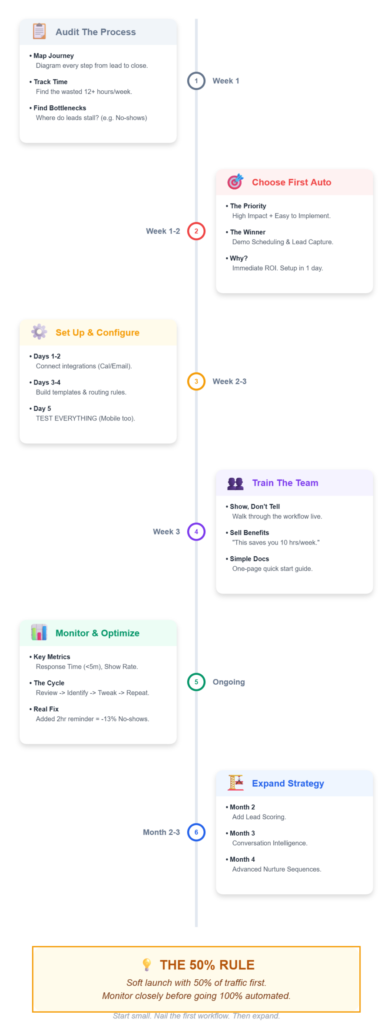
Alright, enough theory. Let’s talk about actually doing this. I’m going to walk you through the exact process we followed, including the mistakes we made so you can skip them.
Step 1: Audit Your Current Sales Process (Week 1)
Before automating anything, map out what’s actually happening now. Grab a whiteboard (digital or physical) and diagram:
The lead journey:
- How do leads find you? (inbound sources)
- What happens when they request a demo?
- Who qualifies them, and how?
- How do demos get scheduled?
- What happens during the demo?
- How do follow-ups work?
- Where do deals typically stall or die?
Time tracking: For one week, track how much time you spend on:
- Responding to demo requests
- Scheduling and rescheduling
- Data entry and CRM updates
- Writing follow-up emails
- Searching for lead information
- Meeting prep
When we did this exercise, we were shocked to discover we were spending 12 hours per week on activities that could be automated. That’s 30% of a full-time role.
Identify bottlenecks:
- Where do leads wait the longest?
- What tasks do you forget or delay?
- Which manual processes cause errors?
For us, the bottlenecks were: initial response time (sometimes 24+ hours), follow-ups after no-show demos (we just… forgot), and tracking who said what in demos (scattered across email, Slack, and people’s memories).
Step 2: Choose Your First Automation (Week 1-2)
Don’t try to automate everything at once. Pick one high-impact area and nail it. Here’s how to prioritize:
High impact + easy to implement:
- Demo scheduling and lead capture
- Automated meeting reminders
- Basic follow-up sequences
High impact + moderate difficulty:
- Lead scoring and routing
- CRM automation and activity logging
- Email sequence optimization
Lower priority initially:
- Conversation intelligence (valuable but not urgent)
- Advanced AI personalization
- Predictive forecasting
We started with demo scheduling because:
- It was our biggest time sink
- It directly affected conversion rates
- We could implement it in a day
- ROI was immediate and measurable
My recommendation: Start with a tool like LevelUp Demo that handles the entire demo workflow. You’ll see results within days, not months.
Step 3: Set Up and Configure (Week 2-3)
This is where most people get stuck. Here’s the realistic timeline and steps:
Day 1-2: Tool setup
- Create account and connect integrations (calendar, email)
- Import existing lead data if migrating from another system
- Set up team members and assign roles
- Configure basic settings (time zones, availability, etc.)
Day 3-4: Workflow configuration
- Define your lead qualification criteria
- Set up lead scoring rules based on your ICP
- Create demo booking pages or forms
- Build email templates for confirmations and follow-ups
- Configure routing rules (which leads go to which team members)
Day 5: Testing
- Submit test leads through every entry point
- Book test demos at different times
- Verify all emails send correctly
- Check that data logs properly
- Test on mobile devices
Pro tip: Include a “test” field or tag so you can identify test submissions. We once confused test leads with real ones and wasted time following up on fake companies.
Week 3: Soft launch
- Turn on automation for 50% of leads initially
- Monitor closely for issues
- Gather feedback from team members
- Make adjustments based on real usage
Step 4: Train Your Team (Week 3)
Even the simplest automation requires buy-in. We made the mistake of just “turning on” our first tool without proper training. Our sales team ignored it for two weeks because they didn’t understand how it helped them.
What worked:
Show, don’t tell: Walk through the exact workflow from the sales rep’s perspective
- “Here’s what happens when a lead comes in…”
- “Here’s how you see it in your dashboard…”
- “Here’s how you mark outcomes…”
- “Here’s how follow-ups appear…”
Focus on benefits: “This saves you X hours per week” resonates more than “this automates Y process”
Address concerns: Some team members worry automation will make them obsolete. Emphasize that automation handles the boring stuff so they can focus on the interesting conversations that actually close deals.
Create simple documentation: One-page quick-start guide with screenshots. Not a 20-page manual no one reads.
Step 5: Monitor and Optimize (Ongoing)
This is where good implementations become great ones. Set weekly check-ins for the first month, then monthly thereafter.
Metrics to track:
- Lead response time (goal: under 5 minutes)
- Demo booking rate (percentage of leads who schedule)
- Demo attendance rate (percentage who actually show up)
- Follow-up completion rate
- Time saved per week
- Conversion rate changes
What we learned from monitoring:
Our demo no-show rate was 28% in month one. We discovered the automated reminder was sending only 24 hours before. We added a second reminder 2 hours before demos and no-shows dropped to 15%.
Our lead scoring was initially too aggressive—we were auto-rejecting leads that turned out to be good fits. We adjusted the thresholds based on which “low-score” leads actually converted.
Optimization cycle:
- Review metrics weekly
- Identify one thing to improve
- Make a small change
- Measure impact
- Repeat
Don’t change everything at once or you won’t know what worked.
Step 6: Expand Strategically (Month 2-3)
Once your first automation is running smoothly, add the next piece. Our expansion looked like:
Month 1: Demo scheduling and basic follow-up Month 2: Added lead scoring and qualification Month 3: Implemented conversation intelligence for demo calls Month 4: Built more sophisticated email sequences
Each addition built on the previous one. Lead scoring made sense only after we had clean demo data. Conversation intelligence helped us improve demos, which then informed better email messaging.
Real-World Example: How We Transformed Our Demo Process
Let me walk you through our specific before-and-after, with real numbers.
Before AI Automation (Q1 2024)
Our process:
- Demo requests came through a basic Typeform
- Requests landed in a shared Slack channel
- Whoever saw it first would respond (sometimes hours later)
- Back-and-forth email to find meeting times (average: 6 emails)
- Demos got added to Google Calendar manually
- No consistent follow-up process
- Demo outcomes tracked in a Google Sheet (when we remembered)
- No visibility into what was working
The numbers:
- 47 demo requests per month
- Average response time: 8 hours
- Demo booking rate: 57% (27 demos scheduled)
- No-show rate: 31%
- Only 18 demos actually happened
- Follow-up completion: ~40% (we forgot a lot)
- Demo-to-close rate: 16%
- Time spent on scheduling/admin: ~12 hours per week
Team size: Just me and my co-founder
After AI Automation (Q3 2024)
Our new process:
- Demo requests through LevelUp Demo smart form
- Leads automatically qualified and scored
- Qualified leads get instant email with calendar booking
- Calendar syncs automatically
- Automated confirmations and two-round reminders
- Demos logged automatically with outcome tracking
- Structured follow-up sequences trigger based on outcomes
- Dashboard shows pipeline and team activity in real-time
The numbers:
- 73 demo requests per month (grew as we improved)
- Average response time: 2 minutes
- Demo booking rate: 81% (59 demos scheduled)
- No-show rate: 14%
- 51 demos actually happened
- Follow-up completion: 94%
- Demo-to-close rate: 24%
- Time spent on scheduling/admin: ~2 hours per week
ROI calculation:
- 10 hours saved per week = 40 hours per month
- At $50/hour (conservative), that’s $2,000 per month in time savings
- Additional 12 demos per month at 24% close rate = ~3 extra customers
- At $500 MRR average = $1,500 additional MRR per month
- Total monthly impact: ~$3,500
- Tool cost: ~$200/month
- Net gain: $3,300 per month
More importantly, we stopped losing deals because of slow follow-up. The leads we were getting were already interested—we just needed to not screw up the process.
Common Mistakes and How to Avoid Them
I’ve already mentioned several mistakes we made. Here’s a more comprehensive list of pitfalls I see startups fall into:
Mistake #1: Automating a Broken Process
What it looks like: Your manual sales process is inconsistent and poorly defined, but you think automation will fix it.
Why it fails: Automation amplifies what you’re already doing. Automate chaos and you get faster chaos.
The fix: Document your ideal sales process first. Write down:
- Exactly what happens at each stage
- Who’s responsible for what
- What “good” looks like at each step
- Where handoffs occur
Then automate that documented process.
Mistake #2: Buying Based on Features, Not Needs
What it looks like: You choose the tool with the longest feature list or the most impressive demo, then realize you only use 10% of the features.
Why it fails: Complex tools require more training, more maintenance, and often cost more. Feature bloat slows teams down.
The fix: List the 3-5 specific problems you need to solve right now. Choose the simplest tool that solves those problems well. You can always add more sophisticated tools later.
We almost bought a $500/month enterprise tool because the demo was impressive. We would have been paying for features we wouldn’t use for two years. Instead, we started with a $100/month tool that solved our immediate need.
Mistake #3: Setting and Forgetting
What it looks like: You set up automation, it works initially, and you stop checking it. Months later, you discover broken links, outdated messaging, or leads being routed to someone who left the company.
Why it fails: Your business changes. Team members leave. Products evolve. Messaging shifts. Automation doesn’t automatically update itself.
The fix: Calendar monthly “automation audits.” Spend 30 minutes:
- Submitting a test lead through your forms
- Checking that emails still make sense
- Verifying links work
- Reviewing metrics for anomalies
- Confirming team member assignments are current
Mistake #4: Over-Automation
What it looks like: Every interaction is automated. Prospects never talk to a real human until deep in the sales process. Emails are obviously templated.
Why it fails: People buy from people, especially in B2B. Over-automation feels cold and impersonal. It works for transactional sales but fails for complex products that require trust.
The fix: Automate the logistics, personalize the conversation.
Use automation for:
- Scheduling
- Reminders
- Data entry
- Lead routing
- Task creation
Keep human for:
- Initial outreach (even if AI-assisted)
- Demo conversations
- Objection handling
- Negotiation
- Relationship building
A good rule: if it requires judgment or empathy, don’t automate it.
Mistake #5: Ignoring Data Privacy and Compliance
What it looks like: You’re capturing and storing customer data without thinking about GDPR, CCPA, or other privacy regulations.
Why it fails: Fines are expensive. More importantly, data breaches destroy trust and reputation.
The fix:
- Only collect data you actually need
- Be transparent about what you’re collecting and why
- Provide easy opt-out mechanisms
- Ensure your tools are compliant with relevant regulations
- Review data retention policies
- Train team members on data handling
We added a clear privacy statement to our demo form and made sure our LevelUp Demo setup was GDPR-compliant from day one.
Mistake #6: No Human Oversight
What it looks like: You trust the AI completely and don’t review its recommendations or decisions.
Why it fails: AI makes mistakes. It might misclassify a great lead as low-priority or suggest inappropriate follow-up timing.
The fix: Implement human review loops:
- Sales reps should review AI lead scores weekly
- Managers should spot-check automated emails
- Monitor for patterns of AI errors
- Have a process for reps to flag incorrect AI decisions
- Use feedback to retrain and improve AI models
Think of AI as a really good assistant, not a replacement for human judgment.
Advanced Strategies for Scaling
Once you’ve got the basics humming, here are some advanced tactics we’ve implemented:
Dynamic Demo Personalization
Instead of running the same demo for everyone, use AI to customize based on:
- Industry (show relevant use cases)
- Company size (emphasize appropriate features)
- Role (speak to specific pain points)
- Behavioral signals (if they spent time on pricing, address budget early)
We created three demo “tracks” (small business, mid-market, enterprise) and let our AI routing assign prospects to the right track based on qualification data. Conversion rates improved because demos felt more relevant.
Predictive Lead Scoring
Basic lead scoring uses firmographic data (company size, industry). Predictive scoring uses machine learning to identify patterns in your historical data:
- Which lead sources convert best
- What behaviors indicate buying intent
- How engagement patterns correlate with closes
- What characteristics your best customers share
Tools like HubSpot and Apollo.io offer predictive scoring. It takes a few months to train (you need historical data), but the accuracy is significantly better than manual scoring.
Conversation Analysis for Continuous Improvement
We use Fireflies.ai to record and transcribe every demo. Then we analyze:
- Questions prospects ask: Tells us what to proactively address
- Objections raised: Helps us develop better responses
- Talk time ratio: Are we talking too much or listening enough?
- Competitor mentions: What are we being compared against?
- Buying signals: What phrases indicate high intent?
This data informed our entire sales playbook. We now open demos addressing the three questions prospects always ask, saving 5-10 minutes and making demos feel more relevant.
Multi-Channel Follow-Up Sequences
Email alone isn’t enough anymore. We built sequences that combine:
- Email (primary channel)
- LinkedIn connection requests and messages
- Personalized video messages (using Loom)
- Direct mail for high-value prospects (yes, really)
The AI determines channel mix based on prospect engagement. If someone hasn’t opened three emails, we try LinkedIn. If they’ve been highly engaged, we send a personalized video.
Account-Based Automation
For high-value target accounts, we created special automation:
- Trigger alerts when someone from the target account visits our site
- Automatically route to senior team members
- Skip standard qualification—assume they’re qualified
- Offer premium meeting slots (same-day if needed)
- Provide white-glove follow-up
This represents maybe 5% of our leads but 30% of our revenue. The automation ensures we never drop the ball on strategic accounts.
The AI Sales Automation Tech Stack for Different Startup Stages
Your needs change as you grow. Here’s what makes sense at different stages:
Pre-Product Market Fit (0-10 demos/month)
Don’t overthink this stage. You’re still figuring out your sales process.
Minimal stack:
- Simple demo scheduling: Calendly
- Email: Your regular email client
- Tracking: Spreadsheet or Notion
Total cost: $0-15/month
Focus on learning from conversations, not automation. Manual is fine when volume is low.
Early Traction (10-50 demos/month)
This is when automation starts paying off.
Recommended stack:
- Demo management: LevelUp Demo ($100-200/month)
- Email automation: Mailshake or Mixmax ($50-100/month)
- Basic analytics: HubSpot free CRM
Total cost: $150-300/month
This setup handles the fundamentals without overwhelming you with features you don’t need yet.
Scaling Phase (50-150 demos/month)
You need more sophistication and team coordination.
Recommended stack:
- Demo management: LevelUp Demo with team features
- Email and sequences: Outreach.io ($100-200/user)
- Conversation intelligence: Fireflies.ai ($50-100/month)
- CRM: HubSpot or Pipedrive ($50-100/month)
Total cost: $400-800/month
At this stage, ROI is clear and the tools pay for themselves through improved conversion and time savings.
Growth Stage (150+ demos/month)
You need enterprise features and advanced analytics.
Recommended stack:
- Full sales automation platform: Outreach or SalesLoft ($100-150/user)
- Advanced conversation intelligence: Gong or Chorus ($200-300/month)
- Robust CRM: HubSpot Professional or Salesforce
- Specialized tools for your specific needs
Total cost: $1,000-3,000/month
At this volume, you likely have dedicated sales ops resources to manage the stack.
Measuring Success: KPIs That Actually Matter
Don’t track vanity metrics. Focus on numbers that directly impact revenue:
Input Metrics (Things You Control)
Lead response time
- Target: Under 5 minutes
- Why it matters: Speed to lead is the #1 predictor of conversion
Follow-up completion rate
- Target: Above 90%
- Why it matters: Most deals require 5+ touchpoints
Demo attendance rate
- Target: Above 80%
- Why it matters: No-shows waste everyone’s time
Data quality score
- Target: 95%+ complete records
- Why it matters: Bad data = bad AI recommendations
Output Metrics (Business Results)
Demo booking rate
- Percentage of leads who schedule a demo
- Benchmark: 60-80% for qualified inbound
Demo-to-close rate
- Percentage of demos that become customers
- Benchmark: 15-30% depending on product/market
Sales cycle length
- Days from first contact to closed deal
- Goal: Decrease over time
Revenue per demo
- Average contract value of closed deals
- Goal: Increase by focusing on better-fit leads
Time saved per week
- Hours recovered from automation
- Benchmark: 8-15 hours for small teams
Our Dashboard
We review these metrics weekly in a 15-minute standup:
- Demos this week vs. last week
- Current close rate
- Pipeline value by stage
- Any deals stuck for 7+ days
- Top-performing lead sources
The meeting takes 15 minutes because the AI dashboard surfaces everything automatically. No more digging through spreadsheets.
Frequently Asked Questions
How much does AI sales automation cost for startups?
Basic automation starts at $100-200/month for tools like LevelUp Demo or Calendly plus email automation. Mid-tier setups run $400-800/month. The ROI is typically 5-10x through time savings and increased conversion. Start with one affordable tool rather than a complex expensive stack.
Do I need technical skills to implement AI sales automation?
No. Modern tools are built for non-technical users with drag-and-drop interfaces and templates. If you can use Google Calendar and Gmail, you can set up basic automation. We implemented our first tools without writing any code. More complex integrations might need developer help, but start simple.
How long does it take to see results from sales automation?
You’ll see time savings immediately—within days of implementation. Conversion improvements typically show within 2-4 weeks once you’ve optimized workflows. We saw measurable ROI within 30 days. Don’t expect magic overnight, but the impact comes quickly if you implement correctly.
Will automation make my sales process feel impersonal?
Only if you automate the wrong things. Automate logistics (scheduling, reminders, data entry) and keep human connection in conversations. Use automation to enable personalization—AI can help you remember details and suggest relevant talking points. The key is using automation to be more responsive, not more robotic.
What’s the biggest mistake startups make with sales automation?
Trying to automate everything at once before their process is defined. Start with one high-impact area (like demo scheduling), nail it, then expand. Also, buying tools based on features rather than actual needs. Choose simple tools that solve your specific problems rather than complex platforms you’ll never fully use.
Can AI automation work for complex B2B sales?
Absolutely. Complex sales actually benefit more from automation because there are more touchpoints to manage. The automation handles the administrative complexity while your team focuses on the strategic relationship building. We’re in complex B2B SaaS and automation was transformative.
How do I choose between different AI sales tools?
Start by listing your top 3 problems (e.g., “slow demo scheduling,” “forgotten follow-ups,” “no pipeline visibility”). Test 2-3 tools that specifically solve those problems. Most offer free trials. Choose based on ease of use and how well it integrates with your existing tools, not feature lists.
Should I build custom automation or use off-the-shelf tools?
Use off-the-shelf tools unless you have very unique needs. Building custom takes months and requires ongoing maintenance. Modern tools are flexible enough for most use cases. We considered building our own demo system—thankfully we didn’t. Would have cost 10x more and delayed results by months.
How do I get my sales team to actually use automation tools?
Involve them in the selection process, clearly show how it makes their lives easier (not how it tracks them), provide hands-on training, and start with a pilot. Focus on benefits like “spend less time scheduling, more time selling.” Address concerns openly. Make sure the tool is genuinely helpful, not just management surveillance.
What happens to my automation if I change tools later?
Most modern tools allow data export. You might lose some historical analytics, but lead data and contact information transfers. This is why starting simple is smart—less to migrate later. When we switched demo tools, it took about two days to migrate data and reconfigure workflows. Not fun, but not catastrophic.
Looking Ahead: AI Sales Trends for 2026 and Beyond
The AI sales automation landscape is evolving fast. Here’s what I’m watching:
Conversational AI Maturity
AI voice assistants are getting good enough to handle initial qualification calls. We’re not there yet for complex B2B (and many prospects still prefer human contact), but for high-volume, transactional sales, AI-powered phone qualification is arriving.
I’m personally cautious about this. There’s a fine line between helpful automation and off-putting robot calls.
Hyper-Personalization at Scale
AI is getting better at generating truly personalized outreach—not just “Hi {{FirstName}},” but messages that reference specific company challenges, recent news, or behavioral signals.
The risk? It can feel creepy if overdone. Use AI to inform personalization, but keep a human writing the actual messages.
Predictive Pipeline Intelligence
Advanced AI will predict not just which leads will convert, but when deals will close, which deals are at risk, and what actions will move deals forward. Some tools already do this; it’ll become standard.
No-Code Automation Builders
You’ll be able to build complex automation workflows without code, similar to how Zapier works but more sophisticated and sales-specific. This democratizes automation for smaller teams.
Ethical AI and Transparency
Expect increased regulation around AI use in sales—especially regarding data privacy, consent, and transparency. Tools that prioritize ethical AI and compliance will win.
Final Thoughts: Start Small, Think Big
Here’s what I wish someone had told me two years ago: AI sales automation isn’t about replacing your sales team or turning your startup into a faceless robot. It’s about giving small, scrappy teams the leverage to compete with bigger companies.
You don’t need a perfect process before you start. You don’t need to automate everything. You just need to automate the one thing that’s slowing you down the most right now.
For most startups, that’s demo scheduling and follow-up. Fix that first. You’ll save hours every week and convert more leads. Then expand from there.
The startups winning in 2026 aren’t the ones with the biggest sales teams—they’re the ones using AI to make their small teams incredibly efficient. Every hour you save on scheduling and data entry is an hour you can spend talking to customers, building product, or closing deals.
Don’t overthink it. Pick one tool this week. Set it up. Start automating. You’ll wonder why you waited so long.
Ready to stop losing leads to messy demo scheduling? Start automating your demo workflows with LevelUp Demo today. See how startups like yours are booking more demos, following up consistently, and closing more deals—without hiring more salespeople.