The calendar invite sits there, mocking you. “Demo: Acme Corp – 2pm.” You prepped for 45 minutes.
You stalked their LinkedIn. You queued up the perfect flow.
2:15pm. No one joins.
You refresh Zoom. You check your email. You wonder if you sent the wrong link, even though you’ve sent that same link 200 times before.
This isn’t a reminder problem. It’s a commitment problem—and most teams are solving for the wrong thing.
Here’s what you’ll learn: Why demo no-shows happen before the booking ever goes into your calendar, and the system-level fixes that make flaky leads self-select out early so your actual show-up rate climbs without a single “just checking in” email.
Why Reminders Don’t Fix No-Shows
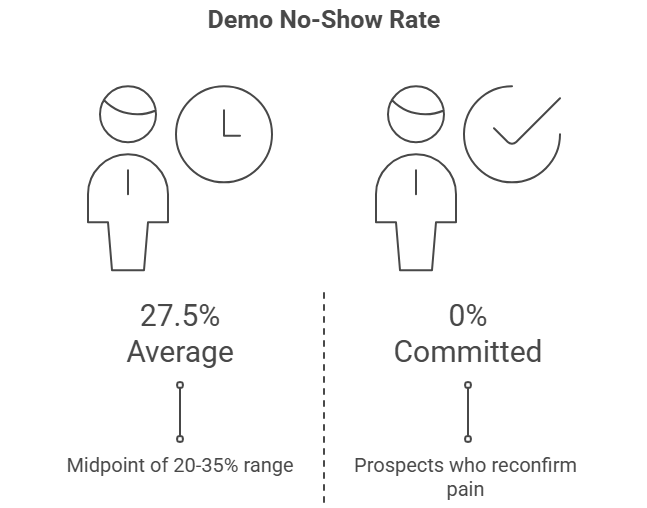
Industry benchmarks consistently report SaaS demo no-show rates between 20-35%. If you’re in that range, you’re not broken—you’re just average.
And average is expensive.
Here’s what actually breaks: the gap between “I want a demo” and “I need to solve this pain right now.”
When someone clicks “Request a Demo,” they’re expressing interest. But interest isn’t intent.
Intent shows up when they’ve already confirmed their pain, named their current workaround, and mentally committed 30 minutes to see if you can fix it.
Most sales demo process workflows skip that commitment step entirely.
You let them book instantly, fire off a confirmation email that lands in spam, and hope they remember why they cared three days later.
Reminders just nag people who weren’t committed in the first place.
What works? Making the booking itself an act of pain reconfirmation.
When prospects have to answer “What’s costing you time right now?” before they see your calendar, the ones who ghost were never going to close anyway.
You’re not losing deals. You’re filtering out noise before it costs you prep time.
📉 2025 Data: The “Agenda Effect”
Recent sales data indicates that sending a customized agenda 24 hours pre-demo reduces no-show rates by nearly 18% compared to standard automated reminders. When prospects see their specific pain point listed in the email body, the meeting shifts from “optional” to “necessary.”
The Real Causes of Demo No-Shows
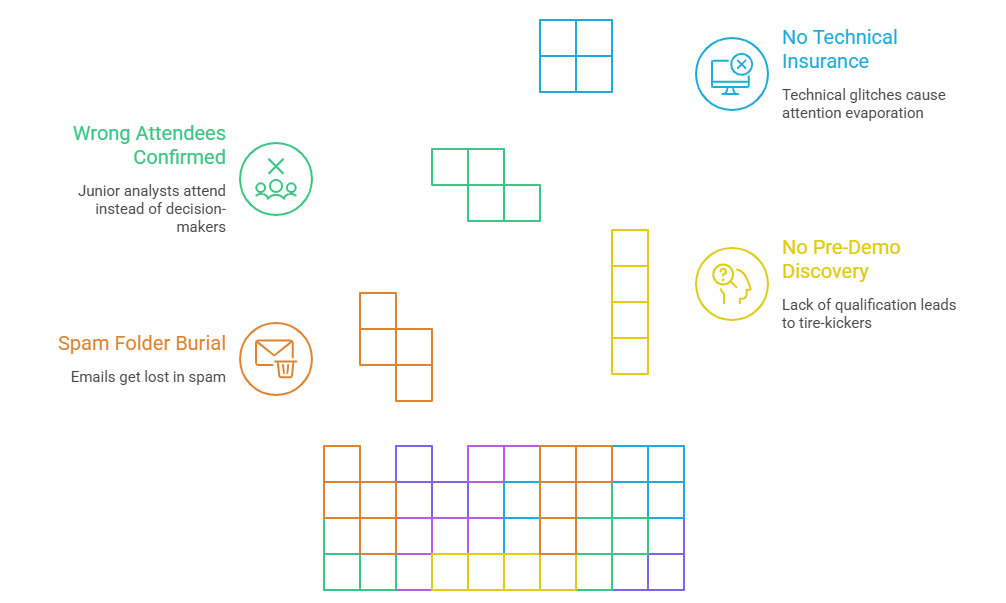
Let’s map the actual failure points.
1. Spam Folder Burial
Confirmation emails land in spam 40% of the time if you’re using certain calendar tools or if your domain reputation is shaky.
The prospect books, never sees the agenda or join link, and forgets you exist.
The fix isn’t “send more emails.” It’s embedding a phone number and SMS reminder link directly in the calendar invite itself.
Test your confirmation email by sending it to a personal Gmail and checking where it lands.
2. No Pre-Demo Discovery
You book a demo with someone who said “looks interesting” but hasn’t articulated what they’re trying to fix.
By demo day, they’ve moved on to 12 other fires.
Multiple sales studies show that responding within 5 minutes improves conversion up to 9x.
But speed without qualification just fills your calendar with tire-kickers.
The fix: Pre-demo questions. Not a survey. Not a form.
A simple reply-required email: “You mentioned [pain]—what’s your current workaround costing you per month?”
If they don’t reply, they weren’t showing up anyway.
3. Wrong Attendees Confirmed
You assume the person who booked is the decision-maker. Demo day arrives and it’s a junior analyst taking notes for someone else who “might be interested later.”
I’ve seen this kill deals that looked perfect on paper.
The fix is a “reply-all confirm your role” email 24 hours before. It sounds pushy. It works.
4. No Technical Insurance
Your wifi drops mid-demo. Your screen-share lags. You scramble to reload the page while the prospect’s attention evaporates in real time.
One founder I worked with lost a $50k deal when their demo login screen froze.
They switched to a pre-recorded 1080p local video mid-call, framed the glitch as “real-world prep proof,” and closed the deal by end-of-week.
The fix: A backup computer with local demo video and pre-loaded browser tabs. Always. No exceptions.
The System That Actually Reduces No-Shows
Forget reminders. Build a process that makes low-intent prospects self-select out before they ever hit your calendar.
Phase 1: Capture With Commitment
When someone clicks “Request a Demo,” don’t just grab their email and calendar link them. Force a micro-commitment.
What to add:
- “What’s the specific outcome you’re trying to improve?” (open text, required)
- “What’s your current workaround?” (open text, required)
- “Who else should join this demo?” (multi-select: founder, sales lead, product, other)
This is where high-intent demo requests separate from casual browsing.
If filling out three fields feels like too much work, they weren’t going to show up.
Visual Checkpoint: Your form should gray out the “Book Now” button until all pain-related fields are populated. No shortcuts.
The Verification: Reply to their submission within 5 minutes with a verbal pain reconfirm: “You mentioned [X] is costing you [Y]—is that still the biggest priority?”
If they reply, they’re real. If they don’t, cancel the calendar hold.
Expert Nuance: 80% of rushed founders skip LinkedIn stalking before this step. Don’t.
Pull up every attendee’s profile and map their role to a specific pain point. If you’re pitching junior-level pains to an exec, you’ve already lost.
Phase 2: Pre-Demo Discovery (The 5-Minute Reconfirm)
This isn’t a sales call. It’s an agenda alignment.
Schedule a 5-minute call or async video 24-48 hours before the actual demo. Script it like this:
“Quick agenda check—you mentioned [pain]. I want to make sure we spend 80% of the demo on that exact workflow. Does that still match where you’re stuck, or has anything shifted?”
What you’re listening for:
- Verbal reconfirmation of the pain (if they hedge, they’re not bought in)
- Names of other attendees and their goals (if they say “just me,” probe why)
- Current workaround details (the more specific, the higher intent)
Visual Anchor: Share your screen showing the exact agenda bullet points you’ll cover. Tick them off verbally as you align. This creates a shared contract.
The Verification: If they verbally reconfirm at least two pain points, they’ll show. If they’re vague or distracted, they won’t.
Friction Warning: Prospects book but forget what they told you in the initial form. No verbal reconfirmation here causes demo drift into generic walkthroughs, and improving demo conversion rates becomes impossible when you’re solving for the wrong pain.
Phase 3: Technical Prep (The No-Excuses Checklist)
Small teams lose demos to avoidable technical failures more than any other factor.
Your pre-demo checklist:
- [ ] Backup computer with local 1080p demo video queued
- [ ] All browser tabs pre-loaded (no live logins during screen-share)
- [ ] Phone number + SMS link embedded in calendar invite
- [ ] Attendee roles mapped to pain points in a shared doc
- [ ] One-click calendar embed sent (no “find time” back-and-forth)
Visual Checkpoint: A shared Notion or Google Sheet with all five items marked green. If even one is yellow, you’re not ready.
The Verification: Send yourself a test calendar invite and confirm it doesn’t land in spam. Click every link. If anything breaks, fix it now.
Expert Nuance: Wifi drop mid-demo is the most common ghost error. The instant your connection wobbles, say: “Let me switch to a backup—this happens, and I’ve got a cleaner version ready.” Then queue your local video. Prospects respect prep. They hate scrambling.
Phase 4: The Inverted Demo (Result Before Process)
Here’s where most teams blow it: they demo chronologically. Login → Dashboard → Features → Pricing → Questions.
That’s a feature dump. Prospects tune out at 15 minutes.
Invert the pyramid. Start with the Promised Land.
The 30-minute structure:
- 0-5 mins: Hook (reconfirm their pain verbally)
- 5-15 mins: Promised Land (show the exact result they described, with their company logo mocked in if possible)
- 15-25 mins: How (walk through 2-3 workflows, no more)
- 25-30 mins: Close (agree on next steps and owner)
Visual Anchor: A fully populated dashboard screenshot that matches their described pain. Not a generic demo environment. Their pain, their language, their outcome.
The Verification: Trigger 2-4 “a-ha moments” where the prospect says “wait, can you show me that again?” If you don’t get at least two, your pain mapping was off.
Friction Warning: Rushing all features without tying each back to a confirmed pain overwhelms prospects. They nod politely and ghost during follow-up. Stick to 2-3 pains max.
Phase 5: Follow-Up Visibility (The Anti-Scatter System)
Demo ends. Prospect says “this looks great, let me loop in my team.” You send a recap email. Then… silence.
This is where small teams lose 40% of pipeline. Not because the demo failed, but because follow-ups scatter across inboxes, Slack threads, and forgotten calendar tasks.
The fix: Centralize demo outcomes in a single shared view.
What to track:
- Demo outcome (Won / Lost / In Follow-up / Pending)
- Agreed next steps (with owner assigned)
- Follow-up due date (with auto-reminder)
- Pain points confirmed during demo (for handoff context)
Visual Checkpoint: A dashboard where every demo has a status bar showing completion percentage and next action owner.
The Verification: If you can’t answer “who owns follow-up on the Acme demo?” in 3 seconds, your system is broken.
Expert Nuance: No centralized view means structured demo follow-ups become impossible. One team I worked with coordinated via Slack threads only, missed follow-up on 40% of demos, then built a shared checklist post-mortem. No-shows dropped 25% because they caught context leaks before booking.
The “Pain Commitment” Filter
Here’s the contrarian take most SEO advice won’t tell you: stop trying to reduce no-shows.
Start trying to prevent low-intent bookings.
When demo requests, pain reconfirmation, and one-click calendar embeds live in a single workflow, flaky leads filter themselves out before they waste your prep time.
You’re not losing deals. You’re gaining back hours.
The teams that turn demos into deals don’t have magic closing skills.
They just make sure the people who show up are already 70% sold because they’ve confirmed their pain three times before the demo even starts.
When demo requests, outcomes, and follow-ups live in one workflow, no-shows stop being a guessing game.
You see exactly where prospects drop off, which pains drive the highest show rates, and which team members need better handoff context.
That’s not a reminder strategy. That’s a system.
⚡ The Power of Multi-Channel
While email reminders get buried, SMS reminders have a 98% open rate. Teams that add a single SMS ping 30 minutes before a demo see an immediate 15% boost in attendance rates. It’s the most effective technical insurance policy you can deploy in 2026.
Troubleshooting the Weird Stuff
“Prospects book but no-show even with pain confirmation”
Check where your confirmation email lands. Send a test to Gmail, Outlook, and a corporate domain. If it’s hitting spam, embed a phone number and SMS link directly in the calendar invite as a backup.
“Small team loses demo context during handoffs”
Record a 60-second audio clip after every discovery call summarizing the pain and attendee roles. Drop it in a shared drive. AEs listen before the demo. Sounds overkill. It’s not.
“Wifi fails mid-demo and prospect disengages during reload”
Keep a pre-recorded 1080p local video queued on a backup laptop. The instant your connection wobbles, switch and say “I’ve got a cleaner version ready.” Prospects respect technical insurance.
“Founder overloads demo with all features, causing confusion”
Cut to 2-3 pains only. Invert to “result-first” in the first 10 minutes. If you’re past 15 minutes and they haven’t said “wait, show me that again,” you’re feature-dumping.
FAQ
Why do demo no-shows happen?
Demo no-shows happen when prospects book without confirming their pain, forget why they cared by demo day, or never received the agenda because confirmation emails landed in spam. Reminders don’t fix low intent—they just nag people who weren’t committed in the first place. The fix is making the booking itself an act of pain reconfirmation so flaky leads self-select out early.
What’s a good SaaS demo no-show rate?
Industry benchmarks consistently report 20-35% no-show rates for SaaS demos. If you’re under 20%, you’re filtering well. If you’re over 35%, you’re booking too many low-intent prospects. The goal isn’t zero no-shows—it’s ensuring the people who do show are already 70% sold because they’ve confirmed their pain multiple times before the demo starts.
Do reminders actually reduce no-shows?
Reminders reduce no-shows by 5-10% at most, but they don’t fix the root cause: low intent at booking. If someone didn’t care enough to confirm their pain before scheduling, a reminder email won’t make them care three days later. The bigger fix is pre-demo pain reconfirmation and one-click calendar embeds so only high-intent prospects make it onto your calendar in the first place.
How can SaaS teams reduce no-shows without more emails?
Reduce no-shows by forcing micro-commitments at booking: require prospects to answer “What’s the specific outcome you’re trying to improve?” before they see your calendar. Then reconfirm their pain verbally 24-48 hours before the demo. Embed phone numbers and SMS links in calendar invites as spam backups. This filters out low-intent leads before they waste your prep time.
How do solo SaaS founders handle demo backups without a team?
Keep a backup laptop with a pre-recorded 1080p demo video and pre-loaded browser tabs. If wifi drops or your screen-share lags, switch instantly and frame it as “I’ve got a cleaner version ready.” One founder lost a $50k deal to a frozen login screen, then closed the next deal by switching to local video mid-call and calling it “real-world prep proof.”
What’s the exact checklist for small sales teams to track demo accountability?
Track five things in a shared doc: demo outcome (Won/Lost/Pending), agreed next steps with owner assigned, follow-up due date with auto-reminder, pain points confirmed during demo, and attendee roles mapped to goals. If you can’t answer “who owns follow-up on this demo?” in 3 seconds, your system is broken and you’ll lose 40% of pipeline to coordination scatter.
Stop Losing Demos to Messy Workflows
If you’re tired of no-shows and lost follow-ups, stop relying on email threads. LevelUp Demo centralizes scheduling, outcomes, and next steps in one clean view—so your team can focus on closing, not coordinating.
The Bottom Line
Reducing demo no-shows isn’t about nagging your prospects. It’s about filtering for intent.
By building pain reconfirmation into your booking flow and using multi-channel reminders as insurance, you stop wasting time on “maybes” and start focusing on the prospects who are actually ready to buy.
The goal isn’t just a full calendar. It’s a calendar full of people who actually show up.