
I’ll never forget the Tuesday morning I realized we’d lost a $12,000 deal because I forgot to follow up.
The lead had filled out our demo form three weeks earlier—excited, qualified, ready to buy. I’d scheduled a call, had a great conversation, promised to send over pricing… and then just… forgot. Life happened. A product bug needed fixing. Two other demos came in. By the time I remembered and sent that follow-up email, they’d already signed with a competitor.
I sat there staring at my inbox, my stomach in knots. Not because we lost one deal—that happens. But because I knew this wasn’t the first time. How many other leads had slipped through the cracks while I was juggling product development, customer support, and trying to remember who I’d promised to call back?
If you’re reading this, you probably know exactly what I’m talking about. You’re wearing too many hats. Your “CRM” is a Google Sheet that you forget to update. Demo requests come in through your website, LinkedIn DMs, email, and that one Slack community—and they’re scattered everywhere. You know you’re losing deals, but you’re not sure how many or why.
Here’s what I learned the hard way: organizing sales leads isn’t about having fancy software or a complicated system. It’s about creating a simple, consistent process that ensures no lead ever falls through the cracks again. By the end of this guide, you’ll know exactly how to capture, prioritize, track, and follow up on every single lead—even if you’re a solo founder with zero sales experience.
So, what exactly does it mean to organize sales leads?
Lead organization is the process of capturing every potential customer who expresses interest in your product, storing their information in one central place, and creating a clear system to track where they are in your sales process. It’s not just data entry—it’s about knowing who needs your attention right now, who’s waiting for a follow-up, and who’s already closed (or lost).
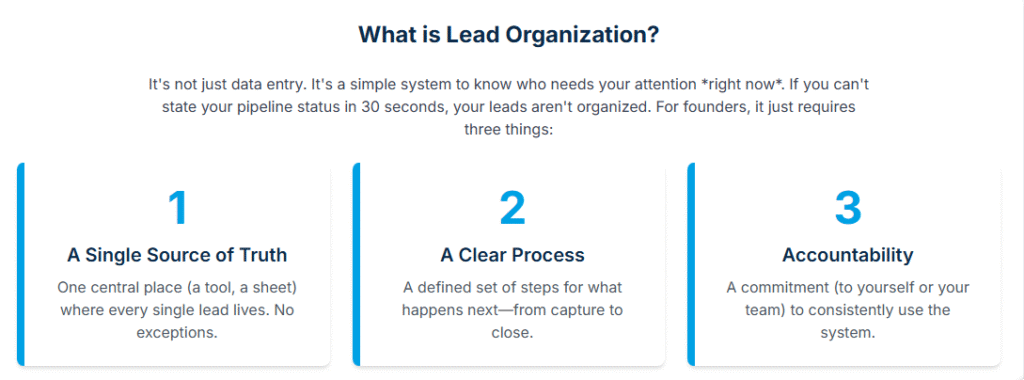
Think of it like this: if someone asked you right now, “How many demo requests did you get this month, and where is each person in your sales process?”—could you answer in under 30 seconds? If not, your leads aren’t organized.
For small teams and founders, this doesn’t require enterprise CRM software or a sales operations team. It just requires three things: a single place to capture leads, a clear process for what happens next, and accountability (even if that’s just you holding yourself accountable).
Let’s walk through exactly how to build that system.
Why organizing sales leads matters more than you think
When I started taking lead organization seriously, our demo-to-close rate jumped from 18% to 34% in two months. Not because our product got better. Not because we changed our pricing. Simply because we stopped losing leads in the chaos.
Here’s the thing most founders don’t realize: you’re not just losing the deals you forget about. You’re also losing deals because prospects can sense disorganization. When you take three days to follow up after a demo, when you can’t remember details from your last conversation, when you send them the same information twice—they notice. And it erodes trust.
Research shows that companies with a structured lead management process see a 23% increase in revenue growth compared to those without one. And leads that are followed up within 5 minutes are 21 times more likely to convert than those followed up after 30 minutes. Every hour you wait, your chances of closing drop dramatically.
But here’s what really matters for small teams: organization creates capacity. When you have a clear system, you can handle 3x the leads without feeling overwhelmed. You know exactly what needs to happen next. You don’t waste mental energy trying to remember who you need to call or whether you already sent that proposal.
I’ve watched founders burn out trying to scale sales without organization. They hit a wall around 10-15 demos per month because they literally can’t keep track of more than that in their heads. The ones who break through that ceiling? They all have one thing in common: a simple, consistent system for organizing leads.
How does lead organization actually work in practice?
Let me walk you through what this looks like in real life, using my own process as an example.
Step 1: Create a single source of truth
First, you need one place where every lead lives. Not scattered across email, Slack, a spreadsheet, and sticky notes on your desk. One place.
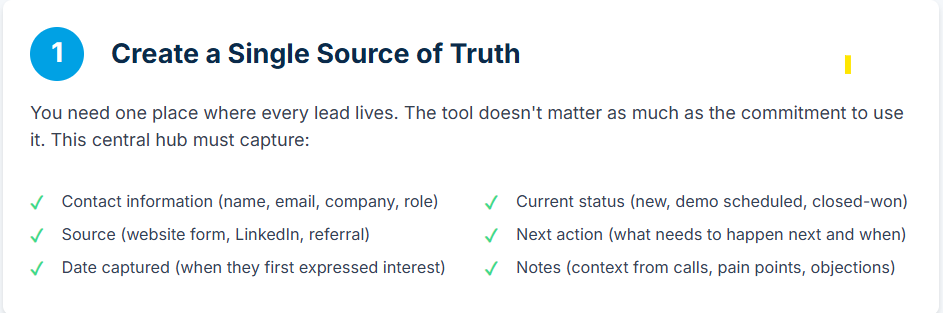
For us, that’s LevelUp Demo, but when I first started, it was an Airtable base. Before that, honestly, it was a Google Sheet with tabs for different stages. The tool doesn’t matter nearly as much as the commitment to use it consistently.
Your single source of truth needs to capture:
- Contact information (name, email, company, role)
- Source (where they came from—website form, LinkedIn, referral)
- Date captured (when they first expressed interest)
- Current status (new lead, demo scheduled, demo completed, follow-up needed, closed-won, closed-lost)
- Next action (what needs to happen next and when)
- Notes (context from conversations, pain points, objections)
Simple, right? But it worked because I actually used it.
Step 2: Capture leads automatically (or as close as possible)
The biggest mistake I made early on was relying on manual data entry. Someone would fill out our demo form, and I’d intend to add them to my spreadsheet… later. Later never came.
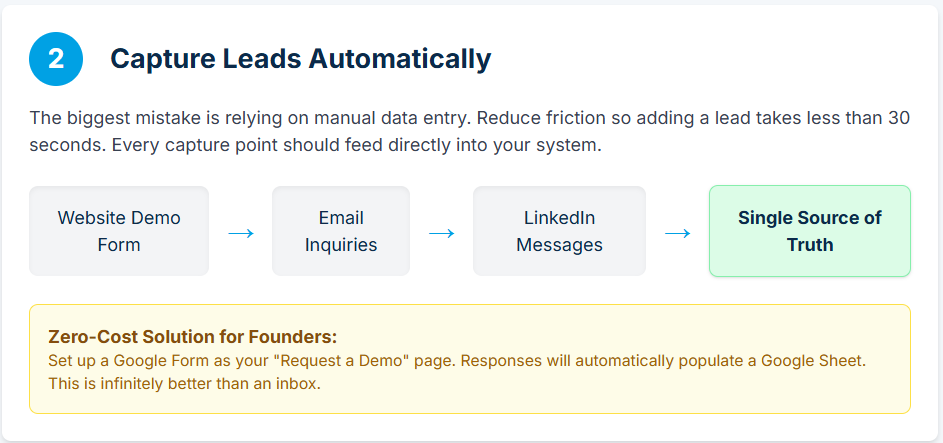
Now, every lead capture point feeds directly into our system:
- Website demo form → automatically creates a new lead
- Email inquiries → forwarded to a specific address that logs them
- LinkedIn messages → I have a template I copy-paste that includes their info, and I add them immediately
The key is reducing friction. If adding a lead takes more than 30 seconds, you won’t do it consistently.
For founders on a budget, here’s a zero-cost solution: Set up a Google Form as your “Request a Demo” page. Responses automatically populate a Google Sheet. Add columns for status, next action, and notes. Check it every morning and update it after every interaction.
Is it perfect? No. But it’s infinitely better than losing leads in your inbox.
Step 3: Qualify and prioritize immediately
Not all leads are created equal, and trying to treat them all the same is a fast path to burnout.
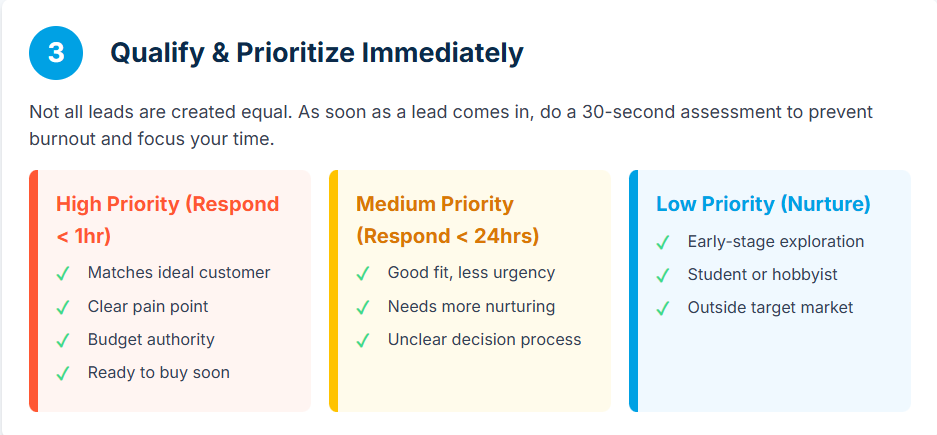
As soon as a lead comes in, I do a quick 30-second assessment:
High priority (respond within 1 hour):
- Company size matches our ideal customer profile
- Clear pain point we solve
- Budget authority (they’re a decision-maker)
- Timeline (they’re looking to buy soon)
Medium priority (respond within 24 hours):
- Good fit but less urgency
- Needs more nurturing
- Unclear decision-making process
Low priority (nurture sequence):
- Early-stage exploration
- Student or hobbyist project
- Outside our target market
I literally add a “Priority” column to my tracking system and mark each lead H/M/L. This simple step prevents me from spending an hour on a call with someone who isn’t ready to buy while a hot lead goes cold.
Step 4: Define your stages and what triggers movement
This is where most founders get stuck. They capture leads but don’t have a clear process for what happens next.
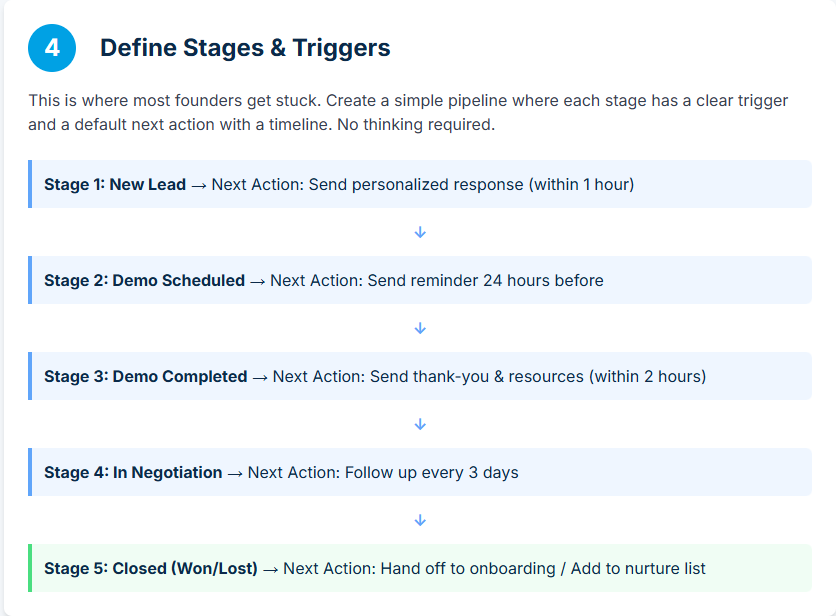
Here’s my simple 5-stage pipeline:
- New Lead → Just came in, needs initial response
- Demo Scheduled → Calendar invite sent, waiting for demo date
- Demo Completed → Demo happened, waiting for follow-up
- In Negotiation → Discussing pricing, terms, or implementation
- Closed → Either won or lost
Each stage has a clear trigger for moving to the next one:
- New Lead → Demo Scheduled: When I send a calendar invite
- Demo Scheduled → Demo Completed: When the demo actually happens
- Demo Completed → In Negotiation: When they express interest in moving forward
- In Negotiation → Closed: When they sign or explicitly say no
And here’s the crucial part: each stage has a default next action with a timeline.
- New Lead → Send personalized response within 1 hour
- Demo Scheduled → Send reminder 24 hours before + prep notes for myself
- Demo Completed → Send thank-you email with resources within 2 hours
- In Negotiation → Follow up every 3 days until resolution
- Closed-Won → Hand off to onboarding
- Closed-Lost → Add to nurture sequence
I literally have these rules written on a sticky note on my monitor. When I move a lead to a new stage, I immediately add the next action and due date. No thinking required.
Step 5: Build a follow-up system you’ll actually use
Here’s where I used to fail spectacularly. I’d have great demos, send a follow-up email… and then nothing. I’d wait for them to respond. Days would turn into weeks.
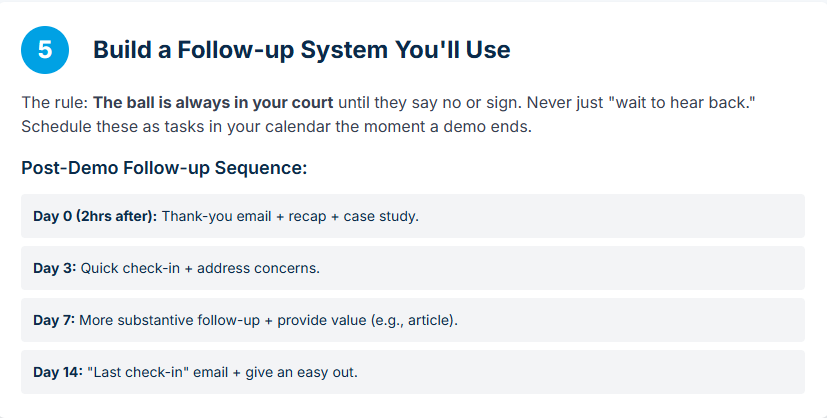
Now I operate on a simple rule: The ball is always in my court until they explicitly say no or sign the contract.
My follow-up sequence after a demo looks like this:
Day 0 (within 2 hours of demo):
- Thank-you email
- Recap of what we discussed
- Answers to questions that came up
- Relevant case study or resource
- Clear next step: “I’ll check in on Friday to see if you have any questions”
Day 3:
- Quick check-in
- Address any concerns
- Share additional resource if relevant
- Propose a follow-up call if needed
Day 7:
- More substantive follow-up
- Acknowledge they might be busy
- Provide value (industry insight, relevant article)
- Restate the problem we solve
Day 14:
- “Last check-in” email
- Give them an easy out: “If the timing isn’t right, totally understand”
- Leave door open for future: “Happy to revisit in a few months”
I schedule these follow-ups in my calendar as tasks the moment the demo ends. If they respond at any point, I adjust accordingly. But I never just “wait to hear back.”
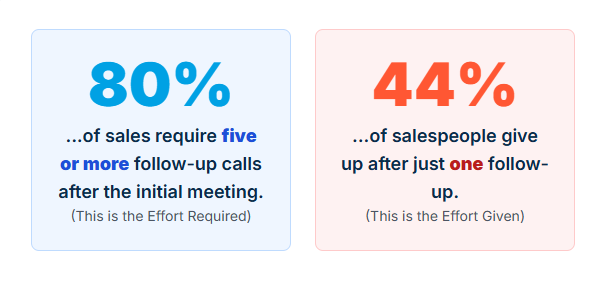
According to research, 80% of sales require five follow-up calls after the initial meeting, but 44% of salespeople give up after one follow-up. The persistence gap is real, and it’s costing you deals.
What are the main benefits of organizing sales leads properly?
You stop losing deals to disorganization
This is the obvious one, but it’s worth stating clearly. When I implemented a proper lead organization system, our “fell through the cracks” rate went from an embarrassing 30% to basically zero. That alone paid for every minute I spent setting up the system.
You can actually scale
Before I had a system, I couldn’t handle more than 10-12 demos per month without dropping balls. Now? I can comfortably manage 40+, and I recently brought on a sales team member who was fully ramped within a week because the process was documented and clear.
Organization creates scalability. Full stop.
You build better relationships
When you can pull up a lead’s information and immediately remember your last conversation, the pain points they mentioned, and what you promised to send them—prospects notice. You’re not just another vendor; you’re someone who pays attention.
I’ve had prospects tell me, “You’re the only company that actually followed up consistently.” That’s not because I’m special. It’s because I have a system that reminds me to follow up.
You make better decisions
With organized data, you can actually see patterns:
- Which lead sources convert best?
- What’s your average time from demo to close?
- Where do deals typically get stuck?
- What objections come up most often?
Last quarter, I noticed that leads from LinkedIn converted at 45%, while website leads converted at 22%. That insight led me to spend more time building relationships on LinkedIn, which directly increased our pipeline.
You can’t optimize what you can’t measure, and you can’t measure what isn’t organized.
You reduce stress and mental load
This might be the most underrated benefit. When you have a clear system, you’re not constantly wondering, “Did I forget to follow up with someone?” You’re not lying awake at night trying to remember if you sent that proposal.
The mental peace of knowing everything is captured and tracked is honestly life-changing.
What mistakes should you avoid when organizing sales leads?
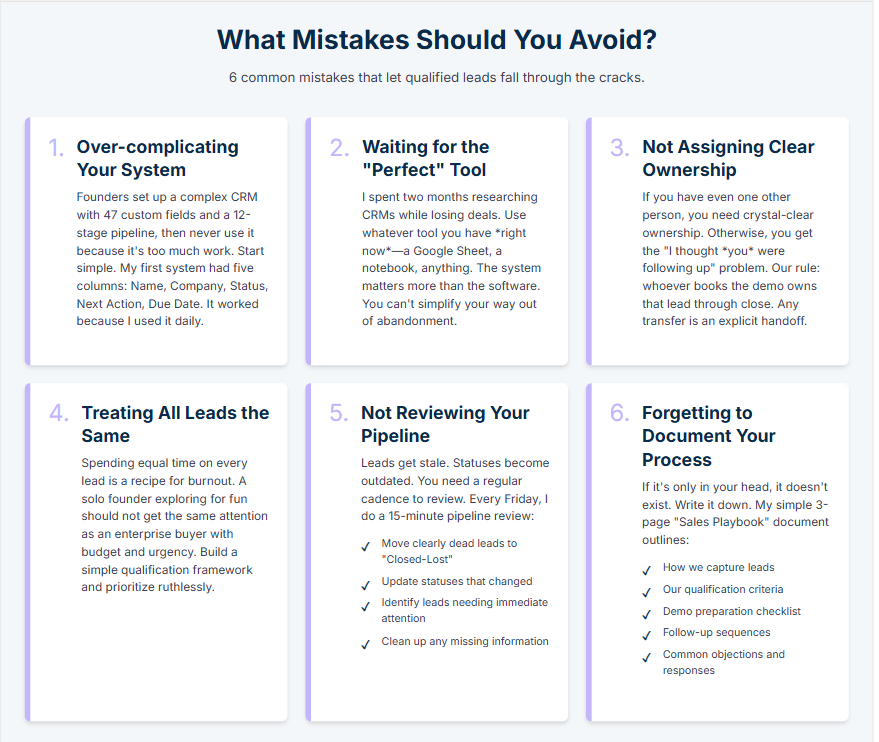
Over-complicating your system
I see founders do this all the time. They set up a complex CRM with 47 custom fields, elaborate automation, and a 12-stage pipeline. Then they never use it because it’s too much work.
Start simple. Really simple. You can always add complexity later, but you can’t simplify your way out of abandonment.
My first system had literally five columns: Name, Company, Status, Next Action, Due Date. That’s it. It worked beautifully because I actually used it every single day.
Waiting to implement until you have the “perfect” tool
I spent two months researching CRM software before I finally just started using a Google Sheet. Those were two months of lost deals while I debated Salesforce vs. HubSpot vs. Pipedrive.
Use whatever tool you have access to right now. Even if it’s a notebook. The system matters more than the software.
Not assigning clear ownership
If you have even one other person involved in sales, you need crystal-clear ownership of every lead. Otherwise, you get the “I thought you were following up” problem.
We use a simple rule: whoever books the demo owns that lead through close. If we need to transfer it (someone goes on vacation, lead needs specialized knowledge), we do an explicit handoff with documentation.
Treating all leads the same
Spending equal time on every lead is a recipe for burnout and missed opportunities. A solo founder exploring your product for fun should not get the same attention as an enterprise buyer with budget and urgency.
Build a simple qualification framework and prioritize ruthlessly. It’s not mean; it’s smart.
Not reviewing and cleaning your pipeline regularly
Leads get stale. Statuses become outdated. You need a regular cadence to review your pipeline and make decisions.
Every Friday, I do a 15-minute pipeline review:
- Move clearly dead leads to “Closed-Lost”
- Update statuses that changed during the week
- Identify leads that need immediate attention
- Clean up any missing information
This weekly hygiene prevents your system from becoming a graveyard of outdated information.
Forgetting to document your process
If it’s only in your head, it doesn’t exist. Write down your stages, your follow-up sequences, your qualification criteria. Future you (or your first sales hire) will thank you.
I keep a simple “Sales Playbook” document that outlines:
- How we capture leads
- Our qualification criteria
- Demo preparation checklist
- Follow-up sequences
- Common objections and responses
It’s just 3 pages, but it’s been invaluable for consistency and training.
How to choose the right tool for your lead organization
You don’t need expensive software to organize leads effectively, but the right tool can make your life significantly easier. Here’s how to think about it based on where you are:
If you’re a solo founder with <10 demos/month
What you need: Basic tracking and reminders
Options:
- Google Sheets + Google Calendar
- Airtable (free tier)
- Notion database
- Even a well-organized notebook
What matters: Consistency, not features. Pick something you’ll check every single day.
If you’re a solo founder with 10-30 demos/month
What you need: Automation for repetitive tasks, better follow-up tracking
Options:
- LevelUp Demo (built specifically for this use case)
- HubSpot (free CRM)
- Pipedrive (affordable, simple)
- Airtable with automation
What matters: Reducing manual data entry and making sure no follow-ups slip through. You want automated reminders and easy status updates.
If you have a small sales team (2-5 people)
What you need: Shared visibility, clear ownership, team coordination
Options:
- LevelUp Demo (includes team assignment and outcome tracking)
- HubSpot (free or starter tier)
- Pipedrive
- Close CRM
What matters: Everyone seeing the same information, clear lead ownership, and preventing duplicate outreach. You need collaboration features and activity logging.
Key features that actually matter (and what’s just noise)
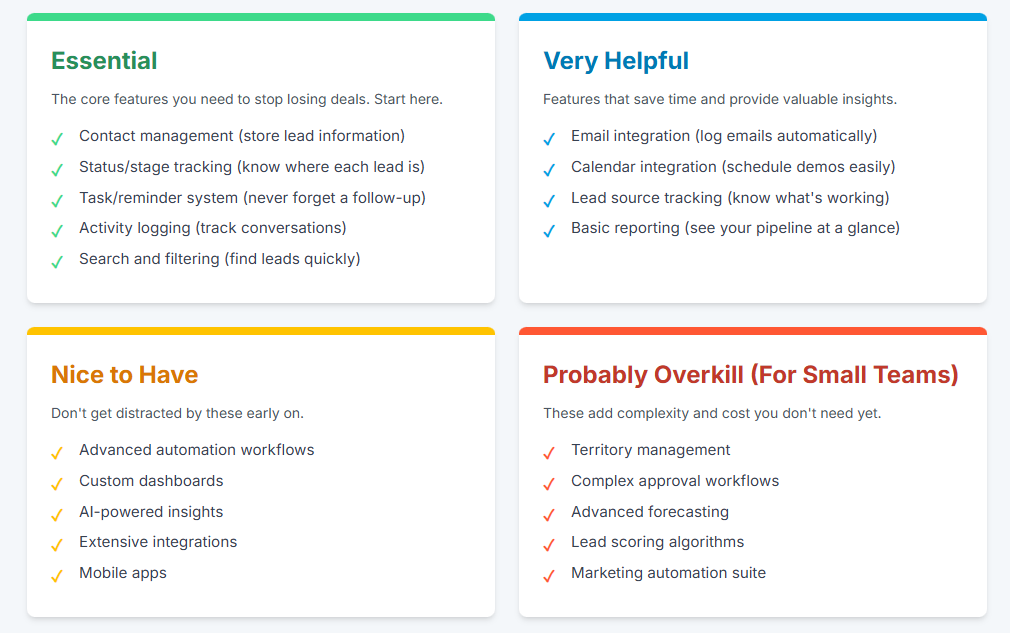
Essential:
- Contact management (store lead information)
- Status/stage tracking (know where each lead is)
- Task/reminder system (never forget a follow-up)
- Activity logging (track conversations and interactions)
- Search and filtering (find leads quickly)
Very helpful:
- Email integration (log emails automatically)
- Calendar integration (schedule demos easily)
- Lead source tracking (know what’s working)
- Basic reporting (see your pipeline at a glance)
Nice to have but not critical early on:
- Advanced automation workflows
- Custom dashboards
- AI-powered insights
- Extensive integrations
- Mobile apps
Probably overkill for small teams:
- Territory management
- Complex approval workflows
- Advanced forecasting
- Lead scoring algorithms
- Marketing automation suite
Here’s my honest take: if you’re just getting started, use the simplest tool that gives you the essential features. I’ve seen founders succeed with Google Sheets and fail with Salesforce. The tool doesn’t make the system work—your discipline does.
That said, if you’re managing demos specifically, LevelUp Demo was built exactly for this problem. It handles lead capture, qualification, scheduling, outcome tracking, and follow-ups without the complexity of a full CRM. We built it because we were frustrated with existing options that were either too simple (spreadsheets) or too complex (enterprise CRM).
Building your lead organization system: Step-by-step implementation
Alright, let’s get tactical. Here’s exactly how to set up a lead organization system this week—no matter what tool you’re using.
Day 1: Audit your current situation (30 minutes)
Before you build a new system, understand what you’re dealing with.
Questions to answer:
- Where do leads currently come in? (Website form, email, LinkedIn, referrals, etc.)
- Where is this information currently stored? (Email inbox, spreadsheet, your memory, nowhere?)
- How many leads have you received in the last 30 days?
- How many of those did you follow up with?
- How many fell through the cracks?
Be brutally honest. I discovered I’d received 23 demo requests in a month and only followed up with 14. That hurt to admit, but it was the wake-up call I needed.
Day 2: Choose your tool and set up your structure (1 hour)
Pick one tool. Seriously, just one. If you can’t decide, use Google Sheets. Here’s a template structure:
Sheet 1: Active Leads
Columns:
- Date Added
- Name
- Company
- Phone (optional)
- Source (dropdown: Website, LinkedIn, Referral, Other)
- Priority (dropdown: High, Medium, Low)
- Status (dropdown: New, Demo Scheduled, Demo Done, In Negotiation, Closed-Won, Closed-Lost)
- Next Action (text: what needs to happen next)
- Due Date (date: when the next action is due)
- Assigned To (if you have a team)
- Notes (ongoing context)
Sheet 2: Closed Deals
Move closed leads here so your active sheet stays clean. Same columns, but add:
- Close Date
- Deal Value
- Win/Loss Reason
Set up conditional formatting so overdue items turn red. Add filters so you can view by status or priority.
If you’re using a proper tool like LevelUp Demo, this structure is already built in—you just need to configure your stages and custom fields.
Day 3: Create your intake process (1 hour)
For each lead source, define:
Website demo form:
- Use a tool that auto-populates your tracking system (LevelUp Demo does this automatically)
- OR set up a Google Form that feeds directly into your Sheet
- OR create an email template you paste each form submission into
Email inquiries:
- Create a specific email address for demo requests
- Set up a filter/rule to flag these
- Block 10 minutes each morning to add them to your system
LinkedIn messages:
- When someone expresses interest, immediately copy their info into your system
- Send your calendar link right away
- Add them with status “Demo Scheduled”
Referrals:
- Create a quick-add template (I have a TextExpander snippet)
- Add source as “Referral – [Name]” so you can track who sends you the best leads
The goal: zero leads slip through. Every expression of interest gets captured within 24 hours, ideally immediately.
Day 4: Define your follow-up sequences (1 hour)
Write out exactly what happens at each stage. Here’s mine:
New Lead (within 1 hour):
Subject: Thanks for your interest in [Product] Hi [Name], Thanks for reaching out! I’d love to learn more about what you’re looking for and show you how [Product] could help. Are you available for a 20-minute call this week? Here’s my calendar: [link] In the meantime, here’s a quick video showing [key feature]: [link] Best,[Your name]
Demo Scheduled (24 hours before):
Subject: Looking forward to our call tomorrow Hi [Name], Quick reminder about our call tomorrow at [time]. I’ll send the video link 5 minutes before. To make sure we use the time well, could you share:- What’s your biggest challenge with [problem area]?- What does success look like for you? See you tomorrow![Your name]
Demo Completed (within 2 hours):
Subject: Great chatting today Hi [Name], Really enjoyed our conversation! As promised, here’s:- Recording of the demo: [link]- Pricing breakdown: [link]- Case study from [similar company]: [link] Based on what you shared, I think [specific insight from conversation]. I’ll check in on [day] to see if you have any questions. In the meantime, feel free to reach out anytime. Best,[Your name]
Write these templates now. Customize them for your brand and product, but have them ready to go. You’ll be amazed how much time this saves.
Day 5: Set up your weekly review process (30 minutes)
Block 30 minutes every Friday afternoon (or Monday morning) for pipeline review. Here’s my checklist:
- Update status for any leads where status changed
- Move clearly dead leads to Closed-Lost (and note why)
- Identify any leads that need immediate action
- Check for overdue follow-ups (these should be red in your sheet)
- Review leads that have been in the same stage for >14 days
- Clean up any missing information
- Celebrate wins (seriously, acknowledge closed deals)
This weekly hygiene keeps your system accurate and actionable. Skip it for a few weeks, and your organized system becomes a mess.
Advanced lead organization strategies (once you have the basics down)
Lead scoring for better prioritization
Once you’re handling 20+ leads per month, manual prioritization gets tedious. A simple scoring system helps.
My basic lead scoring:
Company fit (0-3 points):
- 3 = Perfect ICP (ideal customer profile)
- 2 = Good fit, minor gaps
- 1 = Possible fit, significant gaps
- 0 = Poor fit
Engagement level (0-3 points):
- 3 = Responded immediately, asked detailed questions
- 2 = Engaged but slower to respond
- 1 = Minimal engagement
- 0 = No response to outreach
Timeline urgency (0-3 points):
- 3 = Need to buy within 30 days
- 2 = Looking to buy within 90 days
- 1 = Exploring options, no timeline
- 0 = Just researching
Budget/Authority (0-3 points):
- 3 = Decision-maker with confirmed budget
- 2 = Influencer with likely budget
- 1 = No decision authority but can champion
- 0 = No budget or authority
Total score: 0-12 points
- 10-12 = Drop everything, focus here
- 7-9 = High priority, respond within hours
- 4-6 = Medium priority, standard follow-up
- 0-3 = Low priority, nurture sequence
This takes 30 seconds per lead and dramatically improves how you allocate time.
Segmentation for personalized outreach
As your lead volume grows, one-size-fits-all messaging stops working. Create segments:
By company size:
- Solo founders / freelancers
- Small teams (2-10 people)
- Mid-size companies (11-50 people)
- Enterprise (51+ people)
Each segment has different pain points, budget constraints, and decision processes. Tailor your messaging accordingly.
By use case:
- If your product solves multiple problems, track which problem each lead cares about most
- Customize demos and follow-ups to focus on their specific use case
By source:
- Referrals need different messaging than cold inbound
- LinkedIn leads often want more social proof
- Website leads need more education about what you do
Add a “Segment” column to your tracking system and use it to personalize your outreach.
Integration with your broader sales stack
Once your lead organization system is solid, connect it to your other tools:
Email:
- Log all email conversations with leads (most CRMs do this automatically)
- Use email tracking to see when prospects open your messages
- Create email templates for common scenarios
Calendar:
- Use scheduling tools (Calendly, Chili Piper, or LevelUp Demo’s built-in scheduling) to reduce back-and-forth
- Send automatic reminders to reduce no-shows
- Block time for follow-ups right after demos
Content:
- Track which resources you send to each lead
- Create a library of case studies, videos, and one-pagers for quick access
- Note which content resonates with different segments
Analytics:
- Connect your lead source tracking to your marketing analytics
- Calculate conversion rates by source, segment, and rep
- Identify bottlenecks in your pipeline
The goal isn’t complexity—it’s creating a connected system where information flows smoothly and nothing gets lost.
When should you upgrade from your current lead organization system?
Systems should evolve as your needs change. Here’s when to consider upgrading:
From spreadsheet to lightweight tool:
When:
- You’re managing 15+ active leads at once
- You’re missing follow-ups despite your best efforts
- Manual data entry is taking more than 30 minutes per day
- You’re adding team members who need access
Why: Spreadsheets work great initially, but they don’t send reminders, they require manual updates, and they don’t integrate with your calendar or email.
From lightweight tool to full CRM:
When:
- You have a team of 5+ people doing sales
- You need complex reporting and forecasting
- You require advanced automation and workflows
- You’re integrating with marketing automation, customer success, and billing systems
Why: Full CRMs offer power and flexibility that small teams don’t need, but at scale, they become essential for coordination and insight.
From general CRM to specialized demo management tool:
When:
- Demos are your primary conversion method
- You’re spending hours each week on demo scheduling and follow-ups
- You need better visibility into demo outcomes specifically
- Your CRM feels like overkill for your simple sales process
Why: Tools like LevelUp Demo are built specifically for demo-driven sales, with features like one-click demo forms, automatic scheduling, outcome tracking, and follow-up management—without the complexity of a full CRM.
Here’s my honest recommendation: start with the simplest thing that works, and only upgrade when you’re consistently hitting the limitations of your current system. I’ve seen too many founders spend weeks implementing Salesforce when they had 5 leads per month. That’s not organization; that’s procrastination.
Real-world lead organization in action: Three scenarios
Let me show you how this works in practice with three realistic scenarios.
Scenario 1: Solo founder, 10 demos per month, bootstrapped
Sarah runs a project management tool for creative agencies. She’s doing everything herself—product, marketing, sales, support.
Her setup:
- Airtable base (free tier) with the columns I outlined earlier
- Calendly for scheduling ($10/month)
- Gmail with Boomerang for email reminders ($5/month)
- 30-minute Friday review blocked on her calendar
Her process:
- Demo request comes in via website form → automatically populates Airtable
- She gets a Slack notification (Zapier automation, free tier)
- She responds within an hour with her Calendly link
- Demo gets scheduled → she adds prep notes in Airtable
- After demo → she updates status and schedules follow-up reminders in Boomerang
- Every Friday → she reviews her pipeline, updates statuses, identifies who needs attention
Results: Sarah went from converting 15% of demos to 32% in three months. Not because her product improved, but because she stopped losing leads and followed up consistently.
Total cost: $15/month + 2 hours of setup
Scenario 2: Small team (3 people), 40 demos per month, early revenue
Marcus and his co-founders built a customer feedback tool. They each handle demos for different customer segments.
Their setup:
- LevelUp Demo for lead capture, scheduling, and tracking
- Shared Slack channel for demo notifications
- Weekly 30-minute pipeline sync meeting
- Clear ownership: Marcus handles SMB, Co-founder handles enterprise, Co-founder handles agencies
Their process:
- Demo form on website feeds directly into LevelUp Demo
- Leads auto-assigned based on company size (they set rules)
- Each person manages their own pipeline but everyone can see all leads
- After each demo → they log outcome and next steps
- Weekly sync → review stuck deals, share learnings, identify patterns
- LevelUp Demo automatically reminds them of overdue follow-ups
Results: They scaled from 25 to 40 demos per month without adding headcount. Their close rate stayed consistent at 28% because they maintained the same level of attention per lead.
Total cost: $79/month + 30 minutes weekly sync
Scenario 3: Growing company (8 people), 100+ demos per month, scaling fast
Priya’s company provides analytics software for e-commerce brands. They have 4 sales reps, 2 SDRs, a sales manager, and a customer success person who sometimes joins demos.
Their setup:
- HubSpot CRM (Sales Starter tier)
- Chili Piper for intelligent routing and scheduling
- Gong for call recording and coaching
- Weekly team meeting + daily standup
- Clear handoff process between SDRs and AEs
Their process:
- Marketing generates leads → SDRs qualify and book demos
- Chili Piper automatically assigns to the right AE based on territory and availability
- AEs conduct demos and log detailed notes in HubSpot
- Sales manager reviews pipeline daily, flags at-risk deals
- Customer success joins demos for larger deals to build relationship early
- Weekly team meeting → review conversion metrics, share best practices, identify coaching opportunities
Results: They maintain a 35% close rate even at scale. They can see exactly which lead sources convert best, which reps need coaching, and where deals typically stall.
Total cost: $1,500+/month + significant team coordination time
The lesson: Your system should match your scale. Don’t over-engineer, but don’t stay in spreadsheets when you’ve outgrown them.
How to maintain your lead organization system long-term
Setting up a system is one thing. Using it consistently for months and years? That’s where most people fail. Here’s how to make it stick:
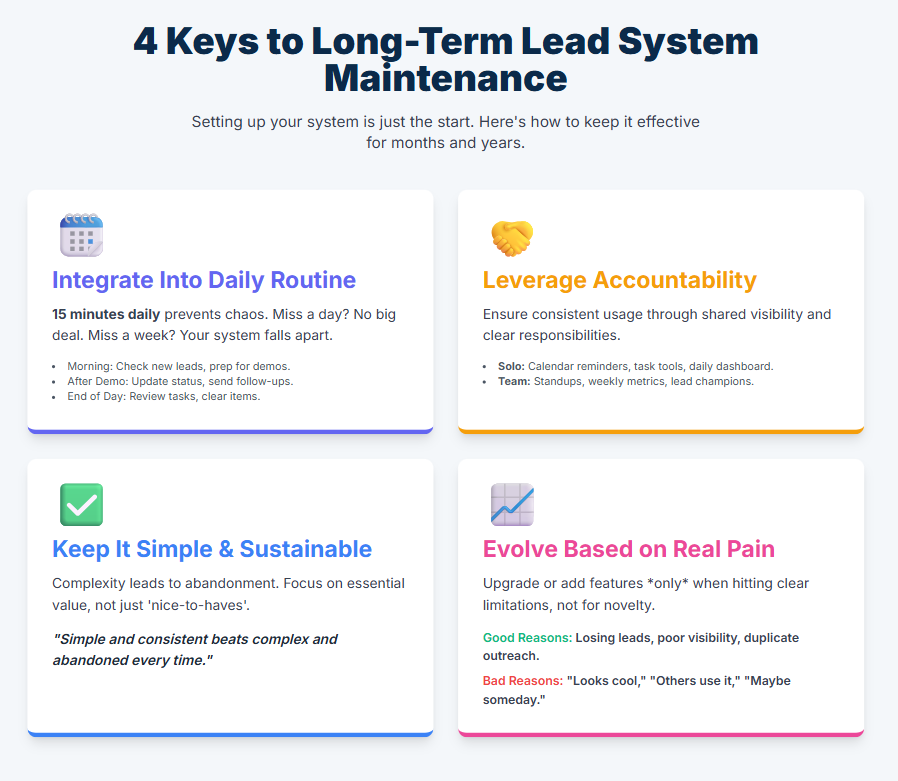
Build it into your daily routine
My daily lead management routine (15 minutes):
Morning (5 minutes):
- Check for new leads overnight
- Respond to any high-priority inquiries
- Review today’s scheduled demos and add prep notes
After each demo (5 minutes):
- Update lead status
- Log key points from conversation
- Send follow-up email
- Schedule next touchpoint
End of day (5 minutes):
- Review tomorrow’s tasks
- Identify any urgent follow-ups
- Clear completed items
This 15-minute daily investment prevents the chaos from building up. Miss a day? No big deal. Miss a week? Your system falls apart.
Use accountability mechanisms
If you’re solo:
- Set calendar reminders for pipeline review
- Use task management tools (Todoist, Things) to track follow-ups
- Create a simple dashboard you check every morning
If you have a team:
- Make pipeline updates part of your standup
- Share conversion metrics weekly
- Celebrate wins publicly (this reinforces the behavior)
- Have a “lead champion” who keeps everyone accountable
Keep it simple and sustainable
The more complex your system, the less likely you’ll maintain it. Every field you add, every automation you build, every report you create—it’s more to maintain.
Regularly ask: “Does this add real value, or is it just nice to have?”
I’ve removed features from my lead organization system multiple times because they sounded good but no one actually used them. Simple and consistent beats complex and abandoned every single time.
Evolve gradually based on real pain points
Your system should grow with your needs, but only when you’re consistently hitting real limitations.
Good reasons to add complexity:
- “We’re losing leads because our manual process can’t keep up”
- “We can’t see which lead sources convert best”
- “Team members are duplicating outreach to the same leads”
Bad reasons to add complexity:
- “This feature looks cool”
- “Other companies use this”
- “Maybe we’ll need this someday”
Add features and processes only when the pain of not having them is clear and significant.
FAQ: Your Lead Organization Questions Answered
How long should I keep leads in my system before marking them closed-lost?
I use a 30-day rule for active leads and 90 days for nurture. If someone hasn’t responded to three follow-ups over 30 days, I move them to closed-lost with a note. After 90 days in nurture with no engagement, they’re out. You can always re-add them if they come back.
Should I use a separate system for tracking demos vs. general leads?
Depends on your volume and complexity. If demos are your primary conversion method, a demo-specific tool like LevelUp Demo often works better than a general CRM. If you have complex multi-touch sales cycles with many non-demo interactions, a full CRM makes sense.
How do I handle leads that come in from multiple sources (website, LinkedIn, email)?
Create one intake process that captures leads from all sources into your single system. Use the “Source” field to track origin, but everything lives in the same place. This is where automated lead capture really shines—website forms and email forwarding can feed directly into your system.
What’s the best way to prioritize follow-ups when I have limited time?
Use a simple scoring system (I outlined one earlier) to identify high-priority leads. Focus on: company fit, engagement level, timeline urgency, and budget/authority. When time is tight, focus on 9+ scores first, then work your way down.
How often should I follow up with leads who aren’t responding?
My rule: follow up 3-4 times over 2-3 weeks, then move to a longer nurture sequence. Sequence: Day 0 (initial response), Day 3, Day 7, Day 14. After that, monthly nurture emails. If they don’t respond to any of these, mark closed-lost after 90 days.
Should I track leads who aren’t ready to buy yet?
Yes, but in a separate “Nurture” status. Don’t let them clutter your active pipeline, but don’t delete them either. Set a reminder to check in quarterly. I’ve closed deals 6-12 months after initial contact because I kept them in my nurture list.
What information is essential to capture vs. nice to have?
Essential: Name, email, company, status, next action, due date. Very helpful: Phone, source, priority, notes. Nice to have: Company size, role, budget, timeline, pain points. Start with essential, add the rest as you see value. Don’t create 30 fields you’ll never fill out.
How do I prevent duplicate leads in my system?
Before adding a new lead, search by email address. Most CRMs automatically detect duplicates. In spreadsheets, use conditional formatting to highlight duplicate emails. If you do create a duplicate, merge them immediately and keep the most complete record.
What should I do with leads from competitors or people just doing research?
I add them with low priority and a “Research Only” tag. Sometimes researchers become buyers. Sometimes they refer real customers. But don’t spend significant time on them. Quick, helpful response, then back to high-priority leads.
How can I get my team to actually use the lead organization system?
Make it easy, make it valuable, and make it visible. Easy: Simple process, minimal fields, quick to update. Valuable: Show how it helps them close more deals. Visible: Review it in meetings, celebrate wins tracked in the system, and lead by example. If the founder doesn’t use it consistently, the team won’t either.
Bringing it all together: Your next steps
Look, I get it. Reading about lead organization is one thing. Actually implementing it when you’re drowning in product issues, customer support, and everything else? That’s another thing entirely.
But here’s what I want you to remember: every deal you lose to disorganization is revenue you’ll never get back. That $12,000 deal I lost because I forgot to follow up? That still stings years later. Not because of the money, but because it was completely preventable.
You don’t need a perfect system. You don’t need enterprise software. You don’t need to spend weeks setting things up.
You need three things:
- One place where every lead lives
- A clear process for what happens next at each stage
- Consistent discipline to actually use it
That’s it. Start there.
Here’s what I want you to do this week:
Monday: Spend 30 minutes auditing where your leads currently are (or aren’t). Write down how many you think you’ve lost in the last month.
Tuesday: Choose one tool—spreadsheet, Airtable, LevelUp Demo, whatever—and set up your basic structure. Don’t overthink it.
Wednesday: Create your intake process. How will leads get into your system? Set that up.
Thursday: Write your follow-up templates. Have them ready to go.
Friday: Do your first weekly pipeline review. It’ll be quick because you just started, but establish the habit.
That’s 5-6 hours total spread across a week. In exchange, you’ll never lose another deal to disorganization.
And six months from now, when you’re closing 30% more deals with the same effort, you’ll wonder why you didn’t do this sooner.
If you’re specifically struggling with demo management—leads falling through between “interested” and “scheduled,” no-shows eating up your time, unclear follow-up processes after demos—check out LevelUp Demo. We built it specifically to solve these problems without the complexity of a full CRM. You can request a demo here (yes, I see the irony), or just start with our free trial and see if it helps.
But whether you use our tool, a spreadsheet, or anything in between, just start organizing your leads. Today. Not next week when things calm down. Not next month when you have more time.
Today.
Your future self—and your bank account—will thank you.