
The Demo That Should Have Closed
The call went perfectly. Forty-two minutes. Every feature question answered. The prospect even said, “This is exactly what we’ve been looking for.”
Our founder wrapped up, promised to send over pricing and a trial link, then jumped straight into the next demo.
Three days later, someone on the team asked, “Did we ever follow up with that logistics company?”
We hadn’t.
The pricing doc never went out. The trial link sat in a draft. The demo follow-up that should’ve happened within hours quietly slipped through the cracks.
By the time we sent a sheepish “Just circling back” email, the prospect had gone silent.
Two weeks later, we marked it Closed–Lost.
We’ve seen this happen more times than we’d like to admit. Not because the demo was bad.
Not because the product wasn’t a fit.
But because the 20 minutes after a demo—the part that actually converts—got swallowed by context switching, inbox overload, and the quiet hope that someone else on the team would handle the demo follow-up.
If your demo follow-up process still relies on memory, sticky notes, or a Slack reminder that gets buried, this guide is for you.
By the end, you’ll have a working system where AI handles the repetitive post-demo work, so your reps can focus on the conversations that actually close deals.
Before You Touch Any AI Tool: The Pre-Flight Check
Here’s where most teams go wrong. They bolt an AI tool onto a broken process and wonder why nothing improves.
Before setting up any automated post-demo workflows, you need four things locked down:
- A recorded demo. If your demos aren’t being recorded and transcribed, AI has nothing to work with. No transcript means no meeting transcript summarization, no action item detection, nothing. Use Zoom, Google Meet, or whatever records reliably—just make sure it’s on.
- A CRM that’s actually being used. It doesn’t need to be Salesforce. It can be HubSpot free tier, Pipedrive, or even a well-structured spreadsheet. But there needs to be one place where deals live. If your team tracks some deals in Notion and others in their heads, stop here and fix that first.
- Clear deal stages. You need at minimum: Demo Scheduled → Demo Completed → Follow-Up Sent → Trial/Proposal → Won/Lost. If you can’t describe your pipeline stages in one sentence each, your AI automations will create more confusion than clarity.
- One person who owns follow-up accountability. On a 3–7 person team, this is usually the person who ran the demo. But it has to be explicit. We’ve watched tasks sit in queues for a week because no rep was assigned—the automation created the task, but nobody picked it up.
Your Stop/Go test: Can you point to the exact CRM field where your last demo’s next steps were logged?
If yes, keep reading. If no, fix your CRM hygiene first.
Phase 1: Let AI Capture What Humans Forget
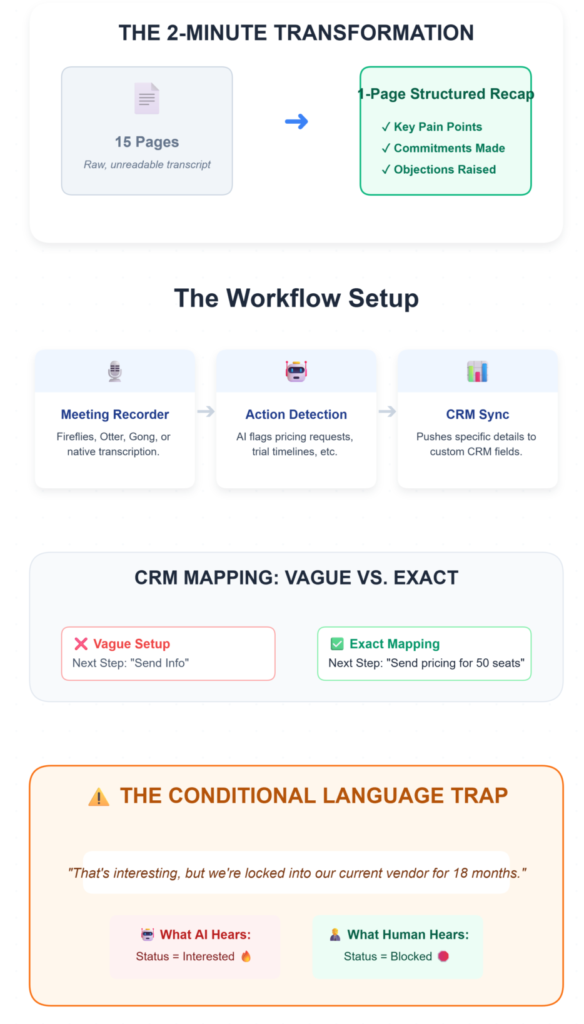
The first place AI earns its keep isn’t in writing emails. It’s in listening.
What to do
Connect your meeting recorder (Fireflies, Otter, Gong, or your platform’s native transcription) to your CRM.
Set up action item detection so the AI flags every commitment made during the demo—pricing requests, trial timelines, integration questions, internal stakeholder mentions.
The goal: within 2 minutes of the demo ending, a structured summary appears. Not 15 pages of raw transcript. A one-page recap with three sections: key pain points discussed, commitments made, and objections raised.
What you should see
In your CRM, a follow-up task appears with the prospect’s name, the specific discussion points, and an assigned owner.
The “Next Steps” field is populated with exact language—something like “Send pricing for 50 seats by Friday” rather than a vague “follow up.”
If you’re seeing generic next steps like “Send info,” your CRM field mapping needs tightening. Map specific language patterns to specific fields. “Pricing request” language goes to the Pricing Inquiry field. “Need to check with my CTO” goes to a Stakeholder Blocker tag.
Verify it’s working
Pull up your last five completed demos. Do all five have auto-populated next steps with specific details?
If fewer than four do, your detection rules need recalibration.
The friction you’ll actually hit
Here’s what the setup guides won’t tell you: AI struggles with conditional language.
A prospect says, “That’s interesting, but we’re locked into our current vendor for 18 months,” and the AI flags it as “interested” instead of “blocked.”
We’ve seen reps waste entire weeks chasing deals that NLP misread as warm. The fix isn’t better AI. It’s a human review gate.
Someone on your team needs to spend 90 seconds scanning the AI summary before it becomes the source of truth.
📉 The 20-Minute Memory Decay
Why rely on AI for this? Behavioral data from 2025 B2B sales teams reveals that sales reps forget approximately 60% of critical, non-recorded deal context within just 20 minutes of a call ending. Automating transcript-to-CRM syncing doesn’t just save admin time—it rescues the actual data you need to close the deal.
Phase 2: Build Follow-Ups That Reference the Actual Conversation
Generic templates are dead. Your prospect just spent 40 minutes telling you their specific problems.
If your follow-up reads like it could’ve been sent to anyone, you’ve already lost momentum.
What to do
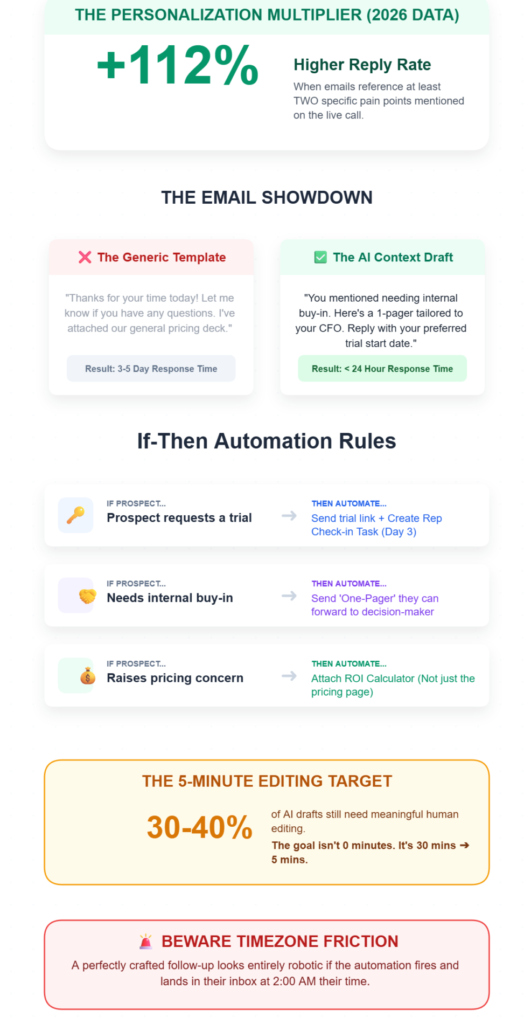
Use contextual email generation to draft follow-ups that pull directly from the transcript.
The email should reference 2–3 specific topics discussed—their use case, the feature they got excited about, the objection they raised.
Set up if-then automation rules based on demo outcomes:
- If prospect requests a trial → send trial link + create a rep check-in task for day 3
- If prospect mentions needing internal buy-in → send a one-pager they can forward to their decision-maker
- If prospect raises a pricing concern → attach the ROI calculator, not just the pricing page
What you should see
A follow-up draft arrives in your inbox within 2 minutes of demo end, pre-populated with the prospect’s name, their use case, and relevant resources.
The call-to-action ties to the actual next step: “Reply with your preferred trial start date” beats “Let me know if you have any questions” every time.
Your reps should spend under 5 minutes reviewing and editing the draft before sending. That’s the target.
If they’re spending 20 minutes rewriting, the AI’s source context is too thin—check that the transcript quality and field mapping are solid.
Verify it’s working
Track reply rates. Personalized follow-ups that reference specific discussion points should pull replies within 24 hours.
If you’re still seeing 3–5 day response times, the emails probably still read as templated.
💡 The Personalization Multiplier
B2B SaaS buyers in 2026 are completely blind to generic templates. Recent performance benchmarks show that follow-up emails referencing at least two specific pain points mentioned on the call see a 112% higher reply rate within the first 24 hours compared to standard “thanks for your time” recaps. AI doesn’t just draft faster; it forces relevance.
The friction you’ll actually hit
About 30–40% of AI drafts need meaningful human editing. That number doesn’t go to zero.
The AI will occasionally pull the wrong emphasis, miss a nuance, or generate something that sounds slightly off. This is normal. The goal was never full automation—it was reducing the writing-from-scratch time from 30 minutes to 5.
And watch your timing rules. We’ve seen follow-ups land at 2 AM in the prospect’s timezone because the automation fired based on demo end time, not recipient location.
Build timezone awareness into your scheduling rules or you’ll kill the momentum you’re trying to protect.
Phase 3: Set Up Behavioral Triggers That Keep Deals Moving
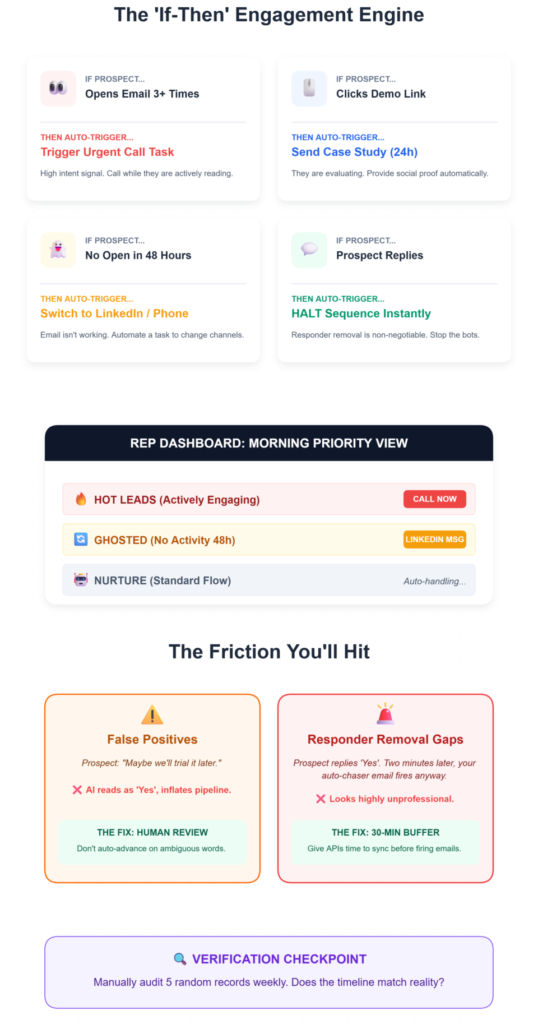
The follow-up email is just the first touch. What happens after that determines whether the deal moves or stalls.
What to do
Configure behavioral trigger workflows based on prospect engagement:
- Prospect opens the follow-up email 3+ times → trigger an urgent check-in call task
- Prospect clicks the demo recording link → send a related case study 24 hours later
- Prospect doesn’t open the email within 48 hours → move to a different channel (LinkedIn message or phone call)
- Prospect replies → immediately remove them from any automated sequence (responder removal is non-negotiable)
Set up engagement data synchronization so every interaction—email opens, link clicks, demo recording views—logs to the contact record in real-time.
What you should see
Your CRM timeline shows a living picture of prospect activity.
Deal stage advances automatically within 5 minutes of key actions—no manual updates needed.
Your reps get a prioritized list each morning: these prospects are hot (high engagement), these are cooling (no activity), these need a different approach.
Verify it’s working
Manually check 5 random contact records. Does the engagement timeline match what actually happened?
Are deal stages accurate, or has the automation inflated your pipeline?
The friction you’ll actually hit
This is where dirty CRM data becomes a real problem.
Overly broad if-then rules will mark a “maybe we’ll trial it” as a confirmed trial, inflating your pipeline with false positives. A prospect says something noncommittal, and suddenly your deal stage synchronization shows a trial that doesn’t exist.
The fix: add a confirmation step. Don’t auto-advance deal stages on ambiguous language. Flag them for human review instead. It adds 2 minutes of work per deal and saves hours of chasing ghosts.
The other ugly one: responder removal gaps. A prospect replies “Yes, let’s schedule,” but your automated sequence still fires two more emails before the system catches the reply. We’ve seen it happen when the email platform and CRM don’t sync fast enough.
It looks unprofessional, and it’s entirely preventable—just build a 30-minute sync buffer into your automation timing.
The Ugly Truth: What Breaks in Practice
Here’s a table of the problems we’ve seen (and the weird fixes that actually work):
| Problem | The Weird Fix | Where We Learned This |
|---|---|---|
| AI flags sarcasm or conditional language as buying intent | Add a “confidence score” threshold—only auto-advance deals when AI confidence exceeds 80%. Below that, flag for human review. | Internal testing across 200+ demo transcripts |
| Prospect completes an automated demo but never hears from a human | Set a hard rule: every demo completion (live or self-guided) triggers a personal outreach within 4 hours. Zero-touch qualification still needs a human handoff. | Community feedback on demo automation abandonment rates |
| Follow-up tasks created but no rep assigned | Default every automated task to the demo runner. No “unassigned” option in the workflow. Remove the ability to create orphan tasks entirely. | Learned after a trial access task sat untouched for 8 days |
| Compliance gaps—prospect opts out of email but gets SMS follow-ups | Audit all channels quarterly. Unsubscribe must propagate across email, SMS, and any retargeting within 24 hours. | CAN-SPAM and GDPR enforcement patterns |
Where This Connects to Your Demo Workflow
If you’ve gotten this far, you’ve probably noticed a pattern: most of these problems start before the follow-up.
They start at the demo itself—how it’s scheduled, how outcomes are tracked, how the handoff from “demo done” to “follow-up sent” actually works.
We’ve been building these workflows for a while, and the gap we kept running into was the lack of a single place to manage the full demo lifecycle: the request, the scheduling, the outcome, and the follow-up.
If your follow-up system still starts in your inbox
LevelUp Demo was built for exactly this gap—a lightweight demo workflow tool that handles lead capture, scheduling, outcome tracking, and follow-up management without the bloat of a full CRM migration. If you’re running a team of 3–7 and losing deals between “great demo” and “first follow-up,” it’s worth exploring how it fits your stack.
FAQ: The Implementation Questions That Actually Matter
How long does it take to set up AI-powered demo follow-ups?
For a team of 3–7, expect 2–3 days for basic setup (transcript connection, CRM field mapping, first automation rules) and 2–3 weeks of tuning before the system runs reliably. The initial setup isn’t the hard part—calibrating the AI’s accuracy on your specific conversation patterns is where the time goes.
Do AI follow-ups actually improve reply rates?
Yes, when they reference specific discussion points. Teams using contextual email generation see prospect replies within 24 hours compared to 3–5 days with generic templates. But the improvement disappears if reps skip the editing step—sending AI drafts unreviewed is worse than sending nothing.
Can this work without an expensive CRM?
Absolutely. The speed-to-lead framework matters more than the tool. A well-configured demo management platform with basic automation beats a $50K CRM that nobody updates. The key is consistent data entry, not software cost.
What if our team is too small for automation?
Small teams benefit the most. When you’re running 8–12 demos a week across 3 people, the continuous feedback loops from AI catch the deals that would otherwise slip through. You don’t need a 50-person sales floor to justify a structured follow-up workflow—you need it precisely because you don’t have one.
How do we handle prospects who ghost after the follow-up?
Build a stalled opportunity sequence: a 3-touch cadence over 10 days using different channels (email → LinkedIn → phone). If no response after the third touch, move to a quarterly nurture list. Don’t keep pinging weekly—it signals desperation and damages intent signals for future outreach.
What’s the biggest mistake teams make with AI follow-ups?
Trusting the automation blindly. Content governance matters: someone on your team should review which AI-generated A/B testing variants are performing and which are tanking, at minimum every two weeks. The teams that treat AI as a drafting assistant outperform the ones that treat it as an autopilot.
The deals you’re losing right now probably aren’t because of bad demos.
They’re because of the 20 minutes after the demo—the part that feels too small to systematize but costs you real revenue every month.
Start with the transcript. Build from there.
Stop Losing Deals in the Follow-Up Gap
LevelUp Demo handles the manual admin work so your reps can focus on the conversations that actually close deals. See how it fits your workflow—no complex migration required.
✅ Log Outcomes Instantly
✅ Track Next Steps
✅ Close More Revenue