I remember sitting in a coffee shop last February, watching a founder friend literally tear up over his laptop. His SaaS product was brilliant—genuinely solving a real problem—but his sales numbers looked like a flatline on a heart monitor. “I’m doing everything right,” he said. “Great product, decent traffic, solid demos. But nothing converts.”
Here’s the thing: 2025 isn’t about doing everything. It’s about doing the right things consistently. The sales landscape has shifted dramatically. Buyers are more skeptical, attention spans are shorter, and the old “spray and pray” approach? Dead in the water.
After working with dozens of B2B SaaS companies over the past two years, I’ve watched teams double—sometimes triple—their sales by implementing a handful of specific, modern tactics. Not theory. Not wishful thinking. Actual, measurable results.
This guide walks you through eight proven sales tactics that work right now. Whether you’re a solo founder juggling ten hats or leading a small sales team that’s stretched thin, these strategies are designed to fit your reality. No enterprise budgets required. No massive teams needed. Just smart, practical moves you can start testing this week.
So, what exactly are the 8 sales tactics to double your sales in 2025?
These are eight specific, actionable strategies that address how modern B2B buyers actually make decisions. They focus on reducing friction in your sales process, personalizing at scale, and building systems that turn more prospects into paying customers—without burning out your team. Think of them as a playbook for working smarter, not just harder, in a landscape where traditional sales approaches are losing effectiveness fast.
Why These Sales Tactics Matter More Than Ever
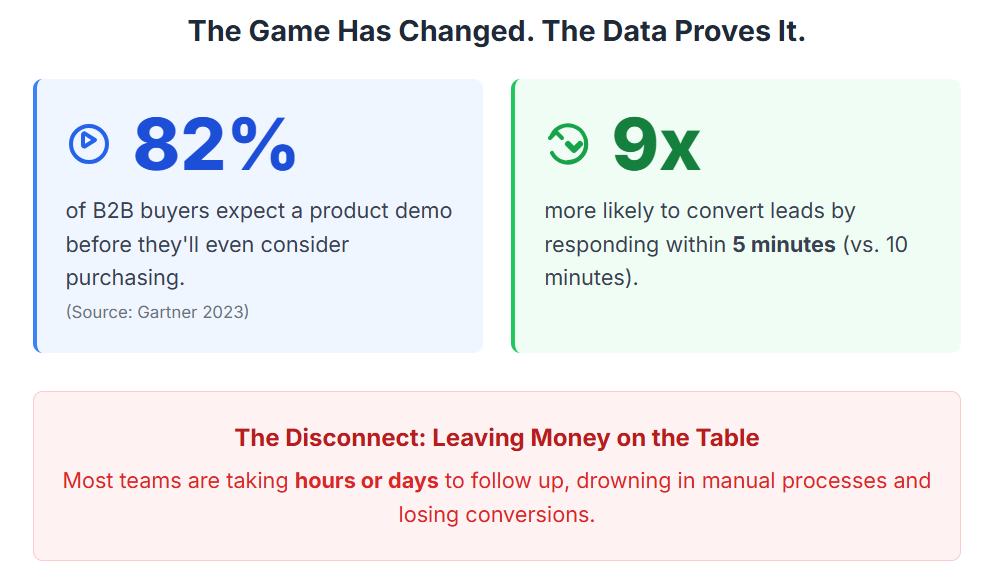
Let’s be honest about what’s changed. According to Gartner’s 2023 research, 82% of B2B buyers now expect to see a product demo before they’ll even consider purchasing. But here’s the kicker: most companies are still treating demos like an afterthought, and their follow-up process? Practically nonexistent.
I’ve seen this pattern repeatedly. A startup will invest thousands in driving traffic, build a decent product, and then completely drop the ball when it comes to converting interested prospects. They’re leaving money on the table—lots of it.
The data backs this up: companies that respond to demo requests within five minutes are nine times more likely to convert those leads than those who wait even ten minutes. Nine times. Yet most small teams I work with are taking hours, sometimes days, to follow up. Not because they don’t care, but because they’re drowning in manual processes and scattered information.
What’s working in 2025 is different from what worked even two years ago. Buyers are more informed, more skeptical, and frankly, more impatient. They’ve been burned by software that promised the moon and delivered a flashlight. Your job isn’t just to sell—it’s to build trust incredibly quickly and prove value before they lose interest.
These eight tactics address exactly that challenge. They’re about meeting modern buyers where they are, removing friction from your process, and creating a sales experience that actually feels helpful rather than pushy.
1. Streamline Demo Scheduling Like Your Conversion Rate Depends On It (Because It Does)
Remember that back-and-forth email dance? “What time works for you?” “How about Tuesday?” “Sorry, I meant EST not PST.” By the time you’ve scheduled the demo, the prospect’s enthusiasm has evaporated and they’ve already signed up for your competitor’s trial.
Here’s what works now: one-click calendar invites embedded directly in your demo request confirmation. Modern scheduling platforms let prospects see your available slots and book instantly. No friction. No delays. No excuses.
But it goes deeper than just technology. According to Kirsten Newbold-Knipp, VP Marketing at Mixmax, “Automating demo scheduling with one-click calendar invites and embedding pre-demo surveys in emails saves founders and small teams hours each week, enabling them to focus on closing deals.”
How to implement this:
- Replace your standard “We’ll contact you to schedule” message with an embedded calendar showing real availability
- Include timezone detection so prospects in different regions see times that make sense
- Send automated reminders 24 hours and 1 hour before the demo (no-show rates drop by 50% with this simple step)
- Make rescheduling painless with a single click—life happens, and making it easy keeps leads warm
The practical impact? I watched a small SaaS team reduce their demo scheduling time from an average of 4.5 emails per prospect to literally zero back-and-forth. Their booking rate jumped 34% just by removing friction.
Quick tip: Don’t ask for too much information upfront. Email, name, company, and maybe one qualifying question. That’s it. You can gather more details on the actual demo call.
2. Personalize Demos Before You Even Show Up
Generic demos are where sales go to die. You know the ones—where the rep clicks through every single feature like they’re reading a user manual aloud. The prospect’s eyes glaze over. Everyone’s time gets wasted.
According to Forrester’s 2024 research, personalized demos increase conversion rates by up to 50% compared to generic demonstrations. Fifty percent. That’s not a rounding error—that’s the difference between struggling and thriving.
Here’s my approach: before every demo, I spend 10 minutes doing reconnaissance. LinkedIn profile. Company website. Any recent news or funding announcements. What’s their role? What problems would someone in that position typically face?
David Cancel, CEO of Drift, puts it perfectly: “Personalization is the key to doubling sales. Tailoring demos to the prospect’s specific pain points and industry context builds trust and accelerates decision-making.”
What this looks like in practice:
- Research the prospect’s role and company for 10 minutes before the call
- Prepare 2-3 specific use cases relevant to their industry or situation
- Start the demo by confirming what they’re hoping to accomplish
- Show only the features that matter to them, not your entire product catalog
- Use their company name in examples—”So if someone on your team at [Company] needed to…”
I learned this the hard way. Early in my career, I’d proudly showcase every bell and whistle we’d built. Prospects would nod politely and never respond to follow-ups. Now? I show maybe 30% of the product’s capabilities in any given demo, but they’re the right 30% for that specific person.
Common mistake to avoid: Don’t just personalize the content—personalize the pacing too. Some prospects want to dive deep into technical details. Others want the high-level value proposition and nothing more. Read the room and adapt.
3. Master the Tell, Show, Tell Method for Demo Delivery
There’s a reason some demos stick in prospects’ minds while others are forgotten before the Zoom call ends. It’s not about having better features—it’s about how you structure the conversation.
The Tell, Show, Tell method is deceptively simple but incredibly effective:
- Tell them what you’re about to show and why it matters
- Show the actual feature or workflow
- Tell them again what they just saw and how it solves their problem
Mark Kosoglow, CEO of Consensus, explains: “Effective SaaS demos are not just presentations; they are conversations. The Tell, Show, Tell method ensures clarity and engagement, while interactive demos empower prospects to experience value firsthand.”
Here’s why this works: people need context before they can absorb information. If you just start clicking through screens, they’re trying to figure out what they’re looking at instead of understanding the value. The repetition at the end reinforces the key takeaway.
How I structure a 25-minute demo:
- Minutes 1-3: Build rapport and confirm their main pain points
- Minutes 4-6: Explain the overall approach and how it addresses their needs
- Minutes 7-18: Show 3-4 key workflows using Tell, Show, Tell for each
- Minutes 19-23: Handle questions and explore any areas they want to dig deeper
- Minutes 24-25: Summarize next steps and schedule follow-up
Keep demos between 20-30 minutes. Any longer and you’re losing attention. Any shorter and you’re not building enough value. This sweet spot has been validated across dozens of SaaS companies I’ve worked with.
Pro tip: Start with the most impactful feature first, not the beginning of the user journey. Hook their attention immediately by showing the thing that solves their biggest headache.
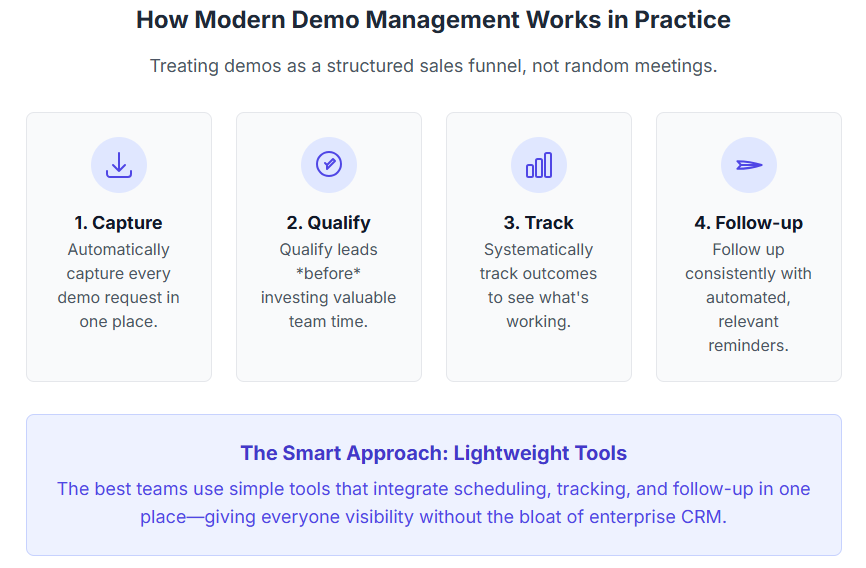
How does modern demo management actually work in practice?
Modern demo management means treating demos as a structured sales funnel, not random meetings. It involves capturing every demo request automatically, qualifying leads before you invest time, tracking outcomes systematically, and following up consistently. The best teams use lightweight tools that integrate scheduling, tracking, and follow-up in one place—giving everyone visibility into what’s working without the complexity of enterprise CRM systems.
4. Build a Follow-Up System That Actually Follows Up
This is where most deals die. Not because the product isn’t right. Not because the price is wrong. But because nobody followed up consistently.
Jill Rowley, a SaaS sales evangelist, nails it: “Follow-up after demos is where many deals are lost. Consistent, timely, and personalized follow-up communications are essential to nurture leads and close more deals.”
Here’s the uncomfortable truth: prospects need an average of 5-7 touchpoints before they convert. Most sales teams give up after one or two attempts. You’re literally quitting right before the finish line.
What a real follow-up system looks like:
Immediately after the demo:
- Send a personalized recap email within 2 hours
- Include a summary of what you discussed
- Attach any resources or case studies mentioned
- Clearly state the next step you agreed on
Day 3:
- Check in with a specific question or additional resource
- Reference something personal from your conversation
- Make it easy to respond with a simple yes/no question
Week 2:
- Share a relevant success story or new feature
- Acknowledge they might be busy and offer flexibility
- Provide value without being pushy
Week 4:
- Last check-in with a clear timeline
- “I’ll assume you’ve moved in a different direction unless I hear back”
- Leave the door open for future conversations
The key is automation with personalization. Set up templates, but customize each one with specific details from the actual demo. Tools that help manage this process are invaluable—tracking demo outcomes and follow-ups in one centralized place means nothing slips through the cracks.
Mistake I see constantly: Sending generic “just checking in” emails. These get ignored. Always lead with value—a new insight, a relevant case study, a specific answer to a question they raised.
5. Leverage Interactive Demos to Engage Self-Serve Prospects
Not every prospect wants to sit through a live demo. Some want to explore on their own terms, at 11 PM on a Sunday in their pajamas. Respect that.
Interactive demos—where prospects can click through and explore features themselves—are seeing 30-40% higher engagement rates compared to static videos, according to Aragon Research’s 2023 findings.
Platforms like Arcade, Consensus, and similar tools let you create clickable walkthroughs that prospects can experience without a sales rep breathing down their neck. Think of them as a “try before you buy” experience without the commitment of a full trial.
When to use interactive demos:
- For inbound leads who aren’t ready to talk to sales yet
- As a follow-up resource after a live demo
- For prospects in different timezones where scheduling is difficult
- To supplement your pricing page so visitors can see value before committing
How to build effective interactive demos:
- Keep them under 5 minutes—attention spans are real
- Focus on one primary workflow, not everything
- Include tooltips and guidance at decision points
- Add a clear CTA at the end to book a live demo or start a trial
- Track which prospects engage and what they click on
I’ve seen small teams use interactive demos as a qualification tool. If someone spends 10+ minutes exploring your interactive demo, they’re serious. That’s a lead worth prioritizing for personal outreach.
Reality check: Interactive demos don’t replace live demos—they complement them. Use them to educate and qualify, then follow up personally with the most engaged prospects.
What are the main benefits and drawbacks of these modern sales tactics?
Benefits: These tactics reduce manual work through automation, increase conversion rates by removing friction, help small teams compete with larger companies, and provide data to continuously improve your process. They’re designed to scale without requiring more headcount.
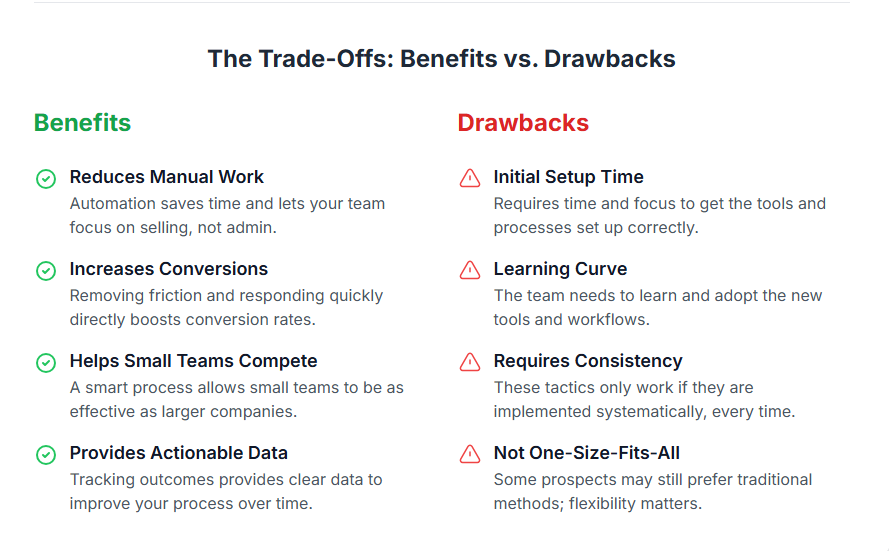
Drawbacks: Initial setup requires time and focus. There’s a learning curve with new tools. You need to maintain consistency—these tactics only work if you actually implement them systematically. And some prospects still prefer traditional approaches, so flexibility matters.
6. Track Demo Outcomes Like a Data-Driven Business
You can’t improve what you don’t measure. Sounds obvious, right? Yet most small sales teams I work with have zero visibility into their demo funnel.
They know how many demos they did last month. But they don’t know:
- Which demos converted and which didn’t
- Why deals were lost
- How long the average sales cycle is
- Which team member has the best close rate
- What follow-up cadence works best
According to the 2024 Sales Enablement Report, small sales teams using demo tracking tools report a 25% increase in demo-to-close conversion rates. That’s not magic—it’s just having the information you need to make smart decisions.
What to track for every demo:
- Date and attendees
- Outcome: Won, Lost, In Follow-up, or Pending
- Reason (if lost): Price, timing, competition, not a fit, etc.
- Next action: What needs to happen next and by when
- Deal size: Helps prioritize follow-ups
- Time to close: From first demo to signed contract
Why this matters: Last quarter, I helped a SaaS team analyze their demo data. We discovered that demos scheduled for Tuesday and Wednesday had a 40% higher close rate than Friday demos. Just by shifting their calendar availability, they improved conversions without changing anything else.
We also found that one sales rep had a 60% close rate while another was at 28%. Not because one was “better,” but because they were showing different things. Once we standardized the approach (using insights from the high performer), everyone’s numbers improved.
Tool recommendation: You don’t need an enterprise CRM for this. Lightweight demo management tools that integrate scheduling, outcome tracking, and follow-up reminders are perfect for small teams. They give you visibility without the complexity.
When should you use these sales tactics?
Implement these tactics when you’re getting demo requests but struggling to convert them, when follow-ups are inconsistent or falling through the cracks, when you can’t clearly see what’s working in your sales process, or when your team is spending more time on administrative tasks than actual selling. Essentially, if you’re serious about scaling sales without proportionally scaling headcount, these tactics become essential.
7. Qualify Leads Before They Waste Your Time
Not all demo requests are created equal. Some are tire-kickers. Some are students doing research. Some are competitors. And some are genuinely qualified prospects ready to buy.
Your job is to figure out which is which before you spend 30 minutes on a demo call.
Simple qualification framework:
Ask three questions on your demo request form:
- What’s your role?
- What problem are you trying to solve?
- What’s your timeline for making a decision?
These three questions tell you almost everything you need to know. If someone writes “CEO” and “Need to streamline our demo process ASAP” and “Looking to implement in the next 30 days,” that’s a qualified lead. If they write “Student” and “Just exploring options” and “No timeline,” that’s not.
What to do with unqualified leads:
Don’t ignore them—nurture them differently. Send them to your interactive demo or a recorded video. Add them to an educational email sequence. Point them to your blog with helpful resources. But don’t give them the same attention as a hot prospect.
The math matters: If 30% of your demo requests are unqualified and each demo takes 45 minutes (including prep and follow-up), you’re wasting about 15 hours per month on leads that will never convert. That’s nearly two full workdays you could spend on actual prospects.
Balancing act: Don’t make qualification so strict that you turn away good leads. I’ve seen companies require a phone screening before allowing demo bookings—that’s often overkill for SMB SaaS. Find the right balance for your price point and sales cycle.
8. Automate the Repeatable, Personalize the Important
Here’s the secret sauce: automation isn’t about removing the human touch. It’s about freeing you up to be more human where it actually matters.
What to automate:
- Demo scheduling and calendar invites
- Reminder emails before demos
- Initial follow-up emails with recap and resources
- Follow-up sequences for prospects who go quiet
- Data entry and outcome tracking
- Internal notifications when leads need attention
What to keep personal:
- The actual demo conversation
- Responses to specific questions
- Negotiations and objection handling
- Relationship building touchpoints
- Check-ins with high-value prospects
I watched a solo founder implement this approach and go from spending 20 hours a week on administrative sales tasks to less than 5 hours. Same number of demos. Better conversion rate. Way less burnout.
The tools you actually need:
You don’t need a massive tech stack. Start with:
- A scheduling tool that integrates with your calendar
- A simple demo management platform that tracks outcomes and follow-ups
- An email tool with basic automation and templates
- That’s it for most small teams
As Jason Lemkin, founder of SaaStr, puts it: “For small SaaS teams, leveraging affordable demo tools that integrate with CRM and automate workflows is a game-changer.”
Real talk: The hardest part isn’t choosing tools—it’s actually using them consistently. Pick simple tools you’ll actually use over powerful tools that sit unused because they’re too complicated.
What mistakes should you avoid with these sales tactics?
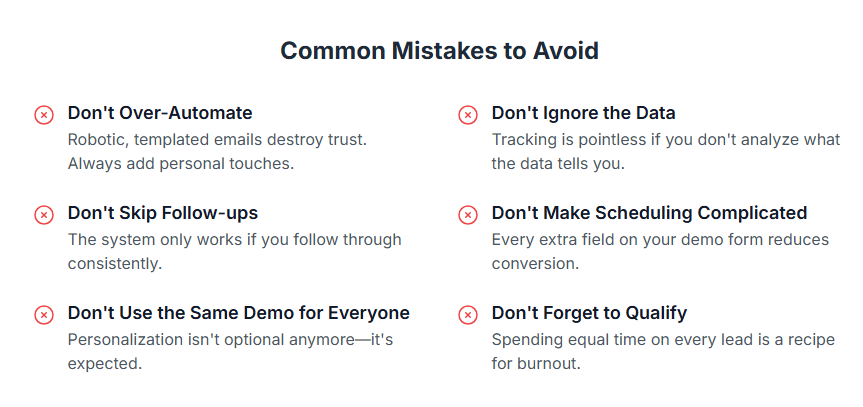
Don’t over-automate: Sending robotic, obviously templated emails destroys trust. Always add personal touches to automated sequences.
Don’t ignore the data: Tracking outcomes is pointless if you never analyze what the data tells you.
Don’t skip follow-ups: The system only works if you actually follow through consistently.
Don’t make scheduling complicated: Every extra field on your demo form reduces conversion.
Don’t use the same demo for everyone: Personalization isn’t optional anymore—it’s expected.
Don’t forget to qualify: Spending equal time on every lead is a recipe for burnout and poor results.
Putting It All Together: Your Action Plan for This Week
Look, I get it. Reading about eight tactics is one thing. Actually implementing them? That’s where things get real.
You don’t need to overhaul your entire sales process overnight. In fact, please don’t try. Here’s what I’d recommend:
This week:
- Implement one-click scheduling on your demo request page
- Create a simple follow-up template with three touchpoints
- Start tracking demo outcomes in a spreadsheet (or better yet, a lightweight demo management tool)
Next two weeks:
- Research three prospects before demos and personalize your approach
- Review your demo data and identify one pattern to optimize
- Set up basic qualification questions on your demo form
This month:
- Test the Tell, Show, Tell method in your demos
- Create or source one interactive demo for self-serve prospects
- Automate your reminder emails and initial follow-ups
The companies doubling their sales in 2025 aren’t doing anything magical. They’re systematically removing friction from their sales process, personalizing where it matters, and building repeatable systems that work without constant manual effort.
Frequently Asked Questions
How can I make demo scheduling easier for prospects?
Use embedded calendar tools that show available time slots directly on your confirmation page. Include timezone detection and one-click booking. Automated reminders sent 24 hours and 1 hour before the demo reduce no-shows by up to 50%.
What’s the ideal length for a SaaS demo?
Between 20-30 minutes works best for most B2B SaaS products. Long enough to demonstrate clear value, short enough to maintain attention. Test different lengths with your audience to find your sweet spot.
How do I personalize demos for different prospects?
Spend 10 minutes before each demo researching the prospect’s role, company, and likely pain points. Use LinkedIn and their company website. Then show only the 3-4 features most relevant to their specific situation, using examples from their industry.
What should I include in demo follow-up emails?
Start with a personalized summary of what you discussed, include any resources or case studies mentioned during the call, clearly state the agreed-next-step, and provide one specific piece of additional value. Send within 2 hours while the conversation is fresh.
How can small sales teams track demo outcomes effectively?
Use a centralized system that logs demo attendance, outcomes (Won, Lost, In Follow-up, Pending), next actions, and key details for each prospect. Even a well-organized spreadsheet works, though dedicated demo management tools provide better visibility and automation.
What are interactive demos and why do they matter?
Interactive demos are clickable product walkthroughs prospects can explore independently, without a sales rep. They increase engagement by 30-40% compared to videos and help qualify serious leads based on how much time they spend exploring features.
How do I handle demo no-shows?
Send automated reminders before the scheduled time. Make rescheduling easy with a one-click option. Follow up promptly with prospects who miss demos—sometimes it’s a legitimate conflict, not lack of interest.
Should I use live or pre-recorded demos?
Use both strategically. Live demos allow real-time personalization and relationship building. Pre-recorded or interactive demos work well for initial engagement, different timezones, or prospects not ready for sales conversations. The best approach combines both.
How important is analyzing demo data?
Critical. Demo data reveals which approaches convert best, optimal timing, where deals are lost, and team performance patterns. Companies that regularly analyze demo metrics see 25% higher conversion rates than those flying blind.
What tools can help solo founders manage demos efficiently?
Look for tools that combine scheduling automation, outcome tracking, and follow-up management in one place. Platforms like LevelUp Demo are specifically designed for small teams needing visibility without CRM complexity. Start simple and add capabilities as you grow.
The Bottom Line: Sales Success in 2025 Isn’t About Luck
Doubling your sales isn’t about working twice as hard. It’s not about hiring more people or spending more on ads. It’s about building modern systems that align with how buyers actually make decisions today.
The eight tactics we’ve covered—streamlined scheduling, personalized demos, structured delivery, consistent follow-up, interactive exploration, outcome tracking, smart qualification, and strategic automation—work together to create a sales process that converts at higher rates without burning out your team.
I’ve watched solo founders implement these approaches and close deals they would have lost six months earlier. I’ve seen small sales teams double their conversion rates in a single quarter. Not because they suddenly became better salespeople, but because they removed friction, added visibility, and built repeatable systems.
The best part? You don’t need an enterprise budget or a massive team to make this work. You just need to start. Pick one tactic from this guide. Implement it this week. Measure the results. Then add another.
The companies winning in 2025 aren’t necessarily the ones with the best products. They’re the ones with the smoothest, most responsive sales experiences. They’re the ones who respect their prospects’ time, personalize intelligently, and follow up consistently.
If you’re a founder or sales leader tired of watching qualified leads slip away, tired of manual processes eating up your day, tired of not knowing what’s actually working—it’s time to modernize your approach.
Want to see how top-performing SaaS teams are managing their entire demo workflow in one lightweight platform? Request a demo and we’ll show you exactly how to implement these tactics without the complexity of traditional CRM systems. Or check out our pricing to see which plan fits your team’s needs.
The sales landscape has changed. Your process should too.