I’ll never forget the morning I found seventeen unanswered demo requests sitting in my inbox. Some were three days old. One prospect had already signed with a competitor.
I wasn’t ignoring these leads on purpose. I was drowning in the daily chaos that every small sales team knows too well: writing follow-ups, prepping for demos, updating the CRM, qualifying new leads, and somehow finding time to actually talk to prospects. The manual work was eating up hours I should’ve spent closing deals.
That’s when I started experimenting with AI prompts—not as some futuristic sales hack, but as a practical way to handle repetitive writing tasks faster. And honestly? It worked. I got those seventeen leads back on track, saved about six hours that week, and stopped losing sleep over missed follow-ups.
If you’re running a small sales team or wearing multiple hats as a SaaS founder, you don’t need another “AI will revolutionize everything” pitch. You need specific, ready-to-use prompts that handle real sales workflows—lead qualification, demo prep, follow-up emails, objection handling—so you can focus on the conversations that actually close deals.
This post walks through seven AI chat prompts I use regularly with tools like ChatGPT, Claude, or Gemini. Each one tackles a specific sales task, includes a realistic SaaS scenario, and explains why it works. No theory, no fluff—just copy, paste, and adjust to your workflow.
What Are AI Chat Prompts for Sales Teams?
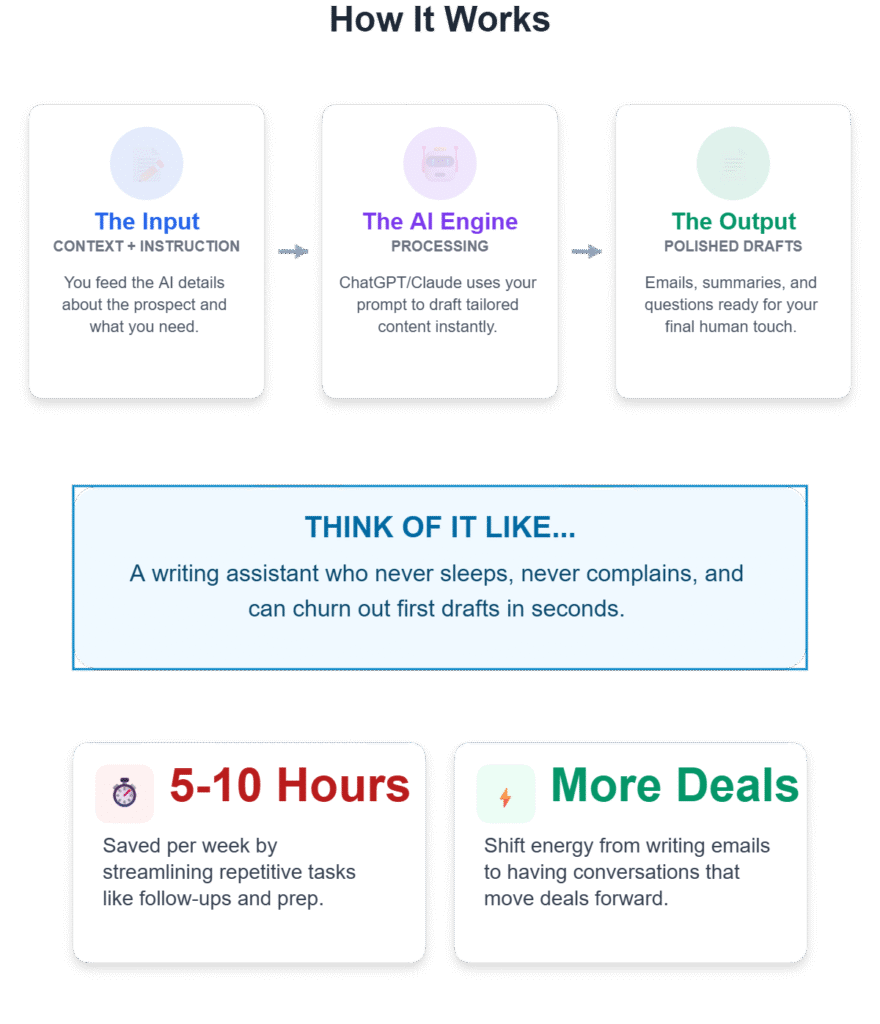
AI chat prompts for sales teams are specific instructions you give to AI tools like ChatGPT or Claude to generate sales-related content—emails, summaries, qualification questions, or follow-up messages. Instead of starting from a blank page every time you need to write a follow-up or prep for a demo, you feed the AI context about your prospect and ask it to draft something tailored.
Think of it like having a writing assistant who never gets tired and can churn out first drafts in seconds. You still review, edit, and add your personal touch, but the heavy lifting is done.
For small sales teams juggling dozens of leads, demo requests, and follow-ups, these prompts save time on repetitive writing tasks so you can spend more energy on conversations that move deals forward. According to research from sales enablement experts, AI prompts can save sales reps 5-10 hours a week by streamlining call prep, follow-ups, and lead research.
How Do AI Prompts Help with Demos and Sales Workflows?
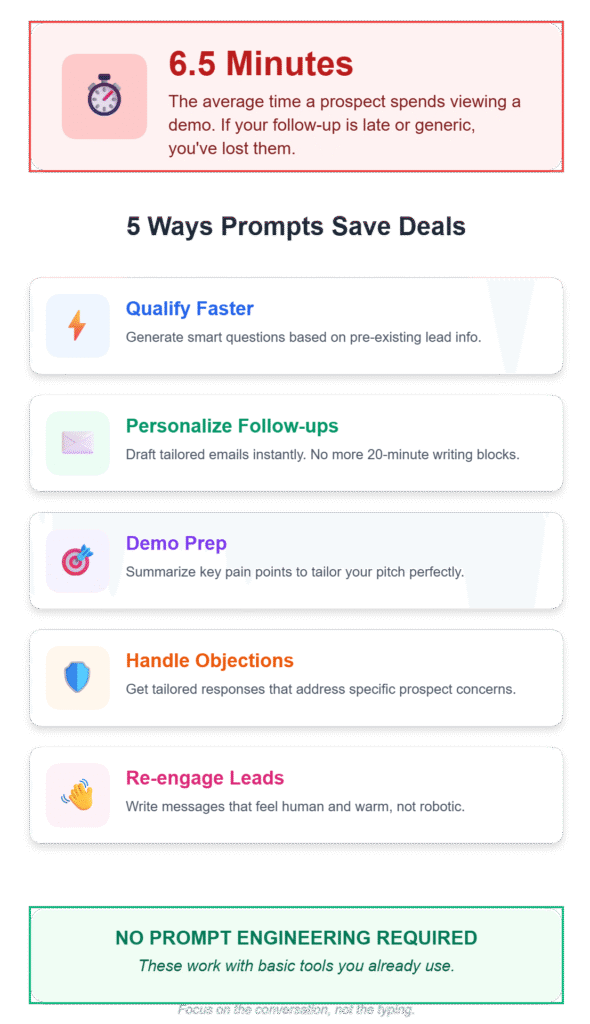
Here’s the thing: prospects spend an average of just 6.5 minutes viewing demos. That’s barely enough time to understand your product, let alone remember everything you discussed. If your follow-up email is generic or arrives three days late, you’ve probably lost them.
AI prompts help you:
- Qualify leads faster by generating smart questions based on the information they’ve already provided
- Personalize follow-ups without spending 20 minutes per email
- Prep for demos by summarizing key pain points and tailoring your pitch
- Handle objections with tailored responses that address specific concerns
- Re-engage cold leads with messages that feel human, not robotic
The best part? You don’t need to be a prompt engineer or spend hours learning complex AI techniques. These prompts work with basic tools you probably already use.
Why AI Prompts Matter for Small Sales Teams
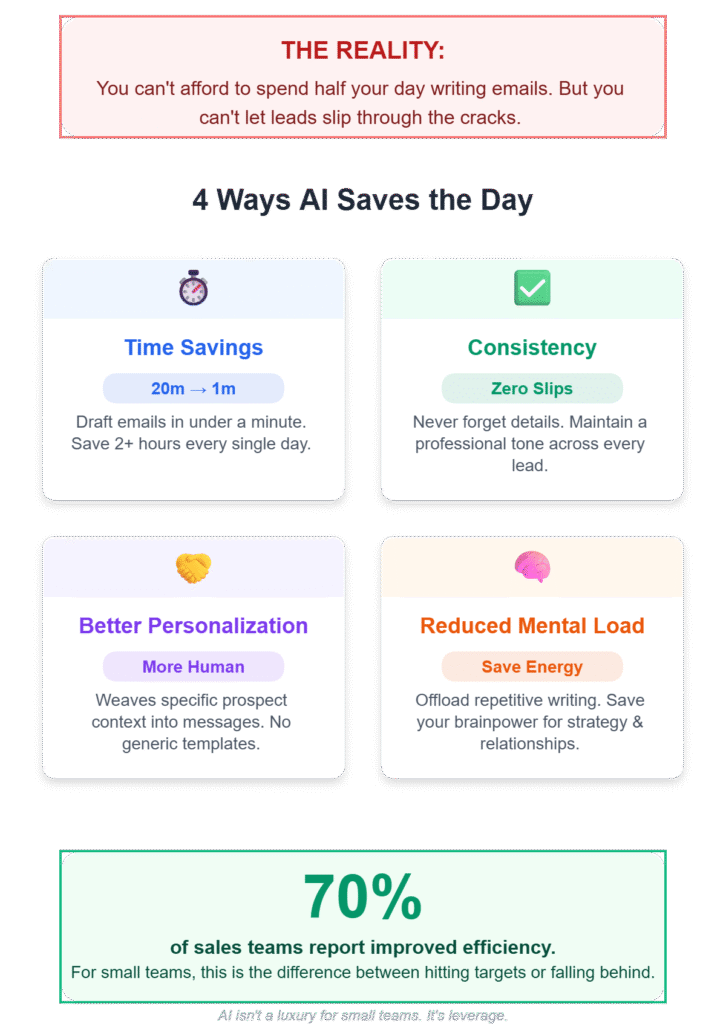
When you’re a team of one to five people, every hour counts. You can’t afford to spend half your day writing emails or manually tracking demo outcomes. But you also can’t afford to let leads slip through the cracks because follow-ups are inconsistent or non-existent.
I’ve worked with early-stage SaaS teams where the founder is handling sales, product updates, and customer support all at once. In those situations, AI prompts aren’t a nice-to-have—they’re a survival tool.
Here’s why they matter:
Time savings: Writing a personalized follow-up email manually takes 15-20 minutes. With a good prompt, you can generate a solid first draft in under a minute. Do that ten times a day, and you’ve saved over two hours.
Consistency: When you’re juggling multiple leads, it’s easy to forget details or send generic messages. AI prompts help you maintain a consistent, professional tone across all communications.
Better personalization: Ironically, AI can help you sound more human by pulling specific details from your prospect’s context and weaving them into your message. No more “Hi [First Name], hope you’re doing well!” templates.
Reduced mental load: Writing the same types of emails over and over is exhausting. Offloading that work to AI frees up mental energy for strategic thinking and relationship building.
According to a study on AI adoption in sales, 70% of sales teams report improved efficiency and productivity after implementing AI-powered tools. For small teams, that efficiency gain can mean the difference between hitting revenue targets and falling behind.
The 7 AI Chat Prompts for Sales Teams
Alright, let’s get into the actual prompts. Each one is designed for a specific sales task, includes a realistic scenario, and explains why it works. I’ve used variations of these in my own workflows, and they’ve saved me countless hours.
1. Lead Qualification After a Demo Request
When to use this: A prospect submits a demo request form, but you need to qualify them before booking time on your calendar.
The scenario: Someone named Sarah from a mid-sized company fills out your demo form. She mentions “improving team collaboration” but doesn’t provide much detail. You want to send a quick email asking the right questions without sounding like you’re interrogating her.
The prompt:
I received a demo request from [prospect name] at [company name]. They mentioned [brief pain point or goal from form].

Write a friendly, conversational email that:
- Thanks them for their interest
- Asks 3-4 qualifying questions about their current workflow, team size, and decision-making process
- Keeps the tone helpful, not pushy
- Ends with a clear next step (e.g., booking a demo or a quick call)

Keep it under 150 words.
Why this works: This prompt forces the AI to balance warmth with efficiency. You’re not asking for a sales pitch—you’re asking for a helpful message that gathers the information you need to prepare a relevant demo. The word limit keeps it concise, which prospects appreciate.
Real example output:
Hi Sarah,
Thanks for reaching out! I’d love to learn more about how you’re thinking about team collaboration at [Company Name].
Before we jump into a demo, a few quick questions to make sure we’re a good fit:
- How many people are on your team?
- What tools are you currently using for collaboration?
- Who else would be involved in evaluating a solution like ours?
Once I have a better sense of your workflow, I can tailor the demo to focus on what matters most to you.
Looking forward to hearing from you!
[Your Name]
This prompt works well for SaaS demos because it highlights the lead’s problem before suggesting next steps, making the email feel consultative rather than transactional.
2. Demo Prep Summary
When to use this: You have a demo scheduled, and you need to quickly review the prospect’s context and prepare talking points.
The scenario: You’re about to demo your project management tool to a prospect who mentioned their team struggles with missed deadlines and unclear task ownership. You have notes scattered across emails and your CRM, and you need a quick summary.
The prompt:
I'm preparing for a demo with [prospect name] from [company name]. Here's what I know about them:

[Paste notes from CRM, emails, or form submissions]

Based on this information:
1. Summarize their main pain points
2. Suggest 3 key features to highlight during the demo
3. Identify potential objections they might raise
4. Recommend 1-2 specific use cases to walk through

Keep it concise and actionable.
Why this works: This prompt turns messy, scattered information into a clear action plan. By asking the AI to identify pain points, features, objections, and use cases, you’re essentially building a mini demo script tailored to that prospect’s needs.
I started using this after realizing I was winging too many demos and missing opportunities to connect features to specific problems. Having a prep summary makes you sound way more organized and consultative.
Pro tip: If you’re using a tool like Levelup Demo to track your demo funnel, you can pull lead information directly from your dashboard and paste it into this prompt for faster prep.
3. Post-Demo Follow-Up Email
When to use this: The demo just ended, and you want to send a follow-up that recaps key points and moves the conversation forward.
The scenario: You demoed your software to a prospect who seemed interested but didn’t commit to next steps. You want to send a follow-up that feels personal, not generic.
The prompt:
I just finished a demo with [prospect name] from [company name]. During the demo, we discussed:

- [Pain point 1]
- [Feature they seemed most interested in]
- [Any objections or questions they raised]

Write a follow-up email that:
- Thanks them for their time
- Recaps the 2-3 most relevant points from the demo
- Addresses any objections they raised
- Suggests a clear next step (e.g., trial signup, follow-up call, or pricing discussion)

Keep the tone friendly and helpful, not pushy. Under 200 words.
Why this works: Personalized follow-ups are critical for moving deals forward, but they’re time-consuming to write manually. This prompt ensures your follow-up feels tailored without requiring you to start from scratch. The AI pulls specific details from the demo and weaves them into a natural, conversational email.
Research shows that timely, personalized follow-ups can increase demo-to-close conversion rates by up to 30%. But here’s the thing: “timely” means within a few hours, not a few days. AI prompts help you hit that window consistently.
4. Handling Pricing Objections
When to use this: A prospect says your product is too expensive or asks for a discount.
The scenario: You sent a proposal, and the prospect replies saying your pricing is higher than expected. You need to respond in a way that reframes value without sounding defensive.
The prompt:
A prospect said: "[Insert their exact objection about pricing]"

Here's context about our product and pricing:
- [Brief description of your product]
- [Key benefits or ROI]
- [How it compares to alternatives]

Write a response that:
- Acknowledges their concern
- Reframes pricing in terms of value and ROI
- Provides a specific example or case study if possible
- Offers a next step (e.g., discussing their budget, exploring a smaller plan, or scheduling a call)

Keep it professional and empathetic. Under 150 words.
Why this works: Pricing objections are emotional. Prospects aren’t just saying “this costs too much”—they’re saying “I’m not convinced this is worth it.” This prompt helps you respond with empathy while shifting the conversation back to value.
I’ve found that the best responses to pricing objections don’t argue—they ask questions. A prompt like this can generate a message that opens the door to a deeper conversation about budget, priorities, and ROI.
5. Cold Lead Re-Engagement
When to use this: A prospect went silent after showing initial interest, and you want to re-engage them without sounding desperate.
The scenario: Someone signed up for a free trial three weeks ago, used it once, and hasn’t logged in since. You want to send a message that feels helpful, not pushy.
The prompt:
I'm trying to re-engage [prospect name] from [company name]. They [signed up for a trial / attended a demo / downloaded a resource] on [date] but haven't engaged since.

Write a short, friendly email that:
- Acknowledges they've been busy
- Offers something helpful (e.g., a quick tip, a resource, or a specific use case)
- Asks a low-pressure question to gauge interest
- Keeps the door open without being pushy

Under 100 words.
Why this works: Re-engagement emails are tricky. You want to remind the prospect you exist without sounding annoying. This prompt helps you strike that balance by focusing on value first and asking second.
One thing I’ve learned: cold leads aren’t always dead leads. Sometimes they just got busy, or the timing wasn’t right. A well-timed, helpful message can bring them back into the conversation.
6. Personalizing Cold Outreach
When to use this: You’re reaching out to a prospect who hasn’t heard from you before, and you want to sound relevant, not generic.
The scenario: You found a prospect on LinkedIn who works at a company that fits your ideal customer profile. You want to send a cold email that references something specific about their business.
The prompt:
I'm reaching out to [prospect name] at [company name]. Here's what I know about them:

- [Industry or niche]
- [Specific challenge their industry faces]
- [Recent news, LinkedIn post, or company update if available]

Write a cold email that:
- Opens with a specific, relevant observation about their business or industry
- Briefly explains how our product helps with [specific pain point]
- Includes a soft call-to-action (e.g., asking a question or offering a resource)
- Keeps the tone conversational and helpful, not salesy

Under 125 words.
Why this works: Generic cold emails get ignored. Personalized ones get responses. This prompt ensures your outreach feels relevant by anchoring it to something specific about the prospect’s business.
I’ve tested this approach with leads coming from Meta Ads, LinkedIn, and inbound form fills. The more specific the opening line, the better the response rate. AI helps you scale that personalization without spending 30 minutes per email.
7. Prioritizing Follow-Ups
When to use this: You have a messy pipeline with dozens of leads in different stages, and you need to figure out who to follow up with first.
The scenario: You have 40 leads in your CRM. Some requested demos weeks ago. Some are in trials. Some went cold. You need to triage.
The prompt:
I have a list of leads in different stages:

[Paste a list with lead names, companies, last interaction date, and stage]

Based on this information:
1. Identify the top 5 leads I should follow up with today
2. Explain why each one is a priority
3. Suggest a specific action for each (e.g., send a follow-up email, schedule a call, send a resource)

Focus on leads most likely to convert or those at risk of going cold.
Why this works: When you’re overwhelmed, prioritization is everything. This prompt helps you cut through the noise and focus on the leads that matter most. It’s like having a sales manager review your pipeline and tell you where to spend your time.
80% of small sales teams say that centralized tracking and accountability are critical for maintaining a healthy sales funnel. If you’re using a lightweight tool like Levelup Demo, you can pull this data directly from your dashboard and use this prompt to figure out your daily action plan.
Common Mistakes to Avoid When Using AI Prompts
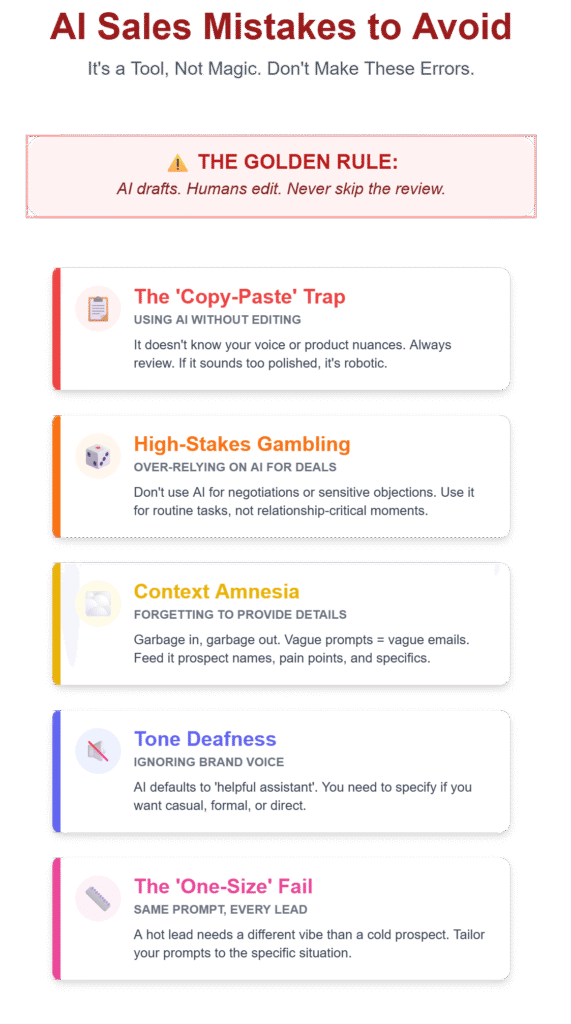
AI prompts are powerful, but they’re not magic. Here are a few mistakes I’ve made (or seen others make) that you should avoid:
1. Using AI-generated content without editing
AI can write a solid first draft, but it doesn’t know your voice, your product nuances, or your prospect’s specific context. Always review and edit before hitting send. If an email sounds too polished or generic, it probably is.
2. Over-relying on AI for complex, high-stakes conversations
AI is great for routine tasks like follow-ups and lead qualification. It’s not great for negotiating contracts, handling sensitive objections, or navigating multi-stakeholder deals. Use it for the repetitive stuff, not the relationship-critical moments.
3. Forgetting to provide enough context
The quality of AI output depends entirely on the quality of your prompt. If you give it vague instructions like “write a follow-up email,” you’ll get a vague email. The more specific context you provide (prospect name, pain points, demo details), the better the result.
4. Ignoring tone and voice
AI doesn’t inherently know whether your brand voice is formal, casual, or somewhere in between. If you want your emails to sound like you, you need to specify that in the prompt or edit afterward.
5. Using the same prompt for every situation
Not all leads are the same. A follow-up for a hot lead who’s ready to buy should sound different from a re-engagement email for a cold prospect. Tailor your prompts to the situation.
How to Get Started with AI Prompts Today
If you’re new to using AI for sales, here’s how to start:
1. Pick one repetitive task that eats up your time. For most people, it’s follow-up emails or demo prep.
2. Choose an AI tool. ChatGPT, Claude, and Gemini all work well. If you’re already paying for one, start there. If not, the free versions are fine for basic prompts.
3. Copy one of the prompts from this post and adjust it to your situation. Replace the placeholders with real prospect details.
4. Review and edit the output. Don’t just copy-paste. Make sure it sounds like you and addresses the prospect’s specific needs.
5. Track what works. Pay attention to which prompts save you the most time and which emails get the best responses. Refine from there.
Once you’ve mastered one or two prompts, you can start building a library of go-to prompts for different scenarios. Over time, this becomes second nature—like having a set of templates, but way more flexible.
FAQ
Can AI prompts replace a sales rep?
No. AI handles repetitive writing tasks, but it can’t build relationships, read body language, or navigate complex negotiations. Think of it as a writing assistant, not a replacement for human judgment.
Do I need technical skills to use these prompts?
Not at all. If you can copy, paste, and type a few sentences of context, you can use these prompts. No coding or AI expertise required.
Which AI tool is best for sales prompts?
ChatGPT, Claude, and Gemini all work well. ChatGPT is the most popular, but Claude often produces slightly more natural-sounding text. Try a few and see which one feels right for you.
How do I make AI-generated emails sound more human?
Provide specific context in your prompt (prospect name, pain points, recent interactions) and always edit the output. Add a personal line or two, adjust the tone, and remove any overly formal language.
Can AI help with lead qualification?
Yes. Use a prompt like the one in section 1 to generate qualification questions based on the information your prospect has already provided. It saves time and ensures you’re asking the right questions.
How much time can AI prompts actually save?
According to research, AI prompts can save sales reps 5-10 hours per week by streamlining follow-ups, call prep, and lead research. For small teams, that’s a huge productivity boost.
What if my prospect figures out I’m using AI?
If your email sounds generic or robotic, they might suspect AI. That’s why you should always review and personalize the output. The goal is to use AI as a starting point, not as the final product.
Are there privacy concerns with using AI for sales?
If you’re pasting sensitive customer information into an AI tool, make sure you’re using a platform that complies with data privacy regulations like GDPR or CCPA. Avoid sharing personally identifiable information unless necessary.
Can AI handle objections during a live demo?
Not in real time, but you can use prompts like the one in section 4 to prepare responses to common objections ahead of time. This helps you sound more confident and prepared during the actual conversation.
Should I use AI for cold outreach?
Yes, but with caution. AI is great for generating personalized cold emails based on specific context (like the prompt in section 6). Just make sure the message feels relevant and human, not templated.
Wrapping Up: AI Prompts Are Tools, Not Magic
Look, AI isn’t going to fix a broken sales process or turn a bad product into a great one. But if you’re already doing the hard work—qualifying leads, running demos, following up consistently—AI prompts can help you do it faster and more consistently.
I’ve seen small teams double their follow-up rate just by using a few simple prompts. I’ve watched founders who were drowning in admin work reclaim hours every week. And I’ve personally stopped losing sleep over unanswered demo requests.
The key is to start small. Pick one prompt from this list, try it with a real prospect, and see how it feels. If it saves you even 30 minutes, that’s 30 minutes you can spend on a conversation that actually closes a deal.
And if you’re looking for a way to keep your entire demo workflow organized—from lead capture to follow-ups to outcome tracking—Levelup Demo can help. It’s built for small teams who need a lightweight way to manage demos without the complexity of a traditional CRM. You can see how it works by requesting a demo or checking out the pricing.
Whatever tools you use, remember: AI is here to help you work smarter, not to replace the human connections that make sales work in the first place.