Last Tuesday, I watched a founder friend lose a $15K deal because he forgot to follow up after a demo. Not because he didn’t care—he was just drowning. Between product calls, investor emails, and customer support tickets, that promising lead simply… disappeared from his radar. Two weeks later, the prospect signed with a competitor who followed up the next day.
Here’s what keeps me up at night: I see this pattern everywhere. Small sales teams and solo founders are running demos, having great conversations, and then losing deals in the follow-up chaos. Not because they’re bad at sales—because they’re trying to do everything manually while wearing seventeen different hats.
AI won’t magically close deals for you. But it can handle the repetitive, time-consuming stuff that causes good leads to slip through the cracks. In this guide, I’ll walk you through five practical ways to use AI in your sales process—ways that actually work for small teams without requiring a data science degree or enterprise budget.
So, what exactly are the smart ways to use AI in sales to close more deals?
AI in sales isn’t about replacing human connection—it’s about removing friction from your sales process. The five smartest applications are: using AI to score and prioritize leads so you focus on high-potential prospects, personalizing outreach at scale without sounding robotic, automating follow-ups so no lead goes cold, extracting insights from sales calls to improve your pitch, and streamlining demo scheduling to eliminate the back-and-forth. Each of these tackles a specific bottleneck that small teams face daily.
Let me break down exactly how each one works and how you can implement it without overhauling your entire system.
Why AI in Sales Matters More Than Ever for Small Teams
I’ve been helping SaaS teams optimize their demo workflows for years, and I’ve noticed something: the gap between teams that use AI and those that don’t is widening fast. Not because AI is some magic bullet, but because it solves the exact problems that plague small teams—limited bandwidth, inconsistent follow-up, and difficulty tracking what’s working.
Here’s the reality: 56% of SaaS companies have already launched or tested AI features in their products within the past year, and 41% are monetizing those features. This isn’t future tech—it’s happening right now. And the teams embracing it are seeing real results: AI-powered scheduling tools alone can reduce no-shows by up to 30% and improve conversion rates by 20%.
But here’s what the statistics don’t tell you: AI doesn’t just improve numbers. It gives you back your time. It lets you focus on the parts of sales that actually require your human expertise—building relationships, handling objections, understanding nuanced needs—instead of copying and pasting follow-up emails at 11 PM.
For small teams especially, AI levels the playing field. You can deliver the kind of personalized, timely experience that used to require a team of ten, even when you’re a team of two.
1. Smart Lead Scoring: Focus Your Energy Where It Counts
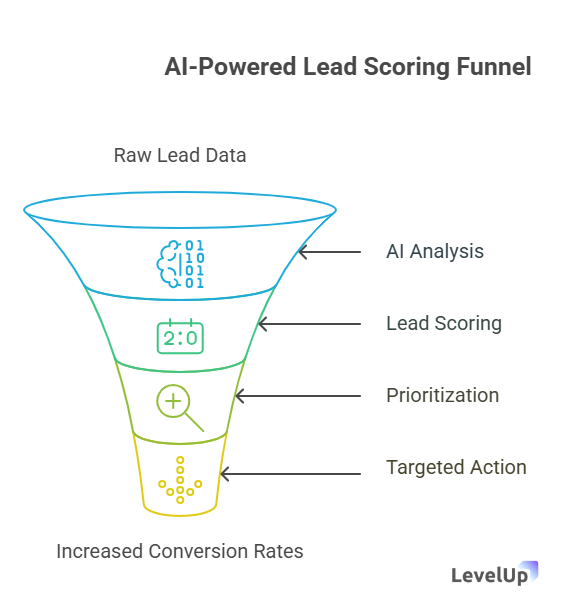
How does AI-powered lead scoring actually work in practice?
AI lead scoring analyzes patterns in your historical data—which leads converted, which didn’t, and what behaviors predicted success—then applies those insights to new leads in real-time. Instead of guessing which demo requests deserve immediate attention, AI assigns each lead a score based on factors like company size, industry, engagement level, and behavioral signals. You wake up to a prioritized list that tells you exactly who to call first.
For small teams, this is transformative. You’re not wasting hours qualifying leads that were never going to buy.
I learned this the hard way working with a three-person SaaS team last year. They were treating every demo request equally—spending just as much time on free-plan tire-kickers as on enterprise prospects. Their close rate was hovering around 8%, and they were exhausted. We implemented AI-powered lead scoring through their CRM, and within two months, their close rate jumped to 15% simply because they were spending time on the right conversations.
Here’s what AI lead scoring evaluates:
- Demographic fit: Company size, industry, location, job title
- Behavioral signals: Website visits, email opens, content downloads, time spent on pricing page
- Engagement patterns: Response time to emails, questions asked, demo attendance
- Historical patterns: Similarity to past customers who converted
How to implement this without a data scientist:
Most modern CRMs—HubSpot, Salesforce, Pipedrive—have built-in AI lead scoring. You don’t need to build algorithms. Here’s the practical approach:
- Start with your CRM’s native scoring: Most platforms offer predictive lead scoring based on your historical data. Turn it on and let it run for a few weeks.
- Customize the criteria: Adjust scoring weights based on what actually matters for your product. If enterprise deals are your target, weight company size heavily. If product-led growth is your model, prioritize engagement signals.
- Create response tiers: Set up workflows where high-scoring leads (say, 80+) trigger immediate notifications, medium-scoring leads (50-79) go into a nurture sequence, and low-scoring leads get automated content.
- Review and refine monthly: AI gets smarter with more data. Check which leads actually converted and adjust your scoring model accordingly.
Common mistake to avoid: Don’t let AI scoring become an excuse to ignore lower-scored leads entirely. Sometimes a small company with huge potential scores lower because they don’t fit traditional patterns. Use AI as a guide, not a gatekeeper.
The beauty of AI lead scoring is that it’s always on. It doesn’t get tired, doesn’t play favorites, and doesn’t let personal biases affect which leads get attention. For a sales CRM upgrade, this kind of intelligent prioritization is often the single biggest impact you can make.
2. Personalization at Scale: Stop Sending Generic Emails
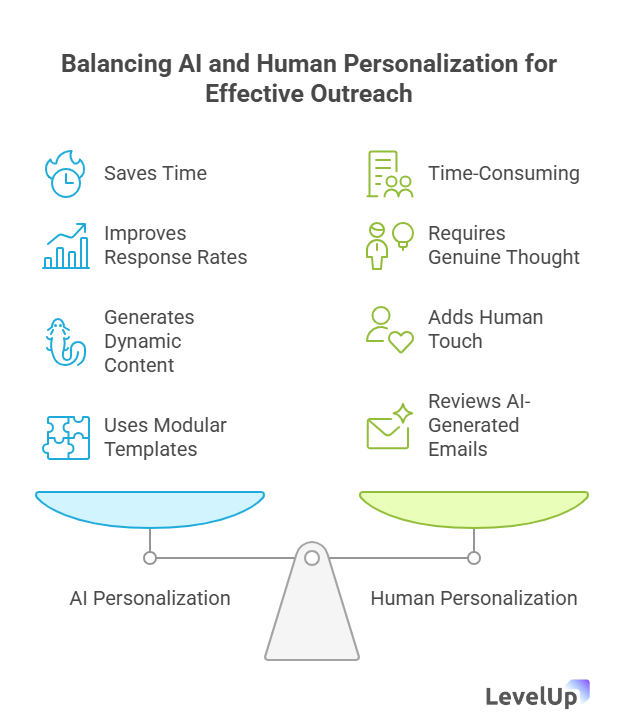
What are the main benefits of AI-driven personalization?
AI personalization lets you send emails that feel hand-written without actually hand-writing each one. The technology analyzes prospect data—their industry, role, company challenges, website behavior—and generates customized messages that reference specific pain points and use cases. The benefit isn’t just saving time; it’s dramatically improving response rates. Personalized emails get 3-5x higher open rates and significantly better reply rates than generic templates.
Look, I used to think personalized outreach at scale was impossible for small teams. You either sent personalized emails to ten people and spent all day doing it, or you sent generic blasts to hundreds and got ignored. AI changed that equation entirely.
Here’s what changed my mind: I watched a two-person sales team use AI to personalize follow-ups after demos. Instead of sending the same “thanks for your time” email to everyone, their AI tool analyzed what was discussed in each demo (pulled from call transcripts) and generated follow-up emails that referenced specific features discussed, concerns raised, and next steps. Their follow-up response rate went from 22% to 61%.
What AI personalization actually looks like:
- Dynamic email content: AI pulls prospect data (company news, role, industry challenges) and weaves it into email templates naturally
- Contextual recommendations: Suggests which case studies, features, or resources to share based on the prospect’s profile
- Timing optimization: Analyzes when each prospect is most likely to open emails and schedules accordingly
- Tone matching: Adjusts language formality based on the prospect’s communication style
How to implement personalization without sounding robotic:
- Start with AI-powered email assistants: Tools like Lavender, Copy.ai, or even ChatGPT can help draft personalized emails. Feed them context about your prospect, and they’ll generate drafts you can refine.
- Use merge fields intelligently: Go beyond {{FirstName}}. Modern tools can pull in company news, recent funding rounds, job changes, or mutual connections automatically.
- Create modular templates: Build email templates with interchangeable sections. AI can select which sections to include based on prospect data—pricing concerns get one module, integration questions get another.
- Personalize subject lines: AI can A/B test and generate subject lines tailored to each prospect’s interests. This alone can improve open rates by 20-30%.
- Always add a human touch: Review AI-generated emails before sending. Add a genuine personal observation or reference something specific from your conversation. AI handles the structure; you add the humanity.
When not to use AI personalization:
Don’t use it for high-stakes, sensitive conversations—executive outreach, contract negotiations, or addressing concerns. Those require genuine human thought. And never let AI personalize without your review; it can occasionally generate awkward or tone-deaf content.
The goal isn’t to trick people into thinking a human wrote every word. It’s to give you the bandwidth to add genuine personalization where it matters most while AI handles the research and structure. For teams building a successful sales process, this balance is crucial.
3. Automated Follow-Ups: Never Let a Lead Go Cold Again
How can AI help with follow-up timing and consistency?
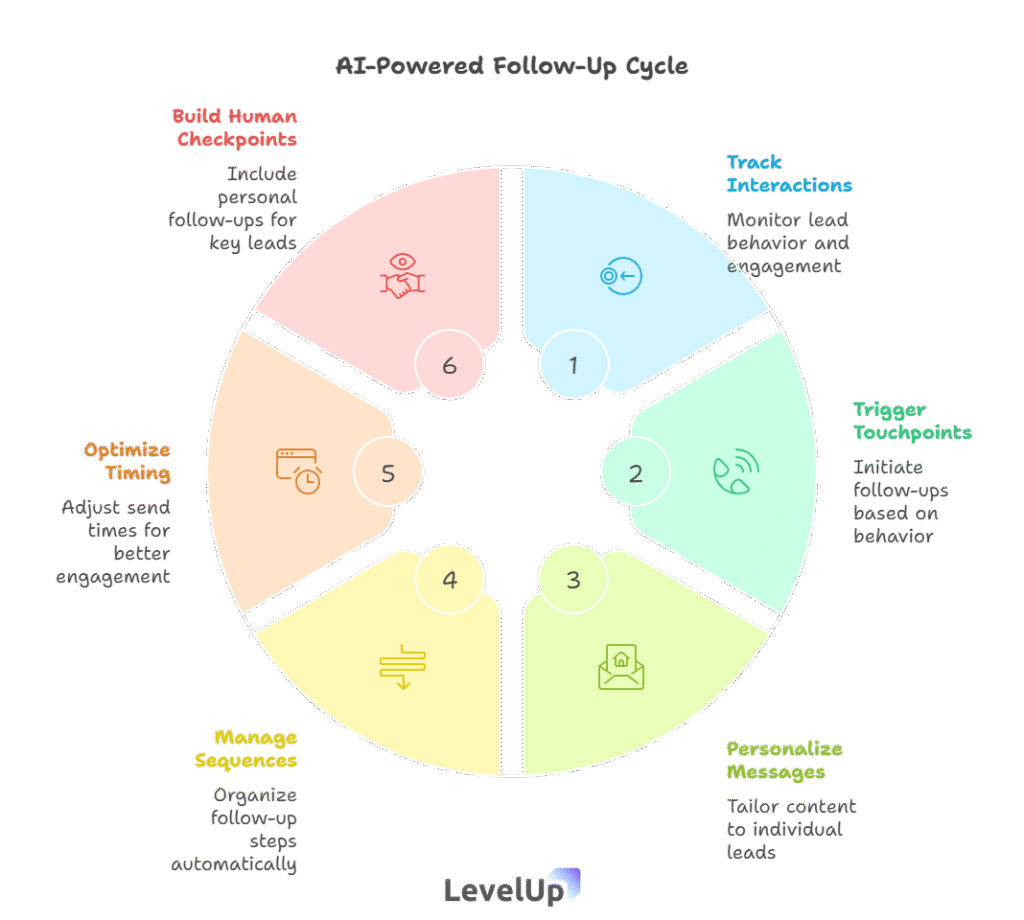
AI-powered follow-up systems track every interaction with a lead—emails opened, links clicked, demo attendance—and automatically trigger the next appropriate touchpoint based on behavior. If a prospect opens your pricing email three times but doesn’t respond, AI can automatically send a targeted follow-up offering to answer questions. If someone misses a demo, AI reschedules with a personalized message. The system ensures consistent, timely follow-up without you manually tracking every prospect’s status.
This is where I see most deals die. Not in the pitch, not in the demo—in the follow-up. You have a great conversation, the prospect is interested, you say you’ll follow up in a few days… and then life happens. You get slammed with other priorities, and that follow-up happens a week late. Or not at all.
I’ve been guilty of this myself. Last year, I had a prospect who was clearly interested after our demo. I meant to follow up the next day with the case study she asked for. Three days later, I remembered—at midnight—and sent a panicked email. She’d already started a trial with a competitor. That case study would’ve taken me five minutes to send if I’d had a system to remind me.
What AI-powered follow-up automation handles:
- Behavioral triggers: Automatically sends relevant content when prospects take specific actions (visits pricing page, downloads resource, opens email multiple times)
- Sequence management: Moves prospects through nurture sequences based on engagement, pausing or advancing them automatically
- Reminder systems: Alerts you when manual follow-up is needed for high-priority leads
- Multi-channel coordination: Manages follow-up across email, LinkedIn, and phone without overlap or gaps
How to build an AI follow-up system that actually works:
- Map your follow-up journey: Before automating anything, document your ideal follow-up sequence. What happens after a demo? After they download a resource? After they go quiet for two weeks? Write it out.
- Set up behavioral triggers: Use tools like HubSpot, ActiveCampaign, or LevelUp Demo to create workflows. For example:
-
- If prospect opens pricing email → wait 2 days → send case study
- If prospect doesn’t respond to demo invite → wait 1 day → send alternative time slots
- If prospect goes silent for 7 days after positive demo → send “just checking in” email with helpful resource
- Personalize automated messages: Use the AI personalization techniques from section 2. Automated doesn’t mean generic. Include specific details from previous conversations.
- Build in human checkpoints: For high-value leads, have AI notify you to follow up personally rather than sending automated messages. Some conversations shouldn’t be automated.
- Test and optimize send times: AI can analyze when each prospect typically opens emails and schedule follow-ups for those windows. This can improve response rates by 15-20%.
Common mistakes with automated follow-ups:
- Too aggressive: Sending daily follow-ups makes you look desperate. Space them appropriately (2-3 days for hot leads, weekly for nurture).
- Too passive: Waiting a week between touchpoints lets competitors swoop in. Strike while interest is warm.
- Ignoring signals: If someone unsubscribes or says “not interested,” respect that. Don’t let automation override common sense.
- Forgetting to update sequences: As your product or messaging evolves, update your automated sequences. Stale follow-ups kill credibility.
The magic of AI follow-up isn’t just consistency—it’s intelligence. The system learns which follow-up patterns work best and adjusts timing and content accordingly. For teams building a sales pipeline, this reliability is the difference between a leaky funnel and a well-oiled machine.
4. Call Analysis & Insights: Learn From Every Conversation
What insights can AI extract from sales calls?
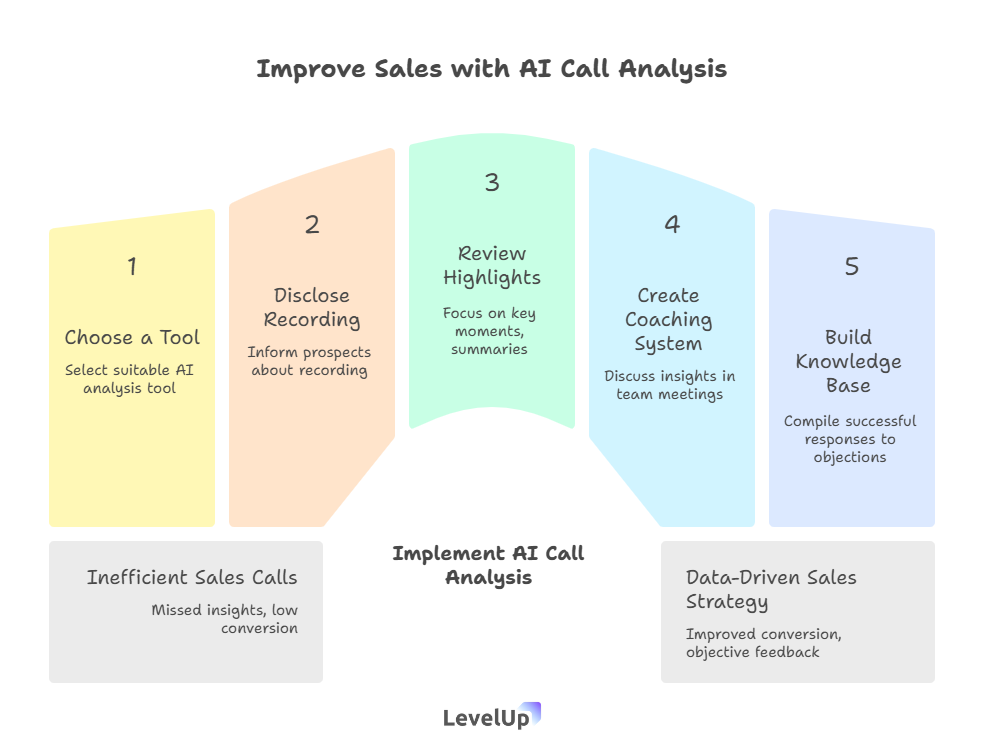
AI call analysis tools transcribe sales calls in real-time, identify key moments (questions asked, objections raised, competitors mentioned), track talk-time ratios, and flag successful patterns. They generate summaries highlighting what worked, what didn’t, and specific action items. For small teams, this means every call becomes a learning opportunity without spending hours reviewing recordings. You get objective feedback on your pitch, understand which objections come up most often, and identify exactly which phrases correlate with closed deals.
I’ll be honest—this one felt creepy to me at first. The idea of AI listening to my sales calls and analyzing my performance? No thanks. But then I tried it, and it completely changed how I approach demos.
Here’s what happened: I used Gong to record and analyze twenty of my demo calls. The AI revealed something I hadn’t noticed—I was talking 70% of the time. I thought I was having conversations, but I was basically giving monologues. Prospects who talked more than 40% of the time were three times more likely to convert. That one insight doubled my close rate over the next quarter just by forcing me to shut up and listen more.
What AI call analysis reveals:
- Talk-time ratio: How much you’re talking vs. listening (ideal is 40-60% for the prospect)
- Key moments: When prospects express interest, raise objections, or mention competitors
- Sentiment analysis: Whether the conversation tone is positive, neutral, or negative
- Question patterns: Which questions you ask correlate with closed deals
- Objection tracking: Common concerns across multiple calls, so you can address them proactively
- Next steps clarity: Whether you established clear action items and timelines
How to implement call analysis without feeling like Big Brother:
- Choose your tool: Options include Gong, Chorus, Fireflies.ai, or Otter.ai (ranging from enterprise to affordable). Most integrate with Zoom, Google Meet, and phone systems.
- Always disclose you’re recording: Start every call with “I’m recording this so I don’t miss any details—is that okay?” Most people say yes, and it builds trust.
- Review highlights, not full calls: AI generates summaries and key moments. You don’t need to re-watch hour-long calls—just review the 5-minute highlight reel.
- Create a coaching system: For teams, review call highlights in weekly meetings. Celebrate what worked, troubleshoot what didn’t. This turns every call into team learning.
- Build a knowledge base: Compile successful responses to common objections. When AI flags a great answer to “Why are you more expensive than X?”, save it for the whole team to use.
Practical example of using call insights:
Let’s say AI analysis shows that prospects who see a live demo of Feature X are 2x more likely to convert, but you only show it in 30% of calls. That’s actionable. Build Feature X into your standard demo flow. Or maybe AI reveals that when you use the phrase “Here’s how this solves [specific problem],” conversion rates jump. Boom—use that phrase more often.
When not to over-rely on AI analysis:
AI can’t read body language (on video calls) or understand subtle context. If a prospect says “That’s interesting” in a flat tone, AI might flag it as positive when it’s actually skepticism. Use AI insights as data points, not gospel. And don’t let analysis paralysis stop you from having natural, human conversations.
The real power here is pattern recognition at scale. You’d never notice these trends reviewing calls manually, but AI spots them instantly. For teams serious about qualifying sales leads effectively, these insights are gold.
5. Smart Scheduling: Eliminate the Back-and-Forth
How does AI improve demo scheduling and reduce no-shows?
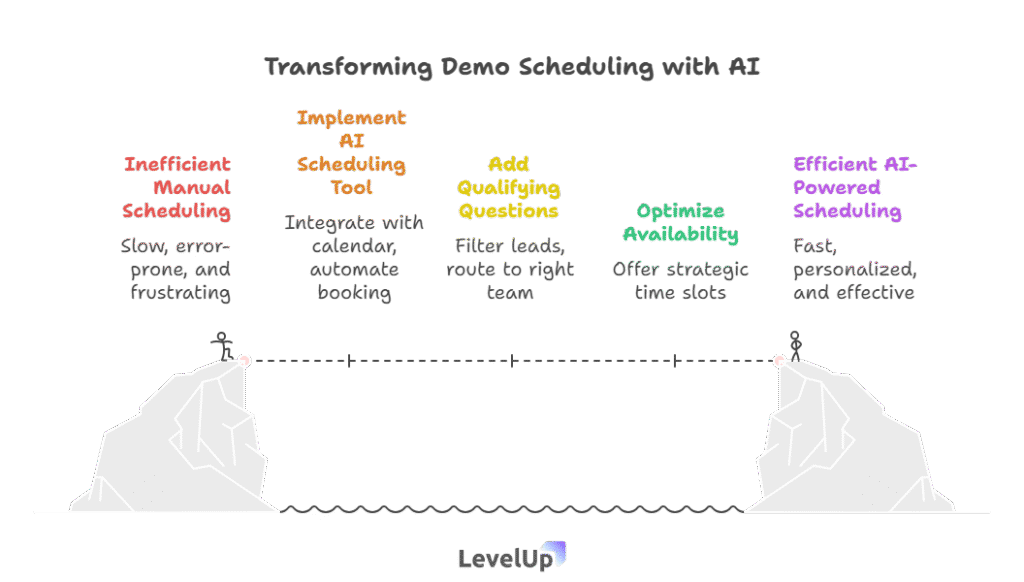
AI scheduling tools integrate with your calendar, automatically find available times that work for both parties, send personalized booking links, and follow up with reminders. Advanced systems analyze historical data to suggest optimal meeting times (when prospects are most likely to attend), automatically reschedule no-shows, and even qualify leads before booking. This eliminates the email tennis of “Does Tuesday work?” “No, how about Thursday?” that wastes days and kills momentum. AI-powered scheduling can reduce no-shows by up to 30% through smart reminders and optimal timing.
Scheduling sounds boring, I know. But this is where deals die in silence. Every day between “Let’s schedule a demo” and the actual demo is a day your prospect can get distracted, talk to competitors, or lose interest.
I used to think scheduling was simple—just send a Calendly link and move on. Then I started tracking the data. On average, it took 3.2 emails and 4.7 days to schedule a demo. Nearly 40% of prospects who expressed interest never actually booked. And of those who did book, 25% no-showed. That’s a lot of leakage.
When we implemented AI-powered scheduling that qualified leads, suggested optimal times, and sent smart reminders, everything changed. Time-to-demo dropped to 1.8 days, booking rate jumped to 78%, and no-shows fell to 12%. Same product, same pitch—just smarter scheduling.
What AI scheduling tools actually do:
- Instant booking: Prospects book immediately while interest is hot, without waiting for your response
- Qualification before booking: AI asks pre-qualifying questions and routes qualified leads to the right team member
- Optimal time suggestions: Analyzes when prospects in similar roles/industries are most likely to attend and suggests those times
- Smart reminders: Sends personalized reminders via email and SMS at optimal intervals (24 hours before, 1 hour before)
- Automatic rescheduling: If someone cancels, AI immediately offers alternative times without manual intervention
- Calendar intelligence: Blocks buffer time, prevents back-to-back bookings, and respects your working hours across time zones
How to set up AI scheduling that actually converts:
- Choose the right tool: Options include Calendly (basic automation), Chili Piper (advanced routing and qualification), Clara (AI assistant that handles scheduling via email), or LevelUp Demo (integrated demo management with smart scheduling).
- Add qualifying questions: Don’t just let anyone book 30 minutes of your time. Ask 2-3 questions upfront:
-
- Company size / industry
- Current solution or pain point
- Timeline for decision
AI can route qualified leads to your calendar and unqualified ones to a resource library or nurture sequence.
- Optimize your availability: Don’t offer every available slot. AI can suggest offering morning slots for enterprise leads (when decision-makers are fresh) and afternoon slots for smaller companies. Test what works for your audience.
- Personalize confirmation and reminder emails: Use the AI personalization techniques from section 2. Include:
-
- What you’ll cover in the demo (tailored to their industry or use case)
- What they should prepare or think about beforehand
- A personal note about why you’re looking forward to the conversation
- Set up automatic no-show recovery: If someone misses a demo, AI can automatically send a friendly “Sorry we missed you” email with a rescheduling link within minutes. Speed matters—the longer you wait, the less likely they’ll reschedule.
Real-world scheduling workflow:
Here’s what the full AI-powered flow looks like:
- Prospect clicks “Request Demo” on your website
- AI scheduling form asks qualifying questions and shows available times
- Prospect books instantly; AI sends personalized confirmation
- AI sends reminder email 24 hours before with prep tips
- AI sends SMS reminder 1 hour before
- If prospect no-shows, AI sends rescheduling link within 5 minutes
- If prospect attends, AI logs attendance and triggers post-demo follow-up sequence
The entire process runs on autopilot, but feels personalized and timely.
Common scheduling mistakes to avoid:
- Offering too many time slots: It creates decision paralysis. Offer 3-5 specific times, not your entire calendar.
- Not respecting time zones: AI should automatically detect and display times in the prospect’s time zone. Confusion kills bookings.
- Generic reminders: “You have a meeting tomorrow” is useless. Remind them why they booked and what they’ll learn.
- No buffer time: Back-to-back demos lead to rushed conversations and burnout. Build in 15-minute buffers.
Smart scheduling isn’t just about convenience—it’s about momentum. The faster you can get someone from interest to demo, the higher your conversion rate. And the fewer no-shows you have, the more deals you close. Simple math, but AI makes it actually happen.
What mistakes should you avoid with AI in sales?
The biggest mistake is treating AI as a replacement for human judgment rather than an enhancement. AI can’t read subtle emotional cues, understand complex context, or build genuine relationships—those are your job. Other critical mistakes include: not reviewing AI-generated content before sending it (which can result in tone-deaf or inaccurate messages), over-automating to the point where prospects feel like they’re talking to a robot, failing to feed AI accurate data (garbage in, garbage out), and implementing too many AI tools at once instead of mastering one at a time. Start small, test thoroughly, and always keep the human touch in your sales process.
Let me share the mistakes I’ve seen (and made) with AI in sales:
- Set-it-and-forget-it syndrome
I once watched a team set up an AI email sequence and never check it again. Six months later, they discovered it was still referencing a product feature they’d sunset. Dozens of prospects received outdated information. AI needs regular maintenance and review.
- Automating too early in the relationship
Early conversations require human touch. Don’t let AI handle initial outreach to high-value prospects or responses to complex questions. Use AI for research and drafting, but send important emails yourself.
- Ignoring the data quality problem
AI is only as good as your data. If your CRM is full of duplicate records, outdated information, and inconsistent formatting, AI will make bad predictions. Clean your data before implementing AI tools.
- Losing your voice
AI-generated content can sound… generic. Always edit it to match your voice and add personal touches. Your prospects should never think “This sounds like ChatGPT wrote it.”
- Not training your team
Implementing AI without training is like giving someone a sports car without teaching them to drive. Invest time in showing your team how to use AI tools effectively, when to override AI suggestions, and how to interpret AI insights.
- Privacy and compliance issues
Some AI tools store conversation data on external servers. Make sure you’re compliant with GDPR, CCPA, and industry-specific regulations. Always get consent before recording calls or using prospect data for AI analysis.
- Over-optimizing for efficiency
Yes, AI can help you send 100 emails a day instead of 10. But if you’re sacrificing quality for quantity, you’re doing it wrong. Better to send 15 genuinely personalized, thoughtful emails than 100 AI-generated blasts.
Frequently Asked Questions
How much does AI for sales cost for small teams?
AI sales tools range from free (ChatGPT for email drafting) to $50-200/user/month for comprehensive platforms like HubSpot or Salesforce with AI features. Most small teams can start with affordable options: Calendly ($10-16/month), Fireflies.ai ($10-19/month for call transcription), and built-in AI features in existing CRMs. You don’t need enterprise-grade tools to see meaningful results.
Can AI actually help close more deals, or is it just hype?
AI demonstrably improves conversion rates when implemented correctly. AI-powered scheduling reduces no-shows by up to 30%, personalized emails get 3-5x higher response rates, and intelligent lead scoring helps teams focus on high-potential prospects. However, AI is an amplifier—it makes good sales processes better but can’t fix fundamental problems with your product-market fit or value proposition.
Do I need technical skills to implement AI in my sales process?
No. Most modern AI sales tools are designed for non-technical users with intuitive interfaces and pre-built templates. You can set up AI scheduling, email personalization, and call analysis without writing a single line of code. If you can use a CRM or email platform, you can use AI sales tools.
Will prospects know I’m using AI, and will they care?
If you’re using AI properly, they shouldn’t notice—and if they do, they usually don’t care. The key is using AI to enhance personalization and responsiveness, not replace genuine human interaction. Always review AI-generated content, add personal touches, and be transparent when recording calls. Prospects care about value and respect, not whether AI helped you schedule the meeting.
How do I choose which AI tool to start with?
Start with your biggest pain point. If you’re losing deals due to slow follow-up, implement automated follow-up sequences first. If scheduling is eating your day, tackle AI scheduling. If you’re unsure which leads to prioritize, start with lead scoring. Don’t try to implement everything at once—master one tool, measure results, then add another.
Is AI in sales only for B2B SaaS companies?
No. While examples in this guide focus on SaaS, AI sales tools work for any business with a consultative sales process—professional services, agencies, high-ticket B2C products, real estate, financial services, and more. The principles of lead scoring, personalization, follow-up automation, and scheduling optimization apply universally.
How long does it take to see results from AI in sales?
You can see immediate impact from some tools (AI scheduling can improve booking rates within days), while others take longer (lead scoring needs 2-3 months of data to become accurate). Most teams see measurable improvements in 30-60 days if they implement thoughtfully and iterate based on results.
Can AI help with cold outreach, or just warm leads?
AI can definitely help with cold outreach through personalized email generation, optimal send-time prediction, and engagement tracking. However, cold outreach has lower success rates regardless of AI. AI is most effective when you have some context about the prospect—their company, role, or behavior on your website—to personalize meaningfully.
What if my CRM doesn’t have AI features built in?
You can add AI capabilities through integrations and standalone tools. Most CRMs integrate with AI scheduling tools (Calendly, Chili Piper), call analysis platforms (Fireflies, Gong), and email assistants (Lavender, Instantly). You don’t need to switch CRMs—just layer AI tools on top of your existing system.
How do I measure if AI is actually improving my sales results?
Track these key metrics before and after implementing AI: lead-to-demo conversion rate, demo-to-close conversion rate, average time to schedule demo, no-show rate, follow-up response rate, and average deal size. Most AI tools include built-in analytics dashboards. Compare 60-90 days pre-AI to 60-90 days post-AI for meaningful results.
Making AI Work for Your Sales Process (Not Against It)
Here’s what I want you to take away from this: AI in sales isn’t about becoming more robotic—it’s about becoming more human where it matters most.
The repetitive stuff—scheduling, data entry, remembering to follow up, analyzing call patterns—that’s what drains your energy and causes mistakes. Let AI handle that. It’s tireless, consistent, and actually pretty good at pattern recognition.
But the human stuff? Understanding a prospect’s unspoken concerns. Building trust. Adapting your pitch when you sense hesitation. Knowing when to push and when to back off. That’s where you add irreplaceable value. AI can’t do that, and it shouldn’t try.
The teams I see winning with AI aren’t the ones with the most sophisticated tools or the biggest budgets. They’re the ones who use AI strategically to remove friction from their sales process, then spend their newly freed-up time having better conversations with prospects.
Start small. Pick one area from this guide—maybe automated follow-ups or smart scheduling—and implement it this week. Get it working smoothly. Measure the impact. Then add the next piece. You don’t need to transform your entire sales operation overnight.
If you’re running demos as a core part of your sales process and struggling with the coordination, tracking, and follow-up chaos, LevelUp Demo was built specifically for this problem. It combines smart demo scheduling, centralized tracking, and automated follow-up management in one lightweight tool—no CRM overhaul required. You can request a demo to see how it handles the demo workflow end-to-end, or just check out the pricing to see if it fits your budget.
But whether you use LevelUp or build your own AI-enhanced process with other tools, the principle remains the same: use AI to eliminate friction, not to eliminate the human connection that actually closes deals.
Now go close some deals. You’ve got AI handling the boring stuff—so you can focus on the conversations that matter.