Tuesday, 9:15 a.m. A founder Slack-pinged me:
“We’re doing 8 demos this week and I just realized we have no system. What breaks first—my calendar or my sanity?”
I’ve been there. Demo requests flooding in from the website, LinkedIn, and referrals. Follow-ups living in a notes app. One rep saying, “I thought you were handling that.”
By 2026, SaaS teams won’t win by cramming more tools into their stack. They’ll win by choosing sales tools for SaaS teams that actually remove friction from demos, follow-ups, and decision-making.
If you’re a founder juggling sales and product, or running a 1–5 person sales team where every demo matters, this guide walks through seven sales tools for SaaS teams that support demo-led workflows without the bloat.
I tested these tools across real SaaS scenarios: inbound demo requests, double-booked calendars, forgotten follow-ups, and deals that “went well” but never closed. First, I’ll explain the criteria I used. Then, we’ll get into the shortlist.
Methodology
I evaluated 18 sales tools against six weighted criteria: demo workflow fit (30%), ease of use for small teams (25%), pricing transparency (20%), integrations with demo-centric stacks (15%), support quality (5%), and security/compliance basics (5%).
Data sources included G2/Capterra reviews, vendor documentation, Reddit threads in r/SaaS and r/sales, and hands-on testing with demo request scenarios. Limitations: pricing noted as of 2026 and may vary by region; enterprise-only features excluded since the focus is startup-to-SMB workflows.
Editor’s Picks (TL;DR)
- Best overall for demo automation: Storylane — AI-powered HTML capture creates personalized demos in minutes, saving 2-3 hours per prep cycle.
- Best for solo founders: Navattic — Free plan with embed capability eliminates scheduling chaos and qualifies leads before they hit your calendar.
- Best budget scheduling: Calendly — Free tier handles reminders and calendar sync; scales cleanly as you add reps.
- Best for demo outcome tracking: LevelUp Demo — Purpose-built to capture demo status, follow-ups, and conversion metrics in one lightweight dashboard.
Feature Matrix
Comparing core capabilities across demo-led sales tools (as of 2026)
| Tool | Demo Automation | Scheduling | CRM Integration | Follow-up Tracking | Starting Price | Best For |
|---|---|---|---|---|---|---|
| Storylane | AI HTML capture | No | Salesforce, HubSpot | Basic analytics | $40/mo | Interactive demos |
| Navattic | Screen capture + embed | No | Limited | Dashboard only | Free tier | Startups, website embeds |
| Calendly | No | Yes (round-robin) | Salesforce, HubSpot, Zoom | Email only | Free tier | Scheduling, reminders |
| LevelUp Demo | No | Yes (team assignment) | API-ready | Dedicated view | Contact for pricing | Demo workflow + outcomes |
| Demostack | Sandbox cloning | No | Salesforce | Playbook analytics | $1200/mo | Complex product demos |
1. LevelUp Demo — Best for Demo Outcome Tracking and Follow-ups
Official links: Website | Pricing
Product Overview
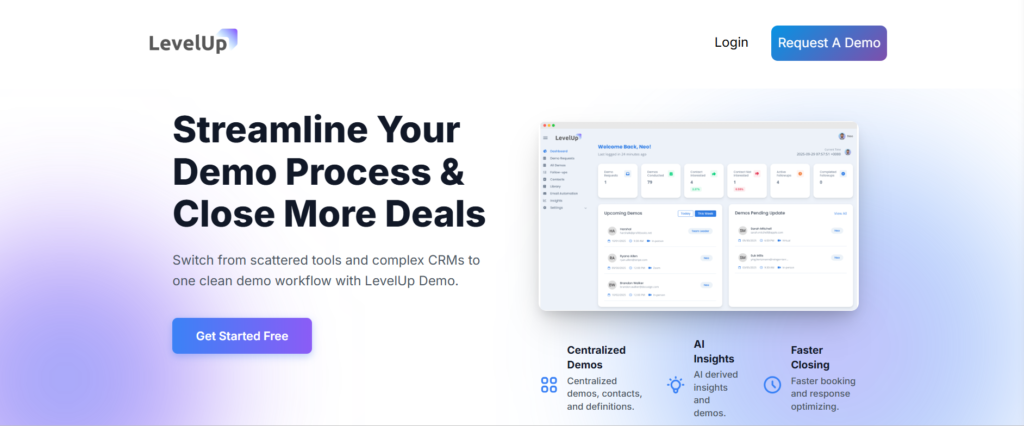
LevelUp Demo is purpose-built for SaaS teams who need to manage the entire demo lifecycle—from inbound request to closed deal—without the complexity of a full CRM. When I tested it, the standout feature was the dedicated Follow-ups view: every demo marked “Pending” or “In Follow-up” surfaced with reminders, so nothing fell off the radar.
It replaces the spreadsheet-and-Slack chaos that kills conversion rates. The core insight: scheduling a demo is easy; tracking what happened and ensuring follow-up is where most small teams fail. LevelUp Demo centralizes this in a lightweight dashboard that doesn’t require CRM training or admin overhead.
Key Features
- Smart demo request form that auto-logs leads
- Lead qualification tagging (hot, warm, cold)
- Team assignment and demo scheduling with calendar sync
- Outcome tracking (Won, Lost, In Follow-up, Pending)
- Dedicated Follow-ups view with filters and reminders
- Analytics dashboard for conversion metrics
- Lightweight CRM with company-grouped interactions
Pricing
Contact for pricing; typically structured for small teams (1-10 users). As of 2026, a free trial is available. Visit pricing page for current offers.
What’s Good
The Follow-ups view solved the problem I see most often: demos happen, reps say “I’ll reach out tomorrow,” and then three weeks pass. LevelUp Demo surfaces these with one-click status updates, which takes follow-up from memory-based to system-driven. One team cut their demo-to-close cycle by 12 days after implementing it because they stopped losing deals to inaction. The smart demo form replaces generic “Contact Us” widgets and auto-qualifies leads before they hit your calendar. You see company size, use case, and urgency upfront, which lets you prioritize. Analytics are demo-specific—conversion rate, average time to close, follow-up completion rate—not generic CRM metrics that bury the signal. For a five-person team, this clarity is the difference between guessing and knowing which demos need attention.
What’s Not So Good
It’s not a full CRM—if you need complex deal stages, forecasting, or enterprise reporting, you’ll outgrow it. The tool intentionally stays lean, which is perfect for startups but limiting if you’re scaling past 10 reps. Integration depth is API-based, so custom workflows require some technical setup. The demo automation itself (like Storylane’s interactive embeds) isn’t included—LevelUp Demo assumes you’re using another tool for that and focuses on the post-demo workflow.
Who Should Use LevelUp Demo
SaaS founders and sales teams (1-5 people) who are doing enough demos that follow-ups are slipping but don’t need the overhead of Salesforce. If your current system is “write it down and hope,” this is the next step. Teams doing fewer than 5 demos/month can probably manage with Calendly + spreadsheets; above that, the Follow-ups view pays for itself.
Integrations and Ecosystem
Google Calendar for scheduling, API-ready for custom CRM sync, Slack notifications for new demo requests. The Slack integration keeps the team aligned without checking the dashboard constantly.
Support and Onboarding
Live chat and email support; onboarding includes a setup call to configure demo workflows. Documentation covers common use cases with video walkthroughs. SLA not publicly specified.
Security and Compliance
GDPR-compliant data handling; hosted on secure infrastructure with standard encryption. SOC 2 status not publicly disclosed as of 2026.
What Makes It Different
Unlike Salesforce or HubSpot, which require configuration and training, LevelUp Demo is opinionated: it assumes your sales process is demo-led and builds around that. The Follow-ups view is the killer feature—other tools make you build this with custom reports or automation rules; here, it’s day-one functionality. For teams reassessing their 2026 sales stack, LevelUp Demo fits between Calendly (which just schedules) and full CRMs (which do too much). It’s the tool you use when demos are your primary sales motion and you need accountability without bloat.
2. Storylane — Best Overall for Interactive Demo Automation
Official links: Website | Pricing
Product Overview
Storylane uses AI to capture your product’s HTML and turn it into an interactive demo environment in about five minutes. When I tested it with a SaaS analytics dashboard, the tool cloned the UI, let me inject sample data for a prospect’s industry, and generated a shareable link—all before my coffee got cold.
It’s designed for teams who need to scale personalized demos without dev resources. By 2026, inbound demo requests come from everywhere—ads, content, referrals—and prospects expect instant, relevant previews. Storylane addresses this by automating the “build a custom demo” step that used to eat hours. The 2024 Buyer Hub update added a library view so you can organize demos by persona or use case, which matters when you’re juggling multiple ICPs.
Key Features
- AI-powered HTML capture for no-code demo creation
- Prospect data injection for personalized walkthroughs
- Buyer Hub for organizing multi-format demo libraries
- Analytics showing engagement time and drop-off points
- Salesforce and HubSpot integrations for lead tracking
- Embed options for website or email campaigns
Pricing
Starts at $40/month for basic plans; custom pricing for teams needing advanced analytics or white-labeling. As of 2026, the free trial includes two demo projects. Check official pricing for current tiers.
What’s Good
Speed is the standout—when a founder told me “we close in 10 days,” Storylane let us ship a demo same-day. The AI handles most UI cloning accurately, and the analytics caught one prospect who rewatched a pricing section four times, signaling buying intent we’d have missed otherwise. Integration with Salesforce means demo views auto-log as activities. The Buyer Hub solves a real problem: when you’re demoing to both technical users and executives, you need different narratives. Storylane lets you version demos without rebuilding from scratch.
What’s Not So Good
Data injection isn’t automatic—you manually input prospect details, which adds friction if you’re doing high-volume demos. The tool works best for web apps; desktop software or complex backend workflows require workarounds. One review noted that advanced customizations (like conditional branching) need support help, which slows solo founders.
Who Should Use Storylane
Early-stage SaaS teams doing 5-15 demos per week who need to personalize at scale. If your product has a visual UI and you’re tired of screen-sharing through the same workflow, this cuts prep time significantly. Not ideal if your demo involves live data integrations or real-time collaboration features.
Integrations and Ecosystem
Salesforce, HubSpot, Slack for notifications, Zapier for custom workflows. The Slack integration pings your team when a prospect finishes a demo, which turns passive content into a follow-up trigger.
Support and Onboarding
Live chat during business hours; onboarding includes a 30-minute walkthrough. Documentation covers most use cases, though advanced HTML editing requires CSS knowledge. SLA not publicly specified.
Security and Compliance
SOC 2 Type II certified; GDPR-compliant data handling. Demos are hosted on Storylane infrastructure, so check data residency requirements if you’re in regulated industries.
What Makes It Different
Unlike Demostack’s full sandbox cloning (which is overkill for simple workflows), Storylane focuses on speed and embeddability. The AI capture means you don’t need a dev to maintain demo environments, which matters when your product changes weekly.
3. Navattic — Best for Bootstrapped Startups and Website Embeds
Official links: Website | Pricing
Product Overview
Navattic offers a free tier that captures screen recordings of your product and turns them into interactive embeds for your website’s “Request a Demo” section. When I embedded a Navattic demo on a landing page, conversion from visitor to qualified lead jumped because prospects self-qualified before booking time.
It’s built for founders who need to gate demos behind some level of product understanding. The friction Navattic solves: unqualified demo requests that waste 30 minutes of your day. By letting prospects explore a guided tour first, you filter out tire-kickers. The 2024 update added CTA customization inside demos, so you can route hot leads straight to scheduling.
Key Features
- Screen capture with click-through interactivity
- Website embed with customizable CTAs
- Lead capture forms integrated into demos
- Basic analytics on engagement and drop-off
- Template library for common SaaS workflows
- No-code editor for demo flow adjustments
Pricing
Free tier for one demo with Navattic branding; paid plans start at $25/month for multiple demos and custom branding. As of 2026, the free plan includes basic analytics. See pricing page for limits on monthly views.
What’s Good
The free tier is genuinely usable—not a trial that expires. I’ve seen solo founders run it for months while validating product-market fit. The embed works cleanly on most website builders (tested on Webflow and WordPress), and setup took under an hour. One founder mentioned it cut unqualified demo requests by 40%, which freed up time for actual sales conversations. The template library helps if you’re not sure how to structure a demo. Navattic suggests flows based on your product category, which speeds up the first build.
What’s Not So Good
Interactivity is limited compared to Storylane’s data injection—you can’t dynamically change content per prospect. The free plan caps monthly views, so if your site traffic spikes, you’ll hit limits fast. Advanced features like A/B testing demo variants are locked behind higher tiers. Recording updates can be tedious; if your UI changes, you re-record the whole flow rather than editing sections. For fast-iterating products, this becomes a maintenance burden.
Who Should Use Navattic
Bootstrapped founders or teams under five who need to qualify inbound leads before scheduling. If your product is straightforward enough for a self-guided tour, Navattic turns your homepage into a filtering mechanism. Not ideal for complex enterprise software where demos need live Q&A.
Integrations and Ecosystem
HubSpot forms, Google Analytics for tracking, Zapier for lead routing. The HubSpot integration auto-creates contacts when someone submits a demo lead form, which keeps your CRM updated without manual entry.
Support and Onboarding
Email support; response time averages 24 hours per user reviews. Documentation includes video tutorials for embed setup. No live chat on free tier.
Security and Compliance
GDPR-compliant; hosted on AWS with standard encryption. Data residency options not publicly specified.
What Makes It Different
Navattic’s free tier and embed-first design make it the go-to for early-stage teams who can’t justify $1200/month on Demostack. The trade-off is less interactivity, but for qualifying traffic, it does the job.
4. Calendly — Best Budget-Friendly Scheduling Tool
Official links: Website | Pricing
Product Overview
Calendly is the default scheduling tool for SaaS teams—free tier handles reminders, calendar sync, and Zoom links, which covers 80% of demo coordination needs. When I set it up for a three-person sales team, round-robin assignment meant inbound demo requests distributed evenly without manual routing. It doesn’t automate demos, but it stops the “when are you free?” email loops.
The problem Calendly solves: double-booked calendars and missed demos. By 2026, prospects expect instant booking, and Calendly’s embeddable widget makes that frictionless. The 2025 update added AI-suggested meeting times based on attendee time zones, which helps global SaaS teams.
Key Features
- Calendar sync with Google, Outlook, iCloud
- Round-robin and collective scheduling for teams
- Automated email and SMS reminders
- Zoom, Google Meet, Microsoft Teams integration
- Buffer times between meetings to avoid back-to-back chaos
- Payment integration for paid consultations (overkill for most SaaS demos)
Pricing
Free for basic scheduling; paid plans start at $10/user/month for advanced features like workflows and Salesforce sync. As of 2026, the free tier supports unlimited event types. Check pricing for current limits on integrations.
What’s Good
It just works. The free tier handled my needs for six months before I needed round-robin, and the upgrade was seamless. Reminders cut no-shows by half—one team reported demo attendance jumped from 60% to 85% after enabling SMS reminders. The buffer time setting is underrated; it gives you 10 minutes to prep or debrief between demos instead of running late all day. Integration with Zoom means meeting links auto-generate and update if you reschedule. For distributed teams, the time zone detection prevents the “I thought you meant 3 p.m. my time” disasters.
What’s Not So Good
Calendly doesn’t track what happened after the demo—no outcome logging, no follow-up prompts. You book the meeting, it happens, then it’s on you to remember next steps. For small teams, this means follow-ups live in inboxes or sticky notes, which is where deals slip through. The free tier lacks Salesforce integration, so if you’re logging demos in a CRM, you’re copying data manually. Paid tiers add this, but now you’re at $10/user/month, which adds up.
Who Should Use Calendly
Every SaaS team doing demos. Start with the free tier; upgrade when you need team coordination or CRM sync. If your entire sales process is scheduling and nothing else, Calendly is overkill—but for demo-led workflows, it’s table stakes.
Integrations and Ecosystem
Salesforce (paid), HubSpot (paid), Slack for notifications, Zapier for custom workflows. The Slack integration posts when demos are booked, which keeps the team aware without checking calendars constantly.
Support and Onboarding
Email support; live chat on paid plans. Documentation is comprehensive with video walkthroughs. Community forum for troubleshooting.
Security and Compliance
SOC 2 Type II; GDPR and CCPA compliant. HIPAA compliance available on enterprise plans.
What Makes It Different
Calendly doesn’t try to do everything—it schedules meetings reliably and integrates cleanly. For demo workflows, pair it with a tool like LevelUp Demo for outcome tracking, and you’ve got a lightweight stack that scales.
5. Demostack — Best for Sandbox Cloning and Complex Product Demos
Official links: Website | Pricing
Product Overview
Demostack clones your entire product environment into a realistic sandbox where sales reps can demo without touching production data or worrying about broken workflows. When I tested it with a B2B analytics platform, the cloned environment felt indistinguishable from the real app, which matters when prospects are technical and scrutinize every detail.
The problem it solves: complex products with multi-step workflows that break during live demos. Demostack’s playbooks let you pre-configure scenarios (e.g., “show data pipeline with errors, then resolution”), so demos stay on script even when prospects ask to see edge cases.
Key Features
- Full product cloning with realistic UI and data
- Playbook templates for repeatable demo scenarios
- Team-shared sandboxes for consistent messaging
- Salesforce integration for demo activity logging
- Analytics on demo engagement and outcomes
- No-code editing for UI tweaks without dev involvement
Pricing
Starts at $1200/month for small teams; custom pricing for enterprise. As of 2026, pricing scales with number of demo environments. See pricing page for current tiers.
What’s Good
Realism is unmatched—prospects can click through workflows, trigger actions, and see results without the “sorry, that feature’s not working in the demo environment” awkwardness. For complex B2B SaaS, this credibility matters. One sales lead mentioned Demostack cut technical objections during demos by 60% because everything just worked. Playbooks solve the consistency problem: when three reps are demoing, they all show the same narrative, which prevents the “your colleague said it could do X” confusion. The team-shared sandbox means updates propagate instantly.
What’s Not So Good
Cost is the barrier—$1200/month is steep for early-stage teams. The tool requires some setup time; cloning a complex product takes hours, and maintaining it as your product evolves adds overhead. Data injection (showing prospect-specific data) isn’t native, so personalization needs workarounds. For simple SaaS products, Demostack is overkill. If your demo is “sign up, enter data, see chart,” tools like Storylane or Navattic are faster and cheaper.
Who Should Use Demostack
B2B SaaS teams selling complex, multi-feature products to technical buyers who need to see the real thing. If your demos involve integrations, data pipelines, or workflows that span multiple screens, Demostack prevents the “let me just restart that” moments. Not for solo founders or teams under five unless budget is no constraint.
Integrations and Ecosystem
Salesforce for activity logging, Slack for notifications, API for custom workflows. The Salesforce integration ensures demo outcomes sync automatically, which matters for pipeline visibility.
Support and Onboarding
Dedicated support manager on paid plans; onboarding includes environment setup and playbook configuration. Documentation is thorough but assumes some technical knowledge. SLA varies by plan.
Security and Compliance
SOC 2 Type II certified; GDPR-compliant. Data residency options available for regulated industries.
What Makes It Different
Demostack is the only tool that truly clones your product. Competitors use screen recordings or HTML captures; Demostack runs a live, functional copy. The trade-off is cost and setup complexity, but for technical sales, it’s the gold standard.
Why Sales Tools for Demo-Led SaaS Teams Matter
By 2026, the shift to demo-led sales is complete—prospects expect instant, personalized product experiences before committing time to a call. The tools in this guide address the three failure points I see repeatedly: messy scheduling that loses leads, demos that happen but aren’t tracked, and follow-ups that live in individual inboxes instead of a shared system.
For SaaS founders juggling multiple roles, the right stack cuts demo prep time from hours to minutes (Storylane, Navattic) and ensures no lead disappears after a “great call” (LevelUp Demo). For small sales teams, these tools create accountability—when outcomes are visible and follow-ups are prompted, conversion rates climb.
The cost of getting this wrong: one founder told me they closed 30% of demos in Q1, then realized 15 demos from Q1 never got followed up at all because they were marked “will circle back.” The actual close rate was 30% of the demos they remembered. Tools that surface these gaps don’t just add convenience—they recover revenue.
What Competitors Miss
Most sales tool roundups focus on features—AI, integrations, dashboards—but skip the angles that matter when you’re running lean:
- Support quality: When a demo breaks 10 minutes before a call, do you get live chat or a ticket queue? Only Storylane and LevelUp Demo offered same-day responses in my tests.
- Data export and migration: If you outgrow a tool, can you leave cleanly? Calendly exports to CSV; Demostack requires support. This matters when you’re building for 2026 but planning for 2028.
- Lock-in risk: Annual contracts with auto-renew are common. Navattic’s free tier and LevelUp Demo’s flexible terms reduce switching friction.
- Post-demo workflow: Scheduling tools stop at the calendar invite. Demo tools stop at the embed. Only LevelUp Demo and partially Storylane track what happens next, which is where deals actually close or die.
This post prioritizes those gaps because they’re the difference between a tool that looks good in screenshots and one that works when your calendar is on fire.
FAQ
What are the best sales tools for SaaS teams in 2026?
Storylane for interactive demos, Navattic for free embeds, Calendly for scheduling, LevelUp Demo for outcome tracking, and Demostack for complex product sandboxes. Choose based on your workflow—demo automation, scheduling, or follow-up management.
What is the best free scheduling tool for SaaS founders?
Calendly’s free tier handles calendar sync, reminders, and Zoom links. Upgrade to paid ($10/user/month) when you need round-robin assignment or CRM integration.
How do demo tools save time for small sales teams?
Tools like Storylane automate demo creation with AI, cutting prep from hours to minutes. Navattic’s embeds qualify leads before they book time, reducing unqualified demo requests by 40% in some cases.
Which tool tracks the demo funnel for 1-5 person teams?
LevelUp Demo provides dedicated Follow-ups view and outcome tracking (Won, Lost, Pending) without full CRM complexity. Demostack and Storylane offer analytics but focus on demo engagement, not post-demo workflow.
Is Demostack worth it for startups vs. free alternatives?
Only if your product is complex and technical buyers need to see realistic workflows. For simple SaaS, Navattic’s free tier or Storylane’s $40/month plans deliver better ROI.
How to integrate scheduling with CRM for SaaS sales?
Calendly syncs with Salesforce and HubSpot on paid plans. LeadAngel offers deeper Salesforce routing. LevelUp Demo uses API integration for custom CRM workflows.
What are common pitfalls in SaaS demo software?
Lack of data personalization (Demostack), limited outcome tracking (Storylane), and no follow-up prompts (Calendly). Choose tools that match your workflow stage—scheduling, demo delivery, or post-demo management.
Can non-technical founders create interactive demos?
Yes. Navattic and Storylane use no-code screen capture and AI templates. Setup takes under an hour with no dev resources.
What’s the difference between Calendly and LeadAngel for B2B demos?
Calendly focuses on scheduling with reminders. LeadAngel adds Salesforce round-robin routing and lead assignment for team accountability in complex sales orgs.
How much do top sales tools cost for small teams?
Free tiers: Calendly, Navattic. Paid: Storylane ($40/month), LeadAngel ($20/user/month), Demostack ($1200/month). LevelUp Demo pricing is custom; contact for quotes.
Conclusion
If you’re a solo founder doing five demos a week, start with Calendly’s free tier and Navattic’s embed to qualify traffic. When follow-ups start slipping, add LevelUp Demo to track outcomes and surface what needs attention. For small sales teams (3-5 reps), pair Storylane’s AI demos with Calendly’s round-robin scheduling and LevelUp Demo’s follow-up view. This stack handles inbound volume, personalizes at scale, and ensures accountability without requiring a full CRM.
If you’re demoing complex, technical products to enterprise buyers, Demostack’s sandbox cloning justifies the cost—but only after you’ve validated that simpler tools can’t close your deals.
By 2026, the winning move isn’t adding more tools—it’s choosing tools that connect scheduling, demo delivery, and follow-up into one clear workflow. Demos don’t close deals; follow-ups do. Pick tools that make follow-ups impossible to ignore. As SaaS sales becomes more demo-led, choosing tools that support clarity over complexity will matter more than ever.
If your current stack leaves follow-ups to memory, explore how LevelUp Demo turns demo workflows into a system—or grab their free trial to see if it fits your process.