Last month, I watched a SaaS founder spend 30 minutes on a demo call, only to discover halfway through that the prospect was a student researching tools for a college project. No budget. No timeline. No buying authority. Just curiosity.
The founder was frustrated—not with the student, but with himself. “I should have known this before I got on the call,” he told me later. “My demo request form just asks for name and email. That’s it.”
Here’s the reality: every demo request isn’t created equal. Some leads are ready to buy tomorrow. Others are browsing. And without the right questions on your form, you can’t tell the difference until you’re already on the call—wasting time you don’t have.
If you’re a SaaS founder or running a small sales team, your demo request form isn’t just a contact form. It’s your first qualification checkpoint. The fields you choose determine whether you spend your week talking to genuine buyers or explaining your product to people who aren’t ready, can’t afford it, or don’t have the authority to purchase.
In this guide, I’ll walk you through 10 high-intent demo form fields that help you understand who’s requesting a demo, why they need it, and how urgent their problem really is. These aren’t random questions—they’re strategic signals that improve demo quality, save your team time, and help you prepare better sales conversations.
What Are High-Intent Form Fields in Demo?
High-intent fields are demo form questions that reveal buying signals. They tell you whether someone is casually browsing or actively evaluating solutions. They help you understand urgency, fit, pain level, authority, and use case—all before you pick up the phone.
Think of them as qualification filters. Not to keep people out, but to help you prioritize who needs your attention first and how to prepare for each conversation. A lead who says “we need this implemented within two weeks” requires a different demo approach than someone who selects “just exploring options.”
The best high-intent fields feel natural to answer, don’t overwhelm the prospect, and give your sales team actionable context. Research shows that forms with 4 to 6 required fields strike the right balance—enough to qualify leads without hurting conversion rates. Each additional field beyond that can reduce form submissions by 4–8%, so every question needs to earn its place.
Now let’s look at the specific demo request form fields that consistently deliver the most value.
1. Company Size (Number of Employees)
What it reveals: Deal size potential, implementation complexity, and whether this lead matches your ideal customer profile (ICP).
Company size is one of the fastest ways to segment demo requests. If your product is built for 50+ person teams and someone from a 3-person startup books a demo, you’ll know to adjust your pitch—or politely qualify them out if they’re not a fit yet.
I learned this the hard way. Early on, I spent hours demoing to solo founders who loved the product but couldn’t justify the price for a team of one. Once I added a company size field to my demo scheduling form, I could spot these patterns immediately and offer self-serve resources instead of live demos for smaller teams.
From a workflow perspective, company size also helps you route leads to the right team member. Larger companies might need an enterprise rep who can discuss custom integrations, while smaller teams might prefer a quick, founder-led walkthrough.
Example in action: A project management SaaS tool might prioritize demos with companies of 20+ employees because those teams have the budget and complexity that justify their pricing tier. Solo freelancers, while valuable, might be better served with a free trial and email onboarding.
Best practice: Use a dropdown with ranges (1-10, 11-50, 51-200, 201+) rather than an open text field. It’s faster for prospects and easier for you to filter in your CRM.
2. Current Solution or Tool
What it reveals: Switching intent, competitive landscape, and specific pain points with existing tools.
When someone tells you what they’re currently using, you learn a lot about their demo readiness. Are they migrating from a competitor? That’s high intent—they’re already convinced they need to change. Are they using spreadsheets or manual processes? That suggests they’re earlier in their buying journey and might need more education.
This field also helps you customize your product demo. If a prospect says “we’re using [Competitor X],” you can prepare to highlight your differentiators and address common migration concerns. If they say “nothing right now,” you know they need to see the foundational value, not just advanced features.
One founder I worked with added this field and discovered that 60% of their demo requests were coming from users of one specific competitor. That insight helped them refine their positioning and even create a dedicated migration guide.
Example in action: A billing automation tool notices a lead is using QuickBooks. During the demo, they can focus on how their tool integrates with QuickBooks rather than replacing it—addressing a key objection before it comes up.
Best practice: Make this field optional if you’re worried about form abandonment. Many prospects will still answer it, and those who don’t are usually early-stage researchers.
3. Primary Use Case or Pain Point
What it reveals: Specific problems the prospect needs to solve and which product features matter most to them.
Not everyone wants your entire product. Some leads care deeply about one specific feature. Others have a unique workflow challenge. When you ask “What’s your primary use case?” or “What problem are you trying to solve?” you get clarity on what to emphasize during your demo presentation.
I’ve seen demos go sideways because the sales rep spent 20 minutes on features the prospect didn’t care about while barely mentioning the one thing that mattered. A simple use-case field prevents that disconnect.
This also helps with demo follow-up. If someone says their pain point is “too many no-shows,” you can send them resources specifically about reducing no-shows instead of generic product marketing materials.
Example in action: A demo scheduling platform offers three use-case options: “Reducing no-shows,” “Better lead qualification,” and “Team coordination.” A lead who selects “Team coordination” gets a demo focused on calendar sync and assignment features, not email reminders.
Best practice: Offer 3-5 predefined options based on your most common use cases, plus an “Other” field for open responses. This keeps the data clean while still allowing flexibility.
Struggling with low demo show-up rates?
See how our automated reminders can recover 20% of your leads.
4. Timeline for Implementation
What it reveals: Urgency and where the lead sits in their buying cycle.
This might be the single most valuable field for prioritizing your demo pipeline. A prospect who needs a solution “within 1 week” is significantly higher intent than someone exploring options “in 6+ months.”
Timeline also changes how you structure your demo call. Urgent buyers want to see proof it works and how fast they can get started. Long-term evaluators want to understand the full feature set and product roadmap.
One sales rep told me she used to treat every demo the same until she added a timeline field to her demo booking form. Now, she front-loads implementation details for urgent leads and focuses on strategic value for longer-term evaluators. Her close rate improved by 30% in two months.
When you’re managing multiple demo requests through a tool like LevelUp Demo, timeline filters become essential for intelligent lead routing and prioritization—ensuring your team focuses on the opportunities most likely to close quickly.
Example in action: A lead selects “Within 2 weeks.” The rep prioritizes this demo, prepares pricing options in advance, and comes ready to discuss onboarding timelines. A lead who selects “Just researching for now” gets a lighter demo and is added to a nurture sequence.
Best practice: Use ranges like “ASAP,” “1-3 months,” “3-6 months,” and “Just exploring.” This gives you clear urgency signals without overwhelming the prospect.
5. Decision-Maker Status
What it reveals: Whether this person can actually buy or if they need to loop in other stakeholders.
Not every demo request comes from the person who signs the contract. Sometimes it’s a team member doing initial research. Sometimes it’s an influencer who needs to bring findings back to a manager.
Knowing this upfront changes your demo strategy. If you’re talking to the decision-maker, you can discuss pricing and close on the call. If you’re talking to an influencer, your job is to equip them with information to champion your tool internally.
I’ve watched too many reps push for a close with someone who kept saying “I need to check with my boss.” It’s awkward for everyone. A simple field like “Are you the primary decision-maker for this purchase?” prevents that uncomfortable situation.
Example in action: A prospect indicates they’re “part of the decision-making team.” The rep adjusts the demo to include shareable materials—screenshots, ROI calculators, comparison charts—so the prospect can easily present to stakeholders.
Best practice: Frame this neutrally. Instead of “Are you the decision-maker?” (which can feel intimidating), try “Who else will be involved in this decision?” or offer options like “I’m the decision-maker,” “I’m evaluating for my team,” or “I’ll present findings to leadership.”
6. Industry or Business Type
What it reveals: Vertical-specific needs, compliance considerations, and how to customize your sales pitch.
Different industries have different priorities when evaluating software. An e-commerce company cares about integration with Shopify. A healthcare SaaS tool needs HIPAA compliance. A consulting firm wants client management features.
When you know someone’s industry, you can prepare relevant examples, case studies, and integrations for your demo. It also helps you spot red flags—if your product doesn’t serve a particular vertical well, you’ll know before the call.
I worked with a SaaS founder whose product worked great for agencies but poorly for manufacturing companies due to workflow differences. Once they added an industry field to their demo form, they could route manufacturing leads to educational content instead of wasting demo time on a poor-fit conversation.
Example in action: A CRM tool sees a demo request from a real estate agency. The rep prepares to highlight property management features, commission tracking, and real estate-specific templates instead of generic sales workflows.
Best practice: If you serve multiple industries, create a dropdown with your top 5-7 verticals plus “Other.” This keeps the data actionable while covering most use cases.
7. Referral Source (How Did You Hear About Us?)
What it reveals: Which marketing channels drive the highest-quality demo leads and how much context the prospect already has.
Not all demo requests start with the same level of product awareness. Someone who found you through a detailed case study arrives with more context than someone who clicked a Facebook ad. Knowing the source helps you adjust your demo approach.
This field also gives you valuable marketing intelligence. If you notice that leads from a specific blog post or partner referral convert better, you can double down on that channel.
One founder told me she discovered that leads from her weekly newsletter had a 60% close rate, while cold ad traffic converted at 15%. That insight shifted her entire acquisition strategy and demo qualification process.
Example in action: A lead indicates they were “referred by a current customer.” The rep starts the demo by asking about the referrer’s experience and builds on that trust. A lead from a Google search gets more foundational education about the problem space.
Best practice: Keep options simple: “Google search,” “Social media,” “Referral,” “Blog/content,” “Partner,” “Other.” You can always dig deeper in your analytics later.
8. Budget or Price Range Awareness
What it reveals: Whether pricing will be a dealbreaker and how to frame your proposal.
Pricing conversations are awkward when they come out of nowhere at the end of a demo call. When you ask about budget upfront—gently—you can qualify leads better and avoid wasting time on prospects who can’t afford your solution.
This doesn’t mean asking “What’s your exact budget?” which feels invasive. Instead, try “Are you familiar with typical pricing for tools like this?” or offer ranges: “Under $100/month,” “$100-$500/month,” “$500+/month.”
I’ve seen reps spend 45 minutes on a demo, get to pricing, and hear “Oh, we were hoping for something under $50/month” when the product starts at $500. A simple budget field on your demo request form prevents that painful surprise.
Example in action: A lead selects “$500+/month” as their expected range. The rep knows pricing won’t be a barrier and focuses the demo on value and ROI. A lead who selects “Under $100/month” for a $500/month product gets routed to a self-serve trial instead.
Best practice: Frame this around expectations, not hard limits. “What budget range are you considering?” feels softer than “What’s your maximum budget?”
9. Number of Users or Seats Needed
What it reveals: Deal size, implementation complexity, and whether this fits your pricing model.
If your SaaS pricing is per-seat or per-user, this field helps you estimate deal value before the demo call. It also signals complexity—onboarding 5 users is very different from onboarding 500.
This information helps you prepare the right demo flow. A small team might see a quick walkthrough. A large team needs to understand admin controls, permissions, and training resources.
One SaaS company I advised added this field and realized they were spending the same amount of time demoing to 2-person teams as they were to 50-person teams. They started routing smaller requests to recorded demos and focused live time on larger opportunities.
Using a demo management platform like LevelUp Demo makes it easy to segment these requests automatically—sending smaller teams to on-demand demos while prioritizing larger enterprise opportunities for your sales team’s live calendar.
Example in action: A prospect indicates they need 30 seats. The rep prepares volume pricing, discusses onboarding timelines, and highlights team management features. A 2-seat request gets a streamlined demo focused on individual productivity.
Best practice: Use ranges (1-5, 6-20, 21-50, 51+) to make this quick to answer and easy to segment in your CRM.
Double your demo bookings this month
Stop chasing leads. Let LevelUp automate your scheduling and follow-ups.
10. Preferred Demo Format
What it reveals: How the prospect likes to consume information and whether they’re ready for a live conversation.
Not everyone wants a live demo immediately. Some prospects prefer to watch a pre-recorded walkthrough first. Others want to jump straight into a conversation. Offering format options improves the experience and respects their time.
This field also helps you manage your sales calendar more efficiently. If someone selects “Send me a demo video first,” you can share a recording and follow up later, freeing up time for higher-intent live calls.
I started offering this option after noticing that some leads would book a demo, then cancel or no-show because they just wanted to see the product quickly. Now, those leads get a video link immediately, and a surprising number of them come back requesting a live demo after watching.
Example in action: A lead selects “Live demo with your team.” The rep schedules a call and prepares for an interactive session. A lead who chooses “Watch a recorded demo first” receives an automated email with a video link and a follow-up sequence.
Best practice: Offer 2-3 options: “Live demo,” “Watch a recording first,” or “Start a free trial.” This gives flexibility without overwhelming the form.
How High-Intent Fields Work in Practice: A Real Example
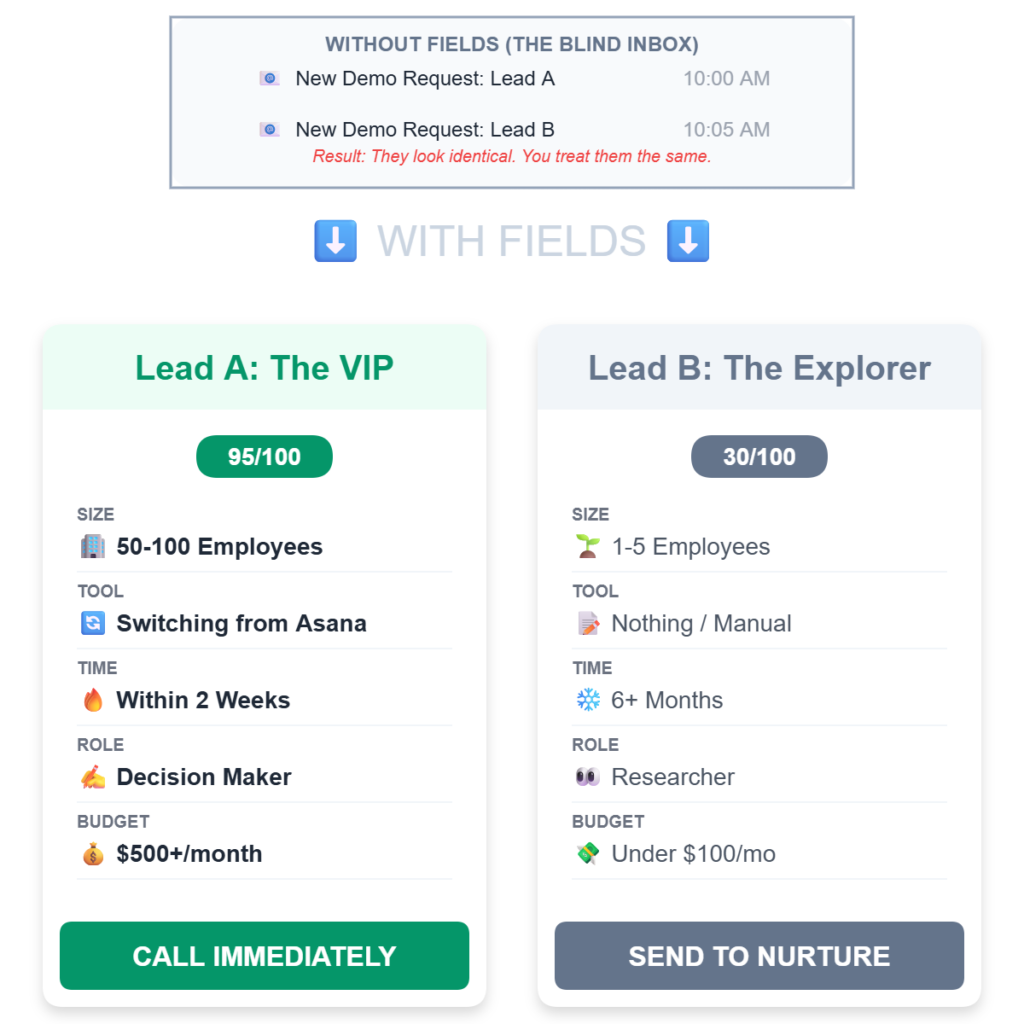
Let’s bring this together with a real scenario. Imagine you run a SaaS tool for project management, and you receive two demo requests on the same day:
Lead A:
- Company size: 50-100 employees
- Current solution: Asana
- Pain point: “Team coordination across departments”
- Timeline: Within 2 weeks
- Decision-maker: Yes
- Industry: Marketing agency
- Budget: $500+/month
- Users needed: 25
Lead B:
- Company size: 1-5 employees
- Current solution: Nothing
- Pain point: “Just exploring options”
- Timeline: 6+ months
- Decision-maker: No
- Industry: E-commerce
- Budget: Under $100/month
- Users needed: 2
Which demo would you prioritize?
Lead A is clearly high-intent. They’re switching from a competitor, have a specific pain point, need a solution quickly, can make the decision, and have budget. This deserves your immediate attention.
Lead B is early-stage. They’re not using anything yet, have no urgency, can’t decide alone, and their budget doesn’t match your pricing. This lead might be valuable eventually, but right now, they’re better served with a free trial and educational content.
Without these fields, both leads look identical in your inbox. With them, you can prioritize effectively and prepare better conversations. When you’re managing dozens of demo requests, tools like LevelUp Demo help you automatically score and route these leads based on the high-intent signals they provide.
Key Benefits of Using High-Intent Demo Form Fields
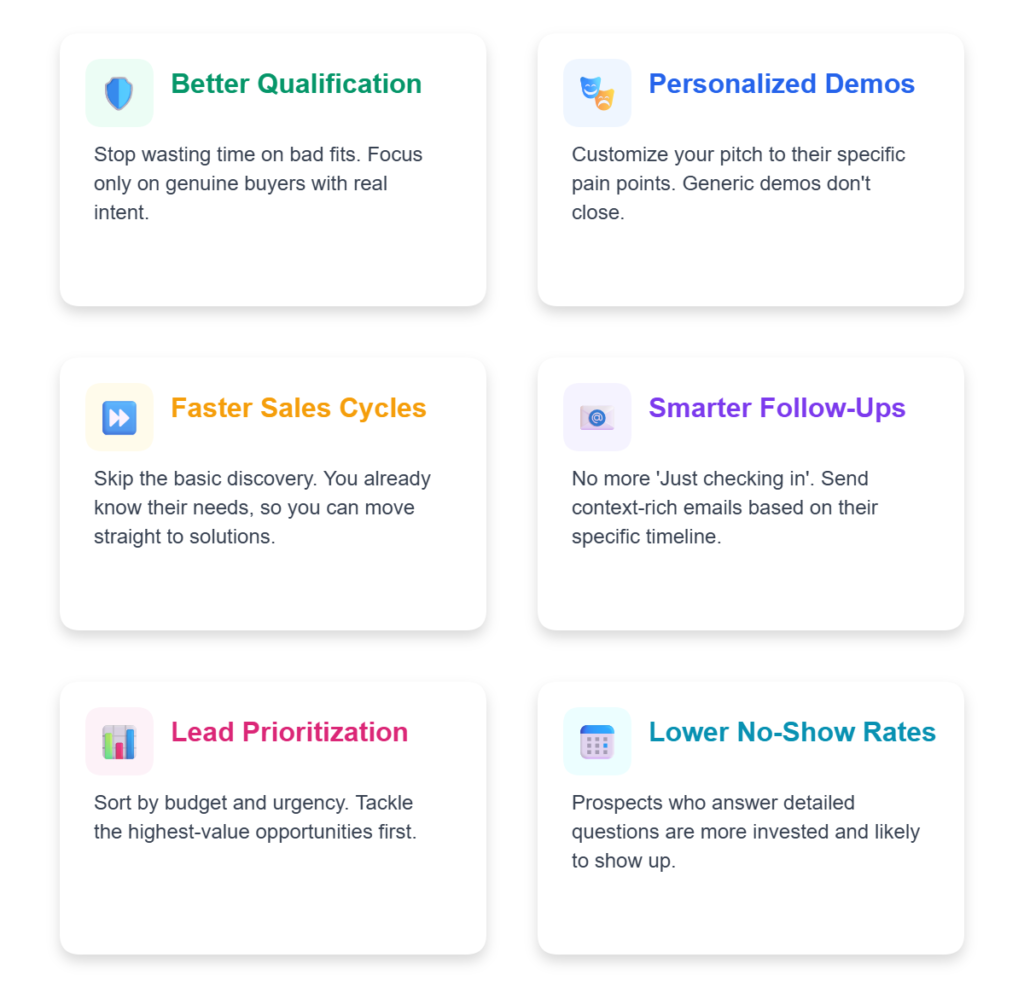
Better Qualification Before the Call
You’ll know who’s worth your time and who needs nurturing before they’re ready. This prevents wasted demos and helps you focus on genuine buyers with real purchasing intent.
More Personalized Demo Experiences
When you know someone’s pain point, timeline, and current solution, you can customize your demo to address exactly what they care about. Generic demos rarely close deals—specific, personalized ones do.
Faster Sales Cycles
High-intent leads move through your pipeline faster because you’re addressing their needs directly. You’re not discovering their pain points during the demo—you already know them and can prepare accordingly.
Improved Follow-Up Communications
These fields give you context for follow-up emails. Instead of “Just checking in,” you can say, “I know you mentioned needing this within two weeks—here’s how we can make that happen.”
Data-Driven Lead Prioritization
Your sales team can sort leads by urgency, company size, or budget and tackle the highest-value opportunities first. This is especially valuable for small teams with limited time.
Lower Demo No-Show Rates
When prospects answer detailed questions, they’re more invested in the process. They’ve already spent time thinking about their needs, which makes them more likely to show up for scheduled demos.
🚀 Unlock the Ultimate Demo Script
Stop winging it. Download the exact framework our clients use to close 3x more deals.
When Should You Use High-Intent Form Fields?
High-intent fields work best when demos are a critical part of your sales process. If you’re a product-led growth company where most users sign up for a free trial and convert without talking to anyone, you might not need all of these fields.
But if you’re in B2B SaaS, selling to mid-market or enterprise customers, or offering a complex product that requires explanation, these fields are essential. They help you manage a high volume of demo requests without sacrificing quality.
Here’s when they’re especially valuable:
- You’re receiving more demo requests than your team can handle
- Your close rate is low because leads aren’t properly qualified
- You’re spending time on calls with people who can’t buy
- Your sales team struggles to prepare for demos without context
- You need to prioritize which leads to follow up with first
- You want to segment leads for different sales approaches
- You’re scaling your demo process and need better organization
If any of these sound familiar, adding high-intent fields to your demo booking form will immediately improve your workflow. And when combined with a dedicated demo management tool like LevelUp Demo, you can automate routing, scoring, and follow-up based on these qualification signals.
Common Mistakes to Avoid with Demo Request Forms
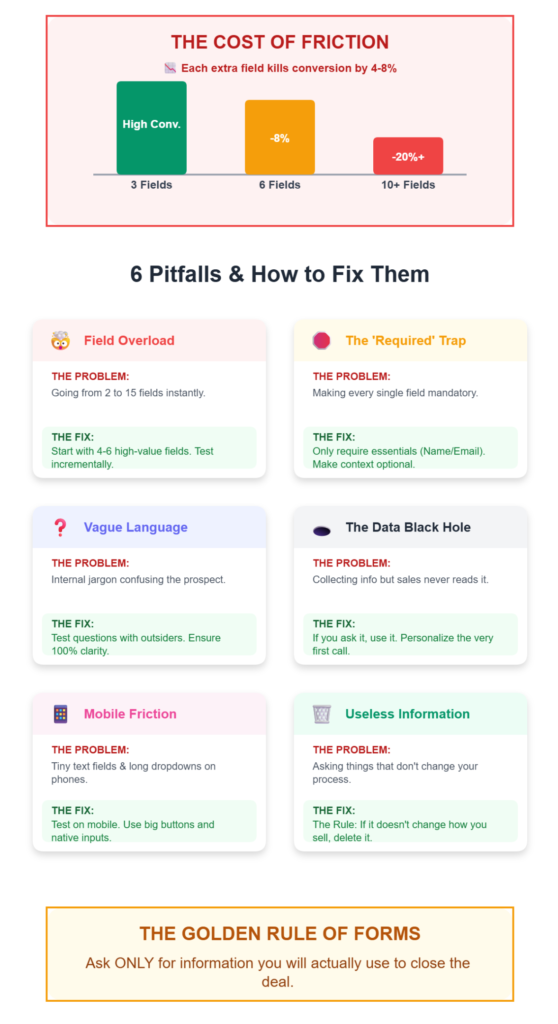
Adding Too Many Fields at Once
Don’t go from a 2-field form to a 15-field form overnight. Research consistently shows that each additional required field reduces conversion by 4–8%. Start with 4-6 of the most valuable fields for your business and test from there.
Making Every Field Required
Required fields increase form abandonment rates. Make only the essential fields mandatory (name, email, company) and leave the rest optional. You’ll be surprised how many people answer optional questions when they’re genuinely interested.
Using Vague or Confusing Language
“What’s your primary use case?” might make sense to you but confuse prospects. Test your questions with real people outside your company to ensure they’re clear and easy to understand.
Forgetting to Use the Data
The worst mistake is collecting all this information and then ignoring it. Make sure your sales team actually reviews these fields before demos and uses them to personalize conversations. Your demo management system should make this data easily accessible.
Not Testing for Mobile Experience
Many people fill out demo forms on their phones. Long dropdown menus and tiny text fields create friction. Test your form on mobile and simplify where needed.
Asking for Information You Won’t Act On
Every field should serve a purpose. If you’re not going to use the answer to qualify, prioritize, or personalize, don’t ask the question. Each field should directly improve your demo process.
Demo Request Form FAQs
How many fields should a demo request form have?
Aim for 4 to 6 required fields to balance lead qualification with conversion rates. Research shows that forms with more than 6 required fields see significantly lower submission rates. You can add optional fields beyond that, but keep the required ones minimal.
What are the must-have fields for a demo request form?
At minimum, collect name, business email, company name, and phone number. From there, add fields that help you qualify and prioritize leads based on your specific sales process, such as company size, timeline, or use case.
Should I use a multi-step form for demo requests?
Multi-step forms can improve completion rates when you need to collect more information. They break the process into manageable chunks and reduce form fatigue. Consider testing a multi-step format if you’re asking more than 6-8 questions total.
How can I reduce demo form abandonment?
Keep forms short, use clear labels, make only essential fields required, and add trust signals like client logos or testimonials near the form. Lead enrichment tools can also auto-fill company data from email domains, reducing the number of fields prospects need to complete manually.
What is progressive profiling for demo forms?
Progressive profiling involves collecting additional information from leads over time rather than all at once. For example, you might ask basic questions on the first form submission and gather more details if they return. This reduces friction and improves conversion rates.
How do I qualify leads with demo request forms?
Include fields that reveal buying intent, such as timeline, current solution, decision-maker status, and budget range. Use this information to segment leads into high-priority, medium-priority, and nurture categories before spending time on live demos.
Should I ask for a phone number on demo forms?
Phone numbers are valuable for follow-up and help qualify serious leads. However, some prospects hesitate to share them. Consider making it optional or explaining why you’re asking: “We’ll use this to send you a demo reminder.”
How can I integrate demo request data into my CRM?
Most modern form tools integrate directly with CRMs like HubSpot, Salesforce, or Pipedrive. Set up automated workflows to capture form submissions, create lead records, and trigger follow-up tasks. Demo management platforms like LevelUp Demo specialize in this integration, streamlining the entire process from form submission to demo completion.
What are the best practices for demo request form CTAs?
Use action-oriented, benefit-focused CTAs like “Book My Free Demo” or “See It in Action” instead of generic “Submit” buttons. Make the value clear—what will they get by clicking?
How can I track demo outcomes and follow-ups?
Centralize demo data in your CRM or a dedicated demo management tool. Track outcomes (won, lost, in follow-up, pending), set reminders for follow-ups, and review metrics regularly to identify patterns and improve your process. LevelUp Demo provides built-in tracking and analytics to monitor demo performance and conversion rates.
Putting It All Together: Building Your Optimized Demo Request Form
High-intent fields transform your demo request form from a basic contact form into a strategic qualification tool. They help you understand who’s requesting a demo, why they need it, and how ready they are to buy—all before you pick up the phone.
Start with the fields that matter most for your business. If you’re struggling with low-quality leads, prioritize timeline and decision-maker status. If you’re wasting time on poor-fit demos, focus on company size and use case. If you’re not sure where to start, test timeline, company size, and current solution first—those three consistently deliver the most value.
Remember, the goal isn’t to create the perfect form overnight. It’s to gradually improve the quality of your conversations and make better use of your sales team’s time. Add a few fields, test for a month, review the data, and adjust.
If demos drive your sales cycle, managing these high-intent fields in a clean, organized workflow can make a huge difference. Tools like LevelUp Demo help you organize demo requests, automatically score and route leads based on qualification signals, track outcomes, and follow up systematically—ensuring that no opportunity slips through the cracks and that your team spends time on the conversations that actually move deals forward.
The difference between a good demo and a wasted call often comes down to the questions you ask before it even starts. Choose them wisely, implement them strategically, and watch your demo-to-close rate improve.
Ready to optimize your demo process? Start by adding 3-4 high-intent fields to your current form and track the difference in lead quality over the next 30 days. Your sales team will thank you.
Want to learn more about optimizing your demo workflow? Explore how LevelUp Demo can help you manage, qualify, and convert more demo requests with less manual work.