I still remember the demo that got away.
It was a Thursday afternoon call with a mid-sized fintech startup—perfect fit, enthusiastic founder, clear pain points we could solve. The demo went brilliantly. They asked all the right questions, nodded at all the right moments, and ended with “this looks great, let’s circle back next week.”
I sent a follow-up email… four days later. By then, they’d already signed with a competitor.
That loss stung. Not because our product wasn’t the right fit—it was—but because I let the deal slip through my fingers with slow, generic follow-up. I learned the hard way that the demo is only half the battle. What happens in the 24 hours after determines whether you close the deal or join the graveyard of “we’ll get back to you” prospects.
If you’re a SaaS founder or part of a small sales team, you already know this pain. You’re juggling product development, customer support, and sales calls. Follow-ups get buried under Slack notifications and urgent fires. Deals that should close… don’t.
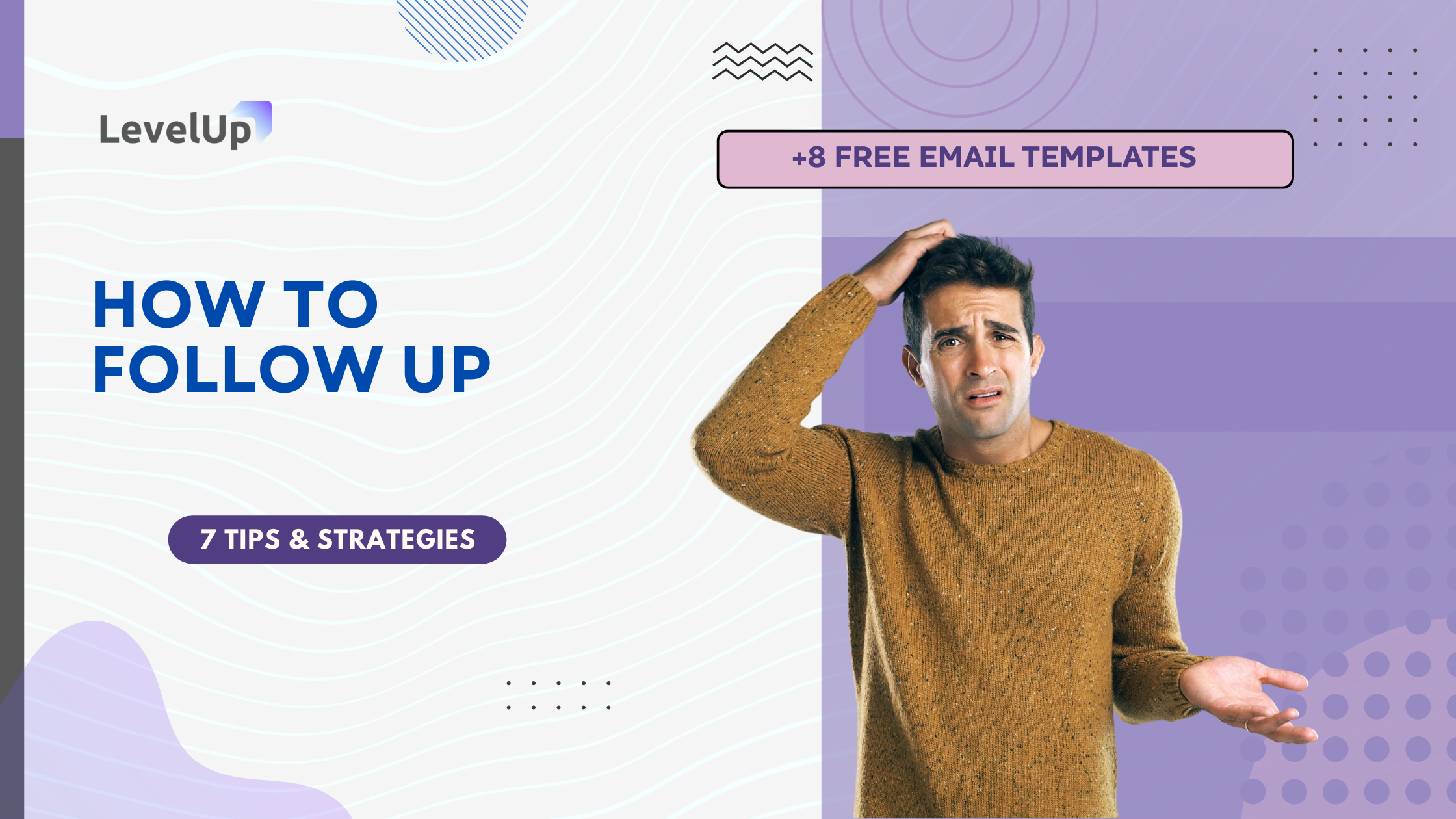
This guide will fix that. By the end, you’ll have a 7-step follow up framework grounded in real conversion data, 8 ready-to-use email templates you can customize in minutes, and a clear decision tree for when and how to re-engage prospects—so you can close more deals without the manual chaos.
Prerequisites & Materials
Before we dive into the framework, let’s make sure you have everything you need. The good news? You probably already have most of it.
What You’ll Need:
– Email account (Gmail, Outlook, or any team email platform)
– CRM or tracking system (HubSpot, Pipedrive, Salesforce, or even a Google Sheet)
– Demo recording or screen-share link (optional but highly recommended—tools like Loom or Demoboost work great)
– Customer testimonials or case studies (if you don’t have these yet, prioritize collecting them)
– Pricing documentation (one-pager, pricing page link, or proposal template)
– 15–30 minutes per follow-up cycle (less once you have templates dialed in)
Assumptions:
– You’ve completed at least one demo and have prospect contact information
– You’re following up on B2B SaaS demos (typically 15–60 minute calls)
– You have basic access to tracking tools (even a spreadsheet counts)
– You’re not using advanced marketing automation yet (we’ll keep this simple)
Out of Scope:
This guide focuses on post-demo email follow-up, timing strategies, and re-engagement. We won’t cover how to deliver the demo itself, live presentation techniques, or complex CRM configuration. If you need those, I’ll point you to resources along the way.
What Exactly Is a Follow-Up Strategy (And Why Most People Get It Wrong)?
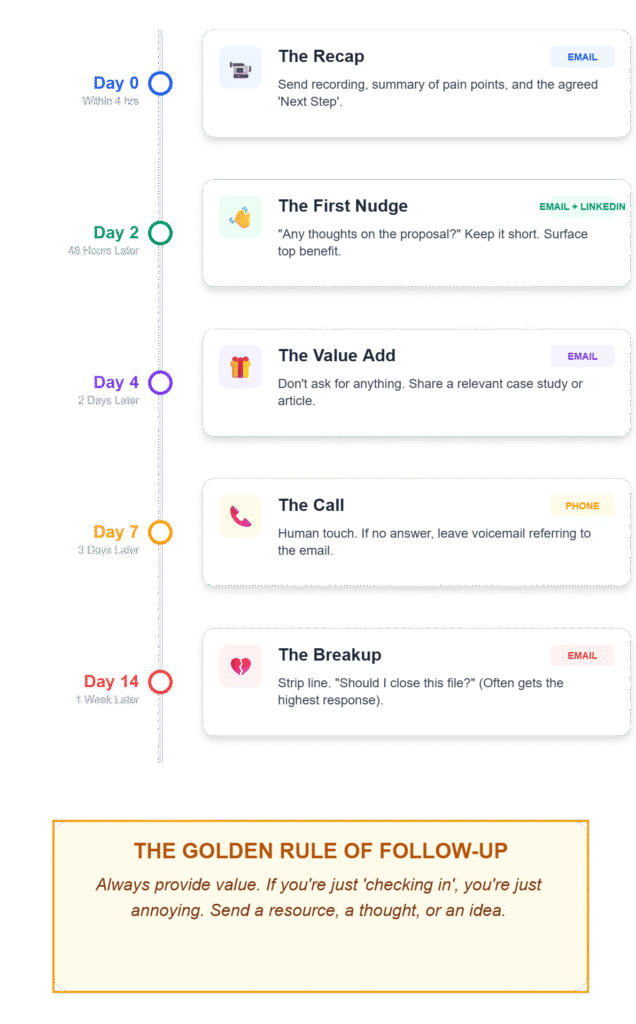
A follow-up strategy is your systematic approach to staying in touch with prospects after a demo—without being annoying, pushy, or forgettable.
Here’s the thing most people miss: following up isn’t about reminding prospects you exist. It’s about continuing the conversation you started in the demo, addressing objections before they solidify, and making the next step so clear and low-friction that saying yes feels easy.
Research shows that 80% of sales require five follow-up calls after the initial meeting, yet 44% of salespeople give up after one follow-up. That’s a massive gap—and a huge opportunity if you’re willing to be consistent and strategic.
The problem? Most follow-ups fail because they:
– Arrive too late (momentum dies after 48 hours)
– Sound generic (“just checking in…”)
– Lack a clear next step
– Focus on what you need instead of what they need
– Ignore the specific pain points discussed in the demo
A good follow-up strategy fixes all of that. It’s repeatable, personalized enough to feel human, and structured enough that nothing falls through the cracks—even when you’re wearing five other hats.
The 7-Step Follow-Up Framework
Let me walk you through the exact framework I use (and teach) for post-demo follow-ups. Each step builds on the last, and together they create a system that converts prospects without feeling salesy.
Step 1: Send Within 24 Hours (The Speed Rule)
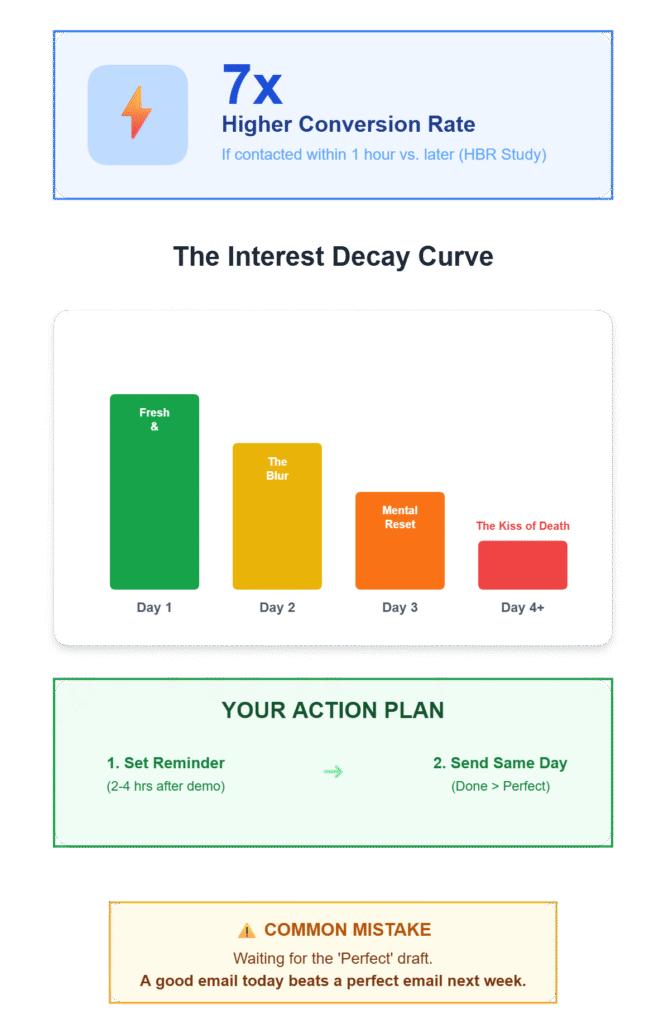
Why it matters: Timing is everything. Research from Harvard Business Review shows that leads contacted within an hour are seven times more likely to convert than those contacted even an hour later. While you don’t need to send your follow-up in 60 minutes, you should aim for same-day delivery—ideally within 4–6 hours of the demo ending.
Here’s what happens when you wait:
– Day 1: Prospect is still excited, remembering key points
– Day 2: Other priorities creep in; your demo blurs with others
– Day 3: They’ve moved on mentally; you’re starting from scratch
– Day 4+: You’re now in “just checking in” territory (the kiss of death)
How to do it:
Set a calendar reminder for 2–4 hours after each demo ends. Not the next morning—that same day. Open your email client, pull up your template (we’ll get to those in a minute), and personalize it with specifics from your conversation.
Common mistake to avoid: Don’t wait until you have the “perfect” follow-up drafted. A good follow-up sent today beats a perfect one sent next week. Done is better than perfect here.
Time investment: 10–15 minutes for a personalized follow-up
Expected outcome: Email lands in their inbox while the demo is still fresh in their mind, increasing the likelihood they’ll read and respond.
Step 2: Recap Key Takeaways & Pain Points Addressed
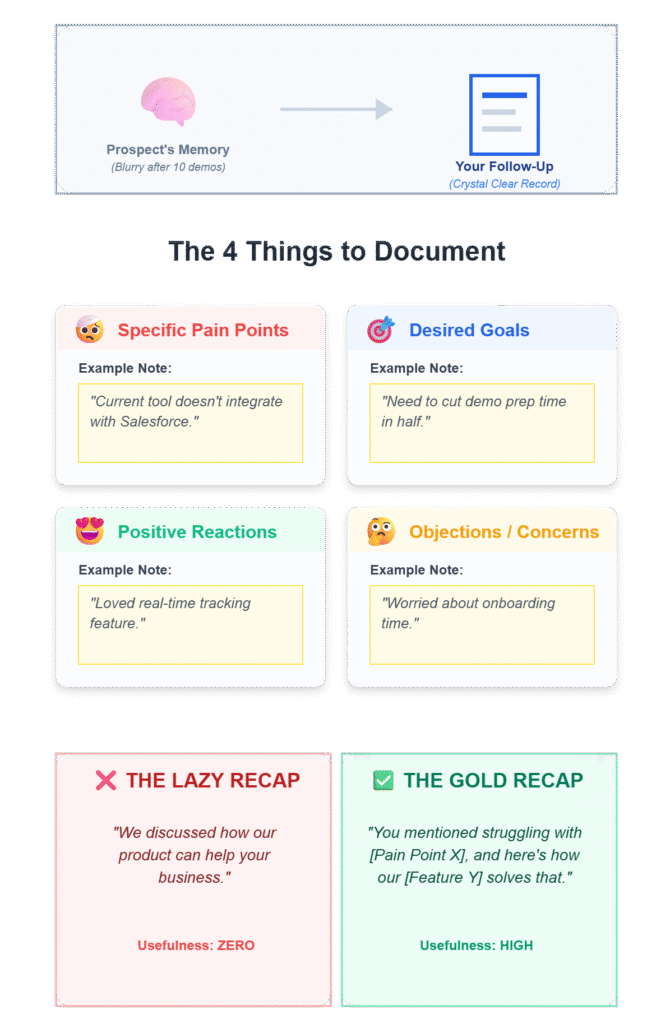
Why it matters: Your prospect sat through dozens of demos this month. They’re not going to remember every feature you showed or every pain point you addressed. Your job is to be their memory.
A strong follow-up email recaps the specific challenges they mentioned and connects those challenges to the solutions you demonstrated. This does two things:
- It proves you were listening (not just pitching)
- It reinforces the value you’re offering in their language
How to do it:
During the demo, take notes on:
– Specific pain points they mentioned (“our current tool doesn’t integrate with Salesforce”)
– Their goals or desired outcomes (“we need to cut demo prep time in half”)
– Features they reacted positively to (“I love that you can track outcomes in real-time”)
– Objections or concerns they raised (“we’re worried about onboarding time”)
Then, in your follow-up, reference these directly:
“You mentioned your team is losing leads because follow-ups aren’t tracked consistently. The automated reminder feature we walked through should help you stay on top of every opportunity without manual tracking.”
Common mistake to avoid: Generic recaps that could apply to anyone. “We discussed how our product can help your business” is useless. “You mentioned struggling with X, and here’s how our Y feature solves that” is gold.
Step 3: Include Proof & Resources (Social Proof, Pricing, Docs)
Why it matters: After the demo, prospects need to justify the decision to themselves (and often to others). Your follow-up should arm them with everything they need to make that case.
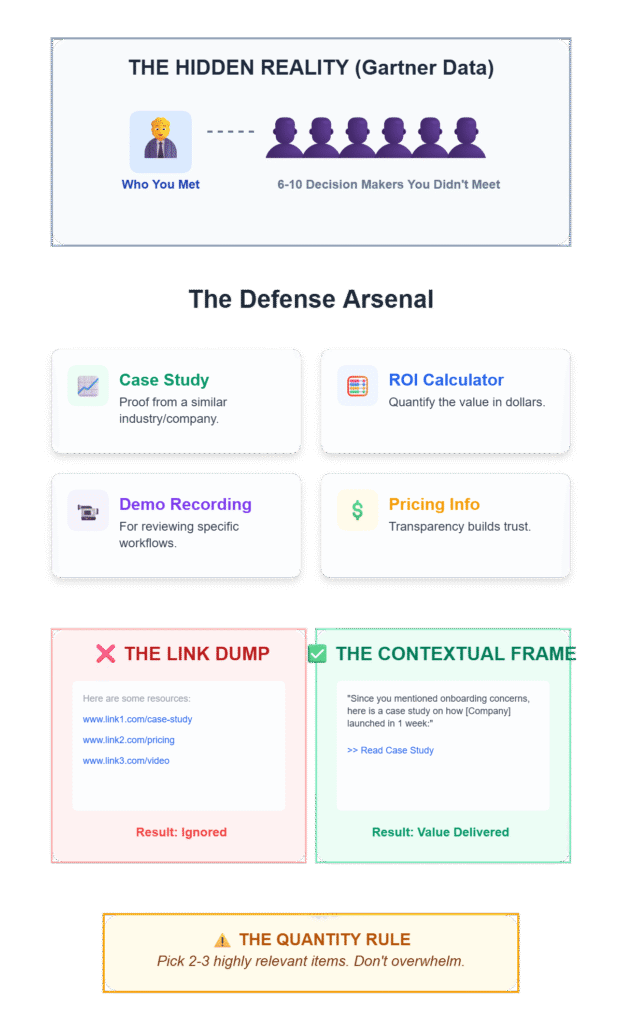
According to Gartner research, the typical B2B buying group involves 6–10 decision-makers. Even if only one person attended your demo, they’ll need to convince others. Make it easy for them.
What to include:
– Case study or testimonial from a similar company or industry
– Pricing information (if appropriate at this stage)
– ROI calculator or one-pager that quantifies the value
– Product documentation or help articles addressing specific features they asked about
– Demo recording so they can review or share with teammates
How to do it:
Don’t just dump links. Frame each resource with context:
“Since you mentioned concerns about onboarding time, I’m attaching a case study from [Similar Company] who got their team up and running in under a week.”
Or:
“Here’s a recording of today’s demo so you can revisit the workflow automation piece we discussed—or share it with your team.”
Common mistake to avoid: Overwhelming prospects with too many attachments or links. Pick 2–3 highly relevant resources. Quality over quantity.
Step 4: Personalize with Specific Call-Outs from the Demo
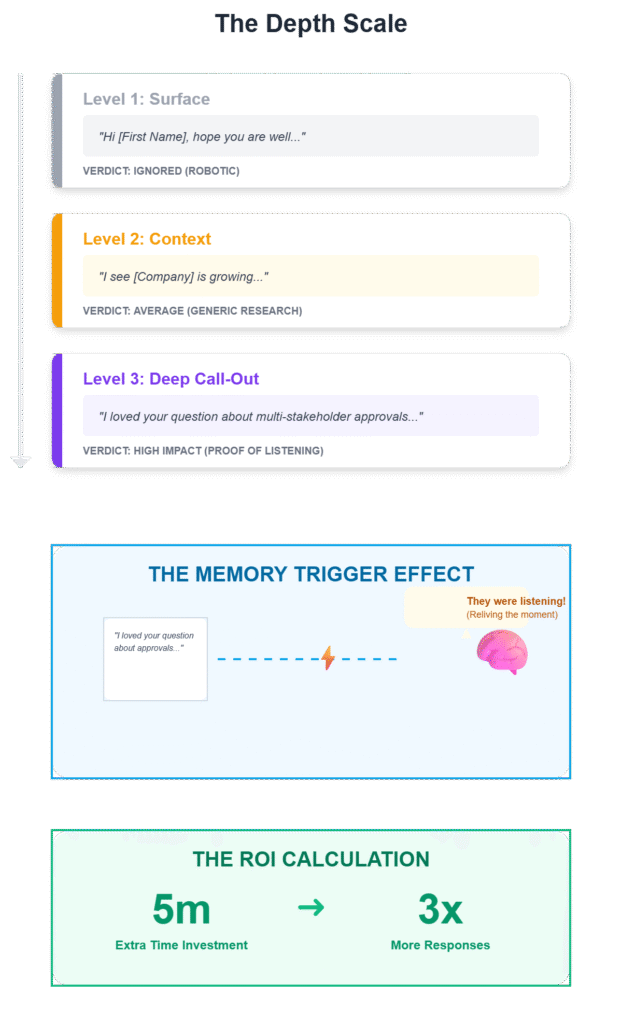
Why it matters: This is what separates a good follow-up from a template that screams “I sent this to 50 people today.”
Personalization isn’t just about using their first name. It’s about referencing specific moments, questions, or comments from the conversation.
How to do it:
Pull from your demo notes and include 1–2 specific call-outs:
“I loved your question about how we handle multi-stakeholder approvals—it’s clear you’re thinking ahead about internal buy-in.”
Or:
“When you mentioned your team is currently using spreadsheets to track demos, I could feel your frustration. That’s exactly why we built the centralized dashboard.”
These small touches show you were present and engaged. They also trigger memory recall, making the prospect relive positive moments from the demo.
Time investment: Add 3–5 minutes to your follow-up time
Payoff: Significantly higher response rates. In my experience, personalized follow-ups get 2–3x more replies than generic ones.
Step 5: Add a Clear Call-to-Action (CTA)
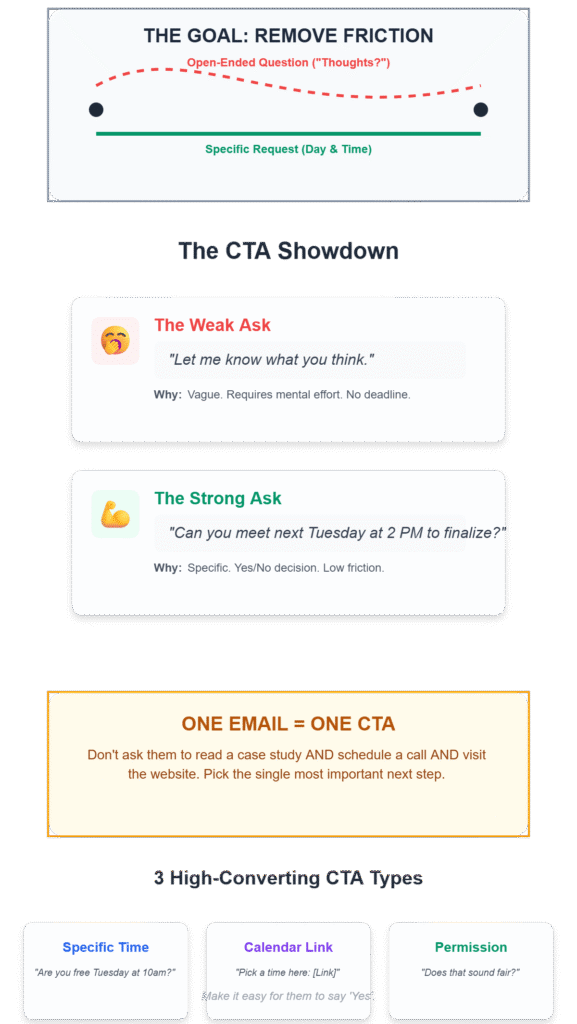
Why it matters: If your follow-up doesn’t tell the prospect what to do next, they’ll do nothing.
Most follow-ups fail here. They end with vague asks like “let me know if you have questions” or “looking forward to hearing from you.” Those aren’t CTAs—they’re invitations to procrastinate.
How to do it:
Every follow-up should have one clear, specific next step:
– “Can we schedule 15 minutes next Tuesday to walk through pricing with your finance lead?”
– “Would Thursday or Friday work for a quick call to address your integration questions?”
– “If this looks good, I can send over a contract by end of week—does that timeline work?”
Notice the pattern: each CTA is specific, time-bound, and easy to say yes to.
Pro tip: Offer two options to increase response rates (“Does Tuesday at 2pm or Wednesday at 10am work better?”). This is called the choice close, and it’s effective because it assumes forward momentum while giving the prospect control.
Common mistake to avoid: Multiple CTAs in one email. “Let me know if you want to chat, or feel free to sign up directly, or I can send more info…” creates decision paralysis. Pick one clear next step.
Step 6: Track & Log the Follow-Up (Accountability)
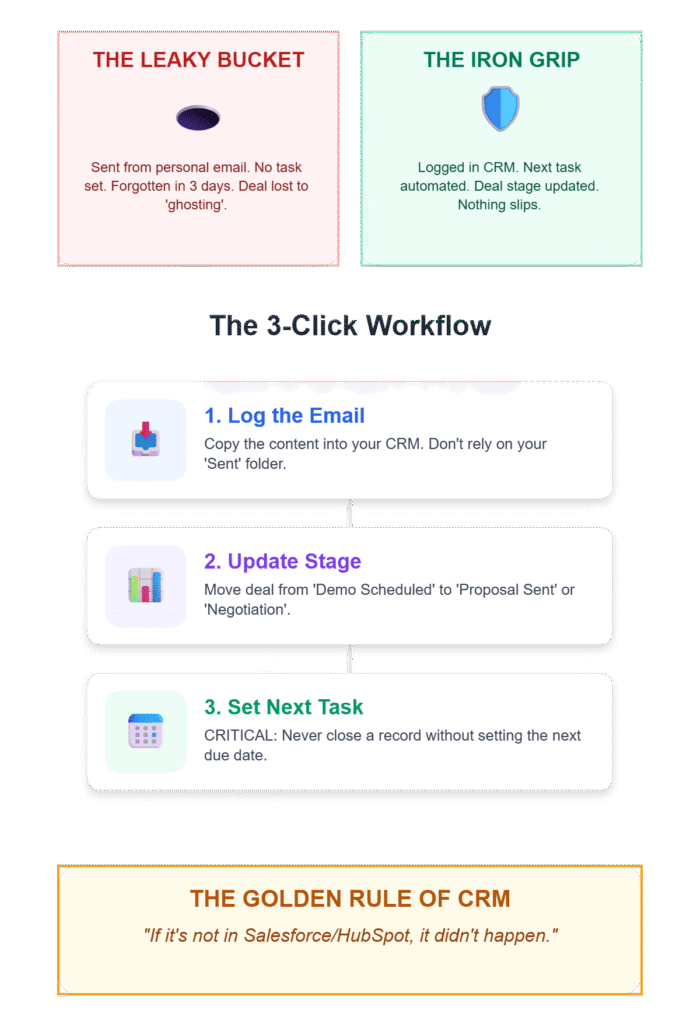
Why it matters: If you’re not tracking follow-ups, you’re flying blind. You won’t know who needs a second touch, what messages are working, or where deals are getting stuck.
This doesn’t require fancy software. A simple spreadsheet with columns for:
– Prospect name and company
– Demo date
– Follow-up sent (date and type)
– Response status
– Next action and date
…will get you 80% of the way there.
How to do it:
Immediately after sending a follow-up, log it in your CRM or tracking sheet. Set a reminder for the next touch (typically 3–5 days later if you don’t hear back).
If you’re using a CRM like HubSpot, Pipedrive, or Salesforce, create a custom pipeline stage for “Follow-up Sent” and “Awaiting Response.” This gives you a visual snapshot of where every deal stands.
Tool recommendations:
– Beginner: Google Sheets with a simple template
– Intermediate: HubSpot Free CRM (includes basic pipeline and reminders)
– Advanced: Pipedrive or Salesforce with automated follow-up sequences
Time investment: 2–3 minutes per follow-up to log and set reminders
Payoff: No more “oh crap, I forgot to follow up with that person” moments. Everything is tracked, nothing falls through the cracks.
Step 7: Set Re-Engagement Reminders for Warm Leads
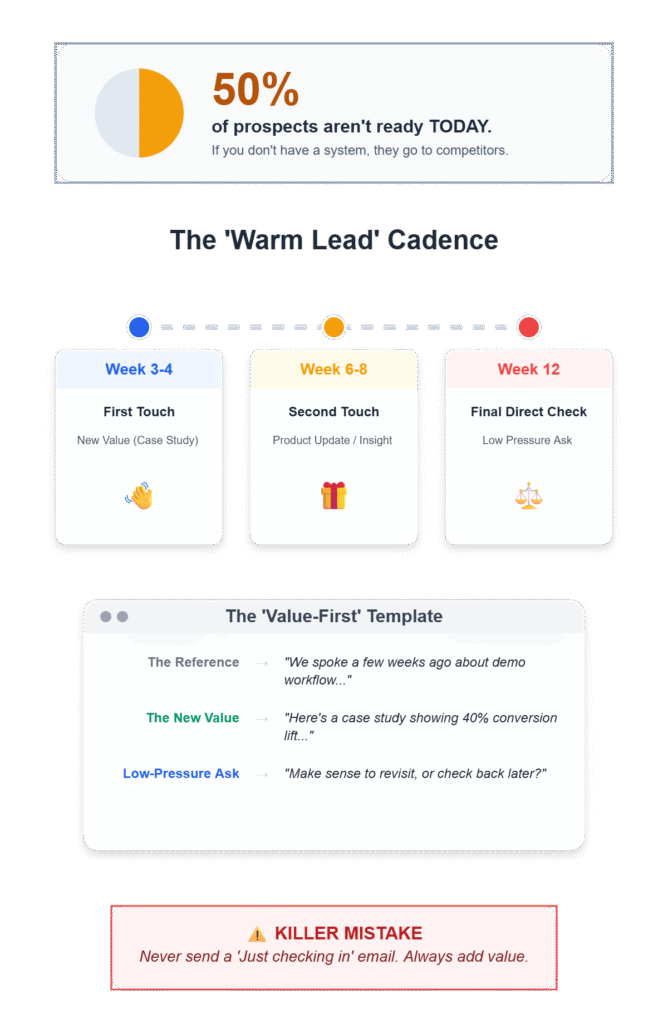
Why it matters: Not every prospect will be ready to buy immediately. Some need time to secure budget, get internal buy-in, or finish their evaluation period. If you don’t have a system for re-engaging these “warm but not ready” leads, they’ll go cold—or worse, sign with a competitor who stayed in touch.
Research shows that 50% of prospects are not a good fit right now, but may be in the future. The key is staying on their radar without being annoying.
How to do it:
When a prospect says “follow up in a month” or “we’re not ready yet,” immediately set a calendar reminder for 3–4 weeks out. Don’t rely on memory—you will forget.
Your re-engagement email should:
– Reference your previous conversation
– Provide new value (a case study, product update, or industry insight)
– Ask a low-pressure question to gauge interest
Example:
“Hi [Name], we spoke a few weeks ago about streamlining your demo workflow. I wanted to share a quick case study from [Similar Company] who saw a 40% increase in conversions after implementing our follow-up system. Would it make sense to revisit this now, or should I check back in another month?”
Common mistake to avoid: Generic “just checking in” emails with no new value. Always bring something fresh to the table—a new resource, a product update, or a relevant insight.
Re-engagement cadence:
– First touch: 3–4 weeks after initial follow-up
– Second touch: 6–8 weeks (if no response)
– Third touch: 12 weeks (final check-in before moving to long-term nurture)
After three attempts with no response, move them to a quarterly newsletter or nurture sequence rather than continuing to email directly.
How Does This Framework Actually Work in Practice?
Let me walk you through a real scenario (anonymized, of course).
The situation: Sarah, a sales ops manager at a 20-person SaaS company, attended a demo on Tuesday afternoon. She was engaged, asked good questions about integration with her CRM, and mentioned her team was losing deals due to inconsistent follow-ups.
What I did:
- Within 3 hours, I sent a follow-up email (Template 1, which we’ll cover next) recapping her pain points and attaching a case study from a similar-sized company.
- Personalized the email with a specific call-out: “I loved your question about Salesforce integration—that’s our most popular feature request, and it’s exactly why we built the native connector.”
- Clear CTA: “Would Thursday at 2pm or Friday at 10am work for a 15-minute call to walk through pricing with your team?”
- Logged the follow-up in HubSpot and set a reminder for Friday if I didn’t hear back by Thursday.
The result: Sarah responded within 2 hours, scheduled the pricing call, and signed a contract 10 days later. She told me later that the fast, personalized follow-up was a major factor—”Most vendors take days to get back to me, and when they do, it’s generic.”
That’s the power of a systematic approach. It’s not magic—it’s just consistency, speed, and personalization at scale.
What Are the Main Benefits of a Follow-Up Strategy?
Let’s talk about what actually changes when you implement this framework.
- Higher conversion rates
This is the big one. According to HubSpot, companies that contact leads within an hour are nearly 7x more likely to qualify the lead. Even if you’re not hitting the 1-hour mark, sending a same-day follow-up puts you ahead of 70% of your competitors.
In my own work with SaaS founders, I’ve seen conversion rates improve by 25–40% simply by implementing a consistent 24-hour follow-up rule.
- Faster sales cycles
When you remove friction from the follow-up process, deals move faster. Clear CTAs, relevant resources, and proactive re-engagement mean prospects don’t sit in limbo wondering “what’s next?”
- Better team accountability
If you’re managing a small sales team, tracking follow-ups in a shared CRM or spreadsheet creates transparency. Everyone knows who’s responsible for what, and nothing gets lost in someone’s personal email inbox.
- Less manual chaos
Once you have templates and a tracking system in place, follow-ups take 10–15 minutes instead of an hour. You’re not starting from scratch every time—you’re customizing a proven framework.
- Stronger relationships
Personalized, timely follow-ups show prospects you care. You’re not just another vendor blasting generic emails—you’re a partner who listens and follows through.
What Mistakes Should You Avoid with Follow-Ups?
I’ve made all of these mistakes, so you don’t have to. Here are the most common follow-up failures and how to avoid them.
Mistake 1: Waiting too long
We covered this already, but it’s worth repeating: speed matters. Every day you wait, your conversion rate drops. Set a same-day follow-up rule and stick to it.
Mistake 2: Being too generic
“Just checking in” emails get ignored. Always reference specific details from the demo and provide new value in every follow-up.
Mistake 3: No clear next step
If your follow-up doesn’t tell the prospect what to do next, they’ll do nothing. Every email needs a single, clear CTA.
Mistake 4: Giving up too soon
One follow-up isn’t enough. Most deals require 5+ touchpoints. Set up a systematic re-engagement cadence and stick to it.
Mistake 5: Overwhelming with information
Don’t attach every case study, white paper, and product doc you have. Pick 2–3 highly relevant resources and frame them with context.
Mistake 6: Ignoring the buying committee
If your prospect needs to get buy-in from others (and they almost always do), make it easy for them to share your materials internally. Include a demo recording and a one-pager they can forward.
Mistake 7: Not tracking follow-ups
If it’s not in your CRM or tracking sheet, it doesn’t exist. Log every follow-up and set reminders for next steps.
Branching Paths: Choose Your Follow-Up System
Not everyone needs the same level of sophistication. Here’s how to choose the right approach based on where you are.
Advanced Path: CRM Automation + Multi-Touch Sequences
Best for: Small sales teams, growing startups, or anyone managing 20+ prospects at once
What you need:
– CRM like HubSpot, Pipedrive, or Salesforce
– Email templates built into the CRM
– Automated follow-up sequences (most CRMs support this)
How it works:
After each demo, log the outcome in your CRM and trigger a follow-up sequence. The CRM automatically sends Template 1 within 24 hours, Template 2 after 3 days (if no response), and Template 3 after a week. You can customize each email before it sends, but the system handles the scheduling and reminders.
Pros: Scalable, automated reminders, centralized tracking, team visibility
Cons: Requires CRM setup and learning curve; free tiers may have limited automation
Tool recommendations:
– [HubSpot Sales Hub]( (free tier includes basic sequences)
– [Pipedrive] ($15/user/month; excellent for small teams)
– [Salesforce Essentials](more robust but steeper learning curve)
Solo Founder vs. Small Team Coordination
Solo founder: Focus on speed and consistency. Use templates to save time, track in a simple spreadsheet or free CRM, and set calendar reminders for every follow-up. Your goal is to never let a lead go cold.
Small team (2–5 people): Centralize tracking in a shared CRM so everyone can see who’s following up with whom. Assign demo leads to specific team members and use pipeline stages to visualize where deals stand. Weekly pipeline reviews keep everyone accountable.
Pro tip for teams: Create a Slack channel or shared doc where team members post quick summaries of demo outcomes and next steps. This keeps everyone in the loop without requiring constant meetings.
8 Ready-to-Use Email Templates
Alright, here’s what you came for—8 email templates you can copy, customize, and start using today. Each template is designed for a specific scenario, and I’ve included notes on when to use each one.
A quick note before we dive in: These templates are meant to be starting points, not rigid scripts. Always personalize with details from your specific conversation. The best follow-ups feel human, not templated.
Template 1: Immediate Post-Demo Summary (24-hour send)
When to use: Send this within 24 hours of every demo, no exceptions.
Subject line: Quick recap: [Your Company] + [Prospect Company] demo
Email body:
Hi [First Name],
Thanks for taking the time to chat today—I really enjoyed learning about [specific challenge they mentioned].
Just to recap, we covered:
– [Feature 1] to address [their pain point]
– [Feature 2] that helps with [their goal]
– [Feature 3] you were excited about
I’m attaching [relevant resource—case study, pricing doc, or demo recording] so you can review or share with your team.
Based on our conversation, I think the next step would be [specific action—e.g., “a quick call to walk through pricing with your finance lead” or “getting you set up with a trial account”].
Does [specific date/time option 1] or [option 2] work for a 15-minute call?
Looking forward to hearing from you!
[Your Name]
Why it works: It’s fast, personalized, and has a clear CTA. The recap reinforces value, and the resources give them something tangible to review.
Template 2: Feature-Focused Follow-Up (for technical buyers)
When to use: When your prospect is a technical decision-maker (CTO, lead developer, product manager) who cares about features, integrations, and implementation details.
Subject line: [Specific feature] deep-dive for [Company]
Email body:
Hi [First Name],
I wanted to follow up on your question about [specific technical feature or integration] from our demo.
Here’s a quick breakdown:
– [Feature name] works by [brief explanation]
– It integrates natively with [tools they use]
– Setup takes about [time estimate] with our team’s help
I’m also attaching our technical documentation and a video walkthrough of [feature] in action.
A few other technical teams we work with (like [Similar Company]) found [specific benefit] especially helpful for [use case].
If you’d like to dig deeper or test this out in a sandbox environment, I can get you set up this week. Does [date/time] work for a technical deep-dive call?
Best,
[Your Name]
Why it works: Technical buyers want details, not fluff. This template provides depth, documentation, and a clear path to hands-on exploration.
Template 3: ROI/Value-Focused Follow-Up (for finance/exec buyers)
When to use: When your prospect is a senior decision-maker (CEO, CFO, VP) who cares about ROI, business impact, and bottom-line results.
Subject line: ROI breakdown for [Company]
Email body:
Hi [First Name],
Following up on our demo—I wanted to share some numbers that might help with your evaluation.
Based on what you shared about [specific challenge], here’s what we typically see with companies your size:
– [Metric 1]: [e.g., “40% reduction in time spent on manual follow-ups”]
– [Metric 2]: [e.g., “25% increase in demo-to-close conversion”]
– [Metric 3]: [e.g., “ROI achieved within 3 months”]
I’m attaching a case study from [Similar Company] that breaks down their results in more detail.
If these numbers align with what you’re hoping to achieve, I’d love to walk through pricing and implementation timelines. Does [date/time option 1] or [option 2] work for a quick call?
Thanks,
[Your Name]
Why it works: Executives think in terms of outcomes and ROI. This template speaks their language and provides concrete proof points.
Template 4: Objection Handler (addressing missing features)
When to use: When a prospect raised a concern or mentioned a feature you don’t have (yet).
Subject line: Re: [Specific concern] from our demo
Email body:
Hi [First Name],
I wanted to circle back on your question about [specific feature or concern] from our demo.
You’re right that we don’t currently offer [feature] the way [competitor] does. Here’s why:
[Brief, honest explanation—e.g., “We prioritize simplicity over feature bloat, so we focus on the core workflows that drive results.”]
That said, [alternative solution or workaround]—and it’s on our roadmap for [timeframe if applicable].
In the meantime, here’s how [Similar Company] handles this: [brief case study or example].
I totally understand if this is a dealbreaker, but I wanted to make sure you had the full picture before making a decision. If you’d like to discuss further, I’m happy to jump on a quick call. Does [date/time] work?
Best,
[Your Name]
Why it works: It’s honest, addresses the objection head-on, and offers alternatives. This builds trust even if you don’t win the deal immediately.
Template 5: Warm Re-Engagement (30–60 days later)
When to use: When a prospect went dark after the demo but didn’t explicitly say no. Use this for your first re-engagement attempt.
Subject line: Checking in + new [resource/update]
Email body:
Hi [First Name],
We spoke a few weeks ago about [specific pain point]. I wanted to check in and share something that might be helpful.
We just published a case study from [Similar Company] that shows [specific result]. I thought of you because [connection to their situation].
[Link to case study]
If you’re still evaluating options, I’d be happy to revisit how we can help with [their goal]. If now’s not the right time, no worries—just let me know when makes sense to reconnect.
Best,
[Your Name]
Why it works: It provides new value (the case study) and gives them an easy out if they’re not interested. Low-pressure but keeps you on their radar.
Template 6: Social Proof Angle (case study + testimonial)
When to use: When you have a strong case study or testimonial from a similar company that will resonate with the prospect.
Subject line: How [Similar Company] solved [specific challenge]
Email body:
Hi [First Name],
I thought you’d find this interesting—[Similar Company] was dealing with [same challenge prospect mentioned], and here’s what happened after they implemented our solution:
– [Specific result 1]
– [Specific result 2]
– [Specific result 3]
[Link to full case study]
Here’s what their [title] said:
“[Direct quote from testimonial]”
If you’d like to discuss how we could help [Prospect Company] achieve similar results, I’d be happy to walk through a customized plan. Does [date/time] work for a quick call?
Best,
[Your Name]
Why it works: Social proof is one of the most powerful persuasion tools. Seeing results from a peer company reduces perceived risk.
Template 7: Urgency Play (limited-time offer or roadmap update)
When to use: Sparingly—only when you have a genuine reason to create urgency (end-of-quarter pricing, upcoming price increase, new feature launch).
Subject line: [Specific update] for [Company]
Email body:
Hi [First Name],
Quick heads up—[specific update, e.g., “we’re launching a new pricing tier next month” or “we’re offering 20% off annual plans through end of quarter”].
Based on our demo, I think [plan/tier] would be the best fit for [Company], and locking in now would [specific benefit].
If you’d like to move forward, I can get everything set up by [specific date]. Does that timeline work on your end?
Let me know if you have any questions!
[Your Name]
Why it works: Legitimate urgency can push fence-sitters to decide. Just don’t manufacture fake urgency—it erodes trust.
Warning: Use this template sparingly. Overuse turns you into “that pushy salesperson.”
Template 8: Committee/Multi-Stakeholder Follow-Up
When to use: When your prospect needs to get buy-in from others (finance, IT, exec team) and you need to make it easy for them to share your materials internally.
Subject line: Materials to share with your team
Email body:
Hi [First Name],
Thanks for the demo today! Since you mentioned you’ll need to loop in [other stakeholders], I wanted to make it easy for you to share.
Here’s everything in one place:
– Demo recording: [link]
– One-pager summary: [link]
– Pricing breakdown: [link]
– Case study from [Similar Company]: [link]
Feel free to forward this email or share the links directly. If it would be helpful for me to join a call with your team to answer questions, I’m happy to do that as well.
Let me know what would be most useful!
Best,
[Your Name]
Why it works: You’re removing friction from the internal selling process. The easier you make it for your champion to advocate for you, the more likely you are to win the deal.
Troubleshooting & Common Mistakes
Even with templates and a solid framework, things can go wrong. Here are the most common issues and how to fix them.
Problem: Prospect isn’t responding to follow-ups
Likely causes:
– Your follow-up was too generic
– You didn’t provide enough value in the email
– They’re busy or distracted (most common)
– They’re not the decision-maker
– They’ve already decided on a competitor
Solutions:
– Wait 3–5 days, then send a second follow-up with new value (case study, product update, or industry insight)
– Try a different channel (LinkedIn message, phone call)
– Ask directly: “Should I keep you posted on updates, or is this not a priority right now?”
– Accept that some leads will go cold—focus your energy on warmer prospects
Problem: Follow-up went to spam
Likely causes:
– Too many links or attachments
– Spam trigger words in subject line (“free,” “urgent,” “limited time”)
– Sending from a new domain with no email reputation
Solutions:
– Test your email with a colleague before sending to prospects
– Use plain text formatting (avoid heavy HTML)
– Reduce number of links (2–3 max)
– Warm up your email domain if you’re sending high volume
Problem: You’re losing track of who needs follow-ups
Likely cause: No systematic tracking in place
Solutions:
– Implement a simple spreadsheet or free CRM (HubSpot, Pipedrive)
– Set calendar reminders immediately after each demo
– Block 30 minutes every Friday to review all open follow-ups
– If you’re managing a team, create a shared dashboard so nothing falls through the cracks
Problem: Follow-ups feel too salesy or pushy
Likely cause: You’re focused on what you need (a sale) instead of what they need (a solution to their problem)
Solutions:
– Reframe every follow-up around their pain points and goals
– Provide value in every email (don’t just “check in”)
– Use softer CTAs: “Would it be helpful to…” instead of “Let’s schedule…”
– Give them an easy out: “If now’s not the right time, no worries—just let me know when makes sense to reconnect”
Anti-Patterns & How to Avoid Them
These are the follow-up approaches that feel intuitive but actually hurt your conversion rates.
Anti-Pattern 1: The “Just Checking In” Email
Why it fails: It provides zero value and puts the burden on the prospect to figure out next steps.
What to do instead: Always bring new value—a case study, product update, or relevant insight. Never send a follow-up that’s purely a status check.
Anti-Pattern 2: The Info Dump
Why it fails: Overwhelming prospects with too much information creates decision paralysis.
What to do instead: Share 2–3 highly relevant resources, each framed with context for why it matters to them specifically.
Anti-Pattern 3: The Passive CTA
Why it fails: “Let me know if you have questions” isn’t a call to action—it’s an invitation to procrastinate.
What to do instead: Propose a specific next step with date/time options: “Does Tuesday at 2pm or Wednesday at 10am work for a 15-minute call?”
Anti-Pattern 4: The One-and-Done Follow-Up
Why it fails: Most deals require 5+ touchpoints. Giving up after one follow-up means you’re leaving money on the table.
What to do instead: Build a systematic re-engagement cadence (3 days, 1 week, 3 weeks, 6 weeks) and stick to it.
Anti-Pattern 5: The Generic Template Blast
Why it fails: Prospects can tell when you’re sending the same email to everyone. It feels transactional, not relational.
What to do instead: Always customize templates with specific details from the demo. Even 30 seconds of personalization makes a huge difference.
How do you know if your follow-up strategy is working? Track these key metrics:
- Response rate
What percentage of follow-ups get a reply (any reply, not just positive ones)?
– Baseline: 10–15% (industry average for cold follow-ups)
– Good: 25–35% (warm leads after a demo)
– Excellent: 40%+ (highly personalized, timely follow-ups)
- Conversion rate
What percentage of demos convert to paying customers?
– Baseline: 5–10% (no systematic follow-up)
– Good: 15–25% (consistent follow-up strategy)
– Excellent: 30%+ (optimized follow-up + strong product-market fit)
- Time to close
How long does it take from demo to signed contract?
– Track average, median, and outliers
– Goal: Reduce time to close by improving follow-up speed and clarity
- Follow-up compliance
What percentage of demos get a follow-up within 24 hours?
– Goal: 100% (this is the easiest metric to control)
- Re-engagement success rate
What percentage of “cold” leads re-engage after a warm follow-up 30–60 days later?
– Baseline: 5–10%
– Good: 15–20%
Version Notes & Recent Changes (2024–2025)
The fundamentals of follow-up haven’t changed, but the tools and tactics have evolved. Here’s what’s new:
AI-powered personalization: AI Tools can now suggest personalized follow-up improvements in real-time. Use these to speed up customization, but always review before sending—AI can be awkward.
Video follow-ups: Short, personalized Loom videos are increasingly popular for post-demo follow-ups. They feel more human than text and allow you to walk through specific features again. Use sparingly—they work best for high-value deals.
Demo analytics: Tools like [Demoboost](https://www.demoboost.com/) and [Navattic](https://www.navattic.com/) now track which parts of your demo prospects engage with, helping you personalize follow-ups based on behavior.
Compliance note: If you’re operating in regions covered by GDPR or CCPA, make sure you have consent to follow up via email. Most demo forms include this consent, but verify with your legal team.
—
FAQs
How soon should I follow up after a demo?
Within 24 hours, ideally within 4–6 hours. Research shows that speed dramatically improves conversion rates. Set a same-day follow-up rule and stick to it.
What if the prospect doesn’t respond to my first follow-up?
Wait 3–5 days, then send a second follow-up with new value (case study, product update, or relevant resource). Most deals require 5+ touchpoints, so don’t give up after one attempt.
How many follow-ups is too many?
For warm leads (post-demo), plan for 3–4 follow-ups over 6–8 weeks. After that, move them to a long-term nurture sequence (quarterly newsletters or product updates). Always give them an easy opt-out.
Should I follow up via email, phone, or LinkedIn?
Email first (it’s expected and low-pressure), then try LinkedIn if you don’t hear back after 2 email attempts. Phone calls work best for high-value deals or when you have a strong existing relationship.
What should I include in a follow-up email?
Recap key pain points from the demo, provide 2–3 relevant resources (case study, pricing, demo recording), personalize with specific call-outs from the conversation, and include one clear call-to-action.
How do I avoid sounding pushy in follow-ups?
Focus on providing value in every email, not just asking for a sale. Use softer CTAs (“Would it be helpful to…”) and give them an easy out (“If now’s not the right time, no worries”).
What if I don’t have case studies or testimonials yet?
Use alternative proof points: data from your own product (e.g., “our users typically see X% improvement”), relevant industry statistics, or even a detailed walkthrough of how your product solves their specific problem.
Should I send follow-ups from a personal email or company email?
Personal email (yourname@company.com) feels more human and gets better response rates than generic addresses like sales@company.com or info@company.com.
How do I track follow-ups without a CRM?
Use a simple Google Sheet with columns for prospect name, demo date, follow-up sent (date), response status, and next action. Set calendar reminders for each next step.
What’s the best subject line for a follow-up email?
Keep it simple and specific: “Quick recap: [Your Company] + [Prospect Company] demo” or “Re: [Specific topic discussed]”. Avoid clickbait or vague subject lines.
Expert Perspectives
I reached out to a few SaaS founders and sales leaders to get their take on what makes follow-ups work (or fail). Here’s what they shared:
On timing:
“We tested same-day vs. next-day follow-ups and saw a 35% difference in response rates. Speed matters more than polish. A good follow-up sent today beats a perfect one sent tomorrow.” — Sarah Chen, VP Sales at a Series B SaaS company
On personalization:
“The follow-ups that work best reference something specific the prospect said—not just generic pain points. If you can’t personalize it in 30 seconds, you weren’t paying attention during the demo.” — James Park, Founder of a sales enablement startup
On persistence:
“Most of our closed deals came after the third or fourth follow-up. The key is providing new value each time—not just ‘checking in.’ If you’re not bringing something useful, you’re just noise.” — Priya Sharma, Customer Success Lead at a B2B SaaS platform
Conclusion & Next Steps
Here’s the truth about follow-ups: they’re not glamorous, they’re not complicated, and they’re definitely not optional.
You already know how to write an email. The framework I’ve shared here isn’t about learning some secret technique—it’s about building a system that ensures you follow up consistently, quickly, and with enough personalization to stand out.
Let’s recap the key takeaways:
- Speed matters. Send your first follow-up within 24 hours. Every day you wait, your conversion rate drops.
- Personalization wins. Reference specific pain points, questions, and moments from the demo. Templates are a starting point, not a script.
- Provide value. Every follow-up should include something useful—a case study, resource, or insight. Never just “check in.”
- One clear CTA. Tell prospects exactly what to do next. Offer specific date/time options to reduce friction.
- Track everything. Use a CRM or spreadsheet to log follow-ups and set reminders. If it’s not tracked, it doesn’t exist.
- Persistence pays. Most deals require 5+ touchpoints. Build a systematic re-engagement cadence and stick to it.
- Re-engage warm leads. Don’t let prospects go cold. Set reminders for 3–4 weeks out and bring new value when you circle back.
What to do right now:
– Save the 8 email templates in a Google Doc or your email drafts
– Set up a simple tracking system (spreadsheet or free CRM)
– Schedule your next demo follow-up for same-day delivery
– Block 30 minutes on Friday to review all open follow-ups
If you’re managing a small sales team or wearing multiple hats as a founder, staying on top of follow-ups can feel overwhelming. That’s exactly why tools like LevelUp Demo exist—to help you track demo outcomes, manage follow-ups, and see your entire pipeline in one clean dashboard without the complexity of traditional CRMs.
The hardest part isn’t knowing what to do. It’s doing it consistently, even when you’re buried in other priorities. Start with one habit: send every follow-up within 24 hours. Everything else builds from there.
Now go close some deals.