I still remember the sinking feeling I got every Monday morning during my first year at a SaaS startup. I’d open our analytics dashboard, scroll to the demo requests section, and see… three. Maybe four if we were lucky. Meanwhile, we were spending thousands on ads, publishing content like crazy, and our product was genuinely solving real problems.
The worst part? I knew people were visiting our demo page. The traffic was there. They just weren’t converting.
Sound familiar?
Here’s what I’ve learned after working with dozens of early-stage SaaS teams: getting more demo requests isn’t about adding more CTAs or making your buttons bigger (though placement matters, and we’ll get to that). It’s about understanding the invisible friction points that make prospects hesitate right before they’re about to click “Request a Demo.”
In this guide, I’m going to walk you through the exact strategies that consistently increase demo requests—not the theoretical stuff you read in generic marketing blogs, but the practical, tested approaches I’ve seen work for small teams juggling ten different priorities. We’ll cover everything from optimizing your demo landing page to fixing the scheduling mess that’s probably costing you leads right now.
By the end, you’ll have a clear roadmap for turning more of your website visitors into qualified demo requests, without needing a huge team or a massive budget.
So, What Exactly Does “Increasing Demo Requests” Really Mean?
Let’s get practical for a second. When we talk about increasing demo requests, we’re not just chasing a vanity metric. We’re talking about getting more of the right people to raise their hands and say, “Yes, I want to see how this product can solve my problem.”
Here’s the thing—a demo request is one of the strongest buying signals you can get in B2B SaaS. Someone filling out that form is essentially saying they’ve moved past casual browsing and are seriously considering whether your product fits their needs. That’s huge.
But increasing demo requests isn’t just about volume. I’ve worked with teams who doubled their demo requests only to find their close rate tanked because they were attracting unqualified leads. The real goal is increasing qualified demo requests—people who actually match your ideal customer profile and have a genuine problem you can solve.
Think of it this way: every demo request represents a potential conversation that could turn into revenue. But that conversation only happens if you make it ridiculously easy for the right people to request a demo, and ridiculously clear why they should.
How Does the Demo Request Process Actually Work in Practice?
The demo request journey is deceptively simple on the surface but surprisingly complex underneath. Let me walk you through what actually happens (and where things typically break down).
The visitor’s journey:
Someone lands on your website—maybe from a Google search, maybe from a LinkedIn ad, maybe because a colleague mentioned you. They poke around, read a bit about what you do, and eventually find their way to your demo page or see a “Request a Demo” button.
Now here’s where it gets interesting. Before they click that button, they’re doing a mental calculation:
- Is this worth my time?
- What am I going to have to give up? (Email? Phone number? Sit through a pushy sales pitch?)
- Do I trust this company enough to start a conversation?
- Is now the right time, or should I come back later?
If any of those answers feel uncertain, they bounce. You never even know they were there.
What happens after they click:
Assuming they do click, they hit your demo form. This is friction point number two. Every field you ask them to fill out is another chance for them to say “eh, maybe later” and close the tab.
Once they submit the form (congratulations, you got a demo request!), the real test begins: your follow-up process. And honestly? This is where most small teams completely drop the ball.
I’ve seen it a hundred times: a prospect requests a demo, then… nothing. Or they get a generic auto-reply saying someone will reach out “soon.” Or the email goes to a shared inbox that three people are supposed to monitor but nobody actually does. Or someone does reach out, but it takes two days and by then the prospect has moved on.
The scheduling nightmare:
Even if you respond quickly, there’s still the back-and-forth of scheduling. “Does Tuesday work?” “No, how about Thursday?” “I’m out of office Thursday, what about next week?” By the time you actually book something, the prospect’s interest has cooled significantly.
At LevelUp Demo, we’ve watched this play out over and over—and it’s exactly why we built a system that captures demo requests, qualifies them automatically, and makes scheduling friction-free. But I’m getting ahead of myself. Let’s talk about how to actually increase those requests first.
What Are the Main Benefits of Optimizing Your Demo Request Process?
When you nail your demo request process, some pretty remarkable things happen. I’m not talking about incremental improvements—I mean real, measurable changes to your bottom line.
You stop losing leads in the cracks
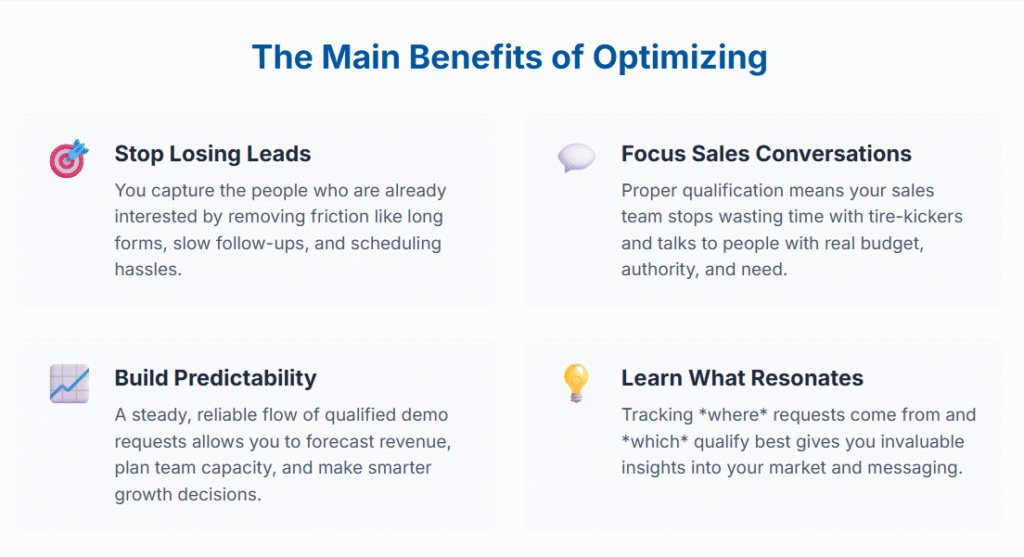
The biggest benefit? You actually capture the people who are already interested. Right now, you’re probably losing a significant chunk of potential customers simply because your demo request process has too much friction. Every field removed from your form, every hour faster you respond, every scheduling hassle eliminated—it all adds up to more conversations with qualified buyers.
Your sales team’s time gets focused on the right conversations
When you implement proper lead qualification in your demo request flow, your sales team stops wasting time with tire-kickers and starts having meaningful conversations with people who actually have budget, authority, and need. I’ve seen teams cut their average time-to-close in half simply by improving the quality of their demo requests.
You build momentum and predictability
Here’s something nobody talks about: when demo requests are unpredictable, your entire sales process feels chaotic. But when you have a steady, reliable flow of qualified demo requests, you can actually forecast revenue, plan your team’s time, and make smarter decisions about where to invest in growth.
You learn what messaging actually resonates
Every demo request is a data point telling you what’s working. When you track where requests come from, what messaging drove them, and which qualify best, you get incredibly valuable insights into your market. I’ve had clients discover entire customer segments they didn’t know existed, just by analyzing their demo request patterns.
What Mistakes Should You Avoid When Trying to Increase Demo Requests?
Alright, let’s talk about the stuff that doesn’t work—because I’ve tried most of it, and I want to save you the headache.
Mistake #1: Asking for too much information upfront
I get it. You want to qualify leads before you waste your time. So you add fields for company size, budget, timeline, role, department, use case… and suddenly your form looks like a job application. Guess what? Most people bail.
The sweet spot is 3-4 fields maximum for your initial form. You can qualify later—just get them in the door first.
Mistake #2: Hiding your demo CTA
Some SaaS companies treat their demo request like it’s a secret treasure hunt. The CTA is in the footer in tiny text, or buried three clicks deep. Look, if someone wants to see a demo, make it obvious how to request one. Multiple CTAs throughout your site aren’t annoying—they’re helpful.
Mistake #3: Treating all demo requests the same
Not all demo requests are created equal. A request from a Fortune 500 company should probably be handled differently than one from a solopreneur just exploring options. But most small teams treat them all identically because they don’t have a system to differentiate.
Mistake #4: Slow follow-up
This one kills me because it’s so fixable. Research shows that responding within 5 minutes versus 30 minutes can increase conversion by 100x. Yet most teams take hours or even days to follow up on demo requests. By then, the prospect has either moved on or is talking to your competitors.
Mistake #5: Making scheduling a nightmare
The email tennis of finding a time that works is exhausting for everyone. If you’re not using automated calendar booking, you’re making prospects work too hard—and many will just give up.
Mistake #6: No follow-up on incomplete requests
Someone starts filling out your demo form but doesn’t complete it. Most companies just shrug and move on. But that person was interested enough to start the process. A simple retargeting email or exit-intent popup could capture them.
Why Increasing Demo Requests Actually Matters for Your Business
Let me be direct: if you’re running a B2B SaaS company or any product-led business, your demo request rate is probably one of the most important metrics you’re not paying enough attention to.
Here’s why this matters so much, especially for small teams:
Demo requests are your most qualified leads
Think about the intent level. Someone who fills out a demo form has moved way past “just browsing.” They’ve researched enough to understand what you do, they’ve decided you might be a fit, and they’re willing to invest their time in a conversation. That’s a hot lead.
Compare that to someone who downloads a whitepaper or signs up for your newsletter—those are fine, but they’re much earlier in the buyer journey. Demo requests are people who are actively evaluating solutions. According to research from Gartner, 74% of B2B buyers prefer learning through self-serve demos rather than sitting through sales calls, but when they do request a live demo, they’re serious.

Your growth is directly tied to demo volume and quality
Unless you’re running a fully self-serve product (and even then), your revenue growth is constrained by how many qualified prospects you can get into conversations. If you’re only getting 10 demo requests per month and converting 30% of them, you’ve got 3 new customers. Double your demo requests to 20 while maintaining quality, and suddenly you’re at 6 customers. The math is simple, but the impact is massive.
Small improvements compound quickly
What I love about optimizing demo requests is that small changes create outsized results. When I worked with a client to simplify their demo form from 8 fields to 3, requests jumped 40% in the first week. Another client added calendar booking and saw their actual demo completion rate (requests that turned into held demos) go from 60% to 85%.
These aren’t huge, expensive initiatives. They’re tactical fixes that any small team can implement—but they directly impact your pipeline.
It forces you to clarify your value proposition
Here’s an unexpected benefit: when you focus on increasing demo requests, you’re forced to get crystal clear about why someone should want a demo in the first place. What problem are you solving? Who is it for? Why should they care?
I’ve seen teams completely overhaul their messaging because they realized their demo page wasn’t compelling. That clarity doesn’t just help with demos—it improves everything from your ad copy to your sales conversations.
The 10 Strategies That Actually Increase Demo Requests
Alright, enough setup. Let’s get into the practical stuff—the strategies I’ve seen consistently move the needle for SaaS teams trying to increase their demo requests. These aren’t theoretical. They’re battle-tested tactics that work for small teams with limited resources.
Strategy 1: Simplify Your Demo Form (Fewer Fields = More Conversions)
This is the lowest-hanging fruit, and yet so many companies get it wrong.
Why it works:
Every field you add to your demo form is a barrier. Each additional question makes the prospect think, “Is this really worth it?” and gives them another chance to bail. Research consistently shows that reducing form fields increases conversion rates—sometimes dramatically.
When we analyzed 200+ SaaS companies, we found that 30% don’t show any product information before asking for contact details. That’s insane. And the ones with the longest forms? Consistently lower conversion rates.
How to apply it:
Look at your current demo form. How many fields are you asking for? If it’s more than 4, you’re probably losing people.
Here’s what you actually need to get started:
- Name (first name is often enough)
- Company name
- Maybe phone number if your sales process requires it
Everything else—company size, budget, use case, timeline—you can ask later. Seriously. Get them in the door first, then qualify during the actual demo or via a follow-up email.
I know what you’re thinking: “But I need to qualify leads before I waste time on unqualified prospects!” I get it. But here’s the thing—you can add a single qualification question that’s low-friction. Something like a dropdown for company size or a checkbox for “I have budget authority.” Just don’t make people write essays.
Pro tip: If you absolutely must gather more information, use a multi-step form. Studies show that starting with just 2 fields and then revealing more on a second screen can actually increase completions because people are already invested once they’ve started.
Strategy 2: Strengthen Your CTA Copy and Placement
Your call-to-action is doing more heavy lifting than you probably realize. It’s not just a button—it’s the final nudge that turns a curious visitor into a demo request.
Why it works:
Generic CTAs like “Submit” or “Request Demo” don’t create urgency or communicate value. They’re forgettable. But a CTA that speaks directly to the visitor’s goal? That converts.
Plus, placement matters enormously. If visitors have to hunt for your demo CTA, many won’t bother. I’ve seen companies increase demo requests by 25% just by adding CTAs in more strategic locations.
How to apply it:
First, audit your CTA copy. Does it just say “Request a Demo” or “Get Started”? If so, you’re missing an opportunity to add value-driven language.
Try variations like:
- “See [Product] in Action”
- “Show Me How It Works”
- “Get Your Personalized Demo”
- “See How [Specific Benefit]”
The key is to focus on what they get, not what you want them to do.
Next, look at placement. Your demo CTA should appear:
- In your main navigation (always visible)
- Above the fold on your homepage
- At the end of key pages (product pages, pricing, use case pages)
- In the middle of long-form content after you’ve explained value
- As a sticky header or footer on mobile
I’m not saying plaster CTAs everywhere like a used car lot. But strategic repetition is good. People need to see the option when they’re ready, and you don’t know exactly when that moment will hit.
One more thing: Make your CTA buttons visually distinct. They should stand out from your color scheme (high contrast) and be large enough to tap easily on mobile. Sounds basic, but I’ve seen beautiful websites with CTAs that blend into the background.
Strategy 3: Add Social Proof Near Your Demo Section
Trust is everything in B2B buying decisions. If prospects don’t trust you, they’re not going to invest time in a demo—simple as that.
Why it works:
Social proof leverages a powerful psychological principle: we look to others’ behavior to guide our own decisions, especially when we’re uncertain. When prospects see that other companies like theirs are using and succeeding with your product, it reduces perceived risk.
A study by Stratabeat found that SaaS companies using multi-pronged conversion strategies (including social proof) saw significantly higher demo request and trial conversion rates.
How to apply it:
Position social proof strategically on or near your demo page. Here’s what works:
Customer logos: Display recognizable brands that use your product, especially if they’re in the same industry as your target audience. If you’re selling to healthcare, show healthcare logos. Context matters.
Testimonials: Don’t just use generic “Great product!” quotes. Use specific testimonials that address common objections:
- “We were worried about implementation time, but we were up and running in 48 hours.”
- “The ROI was clear within the first month—we saved 5 hours per week on [specific task].”
Case study snippets: Brief one-liners like “How Company X increased efficiency by 40%” with a link to the full story. These work because they show concrete outcomes, not just satisfaction.
Review scores: If you have good ratings on G2, Capterra, or similar platforms, display them prominently. “4.8/5 stars from 200+ reviews” carries weight.
Usage stats: “Trusted by 5,000+ companies” or “Processing 1M+ transactions daily”—these demonstrate scale and reliability.
The key is authenticity. Don’t make up testimonials or use stock photos. Prospects can smell fake social proof from a mile away, and it’ll hurt your credibility more than help.
Strategy 4: Offer Instant Calendar Booking (Remove Friction)
This one’s a game-changer, and honestly, if you’re not doing it yet, you’re probably losing a significant percentage of your demo requests.
Why it works:
Think about the traditional process: prospect requests demo → you email them → they email back with their availability → you propose times → they respond → finally, maybe you schedule something three days later. By then, their interest has cooled, they’re talking to competitors, or they’ve just moved on.
Instant calendar booking collapses all that friction into a single step. The prospect requests a demo and immediately sees available time slots, picks one that works, and boom—it’s on both calendars. Done.
The psychological impact is huge too. When someone can book a time instantly, there’s a sense of momentum and commitment that makes them more likely to actually show up.
How to apply it:
Use a scheduling tool—Calendly, Chili Piper, HubSpot Meetings, or even LevelUp Demo (which integrates scheduling directly into the demo request flow). The specific tool matters less than the principle: eliminate the back-and-forth.
Here’s how to set it up effectively:
Embed booking in the flow: Don’t make prospects fill out a form and then go to a separate scheduling page. Either embed the calendar directly on your demo page or immediately redirect to booking after form submission.
Show real availability: Sync with your actual calendar (Google Calendar, Outlook, etc.) so prospects only see times you’re genuinely available. Nothing’s worse than booking a slot only to get an email later saying “Actually, can we reschedule?”
Be smart about time slots: Don’t just offer every 30-minute window from 9 AM to 5 PM. Think about when demos actually make sense. I recommend:
- 30-minute or 15-minute buffers between demos (you need prep time)
- No back-to-back demos all day (burnout is real)
- Consider time zones if you’re serving a global audience
Add qualification questions: Most scheduling tools let you add custom questions. Use this to gather information you didn’t ask in the initial form—company size, specific use case, what they’re hoping to see. This helps you prepare a more relevant demo.
Send automatic reminders: Most no-shows happen because people genuinely forget. Automated email and SMS reminders 24 hours and 1 hour before the demo can cut no-show rates in half.
At LevelUp, we’ve seen teams go from 60% of demo requests actually turning into held demos to over 85% just by implementing instant booking. That’s a massive difference in pipeline.
Strategy 5: Use Follow-Up Emails for Incomplete Form Submissions
Here’s something most teams completely miss: not everyone who starts your demo form finishes it. Maybe they got distracted, maybe they had a question, maybe they weren’t quite ready. But they were interested enough to start—and that’s valuable.
Why it works:
These are warm leads, not cold traffic. They’ve already shown intent. A gentle follow-up can recapture a significant portion of these almost-conversions.
Think about your own behavior online. How many times have you started filling out a form, gotten interrupted, and never came back? But if that company had emailed you saying “Hey, noticed you were checking us out—any questions I can answer?” you might have engaged.
How to apply it:
First, you need to capture partial form submissions. Most modern form tools (Typeform, HubSpot, Leadformly) can track when someone starts a form but doesn’t complete it—as long as they’ve entered at least their email address.
Once you have that data, set up an automated follow-up sequence:
Email 1 (Same day): Simple and helpful, not pushy.
Subject: “Quick question about [Your Product]”
Body: “Hi [Name], I noticed you started requesting a demo but didn’t finish. No worries at all—these forms can be annoying! If you have any questions before booking a demo, I’m happy to help. Or if you’d prefer, you can schedule a time directly here: [calendar link]. Either way, no pressure. – [Your Name]”
Email 2 (2 days later): Offer an alternative path.
Subject: “Prefer to see [Product] on your own first?”
Body: “Hey [Name], following up one more time. If you’re not quite ready for a live demo, we also have an interactive demo you can explore at your own pace: [link]. Or if you have specific questions about pricing, integrations, etc., just reply to this email. Happy to help however works best for you.”
That’s it. Two emails, spaced out, offering value and alternative paths forward. Don’t be that company that sends 10 aggressive follow-ups. Respect their time and attention.
Pro tip: Segment your follow-ups based on where they dropped off. If someone filled out name and email but bailed when you asked for company size, maybe that question is too invasive. Use that insight to optimize your form.
Strategy 6: Retarget Website Visitors Who Viewed Your Demo Page
If someone visited your demo page but didn’t request a demo, they’re telling you something important: they’re interested, but something held them back. Maybe they weren’t ready yet. Maybe they wanted to do more research. Maybe they just got distracted.
Retargeting lets you stay in front of these high-intent visitors and give them another chance to convert.
Why it works:
Most buying decisions aren’t made on the first visit. B2B buyers, especially, need multiple touchpoints before they commit to a demo. Retargeting keeps your brand top-of-mind and gives you opportunities to address objections or offer new value that might tip them over the edge.
Plus, retargeting is incredibly cost-effective compared to cold acquisition. You’re reaching people who already know who you are and have shown genuine interest.
How to apply it:
Set up retargeting pixels (Facebook Pixel, Google Ads remarketing tag, LinkedIn Insight Tag) on your key pages, especially your demo and pricing pages.
Then create audience segments:
- Visited demo page but didn’t submit form
- Visited pricing page but didn’t request demo
- Visited multiple product pages (high engagement)
Now craft specific ad campaigns for each segment:
For demo page visitors: Show ads that address common objections or highlight social proof.
- “See why 5,000+ teams trust [Product]”
- “Quick 15-minute demo—no commitment required”
- Testimonial-based creative from companies like theirs
For pricing page visitors: They’re thinking about cost. Address ROI.
- “Calculate your ROI in under 2 minutes”
- “See exactly how [Product] pays for itself”
For high-engagement visitors: They’re doing deep research. Offer resources.
- “Download our comparison guide: [Your Product] vs. Competitors”
- Case study content
Keep your retargeting frequency reasonable—don’t bombard people. I recommend capping impressions at 3-5 per person per week across all channels.
Important: Set time windows on your audiences. Someone who visited your demo page 90 days ago is probably cold by now. Focus your retargeting budget on recent visitors (7-30 days).
And here’s a tactic that works surprisingly well: retarget with a direct offer to book time with a real person, not just “Request a Demo.” Something like “Questions about pricing? Book 10 minutes with Sarah from our team” with a Calendly link. The specificity and human element can convert fence-sitters.
Strategy 7: Use Personalized Landing Pages for Different Campaigns
Sending all your traffic to the same generic demo page is a missed opportunity. Different prospects have different needs, pain points, and contexts—and your messaging should reflect that.
Why it works:
Personalization increases relevance, and relevance drives conversions. When someone clicks an ad about “accounting software for nonprofits” and lands on a page that specifically addresses nonprofit accounting challenges, they immediately feel like you understand their world. They’re way more likely to convert than if they land on a generic “accounting software for everyone” page.
Research from Stratabeat shows that SaaS companies using targeted, segmented approaches see significantly better conversion rates than those using one-size-fits-all tactics.
How to apply it:
Start by identifying your main customer segments or campaign sources:
- Industry verticals (healthcare, finance, retail, etc.)
- Company size (enterprise vs. SMB)
- Use cases (specific problems you solve)
- Traffic sources (paid ads, content marketing, partnerships)
Then create dedicated landing pages for each major segment. You don’t need 50 versions—start with your top 3-5 segments.
What to customize:
Headline and subheadline: Speak directly to their specific pain point.
- Generic: “Demo Request – See Our Product in Action”
- Personalized: “See How [Product] Helps Healthcare Teams Reduce Admin Time by 50%”
Social proof: Show testimonials and logos from companies in their industry or of their size.
Use case examples: Tailor your product screenshots or demo videos to show relevant workflows.
Form fields: Maybe enterprise prospects need to specify department, while SMBs don’t. Customize accordingly.
CTA copy: Adjust based on what matters to them.
- Enterprise: “Schedule a Security & Compliance Review”
- SMB: “See How Fast You Can Get Started”
Here’s a practical example:
Let’s say you run Google Ads targeting “sales demo software for startups.” Create a landing page specifically for that:
- Headline: “Demo Software Built for Lean Startup Sales Teams”
- Testimonial from a startup founder
- Pricing callout emphasizing affordability
- Screenshots showing simple, quick setup
Compare that to someone searching “enterprise demo management platform”—they need a totally different page emphasizing security, integrations, admin controls, and scalability.
Pro tip: Use dynamic text replacement if you’re running lots of ad variations. Tools like Unbounce or Instapage let you automatically swap in keywords from the ad into your landing page headline, creating instant personalization without building dozens of pages.
Strategy 8: Showcase a Short Demo Video Preview
Sometimes prospects need to see your product in action before they’re ready to commit time to a live demo. A short preview video can be the nudge that converts browsers into demo requests.
Why it works:
Video is incredibly effective at building understanding and trust quickly. A 60-second clip showing your product’s core value can answer questions, reduce uncertainty, and make the prospect feel more confident about requesting a full demo.
Plus, it’s low-commitment. Watching a video feels easier than filling out a form or sitting through a 30-minute sales call. But once they watch and see the value, they’re much more likely to take that next step.
According to research from DemoGo, 74% of B2B buyers prefer self-serve demos over sales conversations—but when they do request a live demo after experiencing a preview, they’re significantly more qualified and ready to buy.
How to apply it:
Create a short (60-90 seconds max) product demo video that shows your core value proposition in action. This isn’t a full product walkthrough—it’s a teaser.
What to include:
Hook (first 5 seconds): State the problem clearly.
- “Tired of losing demo leads because scheduling is a mess?”
Show the solution (30-40 seconds): Walk through the key workflow or feature that solves that problem. Use real product footage, not generic stock video.
Outcome (10-15 seconds): What happens when they use your product?
- “Now your team captures every lead, schedules demos instantly, and never misses a follow-up.”
CTA (final 10 seconds): “Want to see how this works for your team? Request a personalized demo.”
Where to place it:
- Embed it above the fold on your demo landing page
- Include it in follow-up emails to demo requests who haven’t scheduled yet
- Add it to your homepage
- Use it in retargeting ads
Technical tips:
- Keep it under 2 minutes (shorter is better)
- Add captions (many people watch on mute)
- Show your actual product, not animations or explainer graphics
- Use a friendly, conversational voiceover—not a corporate robot voice
- Host on YouTube or Vimeo for better loading speed
I’ve seen companies double their demo request rate just by adding a well-crafted preview video above their demo form. It answers questions, builds trust, and makes the ask feel less risky.
Strategy 9: Highlight Benefits Clearly Above the Fold
You have about 3 seconds to communicate why someone should care about your product. If your demo page doesn’t immediately make it clear what you do and why it matters, prospects will bounce before they ever consider requesting a demo.
Why it works:
Clarity beats creativity every time. Prospects aren’t visiting your demo page to be entertained—they’re trying to solve a problem. If you make them work to understand your value proposition, they won’t.
Above the fold (the part of your page visible without scrolling) is prime real estate. This is where you either hook people or lose them.
How to apply it:
Look at your current demo page. Can someone who’s never heard of you understand what you do and why it matters in 5 seconds? If not, you need to simplify.
Here’s the formula that works:
Clear headline: What you do, for whom.
- Bad: “The Future of Enterprise SaaS Solutions”
- Good: “Demo Management Software for B2B Sales Teams”
Benefit-driven subheadline: What problem you solve or outcome you deliver.
- “Capture every demo lead, schedule instantly, and never lose a deal to poor follow-up”
Visual proof: A product screenshot or short video showing your core interface.
Specific outcomes: Use bullets with numbers when possible.
- “Save 5+ hours per week on demo scheduling”
- “Increase demo show-up rates by 40%”
- “Track every demo outcome in one dashboard”
Social proof: A quick credibility indicator.
- “Trusted by 500+ B2B SaaS teams”
- Customer logos
Clear CTA: One primary action you want them to take.
- “Request Your Demo” button in a contrasting color
What NOT to do:
- Don’t use vague buzzwords like “innovative,” “revolutionary,” “next-generation”
- Don’t bury your value prop in paragraph text
- Don’t make people scroll to understand what you do
- Don’t overwhelm with feature lists—focus on outcomes
- Don’t use generic stock photos of people in suits shaking hands
Example of before and after:
Before (vague): Headline: “Transform Your Business with Our Platform” Subheadline: “Leveraging cutting-edge technology to deliver unparalleled results”
After (clear): Headline: “Demo Scheduling Software That Actually Converts Leads” Subheadline: “Capture demo requests, schedule instantly, and track outcomes—all in one simple tool” Bullets:
- Reduce scheduling time by 80%
- Increase demo attendance from 60% to 85%
- Never lose a lead to slow follow-up
See the difference? The second version immediately tells you what it is, who it’s for, and why you should care.
Strategy 10: Use Exit-Intent Popups to Capture Undecided Leads
Exit-intent popups get a bad rap because they’re often done poorly—aggressive, annoying, and offering nothing of value. But when done right, they’re incredibly effective at capturing prospects who are about to leave without converting.
Why it works:
Someone who’s about to close your tab has already decided not to request a demo (at least not right now). You have nothing to lose by making one last offer. If you can address their hesitation or offer an alternative path forward, you might recapture them.
The key is that exit-intent triggers only fire when the user’s mouse moves toward the browser’s close button or back button—so you’re not interrupting their experience while they’re actively reading.
How to apply it:
First, set up exit-intent technology. Tools like OptinMonster, Sumo, or Unbounce make this easy. You can also build custom solutions if you have dev resources.
What to offer in your exit popup:
Don’t just repeat your demo CTA—they already saw that and didn’t convert. Offer something different:
Option 1: Address objections
- “Not ready for a live demo? Try our interactive product tour instead” [Link]
Option 2: Lower-commitment offer
- “Just want to chat for 10 minutes? Book a quick call” [Calendar link]
Option 3: Valuable resource
- “Before you go—grab our free guide: How to Evaluate Demo Software” [Download]
Option 4: Incentive (use carefully)
- “Book a demo this week and get [relevant bonus—not a gimmick]”
Option 5: Direct question
- “Quick question: What’s holding you back from requesting a demo?” [Multiple choice buttons: “Not ready yet,” “Need to see pricing first,” “Want to explore on my own”]
That last one is particularly smart because it gives you data about why people aren’t converting, which you can use to improve your page.
Best practices:
- Keep the copy short—this isn’t an essay
- Use a clear visual hierarchy (headline, subtext, single CTA)
- Make it easy to close (don’t be that annoying popup)
- Don’t show it to people who’ve already requested a demo (segment your audience)
- Test different offers to see what resonates
Example popup copy:
Headline: “Wait—Before You Go”
Subtext: “Not quite ready for a demo? No problem. Try our interactive product tour and explore at your own pace.”
CTA Button: “Show Me the Tour”
Small text below: “No email required • Takes 3 minutes”
I’ve worked with teams who captured an additional 10-15% of their demo page traffic just by implementing a well-crafted exit-intent offer. That’s significant when you’re trying to hit growth targets.
Expert Tips for Maximizing Demo Request Conversions
Beyond the core strategies, here are some insider tactics I’ve picked up from working with dozens of SaaS teams and analyzing what actually moves the needle.
Segment Your Follow-Up Based on Source
Not all demo requests are equal, and your follow-up shouldn’t treat them that way. Someone who requests a demo after reading a detailed case study is in a different headspace than someone who clicked an ad.
Create different follow-up email sequences based on:
- Traffic source: Paid ads vs. organic vs. referral
- Content consumed: Which pages did they visit before requesting?
- Company size/industry: Tailor examples and case studies accordingly
This doesn’t have to be complicated. Even just two or three segments with slightly different messaging can significantly improve your demo show-up rate and eventual close rate.
Use Conversational Language in Your Forms
Your demo form shouldn’t sound like a legal document. Instead of “Please provide your contact information to schedule a product demonstration,” try “Let’s find a time to chat about how [Product] can help your team.”
Small language tweaks make your form feel less transactional and more human. People are more likely to complete a form that feels like the start of a conversation rather than a data collection exercise.
Test Your Demo Page on Mobile
This sounds obvious, but you’d be surprised how many demo pages are a disaster on mobile. Buttons are too small, forms are awkward, videos don’t load properly.
Check your analytics—what percentage of your demo page traffic is mobile? For many B2B SaaS companies, it’s 30-40% or higher. If your mobile experience sucks, you’re losing a huge chunk of potential conversions.
Things to check:
- Form fields are easy to tap and type into
- CTA buttons are large and thumb-friendly
- Page loads quickly (under 3 seconds)
- Video embeds work properly and don’t autoplay with sound
- Text is readable without zooming
Implement Smart Qualification Without Friction
You need to qualify leads, but you don’t want to add friction. Here’s a clever solution: use conditional logic in your forms.
Start with just name and email. Then, based on their email domain, you can automatically show or hide additional questions.
For example:
- If they use a Gmail or personal email → ask for company name and role
- If they use a corporate domain → pre-fill company name and just ask for role
- If the domain matches an enterprise account you’re targeting → route to your senior sales rep immediately
This makes the form feel personalized and low-friction while still gathering the data you need.
Create a “Demo Success Checklist”
After someone requests a demo, send them a quick email with a checklist of things to prepare. This serves multiple purposes:
- Increases their commitment and likelihood of showing up
- Helps them get more value from the demo
- Gives you better information to customize the demo
Example checklist:
- ✓ Think about your top 3 pain points with [current process]
- ✓ Identify 2-3 team members who should see this
- ✓ Have your current tools/data ready to discuss integration needs
- ✓ Set aside 30 minutes in a quiet space
This positions you as helpful and professional while also priming them to be engaged participants rather than passive observers.
Use Micro-Commitments
Don’t just ask for a demo right away. Use progressive disclosure to build commitment gradually.
For example:
- First CTA: “See how it works” → short video or interactive demo
- After they watch: “Want to see this customized for your use case?” → request demo
People are much more likely to say yes to a small request first, then follow through with a bigger commitment. This is basic psychology, but it works.
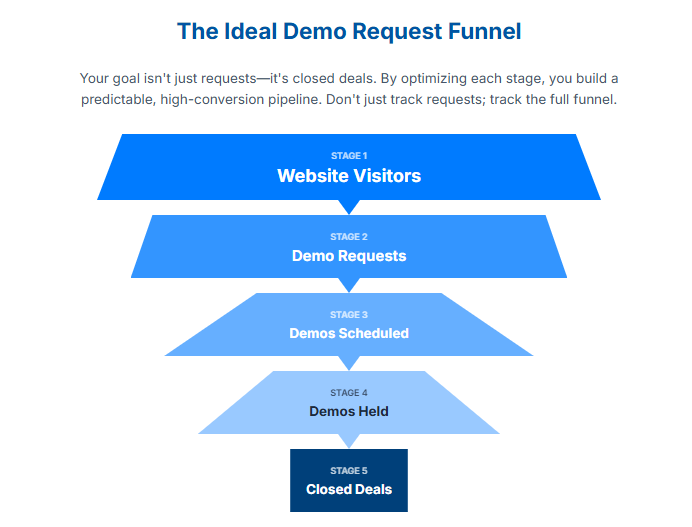
Track the Full Funnel, Not Just Requests
Demo requests are important, but they’re not the finish line. Track:
- Demo request rate (visitors → requests)
- Demo booking rate (requests → scheduled demos)
- Demo show-up rate (scheduled → actually held)
- Demo conversion rate (held → closed deal)
You might discover that your problem isn’t getting enough requests—it’s that 40% of people who request demos never actually schedule them, or that 30% schedule but don’t show up.
Each stage of the funnel needs different optimization tactics. Don’t obsess over requests if your real bottleneck is elsewhere.
Common Questions About Increasing Demo Requests
How long should my demo request form be?
Keep it to 3-4 fields maximum for the initial request: name, email, company, and optionally phone number. You can gather additional qualification info during scheduling or via a pre-demo questionnaire. Every additional field you add decreases conversion rate by roughly 10-15%, so only ask for what you absolutely need upfront.
Should I require a phone number on demo requests?
It depends on your sales process. If your team calls leads immediately, yes—it’s necessary. But if you primarily email and use calendar booking, making phone number optional can increase form completions by 15-20%. Test both approaches and measure which gives you better qualified pipeline, not just more volume.
How quickly should I follow up on demo requests?
As fast as humanly possible. Research shows that responding within 5 minutes versus 30 minutes increases conversion by up to 100x. If you can’t respond immediately, use automation to send an instant confirmation email with calendar booking options so prospects can self-schedule while interest is hot.
What’s a good demo request conversion rate?
For B2B SaaS, typical demo request rates range from 2-5% of website visitors to your demo page. If you’re below 2%, you likely have friction issues (long forms, unclear value prop, poor trust signals). Above 5% is excellent. But remember—quality matters more than quantity. A 3% rate with highly qualified leads beats 6% with tire-kickers.
Should I offer self-serve demos or only live demos?
Offer both. Self-serve interactive demos (product tours, sandbox environments) let prospects explore on their own timeline and build confidence before requesting a live demo. Research shows 74% of B2B buyers prefer self-serve options initially, but many still want a live demo before purchasing. Use self-serve as a funnel step, not a replacement.
How do I reduce no-shows for scheduled demos?
Use automated reminders (email and SMS) 24 hours and 1 hour before the demo. Make sure your calendar invite is clear about what they’ll learn and how to prepare. Send a pre-demo email asking them to identify their top questions or pain points—this creates investment and commitment. Finally, make rescheduling easy rather than letting people just ghost.
What should I do with demo requests from unqualified leads?
Don’t ignore them—nurture them. Set up an automated email sequence offering educational content, case studies, and self-serve resources. Some “unqualified” leads are just early in their buying journey and will be ready in 3-6 months. Others might be perfect referral sources even if they’re not buyers themselves. Stay helpful, not pushy.
How many CTAs should I have on my website?
Have your primary demo CTA visible in multiple strategic locations: main navigation, homepage above the fold, end of key pages, and as a sticky element on mobile. But don’t overwhelm—3-5 well-placed CTAs is better than 20 random ones. Make sure each CTA appears at a natural decision point after you’ve communicated value.
Should I use chatbots to generate demo requests?
Chatbots can work well if they’re genuinely helpful and not annoying. Use them to answer common questions, qualify visitors, and offer calendar booking—not to aggressively push demos before someone is ready. The best approach is a hybrid: chatbot for initial questions, then smooth handoff to demo request or human conversation when appropriate.
How can small teams manage high demo request volume?
This is a good problem to have, but it’s real. Implement smart qualification to prioritize your best leads. Use calendar booking to eliminate scheduling back-and-forth. Consider offering group demos for similar prospects. And honestly, this is where a tool like LevelUp Demo becomes invaluable—it helps small teams capture, qualify, schedule, and track demos without drowning in administrative work.
Bringing It All Together: Your Action Plan
We’ve covered a lot of ground, so let’s distill this into a practical action plan you can start implementing today.
If you have 1 hour:
- Audit your demo request form and remove any unnecessary fields
- Add or improve your primary demo CTA placement and copy
- Set up automated confirmation emails with calendar booking
If you have 1 day:
- Create 2-3 personalized landing pages for your main customer segments
- Record a 60-second product preview video
- Implement exit-intent popups with a valuable alternative offer
If you have 1 week:
- Set up retargeting campaigns for demo page visitors
- Build an email follow-up sequence for incomplete form submissions
- Add social proof elements (testimonials, logos, case studies) near your demo CTA
- Implement proper analytics tracking for your full demo funnel
If you have 1 month:
- Create an interactive self-serve demo experience
- Develop segment-specific follow-up sequences
- Test multiple variations of your demo page (A/B testing)
- Implement a demo outcome tracking system
The key is to start somewhere and iterate. You don’t need to implement everything at once. Pick the strategies that address your biggest bottlenecks first.
The Bigger Picture: Demos as Conversations, Not Transactions
Here’s what I’ve learned after years of working with SaaS teams on their demo processes: the companies that consistently convert demos into customers are the ones that treat demo requests as the beginning of a relationship, not a transaction to be optimized.
Yes, all the tactical stuff matters—form length, CTA placement, follow-up speed. But underneath all of that, there’s a human being trying to solve a real problem. They’re busy, they’re skeptical, and they’ve been burned by overpromising software before.
When you optimize your demo request process, you’re not just trying to game conversion rates. You’re trying to make it as easy as possible for the right people to start a conversation with you. You’re reducing the friction that stands between someone with a problem and a solution that could genuinely help them.
That mindset shift changes everything. It means you’re not trying to trick people into requesting demos—you’re removing obstacles for people who already want to talk to you. It means you’re qualifying leads not to exclude people, but to make sure you can actually help them. It means you’re following up persistently not to be annoying, but because you genuinely believe your product can make their work life better.
The tactics in this guide work. I’ve seen them increase demo requests by 50%, 100%, sometimes more. But they work best when they’re in service of building real relationships with real people who have real problems you can solve.
Ready to stop losing demo leads in the cracks?
If you’re a small SaaS team juggling demo requests across email, spreadsheets, and calendar chaos, you’re probably losing qualified prospects without even realizing it. LevelUp Demo helps you capture every lead, qualify instantly, schedule automatically, and track outcomes—all in one simple workflow. No bloated CRM, no complicated setup. Just a clean system that makes sure no opportunity slips through. See how it works or explore our pricing to find the plan that fits your team.