I’ll never forget the Monday morning I lost a $15K deal because I forgot to follow up. The prospect had asked for pricing after our demo the previous Thursday. I meant to send it Friday morning. But then a customer emergency hit, my calendar exploded, and by the time I remembered on Monday afternoon, they’d already signed with a competitor.
That stung. Not just because of the lost revenue, but because it was entirely preventable. I had no sales pipeline, no system. No process. Just a messy spreadsheet, a cluttered inbox, and the naive belief that I could keep everything in my head.
If you’ve ever lost a lead because you forgot to follow up, double-booked a demo, or simply had no idea which deals were actually moving forward—you’re not alone. Building a sales pipeline isn’t about being a sales genius. It’s about creating a simple, repeatable system that prevents good leads from slipping through the cracks.
In this guide, I’ll walk you through exactly how to build a sales pipeline from scratch, even if you’ve never done this before. We’ll cover what a pipeline actually is, why it matters, the stages you need, how to set one up, and the mistakes to avoid. By the end, you’ll have a clear roadmap to organize your sales process and stop losing deals to disorganization.
So, What Exactly Is a Sales Pipeline?
A sales pipeline is a visual representation of where your prospects are in your sales process—from the moment they first express interest to the point where they become paying customers (and beyond). Think of it as a roadmap that shows you exactly which deals are moving forward, which are stuck, and where you need to focus your energy.
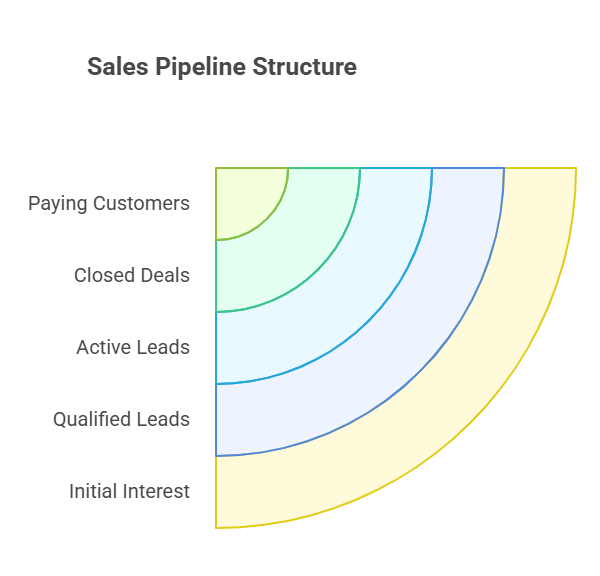
Unlike a sales funnel (which shows volume at each stage), a pipeline focuses on the individual deals and their progress. It’s your command center for managing relationships, tracking conversations, and making sure nothing falls through the cracks.
For SaaS founders and small sales teams, a pipeline is especially critical because you’re often wearing multiple hats. You don’t have the luxury of a dedicated sales ops team to keep things organized. Your pipeline becomes your safety net—the thing that ensures you follow up on time, prioritize the right leads, and actually close deals instead of just having great conversations that go nowhere.
Why Does a Sales Pipeline Matter?
Here is the thing: Without a structured sales pipeline, you’re essentially flying blind. You might feel busy—lots of demos, lots of calls—but you have no real visibility into whether those activities are actually moving deals forward.
A proper pipeline gives you:
- Clarity on what’s working: You can see conversion rates at each stage and identify bottlenecks. If you’re getting tons of demo requests but few closes, you know where to focus your improvement efforts.
- Predictable revenue: When you know how many deals are in each stage and your historical conversion rates, you can forecast revenue with reasonable accuracy.
- Better time management: Instead of chasing every lead equally, you prioritize based on deal stage and likelihood to close.
- Accountability: For small teams, a shared pipeline creates transparency. Everyone knows who owns which leads and what the next steps are.
According to research, companies with a formalized sales pipeline process report 15% higher win rates and 30% faster sales cycles. That’s not because the pipeline itself magically closes deals—it’s because it forces you to be systematic, consistent, and intentional about how you sell.
I learned this the hard way after that lost deal. I spent a weekend building out my first real pipeline in a simple CRM, and within two months, my demo-to-close conversion rate jumped from around 12% to nearly 20%. Not because I became a better salesperson overnight, but because I stopped dropping balls.
How Does a Sales Pipeline Actually Work in Practice?
A sales pipeline works by breaking your sales process into distinct, measurable stages. Each stage represents a specific milestone in the buyer’s journey, and deals move from one stage to the next as prospects take action.
The key is that each stage should have:
- Clear entry criteria: What needs to happen for a lead to enter this stage?
- Specific activities: What do you (or your team) need to do at this stage?
- Exit criteria: What action moves the deal to the next stage?
For example, a lead enters the “Demo Scheduled” stage when they book a meeting. Your activity is conducting the demo. They exit to “Proposal Sent” when you send pricing. Simple, repeatable, trackable.
In practice, you’ll typically manage your pipeline using one of three approaches:
- Spreadsheet: A basic Google Sheet or Excel file with columns for each stage and rows for each deal. Works for solo founders just getting started, but gets messy fast.
- Simple CRM: Tools like HubSpot (free tier), Pipedrive, or Levelup Demo give you visual pipeline boards, automated reminders, and basic reporting without overwhelming complexity.
The best approach? Start simple. You can always graduate to something more sophisticated once you’ve nailed the basics and know exactly what you need.
What Are the Main Stages of a Sales Pipeline?
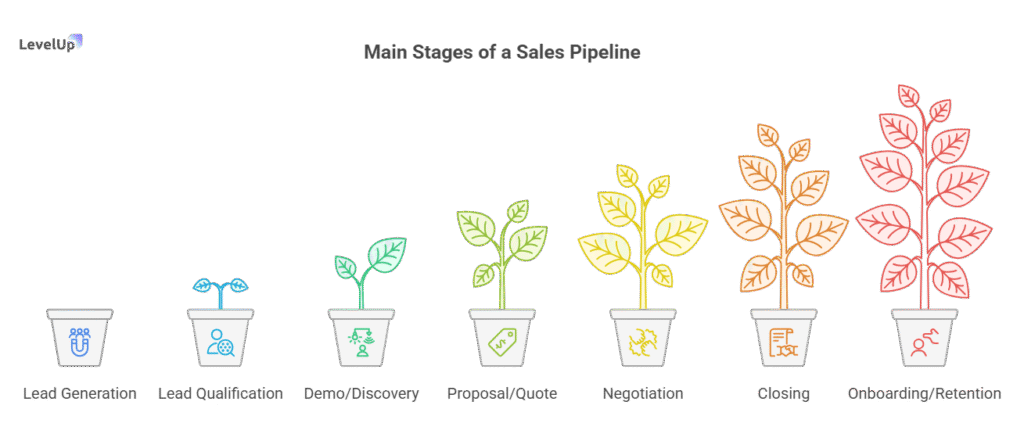
Most SaaS pipelines include 6-7 core stages. You can customize these based on your specific sales process, but here’s a proven framework that works for most B2B SaaS companies:
1. Lead Generation / Prospecting
This is where potential customers first enter your world—through inbound marketing (content, ads, referrals) or outbound efforts (cold email, LinkedIn outreach). At this stage, you’re simply identifying people who might be a fit.
2. Lead Qualification
Not every lead is worth pursuing. Here, you assess whether the prospect fits your ideal customer profile using a framework like BANT:
- Budget: Can they afford your solution?
- Authority: Are you talking to a decision-maker?
- Need: Do they have a problem your product solves?
- Timeline: Are they looking to buy soon?
If they don’t pass this filter, you either nurture them for later or disqualify them entirely. Harsh but necessary—chasing bad-fit leads is how you waste time and miss real opportunities.
3. Demo / Discovery
This is where you showcase your product and dig deep into their specific pain points. For SaaS, the demo stage is critical—it’s often the make-or-break moment. A well-run demo that’s tailored to their needs can dramatically increase your close rate.
Pro tip: Don’t just show features. Tell a story about how your product solves their specific problem. I started recording Loom videos for smaller prospects who didn’t need a live demo—saved me hours and actually improved conversions because they could watch on their own schedule.
4. Proposal / Quote
After a successful demo, you send a formal proposal or pricing quote. This should include clear pricing, terms, implementation timelines, and any customizations discussed. Make it easy to say yes—no confusing jargon or hidden fees.
5. Negotiation
This is where objections surface. Price concerns, feature requests, contract terms—all normal. Your job is to listen, address concerns genuinely, and find a win-win. This stage can take days or months depending on deal size and complexity.
6. Closing
They’ve agreed to move forward. Contracts are signed, payment is processed, and you officially have a new customer. Celebrate—but don’t disappear.
7. Onboarding / Retention
This stage is often overlooked in traditional pipeline models, but in SaaS, it’s essential. Successful onboarding leads to renewals, upsells, and referrals. A smooth handoff from sales to customer success ensures your new customer actually gets value and sticks around.
Each stage should flow naturally into the next. If you find deals getting stuck in one particular stage, that’s your signal to investigate. Maybe your demos aren’t addressing the right pain points. Maybe your proposals are too complicated. Your pipeline will tell you where to focus.
What Are the Main Benefits of Having a Sales Pipeline?
Let me be blunt: if you’re serious about growing your SaaS or startup, a sales pipeline isn’t optional—it’s foundational. Here’s why it matters so much:
You Stop Losing Deals to Disorganization
Before I had a pipeline, I lost deals not because of competition or price, but because I simply forgot to follow up. Or I followed up too late. Or I couldn’t remember what we discussed in the last call. Embarrassing, but true.
A pipeline with built-in reminders and notes ensures every lead gets the attention they deserve. You’ll never again have that sinking feeling of realizing you ghosted a hot prospect for two weeks.
You Can Actually Forecast Revenue
Investors, co-founders, and even your own sanity require some sense of predictable revenue. With a pipeline, you can look at your historical conversion rates (say, 20% of demos close within 60 days) and calculate expected revenue based on what’s currently in your pipeline.
It’s not perfect, but it’s infinitely better than guessing.
You Identify Bottlenecks Quickly
When you track deals through stages, patterns emerge. Maybe you’re getting tons of demo requests but only 10% move to proposal. That tells you your demo process needs work—you’re not uncovering needs or building enough urgency.
Or maybe 50% of proposals go to negotiation, but only half of those close. Time to revisit your pricing or objection-handling strategy.
Without a pipeline, these issues stay invisible until your revenue tanks.
You Improve Team Coordination
If you have even one other person helping with sales, a shared pipeline is a game-changer. Everyone can see who owns which leads, what the next steps are, and where deals stand. No more stepping on each other’s toes or letting leads fall through because “I thought you were handling that.”
Small SaaS sales teams using CRM tools report 30% better pipeline visibility and 20% improved team coordination, according to industry research.
You Build a Scalable Process
Right now, you might be able to juggle everything in your head. But what happens when you hire your first sales rep? Or when lead volume doubles? A documented pipeline process means you can onboard new team members quickly and scale without chaos.
The benefits compound over time. Once you have clean pipeline data for a few months, you can start making smarter decisions about where to invest time, which marketing channels are driving the best leads, and how to optimize your sales process for efficiency.
When Should You Use a Sales Pipeline?
Honestly? As soon as you start having sales conversations.
You don’t need to wait until you have a “real” sales team or fancy CRM. If you’re a solo founder doing demos out of your inbox and a Google Sheet, you need a pipeline. If you’re a two-person team splitting sales and product duties, you definitely need a pipeline.
Here are specific scenarios where a pipeline becomes non-negotiable:
- You’re losing track of who you talked to and when: If you’ve ever had a prospect email you and you couldn’t remember your last conversation, you need a pipeline.
- You’re running demos but not closing consistently: A pipeline helps you diagnose where deals are stalling and what follow-up actions actually move the needle.
- You have more than one person involved in sales: Even if it’s just you and a co-founder, a shared pipeline prevents duplicate work and dropped leads.
- You need to forecast revenue for investors or planning: A pipeline gives you the data to make reasonable projections instead of wild guesses.
- Your sales cycle is longer than a week: If deals take time to mature, you must have a system for tracking them. Otherwise, you’ll forget follow-ups and lose momentum.
That said, there are a few cases where a full pipeline might be overkill in the very beginning:
- You’re still in beta with only a handful of design partners (though even then, a simple tracker helps).
- You’re doing pure self-serve with no sales conversations (but you’ll still want a pipeline for tracking expansion or enterprise leads).
Bottom line: if you’re having sales conversations, you need a pipeline. Start simple, but start now.
How to Build a Sales Pipeline (Step-by-Step)
Alright, let’s get practical. Here’s exactly how to build your first sales pipeline, even if you’ve never done this before.
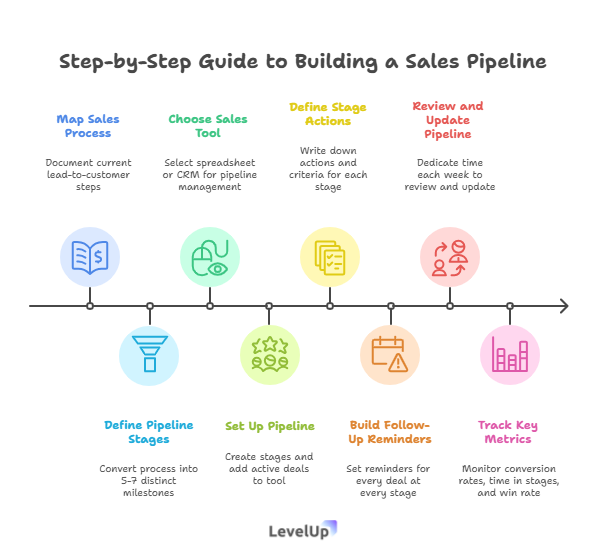
Step 1: Map Out Your Current Sales Process
Before you build anything, you need to understand what your sales process actually looks like today. Grab a piece of paper (or open a doc) and write down every step a lead goes through from first contact to becoming a customer.
For example:
- Lead fills out demo request form on website
- I qualify them via email or quick call
- I schedule and conduct a demo
- I send a proposal with pricing
- We negotiate terms (sometimes)
- They sign the contract
- I hand them off to onboarding
Don’t overthink this. Just document what’s actually happening, not what you wish was happening. Be honest about the messy bits.
Step 2: Define Your Pipeline Stages
Take that process you just mapped and turn it into 5-7 distinct stages. Each stage should represent a clear milestone where something changes.
Using the example above:
- New Lead: Demo request received
- Qualified: Confirmed they’re a good fit
- Demo Scheduled: Meeting booked
- Demo Completed: Demo happened, awaiting next step
- Proposal Sent: Pricing sent, awaiting response
- Negotiation: Discussing terms, addressing objections
- Closed Won: Contract signed (or Closed Lost if they decline)
Keep it simple at first. You can always add or adjust stages later as you learn what works.
Step 3: Choose Your Tool
Now you need somewhere to actually manage your pipeline. Options:
Option A: Start with a Spreadsheet
Create columns for: Lead Name, Company, Stage, Next Action, Due Date, Notes. Add rows for each deal. Update it religiously.
Pros: Free, simple, no learning curve.
Cons: No automation, easy to let it get stale, hard to visualize.
Option B: Use a Simple CRM
Tools like HubSpot (free tier), Pipedrive, or Levelup Demo give you drag-and-drop pipeline views, automated reminders, and basic reporting.
Pros: Visual, automated follow-ups, better team collaboration.
Cons: Small learning curve, some cost (though many have free tiers).
For most SaaS founders and small teams, I recommend starting with a simple CRM. The time you save and the deals you won’t lose are worth the $20-50/month investment.
If you’re specifically struggling with demo management—tracking demo requests, outcomes, and follow-ups—check out Levelup Demo. It’s built specifically for this use case and integrates smoothly without the bloat of a full CRM.
Step 4: Set Up Your Pipeline in Your Chosen Tool
Open your tool and create your stages. Most CRMs let you customize this easily. Then start adding your existing leads and deals.
For each deal, capture:
- Contact info: Name, email, company
- Current stage: Where are they in the process?
- Next action: What needs to happen next? (e.g., “Send proposal by Friday”)
- Notes: Key details from conversations, pain points, objections
Don’t try to backfill every conversation you’ve ever had. Just get your active deals in there and move forward.
Step 5: Define Actions and Criteria for Each Stage
For each stage in your pipeline, write down:
- What needs to happen for a deal to enter this stage?
(e.g., “Demo Scheduled” = calendar invite sent and confirmed) - What actions do you take in this stage?
(e.g., conduct demo, send follow-up email with key points) - What moves a deal to the next stage?
(e.g., prospect confirms interest and asks for pricing)
This creates consistency. If you bring on a team member later, they can follow the same process.
Step 6: Build in Follow-Up Reminders
This is critical. Set reminders for every deal at every stage. If you send a proposal, set a reminder to follow up in 3 days. If you complete a demo, set a reminder to check in within 24 hours.
Most CRMs have built-in task management. Use it. Religiously.
I can’t stress this enough: the money is in the follow-up. Research shows that 80% of sales require five follow-up calls after the initial meeting, but 44% of salespeople give up after one follow-up. Don’t be in that 44%.
Step 7: Review and Update Your Pipeline Weekly
Set a recurring calendar block—30 minutes every Monday morning works for me—to review your pipeline. Ask yourself:
- Which deals moved forward this week?
- Which deals are stuck? Why?
- What follow-ups do I need to do this week?
- Are there any deals I should disqualify?
Update stages, add notes, set new tasks. This weekly discipline keeps your pipeline accurate and actionable.
Step 8: Track Key Metrics
Once you have a few weeks of data, start tracking:
- Number of leads entering the pipeline: Are you generating enough top-of-funnel activity?
- Conversion rate between stages: What percentage of demos turn into proposals? Proposals into closes?
- Average time in each stage: How long does it take to move from demo to close?
- Overall win rate: What percentage of qualified leads ultimately become customers?
These metrics tell you where to focus your improvement efforts. If your demo-to-proposal conversion is low, work on your demo skills. If proposals sit in negotiation forever, revisit your pricing or terms.
What Mistakes Should You Avoid When Building a Sales Pipeline?
I’ve made plenty of pipeline mistakes over the years. Here are the big ones to avoid:
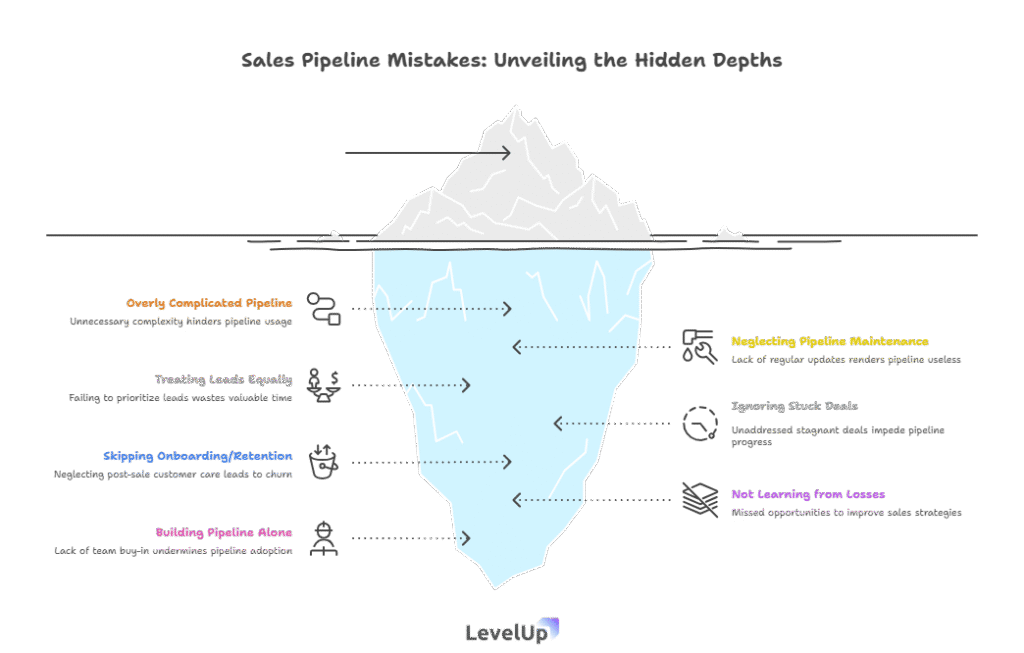
Mistake 1: Making It Too Complicated
Your first pipeline doesn’t need 15 stages and 47 custom fields. Start simple. You can always add complexity later, but you can’t un-complicate an overly complex system you’ll never actually use.
Five to seven stages is plenty to start. Add more only when you have a clear, specific reason.
Mistake 2: Setting It Up and Forgetting It
A pipeline is only useful if you actually use it. I’ve seen founders spend hours building the perfect CRM setup and then never update it after the first week.
Block time every week to review and update your pipeline. Make it a non-negotiable habit like checking your bank account or responding to customer emails.
Mistake 3: Treating All Leads Equally
Not all leads are created equal. A $50K enterprise deal deserves more attention than a $500 self-serve signup. Use your pipeline to prioritize based on deal size, fit, and likelihood to close.
Qualify ruthlessly. It’s better to disqualify a bad-fit lead early than to waste weeks chasing someone who’ll never buy.
Mistake 4: Ignoring Stuck Deals
If a deal has been sitting in the same stage for three weeks, something’s wrong. Either the prospect isn’t really interested, you’re not creating enough urgency, or there’s an unstated objection you haven’t uncovered.
Don’t let deals rot in your pipeline. If they’re not moving, either revive them with a direct conversation or disqualify them and focus your energy elsewhere.
Mistake 5: Skipping the Onboarding/Retention Stage
In SaaS, the sale doesn’t end at contract signing. If you don’t include onboarding and retention in your pipeline thinking, you’ll churn customers faster than you acquire them.
Make sure there’s a clear handoff process from sales to customer success. Track onboarding milestones and check in regularly during the first 90 days.
Mistake 6: Not Learning from Lost Deals
Every lost deal is a learning opportunity. When a prospect says no, find out why. Was it price? Features? Timing? Competitor?
Create a “Closed Lost” stage and add notes about why the deal didn’t happen. Over time, patterns will emerge, and you can adjust your approach.
Mistake 7: Building It Alone When You Have a Team
If you have co-founders or team members involved in sales, build the pipeline together. Get their input on stages, actions, and tools. If they don’t buy into the process, they won’t use it.
A pipeline only works if everyone commits to keeping it updated.
Common Questions About Building a Sales Pipeline
How long should my sales cycle be?
It depends entirely on your product, price point, and market. For SaaS, typical sales cycles range from a few days (low-cost self-serve) to 3-6 months (enterprise deals). Track your average time-to-close and use that to set realistic expectations for forecasting.
If your sales cycle is longer than you’d like, look for stages where deals get stuck and work on removing friction.
Do I need a CRM or can I use a spreadsheet?
You can use a spreadsheet, especially if you’re solo and just starting. But a simple CRM makes a huge difference once you have more than 10-15 active deals. The automation, reminders, and visual pipeline views save time and prevent mistakes.
I’d recommend graduating to a CRM within your first few months of active selling.
How do I know if a lead is qualified?
Use a framework like BANT (Budget, Authority, Need, Timeline). Ask questions early:
- Can they afford your solution?
- Are you talking to the decision-maker?
- Do they have a real problem you solve?
- Are they looking to buy in the next 30-90 days?
If the answer to any of these is no, they’re probably not qualified. Nurture them for later or politely disqualify.
What’s a good conversion rate between stages?
Benchmarks vary by industry, but here are rough guidelines for B2B SaaS:
- Lead to Qualified: 30-50%
- Qualified to Demo: 40-60%
- Demo to Proposal: 40-60%
- Proposal to Close: 25-40%
If you’re significantly below these, dig into why. Are you targeting the wrong audience? Is your demo not resonating? Is your pricing too high?
How often should I follow up with a prospect?
After a demo or proposal, follow up within 24-48 hours. If they don’t respond, follow up again after 3-5 days, then weekly for 2-3 weeks. If you still hear nothing, send a “breakup” email: “Hey, I haven’t heard back—should I assume this isn’t a priority right now?”
You’d be surprised how often that final email gets a response.
Can I automate parts of my pipeline?
Absolutely. You can (and should) automate:
- Demo scheduling (use Calendly or similar)
- Follow-up email sequences (with tools like Outreach or built-in CRM automation)
- Lead capture from your website (with forms that auto-populate your CRM)
- Reminders and task creation
Automation saves time and ensures consistency, but don’t automate the personal touches—those are what build relationships.
What should I do if my pipeline is empty?
If your pipeline is empty, you have a lead generation problem, not a pipeline problem. Focus on:
- Content marketing (blog posts, case studies, webinars)
- Outbound prospecting (LinkedIn, cold email)
- Partnerships and referrals
- Paid ads (if budget allows)
A pipeline only works if you have leads to put in it. Don’t neglect top-of-funnel activities.
How do I manage multiple products or deal types?
Create separate pipelines or use tags/categories to differentiate. For example, you might have one pipeline for new customer acquisition and another for upsells/renewals. Or tag deals by product line or customer segment.
Most CRMs support this kind of segmentation.
Should I include lost deals in my pipeline?
Yes—create a “Closed Lost” stage and move lost deals there instead of deleting them. Add notes about why you lost so you can learn from patterns. You can also re-engage lost deals later if circumstances change.
How do I get my team to actually use the pipeline?
Make it easy and make it a habit. Choose a tool that’s intuitive, provide clear training, and lead by example. Review the pipeline together in weekly team meetings. Celebrate wins when someone moves a deal forward.
If the pipeline feels like extra work instead of a helpful tool, people won’t use it. Keep it simple and show how it benefits them—less chaos, fewer dropped balls, more closed deals.
Bringing It All Together
Building a sales pipeline isn’t complicated, but it does require intentionality. Start by mapping your current process, define clear stages, choose a tool that fits your needs, and commit to updating it regularly.
The magic isn’t in the tool or the stages—it’s in the discipline of using your pipeline consistently. When you do, you’ll stop losing deals to disorganization, gain visibility into what’s working, and build a scalable sales process that grows with your business.
I wish I’d built my first pipeline six months earlier than I did. Those lost deals still sting. But once I committed to the process, everything changed. My conversion rates improved, my stress levels dropped, and I finally felt like I had control over my sales process instead of constantly scrambling.
You don’t need to be perfect. You just need to start. Pick a tool this week, map out your stages, and add your current deals. Review it next Monday. Adjust as you learn. Within a month, you’ll wonder how you ever managed without it.
If you’re specifically struggling with managing demo requests, scheduling, and follow-ups, Levelup Demo is built for exactly that challenge. It’s lightweight, focused, and designed for small teams who need to streamline their demo workflow without the complexity of a full CRM. Check out the pricing or request a demo to see if it fits your needs.
Now go build that pipeline. Your future self—and your bank account—will thank you.